

Your Microsoft Admin Center is showing you a financial mirage. You likely spend hours in spreadsheet hell trying to reconcile your actual negotiated rates with the generic numbers on your screen. It's a common frustration for IT leaders, especially since the November 1, 2025 elimination of Enterprise Agreement volume discounts. This discrepancy is exactly Why Microsoft List Prices Lie: The Custom Pricing Override Every Admin Needs to gain true financial control.
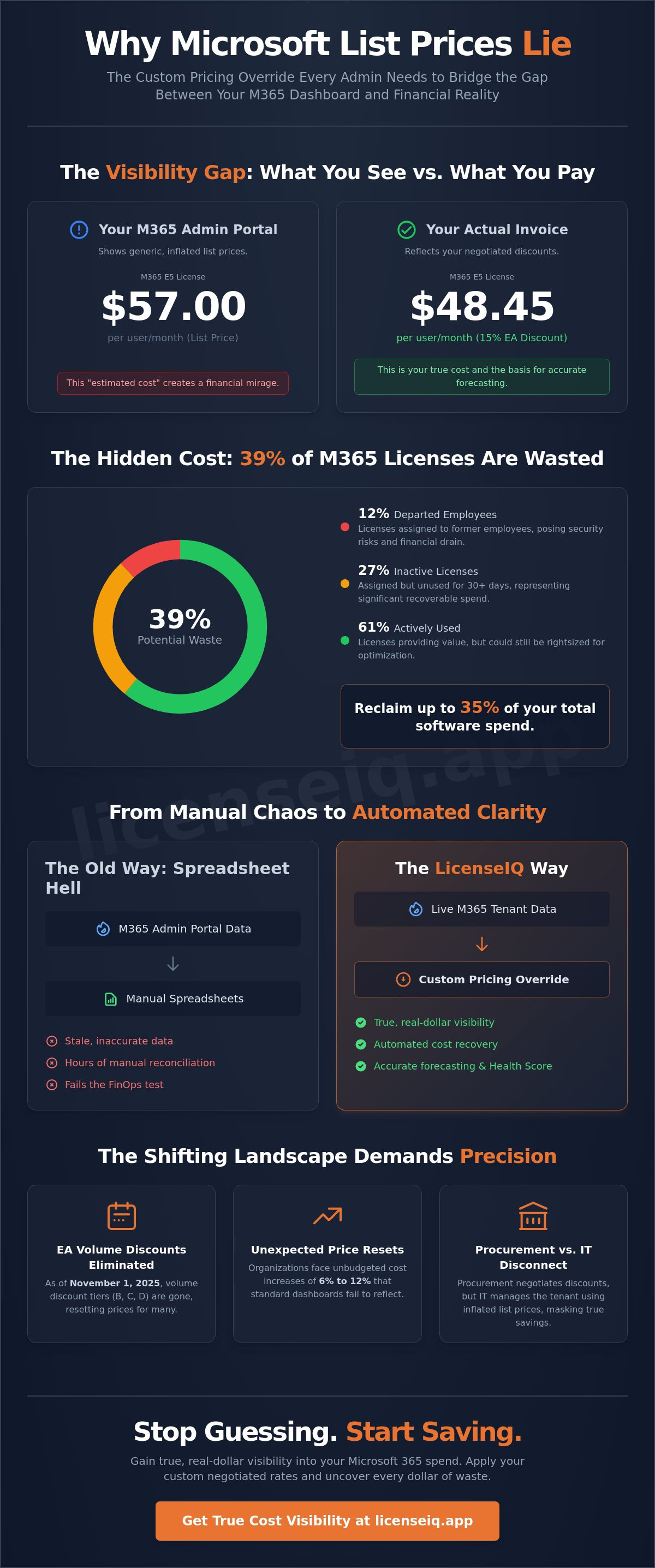
LicenseIQ data shows that 27% of Microsoft 365 licenses typically sit inactive for 30 days or more, while another 12% belong to departed employees. When your dashboard only reflects standard list prices, you can't see the real cost of this waste. We'll show you how to implement a custom pricing override to reclaim up to 35% of your software spend. You'll learn how to move beyond generic metrics to achieve total visibility, automate cost recovery, and establish a Health Score that reflects actual dollar-value savings for your organization.
Key Takeaways
- Identify why the M365 portal's default reporting creates a visibility gap that hides your true software spend.
- Learn Why Microsoft List Prices Lie: The Custom Pricing Override Every Admin Needs to bridge the gap between negotiated contracts and dashboard metrics.
- Recognize how manual spreadsheets fail the FinOps test by introducing stale data and mapping errors into your budget forecasting.
- Follow a structured framework to audit SKU-specific rates and map them to your global tenant for precise cost tracking.
- Discover how automated tools apply custom pricing overrides to generate a real-dollar Health Score and reclaim up to 35% of your budget.
The List Price Mirage: Why Your Microsoft Admin Center is Misleading You
The Microsoft 365 Admin Center is built for scale, not financial precision. It operates on a "one-size-fits-all" reporting model that assumes every organization pays the standard list price. This creates a systemic "Visibility Gap" that prevents IT leaders from seeing the truth. The 'Visibility Gap' is the discrepancy between M365 portal list prices and actual invoice costs.
Most administrators rely on these portal figures because they're the only data points readily available. This reliance builds a false sense of security. When your dashboard displays "estimated costs," it's using a generic baseline that ignores your specific Microsoft Volume Licensing agreement. This is exactly Why Microsoft List Prices Lie: The Custom Pricing Override Every Admin Needs to shift from generic estimates to precise financial governance. The 'Visibility Gap' represents the primary barrier to reclaiming up to 35% of your software spend through effective license optimization.
Relying on these inflated numbers makes your optimization efforts look more successful on paper than they are in reality. This psychological effect leads to complacency. If you think you're saving $5,700 by cutting 100 E5 licenses, but your actual cost is 15% lower due to a CSP promotion, your internal reporting is fundamentally flawed from the start. You're making decisions based on a financial mirage.
The Disconnect Between Procurement and IT Operations
Procurement departments negotiate complex discounts, but the IT teams managing the tenant rarely see those final numbers. Data doesn't cross the aisle. While procurement secures a 10% discount on a three-year subscription for M365 E5, the IT admin still sees the $57 list price in the portal. This disconnect masks the true ROI of license reclamation projects. Without accurate pricing, IT can't provide the CFO with a reliable report on how much money was actually saved by deprovisioning inactive accounts. This lack of transparency also hides the true cost of shadow IT, as unauthorized applications are compared against list-price benchmarks that don't reflect your negotiated reality.
Why Estimated Costs Lead to Over-Budgeting
Using M365 portal usage reports for financial forecasting is a dangerous gamble. These reports track activity, not dollars. One SMB with 500 users recently discovered they over-budgeted by 20% because they forecasted their 2026 spend based on list prices rather than their specific CSP discounts. With a scheduled price increase for M365 E3 taking effect on July 1, 2026, accurate forecasting is more critical than ever. "Health Scores" provided by standard tools are often based on these list prices, making them fundamentally flawed. You can't manage what you can't accurately measure. For true visibility, organizations need a specialized platform like LicenseIQ to apply custom overrides that reflect actual contractual costs.
Negotiation vs. Reality: How EA and CSP Discounts Break Standard Reporting
Negotiating a discount is only half the battle. The real challenge starts when those custom rates meet your Microsoft 365 reporting dashboard. Most standard portals are hardcoded to display list prices, ignoring the specific terms of your Enterprise Agreement (EA) or Cloud Solution Provider (CSP) contract. This disconnect is exactly Why Microsoft List Prices Lie: The Custom Pricing Override Every Admin Needs to maintain financial accuracy. When your dashboard displays a standard $57.00 for a Microsoft 365 E5 license, but your actual cost is 15% lower due to a CSP promotion, every report you generate is fundamentally incorrect.
The complexity intensified on November 1, 2025, when Microsoft eliminated volume based discount tiers (Levels B, C, and D) for Enterprise Agreements. Organizations that previously enjoyed these tiers now face pricing resets of 6% to 12%. Standard dashboards don't account for these sudden shifts in unit costs. They also struggle with "step-up" licenses, where an organization moves from E3 to E5. These transitions often involve temporary credits or staggered pricing that generic portals simply cannot track. This lack of precision makes it impossible to calculate a true ROI on your software investment.
The New Commerce Experience (NCE) has introduced even more rigid rules for CSP licensing. Unlike legacy agreements, NCE requires proactive planning before renewal windows close. If you're managing multiple CSPs or a mix of direct and partner purchases, your reporting becomes a fragmented mess. Custom Negotiated Rates (CNRs) create a reporting nightmare because they exist only on your invoices, not in your live tenant data. To solve this, you need a way to automate the mapping of your actual costs to your active user count.
The Enterprise Agreement (EA) Trap
Price protection is a cornerstone of the EA model, but it often functions as a visibility trap. It locks in your unit price for three years, yet your Microsoft portal continues to show fluctuating list prices or generic estimates. This leads to inaccurate EA true-ups. If your usage data is matched against the wrong price point, you'll likely over-budget for your annual renewal. Multi-year commitments provide stability, but they sacrifice real-time cost visibility unless you manually override the default values in your management tools.
CSP Margins and Hidden Savings
CSP partners often apply their own margins or bundle licenses with value added services. The M365 portal has no way to track these external financial layers. When you mix multiple CSPs, the portal aggregates usage but fails to differentiate between the various price points you've negotiated. Your "Health Score" becomes a meaningless metric if it doesn't account for these specific SKUs. Accurate license optimization requires a system that recognizes exactly what you pay per user, not what Microsoft suggests you should pay.
The Cost of Inaccuracy: Why Manual Spreadsheets Fail the FinOps Test
Manual spreadsheets are the enemy of financial precision. They're static tools attempting to manage a dynamic ecosystem. The moment you save a license tracking sheet, it's already obsolete. User counts fluctuate, roles change, and promotional CSP periods expire. This fundamental inaccuracy is Why Microsoft List Prices Lie: The Custom Pricing Override Every Admin Needs to prevent budget leakage. Relying on manual data entry introduces a high risk of human error in license mapping, where a simple typo can lead to thousands of dollars in misallocated funds.
Manual tracking forces IT departments into a reactive auditing cycle. Instead of continuous optimization, teams spend weeks preparing for annual true-ups or renewals. This delay is expensive. With the scheduled price increase for Microsoft 365 E3 on July 1, 2026, organizations can't afford to wait for a quarterly manual review to find savings. Inaccurate cost tracking also creates a significant security risk. When admins don't see the real-time financial impact of a license, they're more likely to neglect prompt offboarding, leaving active credentials attached to departed employees.
The 35% Waste Problem
Industry data confirms that 35% of SaaS spend is wasted. Approximately 15% of that waste is directly tied to pricing inaccuracies where organizations pay for more than they negotiated. License sprawl occurs when admins lose sight of the real dollar value of inactive seats. If your dashboard shows list prices, a "small" cluster of 50 unused licenses might look manageable, but at actual negotiated rates, that waste represents a specific, recoverable budget line item. To stop this drain, you need a proactive strategy. Consult the Microsoft 365 License Optimization: The 2026 Guide to learn how automated spend recovery replaces manual guesswork.
The 'Offboarding' Financial Leak
Inactive users represent dead money. According to LicenseIQ analysis, 12% of licenses are typically assigned to disabled or departed employee accounts. List prices fail to emphasize this leak because they don't reflect the actual cash leaving your bank account. Knowing the exact cost of an F3 versus an E3 license changes your offboarding priority. It allows you to target high-value recovery first. You can immediately stop this financial drain by using the Office 365 Offboarding Checklist to secure your data and reclaim your spend simultaneously.
Implementing the Custom Pricing Override: A Framework for IT Admins
Moving from theory to execution requires a structured framework. Stop relying on portal defaults that inflate your budget. This is Why Microsoft List Prices Lie: The Custom Pricing Override Every Admin Needs to move from estimated usage to actual financial accountability. Implementation follows a precise five-step process:
- Step 1: Audit current EA/CSP contracts. You must identify every SKU-specific negotiated rate. This includes any Level A pricing adjustments following the November 1, 2025 EA tier elimination.
- Step 2: Map negotiated prices to the M365 Global SKU list. This ensures your internal financial data aligns perfectly with Microsoft's technical identifiers.
- Step 3: Integrate a custom pricing override layer. This software layer sits between your tenant data and your financial reports. It replaces generic list prices with your actual contractual costs.
- Step 4: Automate reconciliation. Stop manual data entry. Connect your tenant usage directly to your actual invoice costs to eliminate the "Stale Data" problem.
- Step 5: Establish a real-time Spend Recovery Dashboard. This provides continuous visibility into your actual software spend and highlights immediate reclamation opportunities.
Mapping Negotiated Rates to SKU Utilization
Managing "Mix and Match" licensing scenarios is where manual systems fail. You might have 200 users on E3 and 300 on E5, but with different discount levels for each. Tracking add-on costs like Microsoft 365 Copilot, which carries a list price of $30.00, requires pinpoint accuracy if you've negotiated a promotional rate through a CSP. For a detailed breakdown of how to categorize these, refer to the Microsoft 365 License Types Guide. This mapping is the foundation of any successful spend recovery project. It allows you to see exactly which users are driving costs based on your specific wallet-out price.
Bridging the Finance-IT Gap
IT manages the users, but Finance manages the checkbook. A custom pricing override allows IT to present "Real Cost Savings" to the CFO that actually match the company bank statements. By automating the Health Score calculation, you provide a metric that reflects actual budget recovery rather than theoretical list-price reductions. Automated governance workflows are the only way to sustain these savings over time. Without automation, your data will degrade within 30 days. To start reclaiming your budget today, connect your tenant to LicenseIQ and apply your custom pricing overrides in minutes.
LicenseIQ: The Automated Solution for True M365 Cost Visibility
LicenseIQ removes the guesswork from SaaS management. It connects to your tenant in minutes to scan every license and every user. This isn't a passive report; it's an active digital auditor that uncovers hidden waste. By applying your specific contract terms, you finally see Why Microsoft List Prices Lie: The Custom Pricing Override Every Admin Needs to achieve total financial transparency. This override allows you to see your Health Score in real dollars, not the inflated estimates found in standard portals.
Our platform identifies inactive users and redundant licenses with AI-native precision. With 27% of licenses typically assigned to users who haven't been active for 30 days, the potential for recovery is immediate. We also target the 12% of licenses often left on disabled or departed employee accounts. LicenseIQ automates the governance workflows required to ensure your 35% savings are maintained year-round. It eliminates the need for manual spreadsheet updates and reactive auditing. You get a vigilant system that monitors your software spend around the clock.
The Spend Recovery Dashboard
The Spend Recovery Dashboard visualizes the gap between list prices and your negotiated reality. It provides real-time, dollar-value recommendations for license downgrades and reclamation. If a user isn't using the premium features of an E5 license, LicenseIQ flags the downgrade to E3. This allows you to use the platform for automated saas spend recovery without wasting hours on manual analysis. It turns complex tenant data into actionable financial health markers. You'll see exactly how much you're saving in actual currency, not just percentages.
AI-Native Governance for SMBs
Speed is critical in modern IT operations. The Model Context Protocol (MCP) allows LicenseIQ to conduct license audits at speeds that traditional software asset management tools can't match. This moves your organization from point-in-time audits to continuous spend recovery. With the global price increase for commercial M365 plans scheduled for July 1, 2026, you need a proactive system to monitor your spend. You don't have to wait for a quarterly review to find waste. Calculate your M365 Health Score with LicenseIQ today to secure your budget before the next renewal window closes.
Reclaim Financial Control Over Your Microsoft Tenant
Standard M365 dashboards serve the masses, but they don't reflect your specific negotiated reality. You've seen exactly Why Microsoft List Prices Lie: The Custom Pricing Override Every Admin Needs to bridge the gap between procurement's contracts and IT's daily operations. Relying on generic portal estimates leads to over-budgeting and missed recovery opportunities. By implementing a custom pricing layer, you transform your tenant from a hidden cost center into a model of financial efficiency.
True visibility requires moving away from manual spreadsheet management and toward automated governance. LicenseIQ connects to your tenant in minutes to provide a precise, real-dollar view of your software ecosystem. Our AI-native system monitors your spend around the clock, ensuring you maintain a lean and compliant stack. You can finally replace "estimated usage" with actual financial accountability that satisfies both the CFO and the IT team.
Don't let list-price mirages dictate your financial future. Take the first step toward total transparency and secure your organization's resources today.
Discover your true M365 Health Score and recover up to 35% of your spend with LicenseIQ
Frequently Asked Questions
What is the difference between M365 list price and negotiated price?
List price is the public "rack rate" set by Microsoft for its standard commercial plans. Negotiated price is the specific rate your organization pays after applying Enterprise Agreement (EA) discounts or Cloud Solution Provider (CSP) partner margins. These differences are Why Microsoft List Prices Lie: The Custom Pricing Override Every Admin Needs to reflect your true financial health. Most organizations pay significantly less than list price due to multi-year commitments or volume agreements.
How do I find my actual negotiated M365 license costs?
You must review your specific licensing contract or your most recent monthly invoice from your CSP partner. This data isn't visible in the Microsoft 365 Admin Center. Check the Customer Price Sheet (CPS) for EA agreements to find SKU-specific rates. These documents contain the "wallet-out" figures required for accurate budget forecasting and spend recovery. Relying on portal estimates instead of these documents leads to inaccurate reporting.
Can the Microsoft 365 Admin Center show custom CSP pricing?
No, the standard portal is hardcoded to display global list prices or generic estimates. It doesn't have a mechanism to ingest the specific margins or promotional discounts applied by your CSP. This is a primary reason why admins struggle with manual spreadsheet reconciliation. You need an external governance layer to map your actual costs to your active user count for true visibility.
Why is my M365 'estimated cost' always higher than my invoice?
The portal calculates "estimated cost" by multiplying your total assigned licenses by the current public list price. It ignores any historical price protection or volume discounts you've negotiated. If you've locked in a lower rate via an EA, the portal's estimate could be 15% higher than your actual invoice. This discrepancy makes the default dashboard data useless for precise financial reporting and budget reconciliation.
How much can a custom pricing override actually save my company?
Implementing a custom pricing override typically uncovers savings of 15% to 20% by identifying the true cost of license waste. When you see the actual dollar value of an inactive seat, you can prioritize reclamation more effectively. This transparency is Why Microsoft List Prices Lie: The Custom Pricing Override Every Admin Needs to move from theoretical optimization to actual budget recovery and financial accountability.
Is it safe to connect a third-party tool like LicenseIQ to my M365 tenant?
Yes, LicenseIQ uses secure, read-only API connections through the Microsoft Graph to analyze usage data. It doesn't require administrative credentials that can modify your environment. The system acts as a digital auditor, scanning for inefficiencies without risking your data integrity. This approach ensures your security posture remains intact while you gain total visibility into your software spend and utilization.
How often should I update my custom pricing overrides?
You should update your overrides whenever your contract terms change, typically during an annual EA true-up or a CSP renewal window. If you've moved to the New Commerce Experience (NCE), you may need to review rates more frequently to account for multi-year commitment discounts. Automation tools handle these updates seamlessly, ensuring your financial dashboards never rely on stale pricing data for their calculations.
What happens to my data if I downgrade an M365 license?
Downgrading a license generally doesn't delete user data, but it does remove access to specific premium features. For example, moving from E5 to E3 removes access to Power BI Pro and advanced security tools. You must ensure the user doesn't rely on these specific tools before executing the change. Proper license mapping helps you identify which users actually utilize premium features to avoid operational disruptions during optimization.


