

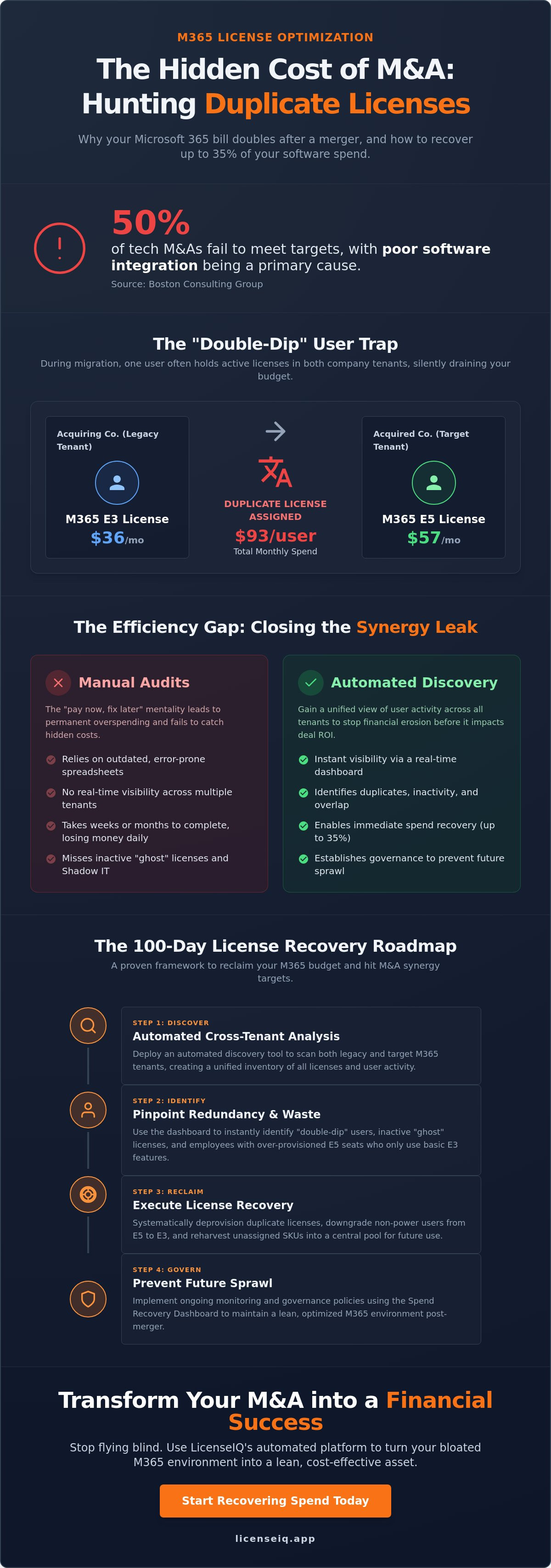
Why did your Microsoft 365 bill double after the merger when you expected cost savings? Most IT leaders assume synergy happens automatically, but a Boston Consulting Group study reveals that 50% of tech M&As fail due to poor software integration. The reality is that Hunting Duplicate Licenses: The Hidden Cost of M&A and Plan Migrations is the only way to protect your bottom line. You're likely double-paying for $36 E3 seats and $57 E5 seats during "bridge" migration periods or losing visibility as users sprawl across multiple tenants.
It's frustrating to watch software spend climb while your headcount stays the same. You need a clean, optimized environment that hits your synergy targets without the headache of a manual audit. This guide shows you how to identify redundant licenses to recover up to 35% of your software spend immediately. We'll walk through the process of using automated discovery to uncover hidden costs and establish governance that prevents future sprawl.
Key Takeaways
- Identify why manual due diligence fails to detect inactive users and overlapping capabilities during entity mergers.
- Learn the specific tactics for Hunting Duplicate Licenses: The Hidden Cost of M&A and Plan Migrations to eliminate "double-dip" spending on E3 and E5 tiers.
- Replace time-consuming manual spreadsheets with automated discovery tools that provide instant visibility across legacy and target tenants.
- Deploy a 100-day license recovery roadmap to reclaim unassigned high-value SKUs and hit your M&A synergy targets.
- Access a real-time Spend Recovery Dashboard to transform your M365 environment into a lean, optimized asset that prevents future license sprawl.
The M&A License Trap: Why Software Spend Spikes During Transitions
Mergers and acquisitions promise operational synergy, yet they frequently trigger an immediate, unmanaged spike in software costs. A Boston Consulting Group study found that 50% of over 37,000 tech company M&As fail; poor software license integration is a primary driver of this collapse. License duplication in an M&A context means paying for overlapping software capabilities across two or more entities simultaneously. It's a silent drain on capital that occurs when the acquiring company inherits a tenant full of redundant seats without a clear plan for consolidation.
Manual due diligence almost always fails to catch these redundancies. IT teams typically prioritize system uptime and user access over spend hygiene during the critical first 90 days. To maintain this focus while ensuring your physical systems are also integrated correctly, Jurij's Solutions LTD offers multi-service IT infrastructure and security support. This psychological trap leads to a "pay now, fix later" mentality that quickly becomes permanent. When two unmanaged software stacks collide, SaaS sprawl accelerates. Without a specialist tool, you're effectively flying blind, assuming that every active license in the acquired company's tenant represents a productive, unique user. In reality, many are inactive accounts or "ghost" licenses that outlive the employees who used them.
Hunting Duplicate Licenses: The Hidden Cost of M&A and Plan Migrations is the only way to stop this financial erosion before it impacts your deal ROI. Organizations often overspend on licenses by an average of 20-30% because they lack a unified view of user activity across multiple tenants.
The Anatomy of a Duplicate License
Duplication often manifests as "Double-Dip" users. These are individuals who hold active accounts in both the legacy environment and the new target tenant, often with different SKU levels. For example, Company A might provide a $36 Microsoft 365 E3 license while Company B assigns a $57 E5 license to the same person during the transition. Disparate SKU choices create a fragmented environment that is impossible to manage via spreadsheets. Additionally, any Shadow IT from the acquired company becomes your legal and financial liability on Day 1, further bloating your monthly spend.
The Financial Impact of Post-Merger Bloat
The true cost of "bridge" licenses is staggering when they remain active for months beyond the migration deadline. Every unassigned E5 seat is $57 of wasted capital every month. This bloat directly erodes the projected ROI of your acquisition, turning a strategic asset into a liability. The "Synergy Leak" is the specific financial delta between your CFO's projected M&A savings and the actual, bloated software invoices that hit your desk post-integration. To close this gap, you must move beyond manual audits and adopt automated discovery to reclaim your budget.
Plan Migrations: The Hidden Duplication in M365 Upgrades
Upgrading to Microsoft 365 E5 is a strategic move for advanced security, but it's a financial landmine if managed poorly. As of May 2026, an E3 license costs $36 per user while E5 is $57. These prices are scheduled to rise to $39 and $60 on July 1, 2026. If you don't aggressively manage the transition, you'll end up paying for both. This "double-paying" period is a core component of Hunting Duplicate Licenses: The Hidden Cost of M&A and Plan Migrations. Many organizations leave the old E3 seats active for months, effectively burning $93 per user every 30 days.
Beyond the base plans, forgotten trial tiers and standalone add-ons often linger in your tenant. If you moved to E5 to access Power BI Pro, which is included in that tier, but kept standalone $10 subscriptions active, you're leaking capital. Understanding the nuances of Microsoft 365 License Types is critical to preventing this bloat. Plan creep occurs when users are pushed to premium tiers without ever touching the advanced features they pay for. It turns a performance upgrade into a permanent tax on your IT budget.
The Migration Gap: Timing Your License Reclamation
The "Safety Net" fallacy is expensive. IT leaders often keep legacy licenses active for 30 to 60 days post-migration to avoid service disruptions. This caution costs thousands in unrecovered spend. You must identify users assigned an E5 who haven't activated advanced security features or Entra ID P2 capabilities. If a user only uses basic Office apps, they don't need the $57 tier. Strategic downgrading allows you to recover spend from non-power users immediately. Using an automated optimization platform ensures you only pay for what your team actually utilizes.
Audit-Proofing Your Migration Strategy
Plan migrations are a common trigger for Microsoft licensing audits. Sudden shifts in license volume or SKU types signal potential non-compliance to vendors. You must document every reclamation step for financial accuracy and to satisfy auditor inquiries. Utilization Tracking is the only metric that justifies a plan upgrade. Without granular data on feature adoption, your higher software spend is indefensible. Clear visibility into who is using what protects your budget and your reputation during a formal review.
Manual Audits vs. Automated Discovery: The Efficiency Gap
The "Excel Trap" is the graveyard of modern IT budgets. Static spreadsheets are obsolete the moment they are saved because SaaS environments change by the second. Relying on manual exports for Hunting Duplicate Licenses: The Hidden Cost of M&A and Plan Migrations is like trying to map a moving target with a polaroid camera. A manual audit for just 100 users can drain 20 to 40 hours of senior IT labor. When you scale this to a mid-market merger involving 1,000 or 5,000 employees, the time-cost alone often exceeds the value of the licenses being recovered. Accuracy risks are high; humans consistently miss inactive accounts, forgotten "Add-ons," and the overlapping SKUs discussed in previous sections.
AI-native tools are the only antidote to this chaos. While traditional checklists suggested by firms like the IMAA provide a framework, they lack the technical depth to track real-time user activity. Automated discovery provides immediate visibility into your software stack, turning a weeks-long manual project into a minutes-long scan. This transition from manual to automated management is no longer optional. Organizations that fail to automate their license tracking frequently overspend on software by 20% to 30%, a cost that could be reinvested into strategic growth.
The Hidden Cost of Manual Tracking
The opportunity cost of manual auditing is staggering. Every hour your IT team spends cross-referencing CSV files is an hour they aren't spending on high-value integration tasks or security hardening. Stale data leads to poor procurement decisions; you might buy 500 new E5 seats because your last spreadsheet said you were at capacity, only to realize later that 600 seats were sitting idle in the acquired tenant. To see how your current process stacks up, compare LicenseIQ vs. Manual Spreadsheets to identify your efficiency leaks.
Automated Governance: The New Standard for 2026
In the 2026 regulatory landscape, real-time tenant scanning is the baseline for operational excellence. New regulations like the Digital Operational Resilience Act (DORA) mandate stricter IT monitoring, which manual audits cannot satisfy. Automated systems provide a "Health Score," a single metric that quantifies your license hygiene and spend efficiency. This score allows finance and IT leaders to communicate using the same data set. Automated workflows act as a vigilant digital auditor, ensuring that "License Sprawl" never returns once the initial M&A integration is complete. It transforms your software stack from a black box into a transparent, optimized asset.
The 100-Day License Recovery Roadmap
Generic integration timelines often stretch to 18 months, but your software budget cannot wait that long. You need a structured, high-velocity approach to reclaim capital. Hunting Duplicate Licenses: The Hidden Cost of M&A and Plan Migrations requires a 100-day sprint to transform your software stack from a liability into a lean asset. This roadmap bypasses the "Excel Trap" and focuses on immediate spend recovery through automated precision. Budgeting for IT system integration in an M&A should be at least $100,000; failing to recover license spend early only adds to this burden.
- Day 1-10: Connect AI-native discovery tools to all legacy and target tenants to establish a baseline of visibility.
- Day 11-30: Identify "Double-Dip" users and unassigned high-value SKUs, specifically targeting the $57 E5 seats that are not in use.
- Day 31-60: Execute automated reclamation workflows for inactive users to stop the monthly "Synergy Leak."
- Day 61-90: Right-size license tiers based on actual feature utilization data gathered during the previous two months.
- Day 100+: Establish a continuous "Health Score" monitoring system to prevent future license sprawl and ensure ongoing compliance.
Phase 1: Discovery and Triage
The first priority is scanning for "Ghost Tenants." These are forgotten environments from the acquired company that continue to generate monthly invoices despite being functionally abandoned. You must categorize every user by their "Activity Level" to prioritize reclamation efforts. High-cost, low-activity users represent the quickest path to ROI. Utilize a comprehensive M365 Offboarding Checklist to ensure that no account remains active simply because it was overlooked during the initial user migration.
Phase 2: Execution and Optimization
Once you have visibility, you must automate the removal of licenses from offboarded employees. Manual removal is too slow and prone to error. Mapping legacy users to the most cost-effective target SKUs ensures that you aren't over-provisioning the new environment. Right-sizing is the alignment of license cost with actual user behavior. By Day 100, your environment should reflect your actual headcount, not your inherited bloat. To hit your synergy targets and secure your environment, start your automated discovery scan today.
LicenseIQ: Automating M&A Spend Recovery
Stop letting the complexity of a merger drain your IT budget. LicenseIQ provides the visibility you need to stop Hunting Duplicate Licenses: The Hidden Cost of M&A and Plan Migrations manually. Our platform connects to your Microsoft 365 tenants in minutes, not weeks. It instantly generates a comprehensive Health Score that quantifies your license hygiene. This score acts as a single source of truth for both IT and finance departments, ensuring everyone is aligned on spend optimization targets.
The Spend Recovery Dashboard translates raw utilization data into hard currency. It shows you exactly how many dollars are wasted on the "Double-Dip" users and "Ghost Tenants" described in our 100-day roadmap. Unlike enterprise-heavy Software Asset Management (SAM) tools that require months of configuration, LicenseIQ is built for speed. It's the preferred choice for mid-market leaders who need immediate results to hit synergy targets. Our automated governance workflows provide a "set and forget" solution; they ensure that once you reclaim your budget, sprawl doesn't return.
Recover Up to 35% of Your M365 Spend
Organizations often overspend on software by 20% to 30% on average. During an M&A transition, this waste can easily hit 35% due to the rapid collision of unmanaged stacks. LicenseIQ uses the Model Context Protocol to automate the discovery of license overlaps that human auditors miss. By analyzing real-time feature adoption, we identify which users are over-provisioned for their actual needs. This data-driven approach is essential for executing the 2026 spend recovery playbook and protecting your bottom line from upcoming price hikes.
Your First Step: The 5-Minute Audit
You don't need a specialized IT degree to optimize your software stack. LicenseIQ delivers actionable insights instead of overwhelming you with raw data. Our platform tells you exactly which licenses to cut and which users to downgrade. It's the difference between guessing your way through a merger and having a vigilant digital auditor at your side. Transparency is the cornerstone of corporate resource management. Don't wait for your next invoice to find out you're overpaying. Start your 5-minute license audit with LicenseIQ today.
Secure Your M&A Synergy Targets Today
M&A success depends on the speed of your integration. You've seen how the "Excel Trap" drains senior IT labor and why manual due diligence fails to catch the ghost tenants that inflate your monthly invoices. Transitioning from a state of unknown spend to total visibility isn't just about cost cutting; it's about operational resilience. By Hunting Duplicate Licenses: The Hidden Cost of M&A and Plan Migrations, you protect your deal ROI and ensure your software stack remains a lean, high-performance asset.
LicenseIQ provides the precision you need to eliminate waste without the complexity of traditional SAM tools. Our AI-native discovery connects in under 5 minutes to reveal your true utilization levels. Using the Model Context Protocol, we automate governance so your environment stays optimized long after the merger is complete. Small and mid-market organizations are already recovering up to 35% of their software spend by replacing guesswork with data-driven decision-making.
Don't let unmanaged licenses erode your acquisition's value. Discover your M365 Health Score and recover wasted spend in minutes. Your journey toward a clean, compliant, and cost-effective digital environment starts with a single scan.
Frequently Asked Questions
What is a 'duplicate license' in the context of M&A?
A duplicate license occurs when one individual holds active subscriptions in both the acquiring and acquired company's tenants simultaneously. This often happens because IT teams provision a new account for an employee before decommissioning their legacy one. You end up paying for two seats for a single user, which creates a silent drain on your integration budget. Hunting Duplicate Licenses: The Hidden Cost of M&A and Plan Migrations is the only way to catch these overlaps before they become permanent expenses.
How long does it take to identify wasted M365 spend after a merger?
You can identify wasted spend in under 5 minutes using automated discovery tools. While manual audits often consume 20 to 40 hours per 100 users, automation provides an immediate view of unassigned high-value SKUs and inactive accounts. This speed is critical for hitting synergy targets within the first 100 days of an acquisition. Immediate visibility allows you to stop the financial leak before the next billing cycle begins.
Can we recover money from licenses we've already paid for annually?
You cannot typically get a cash refund for annual commitments already paid to Microsoft. However, you can reassign those "pre-paid" seats to new hires or users who require upgrades. This strategy prevents you from purchasing additional licenses and effectively recovers the value of your existing spend. It turns a sunk cost into a usable asset for the growing organization, which is a key part of Hunting Duplicate Licenses: The Hidden Cost of M&A and Plan Migrations.
What happens to user data when we reclaim a duplicate license?
Reclaiming a license does not immediately delete user data, but it does remove access to the associated applications. You must ensure that all files and emails are migrated to the primary tenant before the standard 30 day grace period expires. Using automated workflows helps manage this timing to prevent accidental data loss. It's essential to verify that the target account is fully operational before pulling the license from the legacy account.
Why doesn't the Microsoft Admin Center show me these redundancies automatically?
The Microsoft Admin Center is designed to manage a single tenant; it cannot compare users across multiple disparate environments. It lacks the cross-tenant visibility required to identify that "John Doe" in Tenant A is the same person as "J. Doe" in Tenant B. Without a specialist tool, these identities remain siloed. You need a unified dashboard to see the total picture of your software utilization across the entire combined entity.
Is it better to consolidate tenants first or optimize licenses first?
You should optimize licenses first to stop the financial leak immediately. Tenant consolidation can take 12 to 18 months, but license reclamation happens in days. Reducing your seat count before the migration also simplifies the technical move and lowers the total volume of data you need to transfer. Optimization provides instant ROI that can help fund the more complex technical integration tasks that follow.
How often should we run a license audit during a plan migration?
You should run a scan every 30 days during a migration period. This frequency aligns with Microsoft's monthly billing cycles and ensures you aren't double-paying for E3 and E5 seats for more than one billing period. Regular checks prevent "Plan Creep" from becoming a permanent fixture in your IT budget. It ensures that your license count stays aligned with your actual user activity as people move between tiers.
What is a good 'License Health Score' for a newly merged company?
A score of 90% or higher indicates excellent license hygiene and minimal waste. Most newly merged companies start with a score below 65% due to the overlaps inherent in rapid corporate transitions. Aiming for a 90% score ensures that your software utilization is high and that you've eliminated redundant "Add-ons." Maintaining this score requires continuous monitoring rather than a one-time manual check.


