

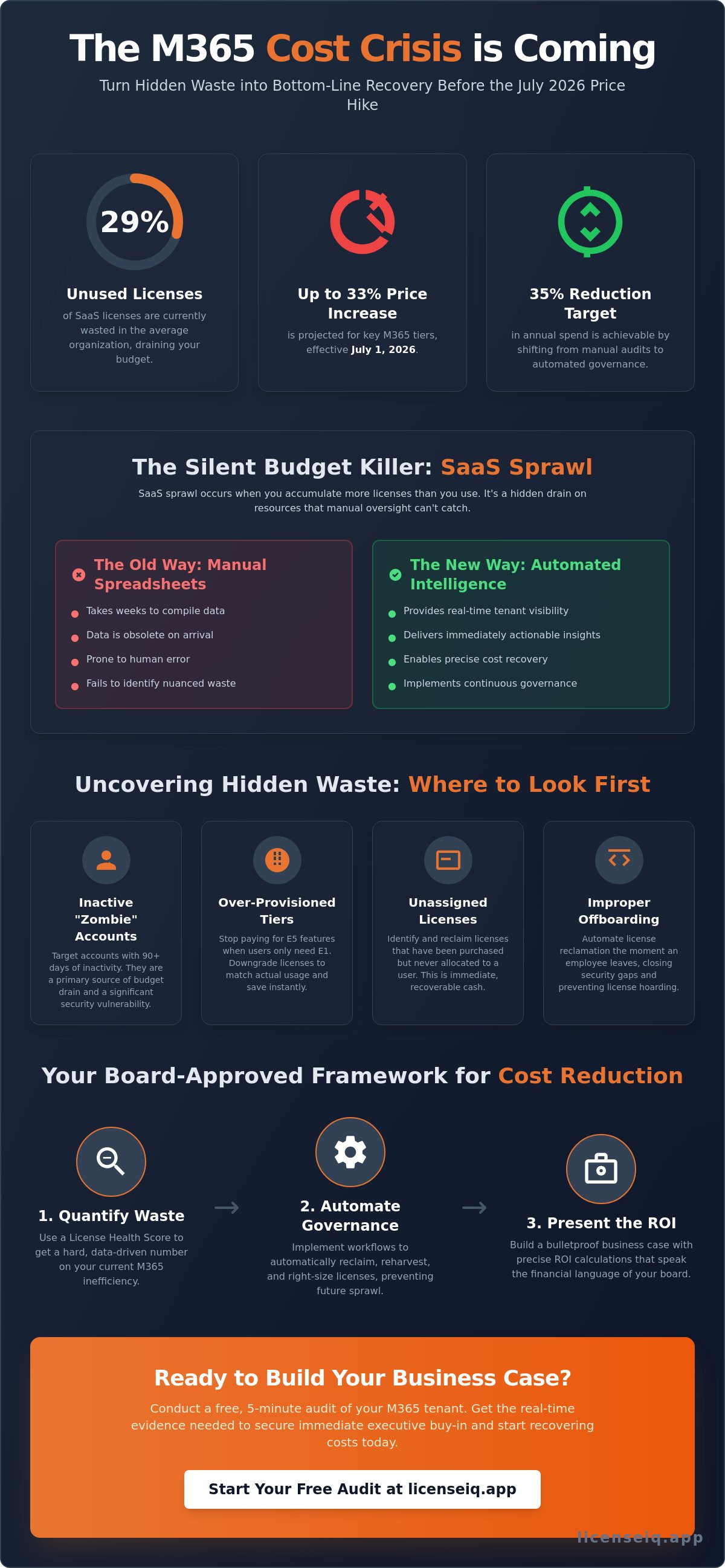
Did you know that 29% of SaaS licenses in the average organization are currently unused or underutilized? With Microsoft 365 prices set to increase by as much as 33% for certain tiers on July 1, 2026, your current licensing strategy is a growing financial liability. Building a Microsoft 365 Cost-Reduction Business Case Your Board Will Approve requires moving past manual spreadsheets that take weeks to compile. You need a proactive approach that identifies obscured waste and translates technical oversight into bottom-line recovery.
It's common to face board skepticism regarding SaaS ROI, especially when opaque licensing tiers make it difficult to prove value. You're likely concerned about cutting licenses that users might actually need, yet the pressure to optimize spend is urgent. This article teaches you how to transform that uncertainty into a data-driven strategy for securing immediate approval. You'll learn how to leverage a License Health Score to target a 35% reduction in annual spend and implement automated governance workflows to maintain those gains. We'll walk through the exact steps to build a bulletproof ROI calculation that turns your M365 environment into a model of operational efficiency.
Key Takeaways
- Stop SaaS sprawl by identifying inactive users and over-provisioned tiers. This prevents budget leaks before the July 2026 price increases take effect.
- Mastering the process of Building a Microsoft 365 Cost-Reduction Business Case Your Board Will Approve requires quantifying waste through clear KPIs like the License Health Score.
- Eliminate security vulnerabilities caused by zombie accounts and improper offboarding. Automated governance workflows protect your data while recovering license costs.
- Calculate a precise ROI for spend recovery tools to secure immediate executive buy-in. A data-driven approach removes board skepticism regarding SaaS investments.
- Use the LicenseIQ platform to conduct a 5-minute audit of your tenant. This provides the real-time evidence needed to validate your implementation roadmap.
The Strategic Context: Why M365 Cost Optimization is a 2026 Priority
Microsoft 365 price increases are no longer a distant concern. Effective July 1, 2026, costs for core subscriptions like Business Basic, E3, and E5 will rise by as much as 33%. These adjustments make M365 cost optimization a critical pillar of corporate financial hygiene. It's time to shift your strategy from buying more seats to recovering existing waste. This transition provides a direct strategic advantage. It allows you to reallocate capital toward high-impact initiatives like AI deployment rather than subsidizing unused software. Proactive license management is now a prerequisite for any organization looking to maintain a lean, efficient operational environment.
Identifying the Silent Budget Killer: SaaS Sprawl
SaaS sprawl occurs when your organization accumulates more licenses than it actually uses. In the context of Microsoft 365, this often manifests as over-provisioning. You might be paying for E5 licenses when users only require E1 functionality. Research indicates that unmonitored tenants lose up to 35% of their value annually due to this inefficiency. Manual auditing is too slow to catch these leaks. It takes weeks to compile data that is often obsolete by the time it reaches your desk. You need a system that offers immediate clarity. Contrast the slow, error-prone nature of spreadsheets with the precision of software intelligence that monitors your Total Cost of Ownership in real time. This visibility is the only way to stop the bleed.
Aligning with Board-Level Financial Goals
Your board focuses on EBITDA improvements and cash flow optimization. They want to see that every dollar spent generates a measurable return. Building a Microsoft 365 Cost-Reduction Business Case Your Board Will Approve requires speaking this financial language. You aren't just "cleaning up IT"; you're optimizing corporate resources. The current fiscal year demands that leadership do more with less. By identifying and eliminating the 29% of SaaS licenses that typically go unused, you provide an immediate boost to the bottom line. Use the sample problem statement below to frame your pitch:
Problem Statement: "Our Microsoft 365 expenditure is projected to increase by up to 33% following the July 2026 price adjustments. Currently, approximately 29% of our licenses are underutilized, creating a significant inefficiency in our SaaS budget. We must move from manual oversight to an automated spend recovery model to protect our margins."
This direct approach removes technical complexity and highlights the financial risk. It positions you as a proactive digital auditor rather than a passive administrator. When you present a plan to recover obscured costs, you demonstrate the meticulous oversight that boards trust. This is the foundation for any successful spend recovery initiative.
Data and Evidence: Quantifying Your License Waste
Boards don't approve theories. They approve hard data. Building a Microsoft 365 Cost-Reduction Business Case Your Board Will Approve requires a granular audit of your current tenant. You must move beyond surface-level counts to expose the hidden waste within your licensing structure. This data serves as the objective evidence needed to justify a shift in procurement strategy. It proves that you aren't just guessing; you're auditing with precision.
Effective Software Asset Management ensures you aren't paying for resources that provide zero utility. To start, map your unassigned licenses. These are seats you've already purchased but haven't allocated to a user. They represent immediate, recoverable cash flow. Additionally, document the 'shadow IT' costs. This includes individual licenses purchased by departments outside of central IT. These decentralized purchases often bypass volume discounts and create visibility gaps that lead to double-paying for the same user.
The Inactive User Audit: Finding the Low-Hanging Fruit
Inactive accounts are the most obvious source of waste. You need to generate an inactive office 365 users report to identify accounts with no login activity for 30, 60, or 90 days. A 90-day window is the standard threshold for permanent decommissioning. If a user hasn't accessed their account in three months, the license is likely redundant. With 29% of SaaS licenses typically going unused in the average organization, reclaiming even a fraction of these inactive seats can save thousands of dollars annually. This is a low-risk move that demonstrates immediate fiscal responsibility.
Right-Sizing: Evaluating E3 vs. E5 Redundancy
Right-sizing is the process of matching license tiers to actual job requirements. Many organizations default to E5 licenses for all employees, but feature usage often tells a different story. If a user only utilizes core productivity tools and basic security, an E3 license is more appropriate. The cost difference between E3 and E5 is significant over a 12-month period. Use this checklist to evaluate redundancy:
- Feature Usage: Does the user require advanced Power BI or phone system features found in E5?
- Security Needs: Can their security requirements be met by E3's integrated features?
- Compliance: Is the user utilizing Microsoft Purview for complex data governance?
Analyzing these patterns allows you to downgrade over-provisioned users without impacting productivity. You can quickly visualize these usage gaps across all tiers using a Spend Recovery Dashboard. This level of oversight ensures that your business case is built on actual user behavior rather than broad assumptions.
Economic Analysis: Calculating ROI and the License Health Score
Boards prioritize financial clarity. Building a Microsoft 365 Cost-Reduction Business Case Your Board Will Approve requires moving from technical metrics to economic ones. You must prove that your optimization efforts directly impact the bottom line. This starts with a single, authoritative KPI: the License Health Score. This metric provides the board with an immediate snapshot of organizational hygiene, moving the conversation from "how many licenses do we have" to "how efficiently are we using them."
Manual auditing is a drain on resources. It takes weeks of specialized labor to compile a snapshot that is outdated before the report is even printed. In contrast, automated platforms provide real-time oversight. When calculating your Return on Investment (ROI), factor in the Total Cost of Ownership. This includes the labor hours saved by replacing manual spreadsheets with software intelligence. A spend recovery tool pays for itself by identifying immediate waste that manual checks often miss, such as dormant accounts or redundant premium features.
Defining the License Health Score
The License Health Score translates complex technical data into a board-friendly metric. A high-scoring tenant represents zero waste and 100% utilization. It tells the board that every dollar spent on M365 is actively contributing to productivity. You can use this score to benchmark your current state against the desired future state. For example, if your current score is 65%, you have a clear mandate to recover the remaining 35% of your budget. This transparency builds trust and demonstrates meticulous oversight of corporate resources.
The 35% Rule: Setting Realistic Savings Expectations
Industry data confirms that most companies waste over 30% of their Microsoft license spending. Some organizations pay for 15-20% more licenses than they actually need. We use the 35% Rule as a conservative benchmark for recovery potential. The formula is simple: (Total M365 Spend x 0.35) = Recovery Potential. This number gives the board a clear target for success. It transforms obscured waste into a tangible financial goal. You can find more strategies to reduce m365 subscription costs in our detailed recovery playbook.
A one-time audit provides a temporary fix. Continuous governance ensures that waste doesn't creep back into the tenant as your workforce changes. Projecting your savings over a three-year period demonstrates a commitment to long-term fiscal discipline. This proactive stance is what secures board approval. It proves that you aren't just reacting to price hikes; you're actively managing the financial health of the organization.
Risk Mitigation and Automated Governance
Building a Microsoft 365 Cost-Reduction Business Case Your Board Will Approve requires addressing more than just the bottom line. Financial waste often mirrors security risk. Every "zombie account"—an inactive user with active credentials—expands your organization's attack surface. These unmonitored entry points are prime targets for malicious actors. By reclaiming these licenses, you simultaneously eliminate unnecessary costs and harden your security posture. Meticulous oversight ensures that your digital environment remains both lean and secure.
Improper offboarding is a dual threat. It creates a budget leak that persists for months while leaving sensitive data vulnerable to unauthorized access. Automated governance solves this by enforcing strict compliance standards across the entire tenant. It removes the human error inherent in manual administrative tasks. When you automate the lifecycle of a license, you ensure that access is revoked and spending is stopped the moment a user no longer requires their seat.
The Security Cost of Inaction
Unmonitored licenses are frequent targets for credential stuffing attacks. When an account remains active long after a user has departed, it becomes a silent liability. You must align your recovery efforts with a comprehensive office 365 offboarding checklist to close these gaps. Automated reclamation closes security holes faster than any manual process. It provides the vigilant oversight necessary to protect corporate resources from both external threats and internal neglect.
Automated Governance Workflows: Beyond the Audit
Periodic audits provide a temporary snapshot. They don't prevent waste from returning as your workforce scales. Automated Governance Workflows offer a permanent solution that resonates with executive leadership. This shift from periodic checks to real-time monitoring ensures your business case savings persist year-over-year. Automation maintains your organizational hygiene without requiring constant intervention from IT staff. It transforms spend recovery from a one-time project into a standard operational procedure.
Don't let inactive accounts compromise your security or your budget. Harden your tenant and recover lost spend by deploying Automated Governance Workflows today.
The Presentation: Pitching the LicenseIQ Implementation Roadmap
The final stage of Building a Microsoft 365 Cost-Reduction Business Case Your Board Will Approve is the implementation roadmap. Your board needs a plan that is both low-risk and high-impact. Propose a 5-minute audit to validate your findings with real-time data from your own environment. This immediate discovery phase removes all guesswork from the presentation. It transforms a theoretical proposal into a concrete spend recovery plan. You aren't just asking for a budget; you're demonstrating exactly how much capital you can return to the organization.
A pilot phase is the most effective way to secure buy-in. By demonstrating value on a smaller scale, you provide the board with the confidence they need for a full annual commitment. Define your success metrics clearly from the start. Focus on three primary indicators: a measurable increase in your License Health Score, the total dollar value of recovered licenses, and the reduction in manual administrative hours. These figures provide the board with a transparent view of the project's success.
The 5-Minute Discovery Phase
Speed is a strategic advantage. Connecting LicenseIQ to your tenant is a straightforward process that doesn't require an IT degree. The platform connects via API or MCP in minutes, allowing for immediate data ingestion. LicenseIQ is an AI-native auditor that identifies waste with a level of precision manual checks cannot match. Once connected, the Spend Recovery Dashboard becomes the board's primary view. It offers a clear, visual representation of obscured waste and immediate recovery opportunities. This transparency is the cornerstone of a successful pitch.
Continuous Accuracy: The Long-Term Vision
Microsoft frequently adjusts its licensing tiers and pricing models. The July 1, 2026 price increases are a prime example of why static audits are insufficient. An annual subscription to a spend recovery platform ensures continuous financial accuracy. The system automatically adapts to Microsoft's packaging updates, ensuring your organization never pays for more than it consumes. This proactive stance protects your 2026 IT budget from future SaaS sprawl. It shifts your IT department from a cost center to a center of operational excellence. Start your 5-minute audit to build your business case today.
Secure Your 2026 IT Budget with Data-Driven Clarity
The July 2026 price hikes demand a shift from manual spreadsheets to automated oversight. You've identified how obscured waste creates both financial leaks and security liabilities. By utilizing the License Health Score, you provide the board with the transparency they require to approve spend recovery. This proactive approach ensures your resources are monitored by a vigilant system that prevents SaaS sprawl from returning.
Building a Microsoft 365 Cost-Reduction Business Case Your Board Will Approve requires this level of digital precision. You now have the roadmap to present a bulletproof ROI that links fiscal hygiene to risk mitigation. It's time to move from theory to action by validating your recovery potential with real-time evidence from your own environment.
Run a free M365 Health Check to validate your business case and uncover up to 35% in wasted spend. Our AI-native platform connects to your tenant in just 5 minutes, providing immediate oversight. Deploy automated governance workflows today and turn operational disorder into total clarity. You have the expert strategy; now use the right tools to secure your organization's financial health.
Frequently Asked Questions
What is a business case for Microsoft 365 cost reduction?
A business case is a formal justification for reclaiming budget from underutilized software assets. It aligns technical license data with corporate financial goals like EBITDA improvement. Building a Microsoft 365 Cost-Reduction Business Case Your Board Will Approve provides the evidence needed to transition from manual oversight to an automated spend recovery model.
How do I prove M365 license waste to my CFO?
Present hard data from a Spend Recovery Dashboard that highlights inactive accounts and over-provisioned tiers. Contrast your current License Health Score against the 100% utilization benchmark. CFOs respond to direct dollar-value recovery potential rather than vague technical improvements. Providing a clear roadmap for immediate spend recovery makes the financial benefits undeniable.
Can I reduce Microsoft 365 costs without affecting user productivity?
Yes, you can achieve this by right-sizing licenses based on actual feature usage. Many users are assigned premium E5 licenses but only utilize core E1 or E3 productivity tools. Downgrading these users maintains their existing workflow while immediately lowering your monthly expenditure. This ensures that every employee has exactly the tools they need without paying for features they don't use.
What are the main categories of Microsoft 365 license waste?
Waste typically falls into four primary buckets: unassigned licenses, inactive users or "zombie accounts," over-provisioned tiers, and duplicate licenses from shadow IT. Research indicates that 29% of SaaS licenses in the average organization are currently unused. Addressing these four areas allows you to recover significant portions of your annual spend before the July 2026 price increases take effect.
How long does it take to see ROI from an M365 optimization tool?
ROI is often immediate following the initial discovery phase. A 5-minute audit can identify thousands in wasted spend that you can reclaim during your next renewal cycle. Automated platforms pay for themselves quickly by replacing hundreds of manual labor hours with precise, real-time software intelligence. This creates a sustainable model for long-term financial hygiene.
What happens if I downgrade an M365 license by mistake?
Modern optimization platforms allow for rapid license reassignment if a user requires a specific premium feature. Automated Governance Workflows ensure that downgrades are based on 90 days of actual usage data, which significantly minimizes the risk of error. If a mistake occurs, the license can be adjusted back to the previous tier within the M365 admin center in minutes.
How does automated governance differ from a manual license audit?
Manual audits are static snapshots that are outdated the moment they're finished. They require weeks of labor and are prone to human error. Automated governance provides continuous, real-time oversight of your tenant. It enforces your business case savings year-over-year by preventing waste from creeping back into the environment as your workforce changes.
Is a business case necessary for SMBs or just large enterprises?
A business case is vital for any organization with a significant SaaS footprint. While enterprises deal with larger license volumes, SMBs often operate with tighter margins where a 35% reduction in M365 spend has a more noticeable impact on cash flow. Meticulous oversight is a universal requirement for maintaining the financial health of any modern business.


