

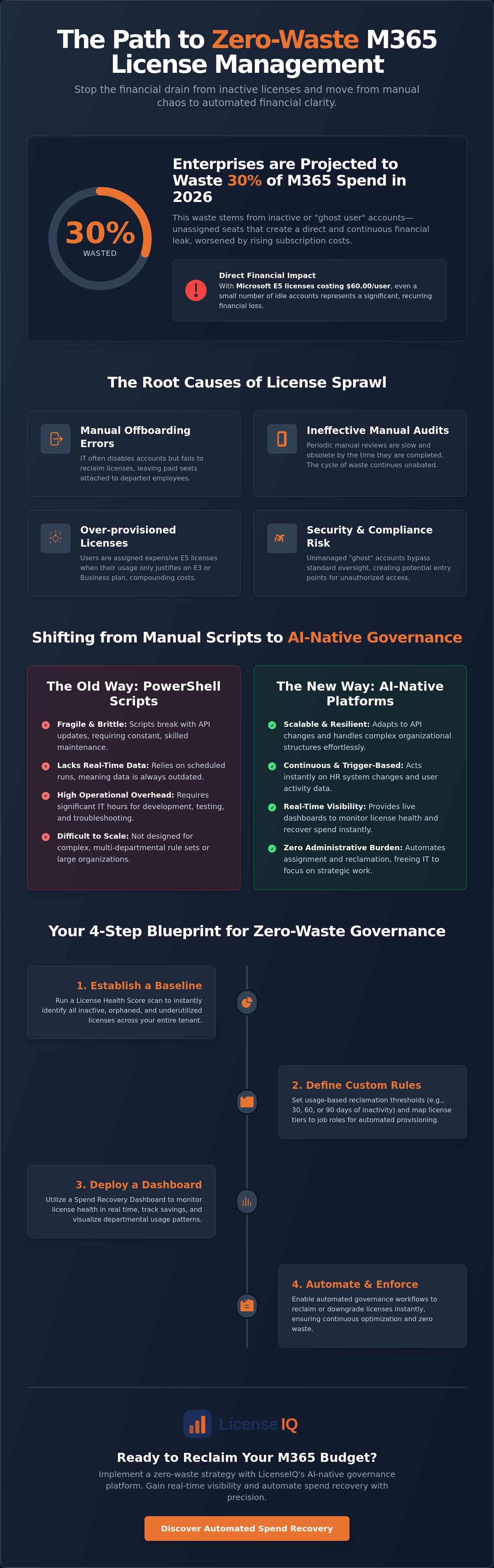
Enterprises are projected to waste an estimated 30% of their Microsoft 365 license spend on inactive or orphaned accounts in 2026. With Microsoft's July 1st price hikes pushing E5 subscriptions to $60.00 per user, every unassigned seat represents a direct financial leak. You've likely dealt with the recurring frustration of manual offboarding errors and the unpredictability of your monthly cloud budget. It's a common operational drain, but it is no longer a necessary one.
This guide provides a precise blueprint for automating m365 license assignment and reclamation to ensure your organization achieves zero wasted spend. We'll show you how to move beyond periodic audits and embrace a system of continuous, AI-driven governance. You'll learn to leverage the latest Microsoft Graph tools and automated workflows to recover spend instantly and maintain real-time visibility into your tenant's health. We are moving from organizational disorder to total financial clarity, providing you with the oversight needed to protect your corporate resources.
Key Takeaways
- Stop the financial drain caused by manual offboarding errors and inactive "ghost users" that inflate your monthly billing.
- Shift to trigger-based provisioning and usage-based de-provisioning to ensure every license delivers maximum utility.
- Understand the operational risks of fragile PowerShell scripts compared to the scalability of automating m365 license assignment and reclamation with AI-native tools.
- Use a License Health Score scan to establish a baseline for your tenant and set custom reclamation thresholds across departments.
- Deploy a Spend Recovery Dashboard to monitor license health in real time and execute automated governance workflows with precision.
The Hidden Financial Drain of Manual M365 License Management
Manual M365 license management is a silent budget killer. Enterprises are projected to waste 30% of their M365 budget on inactive or orphaned accounts in 2026. This "ghost user" problem happens when licenses remain attached to users who've left the company or shifted roles. With Microsoft E5 pricing rising to $60.00 per user this year, even a small percentage of unmanaged seats creates a massive financial leak. Relying on automating m365 license assignment and reclamation is no longer a luxury; it's a fiscal necessity.
Human error during the offboarding process is the primary driver of this waste. When an employee departs, IT teams often prioritize disabling account access for security reasons. They frequently fail to unassign the associated license. This leaves a paid-for seat sitting idle in your tenant. Manual audits can't solve this problem effectively. By the time an administrator finishes a manual review, the data's already obsolete. New hires have joined, others have left, and the cycle of waste continues. Organizations also face the compounding cost of redundant license tiers. Many users hold expensive E5 licenses when their actual usage patterns only justify an E3 or Business Standard plan.
Calculating the Real Cost of License Sprawl
License sprawl isn't just about the monthly bill. It includes the administrative overhead of IT staff spending dozens of hours on manual provisioning and reconciliation. Beyond the financial drain, unmanaged licensed accounts represent a significant security risk. These accounts often bypass standard oversight, providing a potential entry point for unauthorized access. Implementing a rigorous framework for Software Asset Management (SAM) is the first step toward reclaiming control. Without a precise system, you're losing both money and visibility.
Why 2026 Demands a FinOps Approach to IT
The role of IT's shifted from simple administration to strategic software optimization. A FinOps approach treats every M365 license as a dynamic asset that must prove its value. Moving beyond the basic limitations of the M365 Admin Center allows for total transparency. By automating m365 license assignment and reclamation, you convert static expenses into a lean, responsive operation. Platforms like LicenseIQ provide the real-time data needed to make these decisions instantly. This shift ensures your budget supports growth rather than subsidizing unused software.
The Mechanics of Automated License Assignment and Reclamation
Effective governance relies on a bidirectional loop. Automating m365 license assignment and reclamation ensures that licenses flow to active users and return to the pool the moment they become idle. This system removes the administrative burden from IT teams while maintaining tight financial control. Role-Based Access Control (RBAC) serves as the logic layer for this process. It maps specific job functions to corresponding license tiers, preventing over-provisioning before it starts. By defining these parameters, you ensure that a "licensed" user is always an "active" user.
AI-native platforms take this a step further by generating a License Health Score for your entire tenant. This metric identifies obscured waste by scanning for underutilized features within high-cost tiers. It doesn't just look at whether a user logged in; it analyzes if they're actually using the premium tools they're paying for. This level of oversight transforms your tenant from a static expense into a dynamic, optimized environment.
Trigger-Based Assignment Workflows
Productivity begins on day one. By connecting your HR system directly to Microsoft Entra ID, you trigger instant provisioning based on employee status changes. Group-based licensing then automates the allocation of specific tiers. A security analyst might automatically receive an E5 for advanced threat protection, while a frontline worker is assigned an F3. This "mix and match" approach ensures departments have the tools they need without the cost of a one-size-fits-all strategy. It eliminates the lag time between hiring and access, securing immediate operational momentum.
Usage-Based Reclamation Logic
Most organizations fail because they only focus on the "assignment" half of the equation. Usage-based reclamation is the missing piece that stops budget leaks. You must set firm thresholds for inactivity, such as 30, 60, or 90 days. When a user crosses this line, the system initiates an automated notification sequence. If the user doesn't resume activity, the license is reclaimed or downgraded. For example, an inactive E5 seat can be moved to an E3 or reclaimed entirely. Utilizing a Spend Recovery Dashboard allows you to visualize these savings in real time, turning reclaimed seats into recovered capital instantly. This proactive pruning ensures you never pay for "ghost users" again.
PowerShell Scripts vs. AI-Native Governance Workflows
Many IT leaders view PowerShell as a "free" tool for automating m365 license assignment and reclamation. This is a financial illusion. While custom scripts provide granular control, they're inherently fragile. They lack the scale and resilience required for modern enterprise governance. Scripts break when Microsoft updates the Graph API. They require constant maintenance from high-value engineering talent. If the original script author leaves your organization, you're left with a "black box" that poses a significant operational risk. Custom scripts are static. Business needs are dynamic.
Manual scripts also fail to provide the transparency leadership requires. A script can execute a command, but it can't present a Spend Recovery Dashboard that quantifies savings for the CFO. It won't proactively alert you to underutilized license features or suggest tier downgrades based on behavioral data. Moving to an AI-native platform replaces static code with a vigilant, self-healing system. It transforms license management from a background task into a strategic financial advantage.
The Maintenance Trap of Custom Automation
Custom automation creates technical debt. Every hour an engineer spends debugging a failed licensing script is an hour lost to strategic projects. Manual scripts often lack the comprehensive audit trails necessary for modern compliance standards. Without centralized oversight, you lose the ability to prove exactly when and why a license was reclaimed during a security audit. This lack of transparency makes manual scripts a liability in highly regulated environments. You aren't just paying for the script; you're paying for the risk of its failure.
The AI Advantage: Continuous Optimization
AI-native governance utilizes the Model Context Protocol (MCP) to interpret usage data with nuance. Instead of simple "on/off" logic, these systems provide automated recommendations that align with departmental needs. AI-native platforms like LicenseIQ provide a centralized "digital auditor" that never sleeps. This ensures your resources are always optimized without manual intervention.
- Real-time spend recovery: Identify waste the moment it occurs rather than waiting for a monthly scheduled task.
- Predictive analysis: Forecast license requirements based on hiring trends and historical usage patterns.
- Dynamic health scoring: Maintain a constant License Health Score to ensure your tenant stays lean and efficient.
This shift from reactive scripting to proactive AI governance ensures your organization remains agile. You stop chasing errors and start capturing savings.
Building a Zero-Waste M365 Governance Strategy for 2026
Building a zero-waste strategy requires more than just identifying idle seats. It demands a structured approach to automating m365 license assignment and reclamation that aligns with your organization's specific operational rhythm. You must move from manual oversight to a system that functions independently. Follow these five steps to secure your cloud budget for 2026.
- Step 1: Connect your tenant for a baseline License Health Score scan.
- Step 2: Define your reclamation thresholds based on departmental needs.
- Step 3: Establish a 'Right-Sizing' policy for tiered licenses.
- Step 4: Automate the offboarding workflow to ensure instant reclamation.
- Step 5: Monitor the Spend Recovery Dashboard for continuous ROI.
This framework ensures that your licensing environment remains lean. It prevents the slow accumulation of "shelfware" that typically occurs during rapid hiring or reorganization. By treating license management as a continuous cycle rather than a quarterly task, you maintain total financial clarity.
Establishing Your Licensing Baseline
You cannot optimize what you cannot see. The first phase involves uncovering unassigned licenses that are still being billed. These items represent pure financial waste. Next, map user activity to specific license features. If an employee holds an E5 license but hasn't utilized Power BI or advanced security features in 90 days, they're a candidate for a downgrade. For a deeper dive into this process, read our guide on How to Conduct a Microsoft 365 License Audit. This baseline ensures you aren't automating inefficient processes.
Creating Safeguards for Automation
Automation must be precise to avoid operational friction. Create 'Exclude' lists for executive and service accounts to prevent accidental de-provisioning of critical users. Implement a 'soft-reclamation' period. This involves sending automated notifications to users before their license is removed. This gives them a window to justify continued access if their role has changed. Finally, ensure your data retention policies are met during the removal process. Removing a license shouldn't mean losing vital corporate data. By building these guardrails, you gain the full benefits of automating m365 license assignment and reclamation without the risk of business interruption. Ready to see your actual waste? Get your License Health Score now.
Scaling Efficiency with LicenseIQ’s Automated Spend Recovery
Operational efficiency requires specialized tools that deliver immediate results. LicenseIQ provides this clarity by connecting to your tenant in minutes. It identifies up to 35% in potential savings by uncovering idle and underutilized licenses. While large enterprise platforms often require months of configuration, LicenseIQ is built for rapid deployment. It functions as a proactive digital auditor that is always one step ahead of your spending. You stop guessing and start managing with precision.
The LicenseIQ platform replaces organizational disorder with total transparency. It moves beyond simple observation by utilizing Automated Governance Workflows. These workflows transition your team from viewing insights to taking decisive action. SMBs and mid-market leaders choose this AI-native intelligence because it avoids the bloat of legacy software. It provides the oversight you need without the technical complexity you don't. Your resources are monitored by a vigilant system that prioritizes financial health above all else.
From Health Score to Dollar-Value Savings
Your tenant's efficiency is measured by a single, powerful metric: the License Health Score. This score provides a definitive look at your current waste levels. It identifies redundant licenses in seconds, showing you exactly where high-tier subscriptions are being underused. You can see the immediate dollar-value impact of downgrading an inactive E5 seat to a more appropriate tier. Improving this score is the fastest way to recover your IT budget. Find Your M365 Health Score with LicenseIQ to establish your baseline today.
Continuous Monitoring for Financial Accuracy
One-time audits are snapshots of a moving target. They fail because your user base is constantly shifting. Continuous governance is the only way to maintain a lean tenant. Automating m365 license assignment and reclamation ensures that your spend remains optimized every single day. The Spend Recovery Dashboard provides real-time financial transparency, showing you exactly how much capital you've reclaimed.
The system handles the "reclaim and reassign" cycle without constant IT intervention. When a user stops using a premium feature, the system flags the seat for reclamation or a downgrade. This proactive approach eliminates the "ghost user" problem permanently. It secures your corporate resources and ensures you only pay for what your team actually uses. Start your 5-minute M365 audit with LicenseIQ today and take control of your cloud spend.
Secure Your Cloud Budget with AI-Driven Precision
Manual license management is an obsolete practice that drains corporate resources. By transitioning to AI-native systems, you replace organizational disorder with total financial clarity. You've seen how legacy scripts fail to scale and how continuous monitoring ensures every dollar spent on M365 delivers actual utility. The roadmap for 2026 is clear. Automating m365 license assignment and reclamation is the only way to eliminate the 30% waste typically found in enterprise tenants.
With zero-config Automated Governance Workflows and an AI-native Spend Recovery Dashboard, you can identify and eliminate "ghost users" permanently. Don't let unused subscriptions compromise your bottom line. Take the first step toward total oversight and save up to 35% on your M365 subscriptions. Discover your wasted M365 spend in 5 minutes with LicenseIQ. Reclaim your budget and drive your company's growth with data-driven precision. Your tenant is now a lean, optimized asset.
Frequently Asked Questions
Is it safe to automate M365 license removal?
Yes, automation is safe when you implement "soft-reclamation" periods and exclusion lists for executive accounts. Automated systems use precise notification sequences to alert users before a license is removed. This proactive approach eliminates the human error common in manual offboarding while ensuring that no critical business access is lost accidentally. It's a secure way to maintain a lean, high-performance tenant.
How do I identify inactive Microsoft 365 users without manual reports?
You can identify inactive users by deploying an AI-native platform that calculates a License Health Score in real time. These systems analyze login data and specific feature usage across your entire tenant. They replace static, outdated spreadsheets with a live Spend Recovery Dashboard. This gives you immediate visibility into orphaned accounts and idle seats without requiring hours of manual data exports.
What is the difference between license assignment and provisioning?
License assignment is the legal allocation of a subscription seat to a user, while provisioning is the technical process of enabling their account and services. Automating m365 license assignment and reclamation ensures these two functions remain perfectly synchronized. This prevents the "ghost user" problem where accounts remain active and licensed long after an employee has departed or changed roles.
Can I automate license downgrades for users who don't need E5 features?
Absolutely. You can set specific rules that detect if premium features like Power BI or advanced security tools haven't been accessed within a 30, 60, or 90-day window. The system then automatically moves the user to a more cost-effective E3 or F-series license. This "right-sizing" logic ensures you only pay for the high-tier features your team actually utilizes for their daily tasks.
What happens to user data when a license is reclaimed?
Data remains intact according to your organization's specific retention policies. Microsoft typically preserves mailbox data for 30 days after a license is unassigned. By using Automated Governance Workflows, you can trigger data backups or migrations before the reclamation occurs. This process protects vital corporate knowledge while immediately stopping the billing cycle for that unused seat.
How much can a company typically save by automating M365 licensing?
Enterprises can recover up to 35% of their M365 spend by identifying and eliminating waste from idle licenses. Research indicates that centralized governance delivers an average 28% year-over-year cost reduction for organizations. These savings are achieved by reclaiming orphaned accounts and right-sizing users to the tiers that match their actual behavioral data rather than estimated needs.
Does LicenseIQ require a complex implementation process?
LicenseIQ connects to your Microsoft 365 tenant in minutes without any complex configuration or custom coding. It provides an instant License Health Score to establish your baseline waste levels. The platform is designed for rapid deployment, allowing specialized leadership to move from initial insights to automated spend recovery almost immediately after connection.
Can I set different reclamation rules for different departments?
Yes, you can define custom thresholds for inactivity based on the specific needs of different departments or user groups. For example, you might allow a 90-day window for seasonal employees while requiring a 30-day reclamation for external contractors. This granularity is a core benefit of automating m365 license assignment and reclamation, allowing for a flexible yet disciplined approach to cloud spend.


