

Your PowerShell scripts are no longer assets; they're technical debt that puts your tenant at risk. As Microsoft tightens Graph API throttling and removes license grace periods in 2026, the microsoft 365 license management powershell script limitations have become a clear liability for enterprise scale. Relying on manual code to handle complex API calls often leads to silent failures and dangerous security gaps. You're likely spending more time fixing broken modules than actually optimizing your digital environment.
Managing thousands of seats across a hybrid workforce is a relentless task that demands total visibility. You deserve a system that monitors resources with precision rather than a script that breaks every time an endpoint updates. This article identifies the technical and financial risks hiding in your manual processes and reveals a more efficient path to license governance. We'll explore how to eliminate manual maintenance, recover 35% of wasted license spend, and achieve a real-time License Health Score that protects your organization's bottom line.
Key Takeaways
- Understand how Microsoft Graph API throttling creates a hard scalability ceiling for manual scripts in enterprise tenants.
- Identify the critical microsoft 365 license management powershell script limitations that lead to security vulnerabilities and high operational costs.
- Calculate the hidden salary expenses lost to script maintenance and the financial risks of inaccurate license reporting.
- Discover why organizations exceeding 250 users require real-time visibility that static PowerShell snapshots cannot provide.
- Learn to transition from reactive troubleshooting to proactive governance using an instant License Health Score and automated workflows.
The Reality of PowerShell for Microsoft 365 License Management
PowerShell is a robust task automation and configuration management framework. It excels at executing repetitive commands across a tenant. However, there is a fundamental difference between task automation and continuous license governance. When using PowerShell for Microsoft 365, admins often confuse execution with oversight. A script can assign a license in seconds, but it cannot monitor whether that license provides a return on investment over the next six months. It's a tactical tool being forced into a strategic role.
IT leadership frequently defaults to scripting because the software itself carries no additional licensing fee. This "zero-cost" assumption is a financial fallacy. The true cost lies in the high-value engineering hours required to write, test, and troubleshoot code. In 2026, the microsoft 365 license management powershell script limitations are more visible than ever. A script is a static entity in a dynamic environment. It's only as reliable as its last manual update. If your admin hasn't accounted for the latest API changes or tenant configurations, your automation becomes a source of technical debt rather than a solution.
The Evolution of M365 Scripting Modules
The transition from legacy MSOnline and AzureAD modules to the Microsoft Graph PowerShell SDK has significantly increased complexity. Modern enterprise licensing no longer supports simple "one-liner" scripts. Admins must now navigate intricate permission scopes and manage least-privileged access for every automation. This shift requires a deeper level of expertise and more frequent maintenance. If your team is still trying to port old logic into the Graph SDK, you're likely facing persistent authentication errors and broken workflows that stall operational momentum.
Execution vs. Governance: A Critical Distinction
Executing a command is a one-time event; governance is a continuous lifecycle. PowerShell scripts lack the inherent "memory" needed for historical spend analysis. They can tell you a license is assigned today, but they won't show you that the user hasn't opened an app in 90 days. This creates a dangerous gap between "License Assigned" and "License Utilized." Without a persistent data layer, you're flying blind, unable to distinguish between active users and "ghost" accounts that drain your budget every month. Real governance requires a proactive digital auditor, not just a command-line interface.
5 Critical Technical Limitations of PowerShell Scripts
Relying on manual code for enterprise operations creates a fragile infrastructure. While a script might work for a small batch of users, it inevitably fractures under the weight of a complex, global tenant. The microsoft 365 license management powershell script limitations aren't just inconveniences; they're operational bottlenecks that prevent your team from achieving true efficiency. Modern administration requires more than just a list of commands. It requires a system that understands the nuances of the Microsoft Graph ecosystem.
Five technical barriers currently prevent PowerShell from being a viable long-term governance solution:
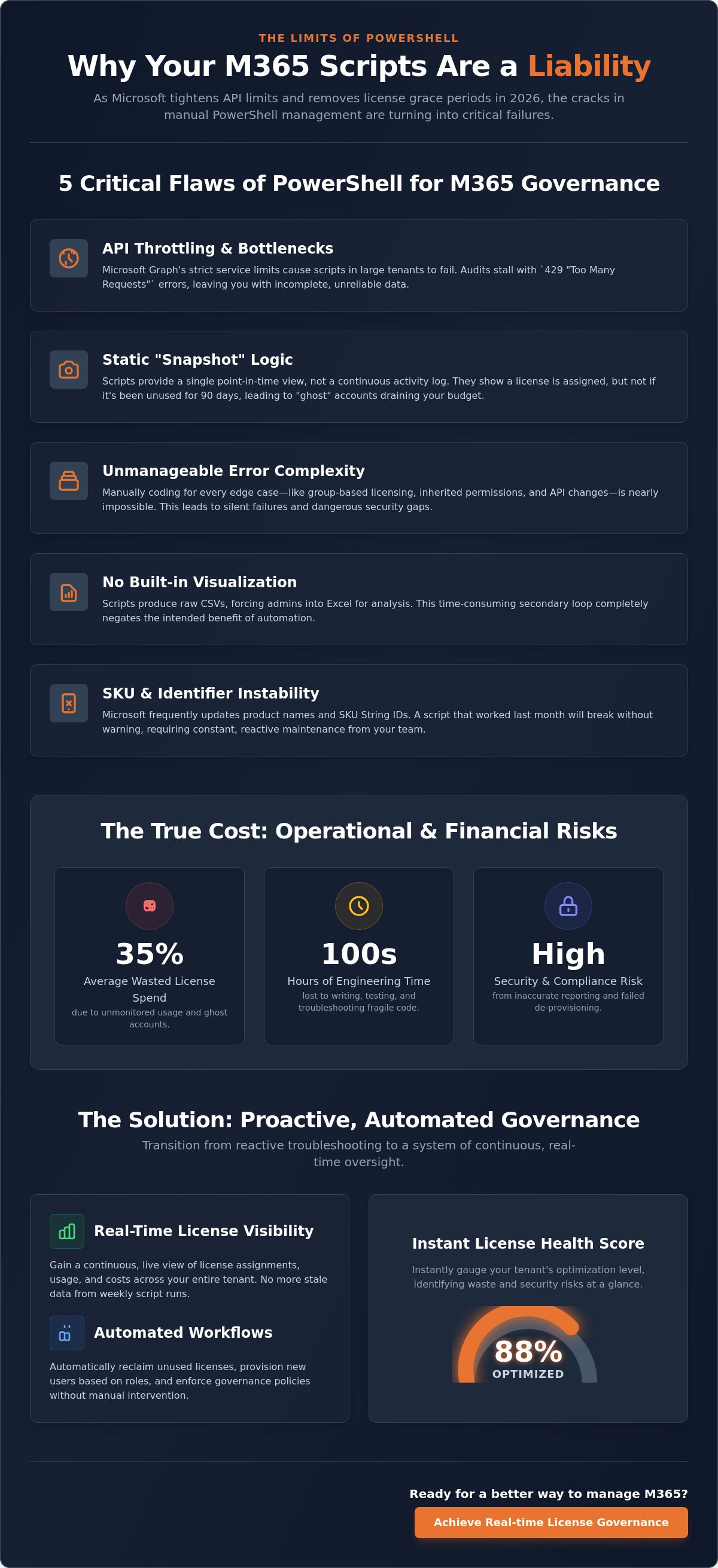
- API Throttling: Microsoft Graph enforces strict service-side limits. Large tenants frequently trigger 429 "Too Many Requests" errors, stalling critical audits.
- Snapshot Logic: Scripts provide a single point-in-time view. They can't track the continuous user activity needed for spend recovery.
- Error Complexity: Coding for every edge case, such as group-based licensing or inherited permissions, is nearly impossible to maintain manually.
- Manual Visualization: Raw CSV outputs force admins back into Excel. This creates a secondary labor loop that negates the benefits of automation.
- Identifier Instability: Microsoft frequently updates SKU String IDs. A script that worked last month will fail the moment a product name or ID changes.
API Throttling and Performance Bottlenecks
The core scalability ceiling for PowerShell isn't the code itself but the Microsoft Graph API's resource unit cost system. Every operation has a specific "cost." When your script audits 1,000 users, it consumes units rapidly. If you exceed the tenant limit, Microsoft pauses your execution. Handling these Retry-After headers requires sophisticated logic that most basic scripts lack. Without this, your long-running audits simply time out, leaving you with incomplete data and zero visibility into your actual license health. For teams needing reliable data without the technical overhead, connecting to the LicenseIQ Platform provides instant clarity without the risk of API timeouts.
The Maintenance Trap: Keeping Up with SKU Changes
Microsoft’s licensing landscape is in a state of constant flux. Renaming plans or unbundling services, like the recent changes to Teams and Copilot licensing, requires immediate code updates. Admins must manually map cryptic String IDs to friendly names to make reports readable for management. This creates a "maintenance debt" where your most expensive technical talent spends hours updating static strings rather than innovating. A script written in 2024 is practically obsolete by 2026 because it cannot adapt to these backend shifts automatically. You aren't just managing licenses; you're managing a growing library of legacy code.
Operational Risks: Why Scripting Costs More Than It Saves
The "free" nature of PowerShell is a deceptive myth. While there's no line item for a script on your monthly budget, the hidden salary costs are substantial. A specialized administrator often spends five hours per week writing, debugging, and updating code. This equates to 20 hours of high-level engineering time lost every month. When you calculate the hourly rate of a senior M365 architect, the cost of maintaining these manual processes far outweighs the price of professional governance platforms. These microsoft 365 license management powershell script limitations directly impact your operational efficiency and bottom line.
Manual scripting also introduces the risk of false positives. Scripts often struggle to account for complex user states, leading to inaccurate reports. If an admin removes a license based on a flawed script output, they risk immediate service outages for active employees. Scripts are also notoriously bad at identifying redundant licenses. A standard script might confirm a user has an E3 license and a standalone Project license, but it won't flag the financial overlap. This inability to see the "big picture" of your license estate results in thousands of dollars in wasted spend every quarter.
The High Cost of Manual FinOps
IT-led scripting focuses on technical assignment, not financial optimization. It lacks the logic to perform deep right-sizing. For instance, scripts cannot easily compare usage data against license costs to recommend a downgrade from E5 to E3. Calculating a true License Health Score requires a multidimensional analysis that raw CSV exports cannot provide. To see how manual processes compare to automated systems, read our analysis on LicenseIQ vs Manual Spreadsheets. Relying on spreadsheets for FinOps is a recipe for organizational disorder.
Security and Compliance Vulnerabilities
Security is the most significant casualty of the scripting approach. Admins often store App Secrets or client credentials in local script files or insecure environment variables. This creates a massive vulnerability if a workstation is compromised. Many scripts require broad Global Admin rights to function, violating the principle of least privilege. Automated Governance Workflows offer a secure, read-only alternative. They provide a precise audit trail, showing exactly what was changed and by whom. Unlike scripts, these workflows don't leave your tenant exposed to "permission creep" or unmonitored administrative actions.
The Scalability Ceiling: When PowerShell Becomes a Liability
Every manual process has a breaking point. For most organizations, that threshold is 250 users. Once you cross this mark, the complexity of your environment outpaces the capabilities of a command-line interface. The microsoft 365 license management powershell script limitations become undeniable as you move from simple task execution to complex, cross-departmental governance. Scripts are designed for silos; they don't scale with the fluid nature of a growing enterprise.
The primary issue is "SaaS Sprawl." Your PowerShell scripts are blind to anything outside the Microsoft ecosystem. While your admin might successfully run a script to assign an E5 license, that script won't tell you if the user already has redundant access in Zoom, Slack, or Salesforce. This isolation prevents you from seeing the total cost of ownership for a single identity. Furthermore, scripts cannot automate the nuanced offboarding workflows required by HR and Legal. They can revoke access, but they cannot verify data retention compliance or recover costs across your entire software stack.
Why AI-Generated Code Isn’t a Total Solution
A common objection is the belief that ChatGPT or other LLMs can simply "fix" broken code. This is a dangerous assumption. AI often hallucinates when handling complex Graph API calls, leading to scripts that run without errors but produce inaccurate data. AI knows syntax, but it doesn't know your specific business logic or license tiers. You still need a centralized platform to execute, monitor, and audit these insights. Without a structured environment, AI-generated scripts just create more unmanaged technical debt. To regain control, you need a system that offers a real-time License Health Score rather than a collection of AI-prompted "band-aids."
Managing SaaS Sprawl Beyond Microsoft
PowerShell is a localized tool in a multi-SaaS world. It leaves massive gaps in your financial visibility. Effective SaaS spend management requires a broader perspective that covers the areas PowerShell ignores. A centralized dashboard provides the oversight your CIO needs to make data-driven decisions. By moving away from fragmented scripts, you can consolidate your governance and eliminate waste across all platforms. Don't let your growth be limited by outdated automation. Connect your tenant to the LicenseIQ Platform today and start recovering your wasted spend in minutes.
Transitioning to Automated Governance Workflows
Recognizing the microsoft 365 license management powershell script limitations is the first step toward operational maturity. Moving from fragmented code to a unified system allows your team to focus on high-level strategy rather than constant maintenance. You can achieve total clarity and financial control in four decisive steps.
- Step 1: Connect your tenant. Integrate your M365 environment with the LicenseIQ Platform. This process takes minutes and establishes a secure, read-only connection without the need for local infrastructure.
- Step 2: Generate a License Health Score. Run an immediate diagnostic to identify ghost accounts, redundant licenses, and underutilized premium features. This provides a baseline for your optimization journey.
- Step 3: Deploy Automated Governance Workflows. Replace your manual offboarding and reclamation scripts with persistent, event-driven workflows. These systems ensure that licenses are recovered the moment a user leaves or changes roles.
- Step 4: Monitor the Spend Recovery Dashboard. Use real-time data to track your savings. This dashboard translates technical usage into dollar-value reports that are ready for executive review.
This transition eliminates the "hidden salary cost" of script maintenance discussed in previous sections. Your engineers stop being code-fixers and start being resource managers. By automating the lifecycle of every license, you remove the human error that leads to service outages or compliance gaps. The shift from manual to automated isn't just a technical upgrade; it's a strategic necessity for any organization managing more than 250 users.
The Power of AI-Native Software Intelligence
The LicenseIQ Platform leverages the Model Context Protocol to automate discovery across your digital estate. This technology goes beyond simple license counts. It analyzes actual user behavior to identify inactive accounts and "zombie" licenses that have been forgotten in the system. You don't need to write a single line of code to see who hasn't logged in or which premium features remain untouched. By following these actionable, automated recommendations, organizations can recover up to 35% of their wasted license spend. This isn't just about saving money; it's about reclaiming resources for innovation.
Securing Your Tenant with Modern FinOps
Modern FinOps demands a departure from high-privilege scripts that reside on local machines or insecure servers. Transitioning to secure, API-based monitoring ensures your tenant remains protected while maintaining continuous financial accuracy. You no longer have to worry about broken modules or manual data entry errors. The system works in the background, acting as a vigilant digital auditor that never sleeps. It provides a level of transparency and oversight that manual scripting simply cannot match. Discover your M365 Health Score today at LicenseIQ and secure your organization’s financial future with precision governance.
Secure Your Financial Health with Automated Governance
Manual scripting is no longer a viable strategy for enterprise operations. As we have explored, the technical debt of maintaining code and the risks of API throttling create a hard ceiling for growth. Relying on outdated modules leads to obscured visibility and significant financial waste. Recognizing the microsoft 365 license management powershell script limitations allows you to shift from reactive troubleshooting to proactive resource optimization. You can replace fragile, high-privilege scripts with a system designed for precision and transparency.
Your organization requires a vigilant digital auditor that uncovers hidden details and recovers lost capital. By connecting your tenant in minutes, you gain access to an AI-native Spend Recovery Dashboard and Automated Governance Workflows that protect your bottom line. It's time to move beyond the command line and embrace a platform that scales with your business. Stop scripting and start saving; recover up to 35% of your M365 spend with LicenseIQ. Take control of your licensing estate and build a foundation of operational clarity today.
Frequently Asked Questions
Is PowerShell still the best way to manage M365 licenses for small businesses?
How often do Microsoft Graph API changes break existing PowerShell scripts?
Microsoft updates the Graph API and its underlying SDK frequently, which often causes silent failures in legacy scripts. The deprecation of older modules has already forced complete rewrites of many automation tools. If your script relies on specific String IDs or permission scopes, it's vulnerable to every backend shift. Constant maintenance is mandatory to ensure operational continuity and avoid data gaps in 2026.
Can PowerShell scripts identify inactive Microsoft 365 users effectively?
PowerShell pulls raw "Last Login" data, but it struggles to identify nuanced inactivity across specific services. A user might log into a device without ever utilizing an expensive E5-licensed application. Scripts provide a static snapshot that misses these critical usage details. Effective spend recovery requires a continuous stream of activity data that static scripts simply cannot process or visualize for leadership.
What are the main security risks of using community-sourced PowerShell scripts?
Community scripts often contain insecure credential handling or require excessive Global Admin permissions. Storing secrets in plain text or local files creates a massive vulnerability for your tenant. You also lack a clear audit trail of what the code actually executes. Using unverified scripts introduces "permission creep" and exposes your environment to unmonitored administrative actions that can compromise your data security.
How much time does the average IT admin spend maintaining license management scripts?
A specialized administrator typically spends approximately five hours per week on script maintenance, debugging, and updates. This equates to 20 hours of high-value engineering time lost every month. These microsoft 365 license management powershell script limitations divert your most expensive talent from innovation to repetitive technical debt. This hidden salary cost makes manual scripting significantly more expensive than an automated governance platform.
What is the difference between a PowerShell script and an Automated Governance Workflow?
A PowerShell script is a one-time execution of commands, whereas an Automated Governance Workflow is a persistent, event-driven system. Workflows monitor your tenant in real-time and trigger actions based on specific lifecycle events, such as offboarding or role changes. Unlike scripts, workflows provide continuous oversight, a full audit trail, and integrated data visualization for immediate financial clarity and tenant security.
Can I use PowerShell to recover wasted spend on Microsoft 365 licenses?
PowerShell can identify unlicensed users, but it is ineffective for deep spend recovery. Scripts cannot easily compare complex usage metrics against license costs to recommend downgrades or identify redundant add-ons. They lack the logic to calculate a real-time License Health Score. True spend recovery requires a multidimensional analysis and financial modeling that raw command-line outputs cannot provide at scale.
Does LicenseIQ replace the need for an IT admin to know PowerShell?
LicenseIQ handles the heavy lifting of license governance and spend recovery, but it doesn't eliminate the value of PowerShell for general tenant configuration. PowerShell remains a useful tool for ad-hoc administration tasks. However, the platform removes the burden of writing fragile scripts for license lifecycles. It allows admins to focus on strategic initiatives while the system handles the routine auditing and financial oversight.


