

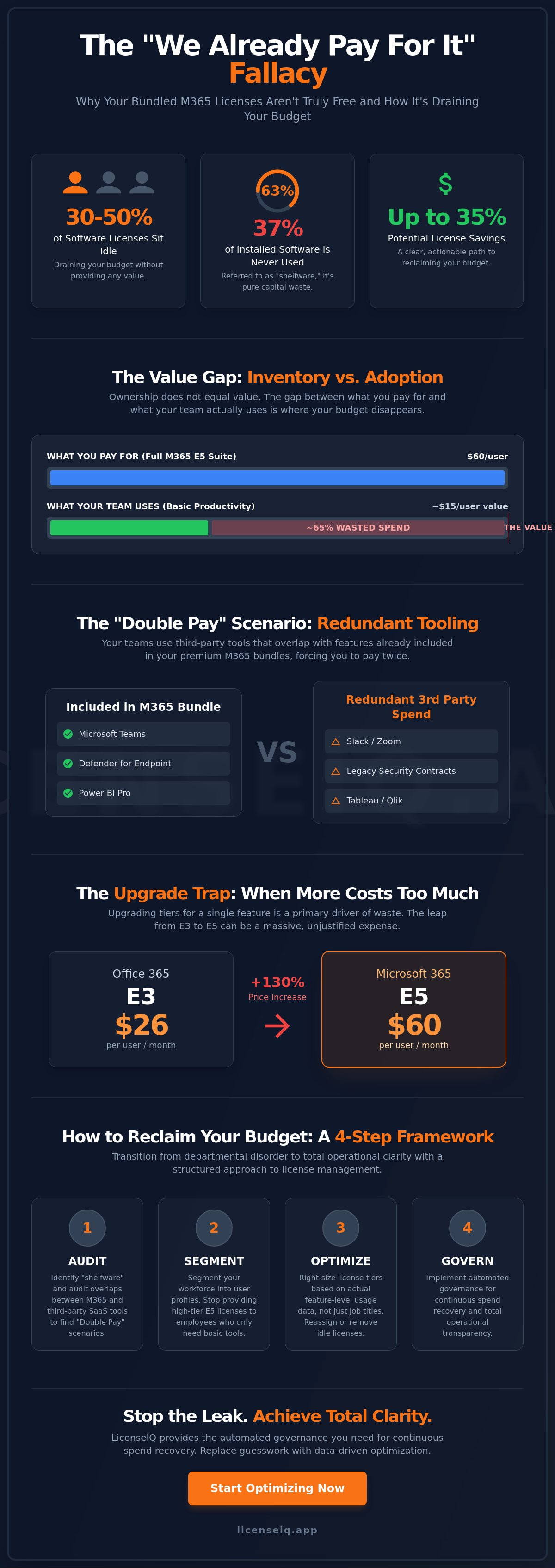
Between 30% and 50% of your software licenses are likely sitting idle right now, draining your budget without returning a cent of value. This hidden financial drain is the core of The "We Already Pay for It" Fallacy: Why Bundled Licenses Aren't Free. You likely feel the pressure of the July 2026 price increases, where Office 365 E3 costs jumped 13% to $26 per user. It's frustrating to watch costs rise while your team continues to pay for third-party tools that overlap with the premium M365 features you already own. Research indicates that 37% of all installed software is never used, which translates to significant wasted capital every month.
You can stop this cycle of overpayment by exposing the gap between what you buy and what your team actually uses. We'll show you how to identify the hidden costs of unused features and eliminate redundant SaaS spend. This article provides a framework to reclaim your budget and outlines a clear, actionable path to achieve up to 35% license savings. It's time to replace departmental disorder with total operational clarity.
Key Takeaways
- Identify "shelfware" within your premium tiers to stop paying for enterprise-grade features that your staff never actually deploys.
- Eliminate the "Double Pay" scenario by auditing overlaps between M365 tools and third-party SaaS applications like Slack or legacy security contracts.
- Recognize The "We Already Pay for It" Fallacy: Why Bundled Licenses Aren't Free to uncover the true marginal costs of bundled inclusions like Power BI and Advanced Security.
- Segment your workforce into specific user profiles to ensure you aren't providing high-tier licenses to employees who only require basic productivity tools.
- Transition from manual tracking to automated governance with LicenseIQ to achieve continuous spend recovery and total operational transparency.
Defining the 'We Already Pay for It' Fallacy
The "We Already Pay for It" Fallacy: Why Bundled Licenses Aren't Free is a logic trap that creates massive financial leakage in modern IT departments. Many procurement teams prioritize administrative simplicity over financial precision. They choose comprehensive Microsoft 365 bundles because it's easier to manage one SKU than five. This convenience comes at a steep price. The fallacy assumes that bundled features have zero marginal cost once you buy the license. In reality, you're paying a premium for every "included" tool through higher per-user monthly fees. If your team doesn't adopt the premium security or analytics tools inside the bundle, you're buying high-priced shelfware. True cost is measured by utility, not just availability.
The Psychology of the 'All-You-Can-Eat' Software Model
IT leaders often feel safer with comprehensive bundles like Microsoft 365 E5. It acts as a digital insurance policy. The fear of missing a critical security update or being under-licensed leads to chronic over-provisioning. This "all-you-can-eat" mentality creates a psychological barrier to auditing. When a tool is labeled as "free" within a suite, it escapes the scrutiny applied to standalone SaaS purchases. This behavior is a classic example of the Sunk cost fallacy. Organizations continue to pay for underutilized bundles simply because they've already integrated them into their operations. The "free" label effectively prevents critical audits of tool efficacy, allowing waste to compound over time.
Inventory vs. Adoption: The Value Gap
Ownership does not equal value. There's a massive difference between having a license in your inventory and having an active user driving ROI. Most SMBs overpay for M365 by at least 35% by default because they lack visibility into feature-level usage. They pay for E5 licenses while users only perform tasks that fit within an E1 or Business Basic profile. This creates a significant value gap that drains your budget every month. Without tools like LicenseIQ, this gap remains invisible to leadership. The value gap is the distance between paid features and utilized tools.
Visibility is the only antidote to this organizational disorder. When you treat bundled features as "free," you lose the ability to hold your software spend accountable. High-performance organizations don't just buy software; they manage its lifecycle with meticulous detail. They recognize that every unused feature in a bundle represents capital that could be reinvested in growth or innovation. Reclaiming this spend starts with acknowledging that nothing in a premium bundle is truly free if it isn't being used.
The Hidden Costs of Premium M365 Bundles
Upgrading your license tier often feels like a simple administrative checkbox. The reality is a sharp spike in operational expense. Effective July 2026, the price for Microsoft 365 E5 rises to $60 per user monthly. This represents a massive leap from the $22 price point of Business Premium. Many organizations trigger these upgrades for a single feature, ignoring the "Cost of Inclusion" for the rest of the suite. If only 5% of your workforce utilizes Power BI Pro, you are paying a massive premium for those specific seats. This inefficiency is the primary driver of The "We Already Pay for It" Fallacy: Why Bundled Licenses Aren't Free.
Trapped capital in these bundles prevents you from investing in specialized, high-ROI tools. Efficient Software Asset Management (SAM) requires you to look past the bundle marketing and calculate the actual utility of every component. You can use a Spend Recovery Dashboard to visualize exactly where these dollars disappear.
E3 vs. E5: When the Upgrade Becomes Waste
The transition from E3 to E5 is frequently justified by security and compliance needs. While E5 includes robust tools like Defender for Endpoint and Insider Risk Management, many firms already own redundant third-party solutions. You must identify the break-even point where the bundle cost is lower than the sum of individual best-of-breed tools. Without this analysis, the upgrade is pure waste. Review our Microsoft 365 E3 vs. E5 comparison to see the specific technical gaps between these tiers.
The Maintenance Burden of Unused Features
Bundles don't just cost money; they cost time. Every enabled feature requires strict governance and security monitoring. Unused tools in a bloated license environment become a playground for Shadow IT. When users find a bundled tool too complex, they bypass it for unauthorized apps, increasing your security surface area. Managing this bloat requires significant manual labor from IT staff who should be focused on strategic growth. A lean environment is a secure environment. Eliminating the shelfware hidden in your bundles reduces both your financial risk and your administrative overhead.
Redundant Tooling: The Shadow Cost of Bundles
The "Double Pay" scenario is the most common symptom of The "We Already Pay for It" Fallacy: Why Bundled Licenses Aren't Free. Many organizations pay for Microsoft 365 E5, which rises to $60 per user in July 2026, while simultaneously maintaining active contracts for Slack or Zoom. You're effectively paying twice for the same communication infrastructure. Statistics show that 31% of employees use two different collaboration tools. This overlap isn't just a minor administrative annoyance. It's a direct leak of capital that could be better allocated to specialized, high-growth initiatives.
Security and storage redundancies follow a similar pattern. You might be paying for Microsoft Defender for Office 365 Plan 1, which began rolling out to Business Premium and E3 licenses in June 2026, while keeping your legacy antivirus contract active. Similarly, departments often cling to Dropbox or Box despite having massive OneDrive storage capacities already included in their M365 bundle. These redundancies persist because IT departments lack the granular visibility to force a transition. Consolidation efforts often fail when they rely on executive mandates rather than hard usage data. Without automated oversight, you can't prove that a redundant tool is actually unnecessary.
Identifying Cross-SaaS Redundancy
Mapping your M365 feature set against your broader SaaS stack is the first step toward financial health. You must analyze the functional capabilities of every tool in your environment to find where they collide. SaaS redundancy is defined as paying for the same functional outcome twice. When you pay for advanced compliance archiving in M365 but also maintain a separate Global Relay or Smarsh contract, you're inflating your overhead. Total clarity on feature overlap allows you to terminate redundant contracts and reclaim significant portions of your IT budget. This process requires a meticulous audit of every sub-component within your premium bundles.
Why 'Free' Teams Isn't Free if No One Uses It
A bundled tool is only an asset if it drives actual adoption. If your workforce avoids Microsoft Teams in favor of Slack, that "free" bundled tool is a liability. It represents the price difference between a lower-tier license and your current premium subscription. Forcing users into tools they dislike often leads to shadow IT, where employees purchase their own software on corporate cards. You must measure adoption rates against license costs to see the true ROI. Read our playbook on How to Reduce M365 Subscription Costs to learn how to identify these usage gaps. Data-driven governance ensures you aren't subsidizing tools that your team actively ignores.
How to Audit Your Bundled License Value
Manual license reviews are obsolete the moment your IT team finishes the spreadsheet. You need a dynamic, repeatable process to identify financial leakage. To dismantle The "We Already Pay for It" Fallacy: Why Bundled Licenses Aren't Free, you must audit the actual utility of every sub-component in your tenant. Precision is the only way to stop overpaying for features your team ignores. Follow this five-step framework to regain control of your spend:
- Step 1: Export active usage reports for every sub-component of the bundle, including specialized tools like Power BI, Visio, and Project.
- Step 2: Segment users by "Power User" vs. "Basic User" profiles based on their actual feature requirements.
- Step 3: Compare specific feature usage against the cost of the next tier down to identify over-licensing.
- Step 4: Flag every user who hasn't logged in or utilized premium features for 30, 60, or 90 days.
- Step 5: Calculate your License Health Score to establish a baseline for your current tenant efficiency.
Metrics That Matter: Moving Beyond 'Active Users'
High-level tenant stats are deceptive. A user might be "active" because they check email, but that doesn't justify a $60 monthly E5 license. You must analyze the "Last Activity Date" for specific premium applications. If a user hasn't touched Power BI in 60 days, they don't need the bundle that includes it. Granular data exposes the waste that "Active User" counts hide. Using a Microsoft 365 license optimization tool automates this data collection, providing immediate oversight without the manual labor of PowerShell scripts.
The 90-Day Rule for License Reclamation
Inactivity is an expense. We recommend a strict 90-day rule: if a premium feature remains untouched for three months, the license should be automatically downgraded. This reclamation doesn't disrupt workflows; it simply aligns costs with reality. You can reallocate these high-tier licenses to new hires or power users who actually need them. Refer to our Office 365 Offboarding Checklist to ensure your reclamation steps are secure and compliant. Stop subsidizing digital shelfware. Calculate your License Health Score today to uncover exactly how much capital is trapped in your unused bundles.
Automated Governance: Reclaiming Your M365 Budget
Manual license management is a losing battle in 2026. By the time your team finishes a manual audit, your tenant data is already cold. With Microsoft 365 E5 prices rising to $60 per user in July 2026, you can't afford to wait for quarterly reviews to find waste. Spreadsheets lack the speed to counter The "We Already Pay for It" Fallacy: Why Bundled Licenses Aren't Free. You need a system that operates at the same velocity as your cloud environment. The LicenseIQ Platform provides this oversight, replacing administrative guesswork with AI-native discovery and precise spend recovery.
Efficiency starts with a single metric: your License Health Score. This score provides real-time financial oversight by quantifying the gap between what you've purchased and what your team actually utilizes. Instead of spending weeks chasing departmental usage, you can identify redundant licenses in minutes. This level of transparency is the only way to protect your organization's financial health against compounding subscription costs.
From Discovery to Recovery in 5 Minutes
The LicenseIQ Platform connects directly to your M365 tenant to provide instant, dollar-value recommendations. It doesn't just show you who is active; it identifies exactly which premium features are being ignored. Our Automated Governance Workflows then allow you to act on this data immediately. You can reclaim unused seats or downgrade over-provisioned users with a few clicks. Organizations using this continuous monitoring approach frequently achieve up to 35% in license savings. By automating the reclamation process, you ensure that "shelfware" never has a chance to accumulate on your balance sheet.
Setting Up Continuous Financial Accuracy
Proactive governance is the only way to maintain a lean IT estate. Moving away from reactive audits allows your team to focus on strategic growth rather than administrative cleanup. The Spend Recovery Dashboard visualizes your trapped capital, showing you exactly where bundled features aren't returning value. This dashboard turns complex technical data into clear financial insights for leadership. Total operational clarity ensures your M365 spend is always optimized for your current headcount and actual feature requirements. Don't let unused bundles drain your resources. Start your 5-minute M365 audit with LicenseIQ to uncover your immediate savings potential and secure your budget for the future.
Secure Your Financial Health with Automated Oversight
Stop allowing "included" features to mask operational waste. You've now seen how The "We Already Pay for It" Fallacy: Why Bundled Licenses Aren't Free drains your budget by hiding unused premium tools. By auditing cross-SaaS redundancies and enforcing strict reclamation rules, you transform your IT department from a cost center into a lean, data-driven operation. Precision is your only defense against the July 2026 price increases.
Total transparency is no longer a manual task. AI-native discovery takes only 5 minutes to reveal the truth about your tenant health. You can identify up to 35% savings on M365 licenses and maintain those gains through Automated Governance Workflows. This continuous accuracy ensures that your capital is always working for your growth, not for your vendors. It's time to replace organizational disorder with a vigilant and precise monitoring system.
Discover your M365 Health Score and recover wasted spend today.
Take control of your digital estate and build a foundation of absolute financial clarity. Your resources deserve proactive protection and you now have the framework to secure them.
Frequently Asked Questions
Is it always cheaper to buy a Microsoft 365 bundle than individual apps?
No. While bundles offer a lower per-app price on paper, they are only cost-effective if your team actively utilizes every included tool. If you only require email and basic Office applications, paying for a premium bundle is significantly more expensive than a standalone Business Basic license. Organizations often prioritize procurement simplicity while ignoring the total cash outflow for features that remain as shelfware.
What are the most common unused features in a Microsoft 365 E5 license?
Power BI Pro, Advanced Compliance, and Phone System capabilities are the most frequently ignored features in the E5 tier. Many businesses will pay the $60 per user monthly rate effective July 1, 2026, but continue using third-party tools for analytics or voice. This creates a massive value gap where you subsidize premium infrastructure that your staff never adopts or deploys.
Can I mix and match different M365 license tiers within the same company?
Yes, you can and should assign different tiers based on specific user requirements. You aren't required to put every employee on an E5 or E3 plan. By segmenting your workforce into "Basic" and "Power" users, you can assign lower-cost licenses like Business Basic to those who only need core productivity tools. This strategic allocation is the most direct path to reducing your monthly subscription spend.
How do I identify which users are not using their assigned premium features?
You must analyze the "Last Activity Date" for individual sub-components within your tenant reports. Standard "Active User" metrics are deceptive because they count any interaction with the suite as activity. To uncover The "We Already Pay for It" Fallacy: Why Bundled Licenses Aren't Free, you need granular data showing when a user last accessed specific premium apps like Defender for Office 365 or Intune.
What is a License Health Score and why does my business need one?
A License Health Score is a real-time metric that quantifies the efficiency of your software spend by measuring paid features against actual adoption. Your business needs this score to gain immediate clarity on financial leakage. It serves as a vital guardian of corporate resources by highlighting exactly where your budget is wasted on underutilized bundles and redundant SaaS tools.
How much money can an SMB typically save by optimizing their M365 licenses?
An SMB can typically save up to 35% on their total Microsoft 365 subscription costs through proactive optimization. Since research shows between 30% and 50% of licenses in an average organization go unused, the recovery potential is substantial. Eliminating orphaned accounts and downgrading over-provisioned users provides an immediate boost to your organization's financial health and operational transparency.
Does downgrading a license cause data loss for the user?
No, downgrading a license does not cause data loss if managed with the correct technical oversight. Most productivity data resides in SharePoint or OneDrive, which remains accessible across various commercial tiers. You may lose access to specific premium features like advanced security logs or increased mailbox capacities. Using a structured transition process ensures your data remains secure while you reclaim your budget.
How often should we conduct a Microsoft 365 license audit?
You should transition from periodic audits to continuous, automated monitoring. Manual audits are often outdated before they are finished and fail to capture the dynamic nature of user onboarding and offboarding. Automated Governance Workflows provide real-time oversight, ensuring your license allocation always matches your actual operational needs. This proactive approach eliminates the need for labor-intensive manual reviews and prevents The "We Already Pay for It" Fallacy: Why Bundled Licenses Aren't Free from taking root.


