

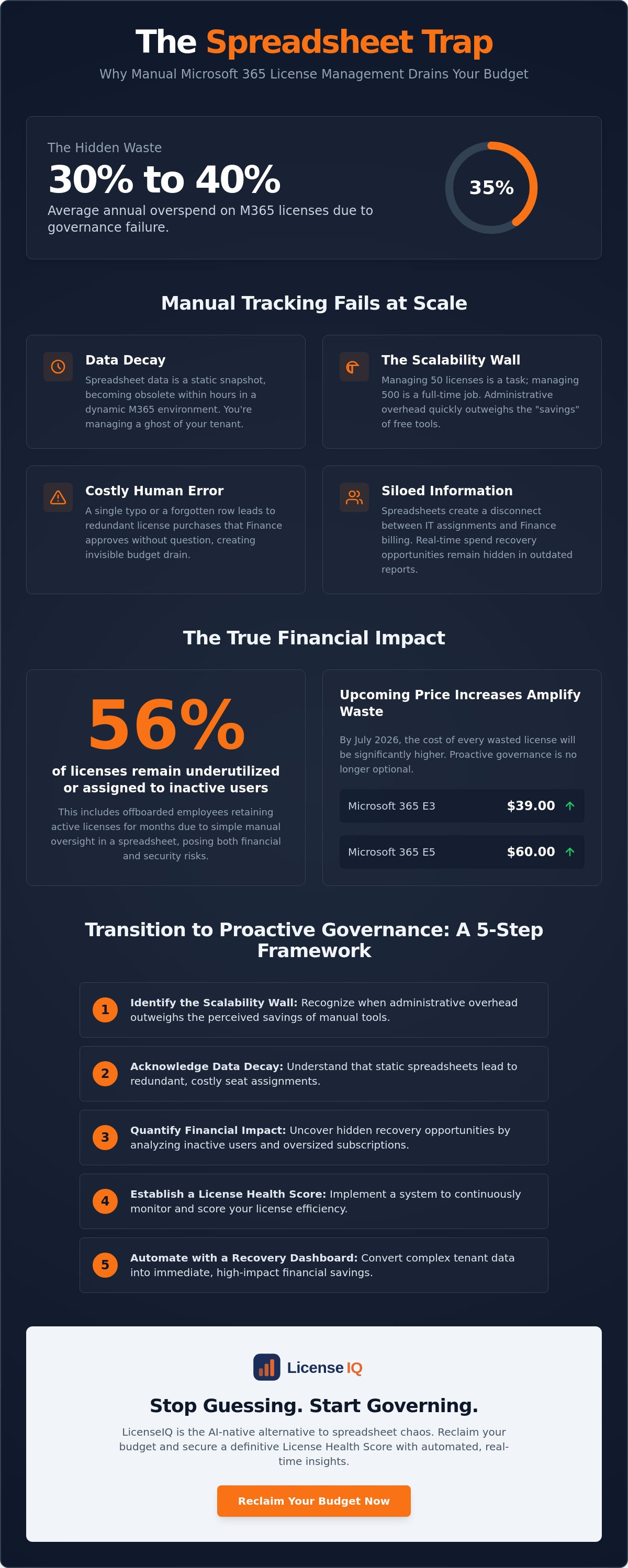
Organizations overspend on Microsoft 365 licenses by an average of 30% to 40% every single year. This massive waste isn't a procurement error; it's a governance failure. The core issue lies in the challenges of managing m365 licenses in a spreadsheet, a method that ensures your data is obsolete within hours of an update. When you rely on manual tracking, you're not managing resources; you're documenting decay.
You likely spend hours chasing department managers for offboarding details only to find that 56% of your licenses remain underutilized or assigned to inactive users. With Microsoft 365 E3 prices rising to $39.00 and E5 hitting $60.00 in July 2026, the cost of these obscured details is no longer sustainable. It's time to stop guessing and start auditing with precision. This article reveals why manual tracking is a financial liability that drains your budget through hidden inefficiencies. You'll learn how to transition from spreadsheet chaos to automated governance using the LicenseIQ platform to reclaim your budget and secure a definitive License Health Score.
Key Takeaways
- Identify the scalability wall where administrative overhead outweighs the perceived savings of manual tracking tools.
- Understand why data decay is one of the primary challenges of managing m365 licenses in a spreadsheet, leading to redundant and costly seat assignments.
- Quantify the financial impact of inactive users and oversized subscription tiers to uncover hidden recovery opportunities.
- Follow a structured five-step framework to establish a License Health Score and transition to a proactive governance model.
- Use the LicenseIQ Spend Recovery Dashboard to convert complex technical data into immediate, high-impact financial savings.
The Spreadsheet Trap: Why Manual M365 Tracking Fails at Scale
Managing a few dozen seats in a CSV file feels manageable at first. It's free, accessible, and familiar. However, as an organization grows, this manual approach creates a scalability wall that IT teams eventually hit with force. One of the primary challenges of managing m365 licenses in a spreadsheet is that the administrative overhead quickly exceeds the perceived cost-benefit of using "free" tools. When you track 50 licenses, it's a weekly task; when you track 500, it's a full-time job.
The Spreadsheet Trap is a state of operational blindness caused by static data. It forces high-value IT professionals to act as data entry clerks rather than strategic architects. This manual workflow is inherently reactive. By the time a spreadsheet is updated, the actual state of the Microsoft 365 tenant has already changed. This lag creates a disconnect between IT assignments and Finance billing, leading to thousands of dollars in unoptimized spend that remains invisible to leadership.
The Illusion of Control in Excel
Excel offers a false sense of security. While IT might think they have a handle on assignments, manual entry is prone to human error. A single typo or a forgotten row leads to redundant license purchases that Finance pays for without question. This is where professional Software Asset Management (SAM) principles become vital. Without a real-time sync to Entra ID, spreadsheets create "Shadow IT" pockets. Licenses are assigned but never monitored, and "free" tools end up costing more in labor hours than a dedicated optimization platform.
Siloed Information vs. Organizational Transparency
Information silos are the enemy of efficiency. Spreadsheets prevent Finance from seeing real-time spend recovery opportunities, leaving them to rely on outdated reports. Auditing historical changes in a shared CSV is nearly impossible. There's no definitive trail of who changed what or why. This lack of transparency is a major security risk. Offboarded employees often retain active licenses for months because of a simple manual oversight in a column. Moving to a platform like LicenseIQ replaces these fragments with total clarity, ensuring every license is accounted for and every dollar is justified.
Data Decay: The Primary Challenge of Managing M365 Licenses in a Spreadsheet
A spreadsheet is a static lie the moment you save it. In a dynamic Microsoft 365 environment, users are added, roles change, and employees leave every week. This constant motion creates one of the most persistent challenges of managing m365 licenses in a spreadsheet: data decay. By the time you reconcile your manual list, it's already obsolete. You aren't viewing your tenant; you're viewing a ghost of it.
The "Stale Data" problem has direct financial consequences. If your report is even 24 hours old, you might purchase unnecessary E5 seats because the spreadsheet didn't reflect a recent offboarding. This friction eventually leads IT teams to abandon the file entirely. When documentation fails, budget forecasting for the next fiscal year becomes a guessing game. Inaccurate license counts skew your projections, leaving you unprepared for the July 2026 price increases where M365 E5 will reach $60.00 per user.
Real-Time Tenant Flux vs. Static Documentation
A typical 200-user tenant experiences dozens of changes weekly. New hires need access, contractors finish their terms, and users require temporary upgrades for specific projects. A static document cannot track "Last Sign-in" dates or usage depth across multiple SKUs. This lack of oversight mirrors the systemic waste documented in the GAO report on federal software licenses, which details the high cost of fragmented management and poor license visibility.
Manual methods cannot monitor:
- Real-time license health metrics.
- Inactive Teams channels or shared documents.
- Partial feature usage within high-tier bundles.
The Collaborative Chaos of Shared Files
Manual tracking also introduces version control nightmares. When multiple administrators manage a single file, "master" lists often split into conflicting copies. Hidden rows or broken formulas can obscure hundreds of dollars in monthly spend. Manual tracking also introduces version control nightmares, compounding the challenges of managing m365 licenses in a spreadsheet when multiple administrators access the same file. During a formal Microsoft 365 audit, these manual logs often fail to provide the necessary evidence of compliance or optimization.
Stop fighting against decaying data. Establishing a real-time License Health Score ensures your records match your actual tenant state every second of the day.
The Invisible Cost: Calculating the ROI Lost to Manual Management
Manual license tracking is a financial drain disguised as an administrative task. When IT teams rely on static files, they lose sight of the "Big Three" of Microsoft 365 waste: inactive users, redundant SKUs, and oversized tiers. These inefficiencies are among the most expensive challenges of managing m365 licenses in a spreadsheet because they represent direct capital leakage. Every row in your spreadsheet represents a potential $30/month leakage point, especially when add-ons like Copilot are involved.
The "Safety Buffer" trap further compounds this issue. Because IT managers often distrust their manual records, they over-purchase licenses to avoid "out of stock" errors during onboarding. This practice creates a surplus of unassigned seats that Finance continues to fund indefinitely. By July 2026, an unassigned Microsoft 365 E5 license will cost your company $60.00 per month. Without automated oversight, a company with just 20 forgotten E5 seats wastes $14,400 annually on silence. These common enterprise software licensing challenges prove that documentation without intelligence is a liability.
Inactive Users: The Billion-Dollar Problem
In 2026, an inactive user is defined as any account with 90 or more days without a sign-in. Statistics from 365TUNE show that organizations overspend on M365 licenses by an average of 30% to 40%. Spreadsheets hide this waste because they cannot pull real-time telemetry from the tenant. You might see that a license is "assigned," but you cannot see that it hasn't been used since the previous quarter. Understanding how to reduce M365 subscription costs requires moving beyond simple assignment lists toward actual usage analysis. Relying on manual updates means you're likely paying for 35% more capacity than your workforce actually requires.
SKU Bloat and Tier Optimization
Redundant licenses occur when users are assigned both a comprehensive bundle and a standalone application license for a tool already included in that bundle. Spreadsheets rarely catch these overlaps. Furthermore, the cost gap between E3 ($39.00) and E5 ($60.00) is significant. If a user only requires basic productivity tools, keeping them on an E5 tier is a $21.00 monthly overpayment. Manual tracking also fails to distinguish between "Shared Computer Activation" and "User-Based" licenses effectively. This lack of granularity ensures that your M365 spend remains inflated, regardless of how many hours you spend cleaning your CSV files.
Transitioning to Automated Governance: A 5-Step Framework
Identifying the waste in your tenant is only the first step. To eliminate the challenges of managing m365 licenses in a spreadsheet, you must replace manual data entry with a proactive system of record. Transitioning to automated governance isn't just about better reporting; it's about building a vigilant infrastructure that protects your financial resources. This framework allows you to move from reactive "firefighting" to a state of total operational clarity.
Follow this structured five-step path to reclaim your Microsoft 365 budget:
- Step 1: Connect Your Tenant. Integrate your Microsoft 365 environment with an AI-native intelligence platform. This connection takes minutes and provides an immediate, 100% accurate scan of your actual license usage.
- Step 2: Benchmark Your Waste. Establish a License Health Score. This metric provides an instant baseline of your current inefficiencies, allowing you to track progress as you optimize.
- Step 3: Discover Inactive Accounts. Automatically identify users who haven't signed in for 90 days or more. This removes the need to manually cross-reference HR lists with Entra ID logs.
- Step 4: Implement Automated Governance Workflows. Deploy "if-this-then-that" logic for offboarding and license reclamation. These workflows handle the repetitive tasks that typically cause spreadsheets to fall behind.
- Step 5: Align IT and Finance. Set up a real-time Spend Recovery Dashboard. This provides leadership with a transparent view of the dollar value recovered, turning technical data into financial results.
Moving Beyond the PowerShell Script
Many IT leaders rely on custom PowerShell scripts to bridge the gap left by spreadsheets. While scripts are useful for "discovery," they aren't "governance" tools. A script provides a snapshot in time that is obsolete by the next business day. Effective management requires continuous monitoring rather than periodic auditing. To truly scale, you must understand the entire Mastering the Microsoft 365 License Management Lifecycle. Platforms provide the persistent oversight that a one-off script simply cannot match.
Automating the Reclamation Lifecycle
Efficiency requires removing the human friction from license recovery. Automated Governance Workflows can send notification alerts to department managers for approval before a license is reclaimed. This ensures that no critical access is revoked by mistake while maintaining a lean tenant. Automated offboarding also closes security gaps that occur when manual spreadsheet updates are forgotten. Connect your tenant to the LicenseIQ Platform today to see your current waste in real-time and begin your transition to automated governance.
LicenseIQ: The AI-Native Alternative to Spreadsheet Chaos
LicenseIQ solves the inherent challenges of managing m365 licenses in a spreadsheet by replacing manual entries with real-time, AI-native intelligence. It doesn't just document your tenant; it audits it. The platform connects to your Microsoft 365 environment in minutes. This provides a 100% accurate view of your total spend, eliminating the lag and human error associated with static CSV files. You gain immediate oversight into every active, inactive, and unassigned seat across your organization.
The Spend Recovery Dashboard converts complex technical telemetry into clear, dollar-value recommendations. It identifies exactly where your budget is leaking and provides the tools to stop it. By replacing guesswork with data-driven decision-making, businesses can achieve a high License Health Score through continuous, automated optimization. This isn't a periodic check-up; it's a vigilant, 24/7 monitoring system designed to protect your corporate resources from waste.
Five Minutes to Financial Clarity
The "5-Minute Audit" promise is the foundation of the LicenseIQ experience. The platform scans every user, license, and add-on without requiring manual effort from your IT team. While complex Excel formulas often miss redundant licenses or overlapping SKUs, LicenseIQ identifies these conflicts instantly. It uncovers the obscured details that lead to thousands of dollars in annual waste. Stop fighting with decaying data and start recovering your capital. You can discover and recover your wasted M365 spend with LicenseIQ to see the immediate impact on your bottom line.
Built for SMB Efficiency
Small and medium businesses often lack the resources for expensive IT consultants or the specialized knowledge required to maintain custom PowerShell scripts. LicenseIQ's Automated Governance Workflows eliminate this burden. The system manages the entire license lifecycle, from initial assignment to automated reclamation. It ensures continuous financial accuracy by utilizing the Model Context Protocol, keeping your license data aligned with your actual operational requirements. This level of transparency is essential for navigating the July 2026 price increases effectively. For a deeper dive into modern management strategies, read Microsoft 365 License Optimization: The 2026 Guide. Transitioning away from spreadsheet chaos allows your IT team to focus on growth rather than data entry, turning license management into a strategic advantage.
Secure Your Financial Health with Automated Governance
The era of documenting license assignments in static files has ended. As Microsoft prices rise, the financial risks associated with the challenges of managing m365 licenses in a spreadsheet become too significant to ignore. You've seen how data decay and information silos drain your resources. Now, you have the framework to stop the leakage and reclaim your budget. LicenseIQ provides the oversight needed to transform your IT department from a cost center into an optimized operation.
Our AI-native scan takes only minutes to identify up to 35% in wasted spend across your entire tenant. We empower SMBs with Automated Governance Workflows that replace manual chores with digital precision. Every unassigned seat or redundant SKU is an opportunity for recovery. Don't let obscured details compromise your organization's financial health. Stop wasting money on M365 licenses—get your Health Score now. Take control of your tenant today and secure a leaner, more transparent future for your organization. Your resources deserve a vigilant guardian.
Frequently Asked Questions
Is it really that hard to manage M365 licenses in a spreadsheet?
Yes, because manual entry can't keep pace with constant tenant flux. It creates one of the primary challenges of managing m365 licenses in a spreadsheet: data decay. By the time you update a row, a user has already changed roles or left the company. This creates a permanent state of inaccuracy that hides waste. You end up paying for resources that no longer serve a business purpose.
How much money can I save by moving away from manual license tracking?
Organizations typically save between 30% and 40% on their Microsoft 365 spend by identifying inactive or oversized licenses. Research from 365TUNE confirms this level of overspending is standard for organizations without automated oversight. Eliminating unassigned E5 seats alone saves significant capital as prices rise to $60.00 per month. Automation ensures these savings are permanent rather than one-time events.
What is the biggest risk of using Excel for M365 license management?
The biggest risk is operational blindness leading to significant financial leakage. Spreadsheets lack a real-time connection to Entra ID, meaning you're making procurement decisions based on stale data. This leads to purchasing new licenses for users who could've been assigned reclaimed seats from offboarded employees. Without a vigilant system, you lose visibility into your actual license health and waste thousands in avoidable costs.
Can PowerShell replace a dedicated license management platform?
No, PowerShell is a discovery tool rather than a governance solution. While scripts can pull a snapshot of data, they require manual maintenance and don't offer automated reclamation workflows. They lack the Spend Recovery Dashboard and License Health Score metrics needed for continuous financial optimization. Relying on scripts still leaves the heavy burden of decision-making and manual follow-up on your IT team.
How do I find inactive Microsoft 365 users without a spreadsheet?
Use an AI-native platform like LicenseIQ to scan your tenant for sign-in telemetry. The system automatically identifies users who haven't accessed their accounts in 90 days or more. This removes the human friction and potential for error inherent in the challenges of managing m365 licenses in a spreadsheet. Automated discovery provides a 100% accurate list of reclamation candidates in minutes, allowing for immediate action.
What happens to data when I reclaim a license from an inactive user?
Reclaiming a license removes the user's access to services, but their data remains subject to your organization's retention policies. Microsoft typically holds data for 30 days before permanent deletion. Automated Governance Workflows ensure that manager approvals and data preservation steps occur before any license is officially reclaimed. This protects your corporate resources while simultaneously reducing unnecessary monthly subscription costs across the organization.
How often should I audit my Microsoft 365 licenses?
You should move from periodic audits to continuous monitoring. Quarterly or annual reviews are insufficient because they allow waste to accumulate for months between checks. Real-time oversight ensures that every license change is documented and optimized the moment it occurs. This proactive approach maintains a high License Health Score and prevents cost creep from impacting your bottom line during the fiscal year.
Does LicenseIQ replace the Microsoft 365 Admin Center?
LicenseIQ works alongside the Microsoft 365 Admin Center to provide the financial intelligence that the native portal lacks. While the Admin Center handles technical assignments, LicenseIQ focuses on spend recovery and automated governance. It turns technical data into actionable financial insights for leadership. It acts as an auditor that ensures your resources are being used with maximum efficiency and total transparency.


