
Your annual Microsoft 365 license review isn't a strategy. It's a forensic autopsy of money you've already lost. While many IT leaders view the yearly cleanup as a standard best practice, this point-in-time approach ignores the waste that accumulates every single day between audits. When evaluating Scheduled vs Manual Scans: Why Continuous Auditing Beats the Annual Review, it becomes clear that waiting for a calendar date to optimize your environment is a recipe for fiscal leakage.
You've likely spent days on manual exports and spreadsheet imports only to find that your data is obsolete by the time you act. It's an inefficient cycle that leaves your organization vulnerable to hidden costs from inactive users and redundant license tiers. We'll show you how to close the 365-day gap and recover up to 35% of wasted software spend through real-time governance. You'll discover how the LicenseIQ Platform delivers a clear License Health Score and uses Automated Governance Workflows to lower audit-related labor costs by up to 55%. This guide provides a roadmap for total oversight that replaces manual work with direct dollar-value recovery recommendations.
Key Takeaways
- Eliminate the "365-day gap" where license waste accumulates silently between outdated annual reviews.
- Understand the technical limitations of Scheduled vs Manual Scans: Why Continuous Auditing Beats the Annual Review to ensure your governance data remains actionable.
- Quantify direct ROI by instantly identifying and downgrading underutilized E5 licenses to more cost-effective tiers.
- Establish a real-time License Health Score in under five minutes to gain immediate visibility into tenant waste and recovery targets.
- Leverage Automated Governance Workflows to replace high-cost manual oversight with a proactive, digital auditor.
The 365-Day Gap: Why Annual Reviews Leave Money on the Table
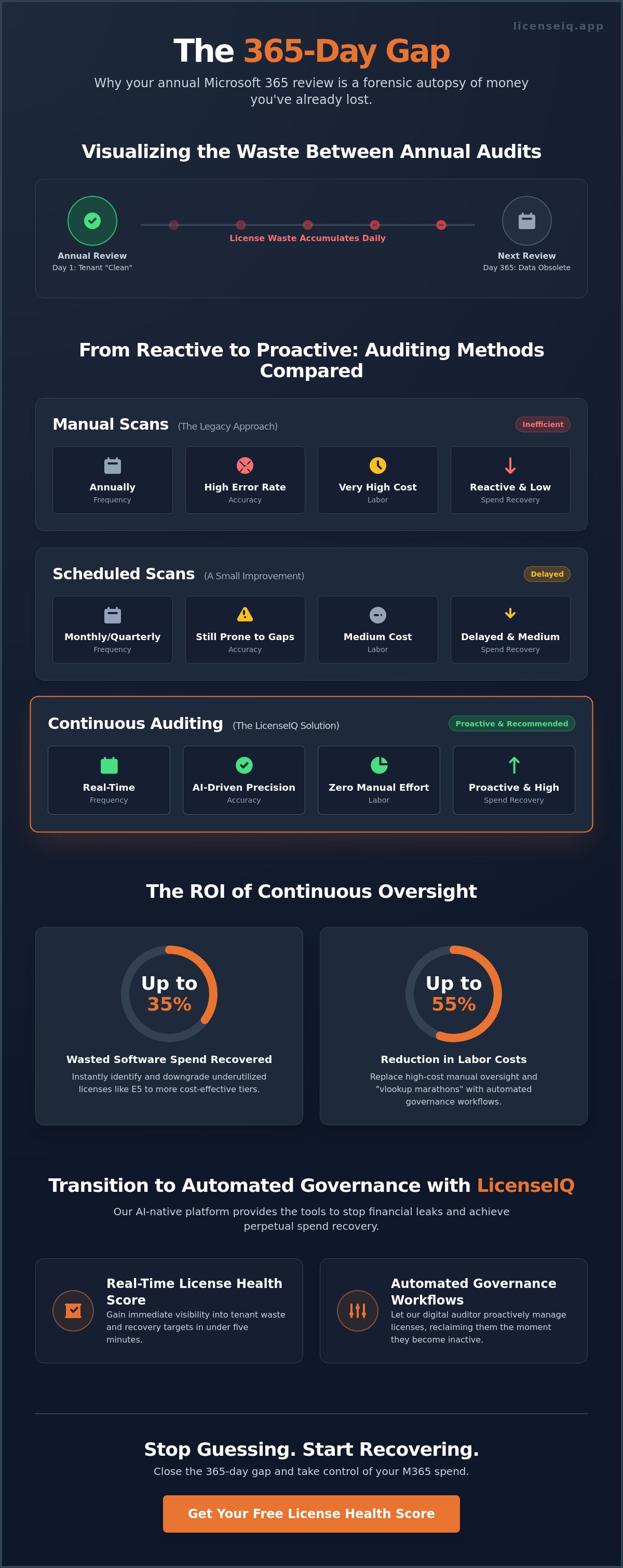
The traditional annual review is a snapshot of the past, not a map for the future. Relying on a point-in-time audit creates a dangerous fallacy. You capture a single moment of compliance that becomes obsolete the very next business day. In the debate of Scheduled vs Manual Scans: Why Continuous Auditing Beats the Annual Review, the primary failure of the annual model is its inability to account for the speed of modern enterprise change. Your M365 environment is a living ecosystem. Users join, roles shift, and projects end. A "clean" tenant can become bloated and inefficient within just 30 days of a manual cleanup.
License waste accumulates silently. It happens through employee churn when offboarding processes fail to reclaim high-value seats. It happens when "free" trial tiers for premium features like the E7 Frontier Suite automatically convert to paid subscriptions without oversight. This creates a psychological trap. Leadership feels a false sense of security because they "did the audit" in January. Meanwhile, thousands of dollars leak from the budget every month until the next scheduled review. True financial health requires a shift toward Continuous Auditing, which provides the real-time visibility needed to stop these leaks as they occur.
The Hidden Cost of License Drift
License drift is the gradual, invisible misalignment between what you pay for and what your team actually uses. It's the silent killer of IT budgets. When you rely on annual reviews, you're performing a forensic autopsy on wasted capital. It's reactive, not proactive. You identify money that is already gone rather than preventing the spend in the first place. This lack of oversight often leads to these 5 Signs You Are Wasting Money on M365 Licenses. Without a persistent monitoring system, you're essentially guessing your license requirements for 364 days of the year.
The Productivity Drain of Manual Auditing
Manual auditing is a massive drain on specialized talent. Your high-level IT administrators shouldn't spend forty hours a week on "vlookup" marathons and CSV exports. Manual data entry in complex M365 environments carries a high error rate that leads to either overspending or compliance risks. Industry data shows that AI-driven auditing can lower audit-related labor costs by 40-55%. The snapshot problem acts as a permanent barrier to fiscal agility because you're always making decisions based on old data. It's time to stop the manual grind and embrace automated precision.
Scheduled vs. Manual vs. Continuous: A Technical Breakdown
Choosing an auditing method dictates the financial health of your M365 environment. Manual scans represent the legacy approach. They require high effort, occur at low frequencies, and suffer from high error rates due to human data entry. Scheduled scans offer a slight improvement by automating the data pull at set intervals, such as monthly or quarterly. However, they still lack real-time triggers. When comparing Scheduled vs Manual Scans: Why Continuous Auditing Beats the Annual Review, the technical advantage lies in the shift from periodic snapshots to a persistent data stream. Continuous auditing operates with zero manual intervention, providing immediate spend recovery through AI-driven oversight.
This evolution moves IT departments away from simply "checking the boxes" for compliance. Instead, it empowers them to actively optimize the budget. By adopting Real-Time Auditing, organizations can identify anomalies the moment they occur. This level of precision is impossible with manual or scheduled methods that only look backward at historical waste.
Frequency vs. Accuracy: The Diminishing Returns of Manual Work
Increasing the frequency of manual scans is not a scalable solution for growing organizations. The more often you pull manual reports, the more you drain specialized IT resources. Accuracy suffers as the volume of data increases. A manual scan provides a static "snapshot" that ignores the dynamic nature of user behavior. In contrast, a continuous stream captures real-time triggers, such as an employee departure or a project conclusion. This allows for the immediate reclamation of licenses, preventing weeks or months of unutilized spend. If you want to see how your current environment stacks up, you can evaluate your tenant health through automated oversight.
The Role of AI in Modern Governance
AI transforms governance from a passive record-keeping task into an active financial tool. It identifies complex patterns of underutilization that human auditors often miss, such as users who have premium E5 features but only use basic email functions. This technology enables the "Health Score" concept. This score acts as a real-time KPI, giving IT leaders immediate clarity on their tenant's efficiency. Transitioning to automated license governance is now the industry standard for organizations that prioritize fiscal agility. AI-native platforms can reduce audit-related labor costs by 40-55% while ensuring that no license remains inactive for more than 24 hours.
The Financial Impact: Quantifying the ROI of Continuous Oversight
Most FinOps strategies fail because they rely on historical data. They look back at what was spent rather than managing what is being spent right now. In the debate of Scheduled vs Manual Scans: Why Continuous Auditing Beats the Annual Review, the financial impact is the most compelling argument for automation. Continuous oversight transforms your M365 tenant from a cost center into a lean, optimized asset. You don't have to wait for a quarterly meeting to see where money is leaking from your budget.
Direct savings come from immediate, data-driven action. An automated system identifies users assigned E5 licenses who haven't touched a premium security or compliance feature in 90 days. You can downgrade these seats to E3 or F3 instantly through the Spend Recovery Dashboard. This isn't just about minor adjustments. Organizations using the LicenseIQ Platform typically reclaim up to 35% of their monthly software spend by eliminating these misaligned tiers. Every day a seat remains over-provisioned is a day of unrecoverable capital loss.
Indirect savings are equally significant for the bottom line. You eliminate the need for specialized IT consultants who charge premium rates to perform annual "forensic" reviews. Your internal team also regains hundreds of man-hours previously lost to manual spreadsheet management. Some leaders worry that continuous auditing creates "noise" or alert fatigue. Precise systems are designed to be silent until they find actionable waste. They provide clarity, not clutter, by focusing only on direct dollar-value recovery recommendations.
Stopping the "Zombie License" Cycle
Zombie licenses are subscriptions assigned to offboarded or inactive users that continue to draw from your budget. They represent the primary source of M365 waste in mid-market organizations. These ghost accounts often go undetected for months because manual audits don't happen often enough to catch them. Learning how to reclaim M365 licenses from inactive users in real-time ensures your zombie count stays at zero. It's the difference between a one-time cleanup and perpetual hygiene.
Budget Forecasting with Real-Time Data
Accurate budget forecasting for the upcoming 2026 Microsoft 365 price increases requires precise usage data. Continuous auditing replaces guesswork with hard metrics. You'll know exactly how many seats you need based on actual consumption patterns rather than outdated headcounts. Real-time clarity through a Spend Recovery Dashboard eliminates end-of-quarter budget surprises and allows for confident financial planning. You move from a reactive state of "paying the bill" to a proactive state of "managing the investment."
How to Transition from Periodic Audits to Automated Governance
Transitioning from a reactive posture to a proactive governance model is a matter of hours, not months. Some organizations delay this shift because they assume it requires an overhaul of IT infrastructure. In reality, the move toward Scheduled vs Manual Scans: Why Continuous Auditing Beats the Annual Review is built on a streamlined, five-step framework that prioritizes immediate results.
- Connect: Integrate your M365 tenant with an AI-native platform. This establishes the live data pipeline.
- Baseline: Generate a License Health Score. This identifies immediate recovery targets within your current environment.
- Automate: Deploy Automated Governance Workflows. These handle the repetitive tasks of license reclamation without human intervention.
- Optimize: Shift your IT team's focus. They move from tedious data collection to high-value strategic optimization.
- Monitor: Review monthly Spend Recovery Dashboards. This replaces the stress of the annual report with consistent, manageable oversight.
You can start your transition today by connecting your tenant for a baseline health assessment.
The 5-Minute Connection: Overcoming Implementation Fear
Modern digital auditors don't require an "IT degree" or weeks of configuration to deploy. By utilizing read-only API access, the LicenseIQ Spend Recovery Dashboard connects to your tenant in under five minutes. This method ensures your data remains secure while providing the platform with the necessary visibility to uncover obscured waste. You gain the benefits of continuous oversight without the friction of a traditional software rollout. It's a plug-and-play solution for a complex administrative problem.
Setting Up Automated Offboarding
Offboarding is the critical trigger that separates continuous auditing from periodic checks. When an employee leaves, the window for license waste opens immediately. By implementing an Office 365 offboarding checklist powered by automation, you ensure that licenses are reclaimed the moment a user is deactivated in Entra ID. This prevents the "zombie license" cycle mentioned previously. It guarantees that your seat count remains perfectly aligned with your active workforce, protecting your budget from silent decay.
LicenseIQ: The AI-Native Path to Perpetual Spend Recovery
The LicenseIQ Platform functions as a proactive digital auditor that never sleeps. It resolves the limitations discussed in the debate of Scheduled vs Manual Scans: Why Continuous Auditing Beats the Annual Review by maintaining a persistent presence in your M365 tenant. While manual audits provide a blurry look at the past, LicenseIQ offers a high-definition view of the present. It transforms complex administrative data into a single, actionable License Health Score. This score gives leadership immediate clarity on where their resources are optimized and where they are being drained by inefficiency.
For SMB leadership, the Spend Recovery Dashboard is the primary tool for financial oversight. It moves beyond simple reporting by providing direct dollar-value recommendations. You don't have to interpret spreadsheets or guess at your next move. The system identifies exactly which licenses to downgrade or reclaim to hit your savings targets. Stop waiting for the next annual review to find out you've overspent. Start recovering your software budget in real-time with a system designed for total operational transparency.
Specific Insights for Microsoft 365
Generic SaaS management tools often fail because they lack the deep integration required for the Microsoft ecosystem. They struggle to navigate the nuances of tiered licensing and specific user permissions. LicenseIQ succeeds where others fail by using AI-native intelligence to analyze usage with surgical precision. It distinguishes between "unassigned" licenses and "unused" licenses that are still costing you money every month. This level of detail is critical for identifying waste in premium tiers like E5 or the new E7 Frontier Suite. You can run a free scan today to see the obscured details of your current tenant health.
Designed for SMB Efficiency
LicenseIQ eliminates the need for expensive, third-party FinOps consultants. It provides the same level of expert oversight through Automated Governance Workflows that operate in the background of your business. This "set it and forget it" approach ensures that your M365 environment remains lean without requiring constant human intervention. As you move into 2026, the potential to reclaim up to 35% of your software spend is no longer a goal; it's a measurable reality. Secure your resources and empower your IT team to focus on growth rather than data entry. Total clarity is just a five-minute connection away.
Achieve Perpetual Budget Optimization
The annual audit is a legacy habit that no longer serves the speed of modern enterprise. By shifting from periodic snapshots to a persistent data stream, you eliminate the 365-day gap where waste accumulates. We've explored how Scheduled vs Manual Scans: Why Continuous Auditing Beats the Annual Review is the critical distinction between forensic cost-cutting and proactive budget management. You can now replace the high-effort manual grind of CSV exports with Automated Governance Workflows that protect your capital.
Real-time oversight through an AI-native Spend Recovery Dashboard ensures that no license remains inactive or over-provisioned. It's a transition that allows your IT team to stop collecting data and start executing strategy. With the ability to recover up to 35% of wasted software spend, the path to fiscal agility is clear. You don't have to wait for the next fiscal year to optimize your tenant.
Take the first step toward total transparency today. Connect your tenant in 5 minutes and find your M365 Health Score to uncover immediate savings. It's time to reclaim your budget and move forward with confidence.
Frequently Asked Questions
What is the main difference between a manual scan and continuous auditing?
Manual scans are static snapshots that require human intervention to export and analyze data. They represent a single moment in time that quickly becomes obsolete. Continuous auditing uses API-driven automation to monitor your tenant in real-time. This distinction is central to why Scheduled vs Manual Scans: Why Continuous Auditing Beats the Annual Review remains a critical discussion for IT leaders seeking total operational transparency.
How often should a company audit its Microsoft 365 licenses?
You should monitor your environment daily rather than relying on a fixed calendar schedule. Monthly or quarterly reviews leave too much room for waste to accumulate between checks. Continuous monitoring ensures that as soon as a user's status changes or a project concludes, the associated license is identified for reclamation immediately. This prevents unutilized spend from lingering for months at a time.
Can continuous auditing replace my annual compliance review entirely?
It transforms the annual review from a stressful forensic cleanup into a simple verification of persistent hygiene. While you may still generate a year-end report for stakeholders, the data is already optimized and accurate. Continuous auditing ensures you are always audit-ready. This eliminates the weeks of manual work typically required to prepare for year-end compliance or financial reviews.
Will a continuous auditing tool slow down my M365 tenant performance?
No, modern auditing tools use read-only API calls that do not impact user experience or tenant speed. These calls happen in the background and require no local software installation on user devices. Your environment remains fully operational while the system gathers the necessary data to update your License Health Score. It is a non-intrusive way to maintain fiscal oversight.
What is License Drift and how does it affect my bottom line?
License drift is the gradual misalignment between your active workforce and your paid subscriptions. It occurs when users are offboarded but their licenses aren't reclaimed, or when employees are over-provisioned for premium features they don't use. This drift creates silent financial leakage. If left unchecked, it can consume a significant portion of your IT budget without providing any measurable business value.
How much can an SMB typically save by switching to continuous monitoring?
Savings vary based on tenant size, but most organizations find immediate recovery targets by identifying unutilized premium seats. By downgrading inactive E5 users to E3 or F3 tiers, companies stop paying for features that aren't providing value. This real-time adjustment prevents the accumulation of waste that typically occurs with Scheduled vs Manual Scans: Why Continuous Auditing Beats the Annual Review.
Is continuous auditing difficult to set up for a small IT team?
Deployment is straightforward and takes less than five minutes using a secure API connection. Small IT teams benefit most from this because it removes the burden of manual spreadsheet management. Once the connection is established, the platform runs autonomously. This allows your team to focus on high-value technical projects rather than repetitive data entry tasks.
What happens if the continuous audit identifies a license that is actually needed?
The system provides data-driven recommendations rather than taking destructive actions without oversight. You maintain final control over all license changes through the Spend Recovery Dashboard. This ensures that while the system identifies potential waste with surgical precision, your IT team can validate specific usage patterns before any downgrades or reclaims are finalized.


