

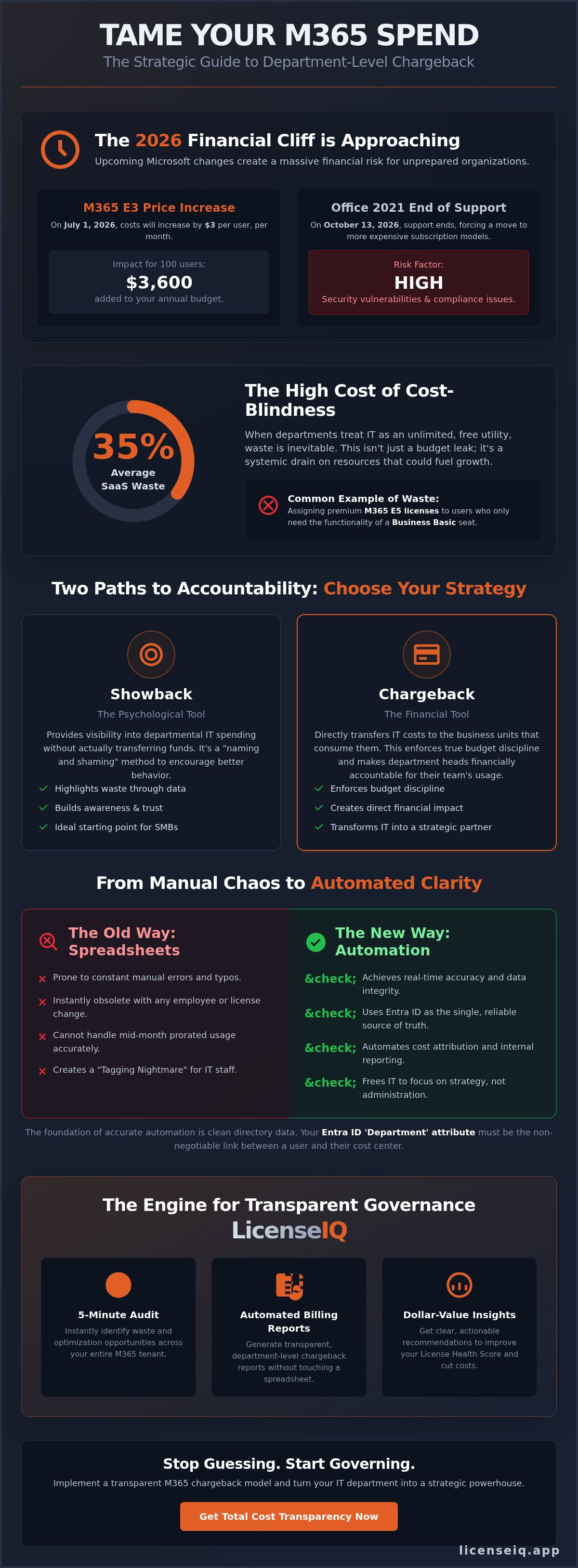
On July 1, 2026, Microsoft 365 E3 costs will increase by $3 per user, per month, instantly adding $3,600 to the annual budget for every 100 seats. This price hike, coupled with the October 13, 2026, end of support for Office 2021, creates a massive financial risk for organizations relying on legacy licensing. Implementing a Department-Level Chargeback for Microsoft 365: Making Costs Visible is no longer a back-office task; it is a governance strategy that forces departments to own their digital waste. You're likely tired of manual spreadsheet errors and the lack of accountability from leaders who treat IT resources as an unlimited free utility.
It's time to end the cycle of budget bloat. You'll learn how to eliminate M365 waste by implementing a transparent departmental chargeback model that aligns IT spending with actual business usage. This article outlines how to use the LicenseIQ platform and automated governance workflows to achieve total cost transparency. We'll demonstrate how to replace shadow SaaS waste with automated internal billing reports; this ensures your organization maintains a high License Health Score through precise, data-driven oversight.
Key Takeaways
- Shift from passive visibility to financial accountability by distinguishing between showback and a true internal chargeback model.
- Optimize cost attribution by mapping Entra ID department fields to specific cost centers, bypassing the limitations of standard admin reports.
- Eliminate the accuracy gap caused by manual tracking and mid-month license changes through automated, real-time software intelligence.
- Streamline your implementation of Department-Level Chargeback for Microsoft 365: Making Costs Visible by aligning Finance and HR stakeholders early in the process.
- Deploy the LicenseIQ platform to conduct a 5-minute audit and generate the dollar-value recommendations required for transparent internal billing.
What is Department-Level Chargeback for Microsoft 365?
Chargeback is the internal transfer of IT expenses to the specific business units that consume them. It transforms the IT budget from a consolidated overhead cost into a transparent, departmental ledger. Microsoft 365 operates on a seat-based model. This makes it the primary target for this strategy. As licensing costs for Enterprise plans increase by up to 13% in July 2026, failing to attribute these costs leads to systemic waste. Implementing a Department-Level Chargeback for Microsoft 365: Making Costs Visible ensures every dollar spent is justified by the department head. You stop guessing where the money goes. You start seeing the data.
The year 2026 marks a critical shift toward AI-driven cost attribution. Organizations are moving away from quarterly manual checks toward real-time monitoring. This transition allows for precise cost center mapping that reflects the fluid nature of modern workforces. By automating this process, IT leaders stop being administrators; they start acting as strategic financial advisors. Precise data replaces the friction of internal budget disputes.
Showback vs. Chargeback: Choosing Your Maturity Level
Organizations must determine their financial maturity level before deploying a framework. A showback model provides visibility without transferring funds. It's a psychological tool designed to highlight waste and encourage better license management through social pressure. In contrast, a chargeback model is a financial tool that enforces budget discipline through actual budget impacts. Departments pay for what they use. Most SMBs should start with showback to build trust and data accuracy. This foundational understanding of IT chargeback and showback allows leadership to see the "why" before they feel the financial impact on their specific P&L statements.
The True Cost of M365 Cost-Blindness
Free licenses don't exist. When departments believe they do, waste is inevitable. General industry data indicates that cost-blindness leads to an average of 35% waste in SaaS spending. This often manifests as premium E5 licenses assigned to users who only require the functionality of a Business Basic seat. Following the 2026 price increases, these errors are expensive. An unoptimized E5 seat drains resources that could be used for strategic growth. IT shouldn't be the "bad guy" for these overages. Use the LicenseIQ Platform to shift the burden of proof to department heads. They must justify the spend or IT reclaims the resource. This protects the organization's financial health while ensuring total operational transparency.
The Mechanics of M365 Cost Attribution in 2026
Attributing costs requires a technical anchor. In 2026, that anchor is Entra ID. Most organizations fail because they rely on static spreadsheets. These documents become obsolete the moment a user changes roles or a department restructures. Effective Department-Level Chargeback for Microsoft 365: Making Costs Visible relies on the 'Department' and 'Company' attributes within Entra ID to automate cost center mapping. If your directory data is messy, your billing reports will be wrong. Clean directory data is the non-negotiable foundation of any chargeback framework.
Native Microsoft 365 Admin Center reporting offers a high-level view, but it lacks the granularity needed for financial reconciliation. It doesn't account for mid-month license swaps or prorated usage. This creates a 'Tagging Nightmare' where IT staff manually tag users in dynamic environments. Manual tagging is a recipe for error; it's a reactive process that can't keep pace with a modern workforce. You need a system that tracks changes in real time. Reviewing Cloud Cost Allocation Models Explained helps bridge the gap between technical usage and financial reporting requirements.
Leveraging Entra ID for Departmental Mapping
Precision starts with your user directory. By strictly enforcing the 'Department' and 'Company' attributes, you create a direct link between a user's license and their budget holder. This isn't just about naming; it's about data hygiene. Automated sorting scripts can then pull this data to generate monthly invoices. Without clean directory data, IT is forced into manual reconciliations that take hours. Organizations that prioritize directory health find that chargeback becomes a background process rather than a monthly crisis. It's the difference between guessing and knowing.
The Challenge of Shared Costs and AI Agents
Shared resources present another layer of complexity. Shared mailboxes and SharePoint storage often sit in a 'no man's land' of unassigned costs. While Microsoft introduced departmental billing for Microsoft 365 Backup in March 2026, core license attribution remains a challenge for many. AI agents add to this burden. Attributing Microsoft 365 Copilot usage requires monitoring specific consumption patterns rather than just seat assignments. You can't rely on basic seat counts for AI agents. You need automated governance workflows to capture these nuances without manual intervention. Managing the 'Agent 365' control plane requires a tool that understands the specific dollar-value recommendations for every SKU in your environment. This level of oversight ensures that even the most complex AI deployments remain financially transparent.
Manual Spreadsheets vs. Automated Software Intelligence
Manual spreadsheets are the enemy of precision. Relying on Excel to manage a dynamic Microsoft 365 tenant leads to the 'accuracy gap.' This gap occurs when mid-month license changes go unrecorded until the next audit cycle. If an employee offboards on the 10th of the month, a manual report often bills the department for the full 30 days. These errors compound across thousands of users and multiple business units. Transitioning to a Department-Level Chargeback for Microsoft 365: Making Costs Visible requires moving beyond static data. Automated software intelligence performs real-time scanning. It captures every license assignment and reassignment as they happen. This ensures your financial records reflect reality, not a snapshot from three weeks ago.
Automated systems use intelligent algorithms to analyze usage patterns across Teams, SharePoint, and Exchange. They don't just check if a license is assigned; they check if it's being utilized. This level of oversight is impossible with manual spreadsheets. When you implement a Department-Level Chargeback for Microsoft 365: Making Costs Visible, you empower department heads with precise data. They can no longer claim ignorance of their spending. LicenseIQ acts as a proactive participant in your growth, ensuring that every seat is optimized for the best possible financial outcome. It replaces the passive spreadsheet with an active, vigilant auditor.
The Hidden Cost of Manual Audits
Manual monthly audits are a drain on high-value IT talent. A typical enterprise spends dozens of labor hours each month reconciling Entra ID exports with finance spreadsheets. This process is prone to human error; a single misplaced decimal can trigger a departmental budget crisis. Automation offers an immediate ROI by reclaiming these hours for strategic projects. You can compare the efficiency gains in our guide on LicenseIQ vs. Manual Tracking. By removing the human element from data collection, you ensure that internal financial transfers are defensible and accurate. This builds trust between IT and the finance department.
Real-Time Spend Recovery: Beyond Static Billing
Static billing only tells you what happened in the past. Automated intelligence tells you what's happening now. Our License Health Score provides a clear metric for the quality of your license allocation. It measures how effectively your current spend aligns with actual user activity. If a department has 50 unused E5 seats, your score drops immediately. This visibility enables real-time spend recovery. You identify inactive users the moment they stop providing value. Executives gain immediate oversight through a centralized dashboard. This replaces the guesswork of manual reporting with a vigilant, digital system that never sleeps. It's not just about seeing waste; it's about the proactive recovery of corporate resources through data-driven decisions.
How to Implement a Chargeback Framework in 5 Steps
Successful implementation requires a structured approach that balances technical precision with organizational politics. Moving to a Department-Level Chargeback for Microsoft 365: Making Costs Visible isn't an overnight switch. It's a phased evolution. You must first secure buy-in from those who control the purse strings and those who manage the user data. Without this alignment, even the most accurate technical reports will face internal resistance. Follow these five steps to establish a defensible, automated framework.
- Step 1: Stakeholder Alignment. Schedule a meeting with Finance and HR. Finance requires a predictable internal billing cycle. HR provides the organizational hierarchy needed for accurate mapping.
- Step 2: Data Normalization. Audit your Entra ID department fields. Standardize naming conventions across the tenant. Consistency here prevents billing errors later.
- Step 3: Define Allocation Rules. Establish clear logic for proration. If a user joins on the 20th, does the department pay for the full month or a fraction? Document these rules to ensure transparency and fairness.
- Step 4: The Showback Phase. Issue "Visibility Reports" for two or three months. This allows department heads to see their potential costs without an actual budget impact. It builds confidence in the data.
- Step 5: Full Chargeback. Transition to automated monthly debits. At this stage, IT stops managing licenses and starts managing the system that allocates them.
Step 1: The 'Why' Meeting with Department Heads
Department heads often view IT chargebacks as a "tax." You must reframe this perception. Position chargeback as a tool for budget reclamation. Use your Spend Recovery Dashboard to show them exactly where their budget is leaking through unused or over-provisioned seats. When a leader sees they can save hundreds of dollars a month by simply downgrading five users, their attitude shifts. Incentive alignment is achieved when department heads realize that every dollar saved on licenses is a dollar they can reinvest in their own team's strategic goals. You're giving them control, not taking it away.
Automating the Workflow with LicenseIQ
Manual implementation is a recipe for failure. You need a system that integrates directly with your tenant to provide real-time updates. LicenseIQ connects in minutes to establish an instant baseline audit. This baseline serves as your source of truth for all future billing. By setting up Automated License Governance, you ensure that offboarding and role changes are reflected in the budget immediately. This eliminates the "drift" that typically occurs in manual systems. Stop chasing data and start acting on it by launching a LicenseIQ baseline audit to secure your organization's financial health.
LicenseIQ: The Engine for Transparent M365 Governance
LicenseIQ transforms raw tenant data into specific dollar-value recommendations. It provides the financial clarity required for a successful Department-Level Chargeback for Microsoft 365: Making Costs Visible. The process begins with the '5-Minute Audit.' This rapid assessment connects to your environment and identifies immediate optimization opportunities. It establishes a baseline for visibility that manual processes simply can't match. You stop guessing which department owes what. You start recovering spend through a vigilant and precise system. Efficiency is no longer an aspiration; it's a measurable outcome of our platform.
Our License Health Score serves as the primary metric for departmental performance. It tracks how well each business unit aligns its allocated licenses with actual usage patterns. High scores indicate lean operations. Low scores signal immediate waste that requires intervention. This score creates a culture of accountability among department heads. They can no longer ignore the financial impact of their software requests. By using a data-driven auditor, you ensure that every seat provides maximum value to the organization's bottom line.
Recovering Up to 35% of M365 Spend
Departmental visibility naturally leads to license right-sizing. When leaders see the direct impact of software costs on their specific budgets, they prioritize efficiency. LicenseIQ identifies redundant licenses across different business units that often go unnoticed in siloed environments. By consolidating these resources and reclaiming unused seats, organizations can recover up to 35% of their total M365 spend. This isn't a projection; it's the direct result of meticulous digital auditing. You can explore these features on the LicenseIQ Homepage to see how we automate the recovery process. Our Spend Recovery Dashboard makes waste visible so you can eliminate it instantly.
Future-Proofing Your SaaS Governance
SaaS governance is entering a new era of complexity. By late 2026, the expansion of AI agent costs will create additional layers of financial risk. Organizations must prepare for these shifts today. The role of the Model Context Protocol (MCP) will become vital in automated license management. It ensures that AI agents and digital workers are allocated and billed with the same precision as human users. LicenseIQ is built to handle these emerging technologies, ensuring your chargeback model remains robust as your tech stack evolves. Transparency is the ultimate guardian of corporate resources. Don't let your budget drift into disorder; implement a system that stays one step ahead of the curve.
Secure Your Budget with Total Visibility
The 2026 price increases make financial oversight a necessity, not an option. Implementing a Department-Level Chargeback for Microsoft 365: Making Costs Visible shifts the burden of spend from IT to the departments driving consumption. Manual spreadsheets fail to capture real-time changes. AI-native software intelligence recovers up to 35% of M365 spend by identifying waste instantly. Stop letting unassigned licenses and inactive seats drain your corporate resources.
Our Automated Spend Recovery Dashboard provides the precision needed to maintain a lean, efficient tenant. By leveraging the License Health Score, you transform IT from a cost center into a strategic advisor. LicenseIQ acts as an active participant in your growth, ensuring that transparency remains the cornerstone of your identity. Take control of your digital environment today. It's time to replace organizational disorder with total clarity. Your path to optimized governance starts now.
Get your M365 Health Score and start recovering spend in 5 minutes.
Frequently Asked Questions
What is the difference between showback and chargeback in M365?
Showback provides visibility by informing department heads of their costs without actually moving funds. It serves as an educational tool to highlight waste and encourage better habits. Chargeback is the actual financial transfer of IT costs to a specific business unit's budget. Most organizations use showback as a transitional phase to build trust before enforcing full financial accountability.
How do I handle M365 license costs for employees who work across multiple departments?
Assign the cost to the primary department listed in the employee's Entra ID profile for maximum simplicity. If a precise split is required, you can use weighted percentages based on project codes or time allocation. Automated systems handle these calculations to ensure the IT budget remains balanced. Consistency in your mapping logic prevents disputes between department heads during monthly reconciliations.
Does Microsoft 365 have a native tool for departmental chargeback?
Microsoft lacks a single, native tool that automates chargeback for core licenses like E3 or E5. While departmental billing for Microsoft 365 Backup became available in March 2026, it only covers backup-specific costs. General license attribution still requires manual exports or specialized platforms like LicenseIQ. You need a solution that bridges the gap between technical usage and financial reporting.
How often should I run chargeback reports for my organization?
Run your reports monthly to align with standard corporate accounting cycles. This frequency allows you to capture mid-month license changes and prevents billing errors from compounding. Real-time monitoring is even better for high-growth companies. It ensures that Department-Level Chargeback for Microsoft 365: Making Costs Visible remains accurate as users join or leave the organization.
Can I implement chargeback without manual tagging in Azure?
Yes, you can eliminate manual tagging by leveraging existing Entra ID attributes. Attributes such as 'Department,' 'Company,' and 'Office' serve as automated anchors for cost center mapping. Automated governance workflows pull this data directly to generate reports without human intervention. This approach removes the risk of human error and ensures your billing data stays synchronized with your directory.
What are the common pitfalls when starting a departmental billing model?
Poor data hygiene is the most frequent cause of failure. If your Entra ID department fields are blank or inconsistent, your cost mapping will be wrong. Another pitfall is failing to align with Finance and HR before the rollout. You must define clear rules for proration and license upgrades early to avoid political friction when the first invoices are issued.
How does chargeback help in reducing total Microsoft 365 costs?
Chargeback forces department heads to justify their own software spending. When a manager sees the direct impact on their budget, they're more likely to reclaim unused seats or downgrade over-provisioned users. This visibility can recover up to 35% of wasted spend by eliminating redundant E5 features. It turns every department head into a proactive steward of the company's financial resources.
Is departmental billing available for Microsoft 365 Backup and Copilot?
Departmental billing for M365 Backup was officially released in March 2026 to help scope backup policies by region or unit. Copilot attribution is more complex because it involves high-cost AI agents. You must use automated tools to track these specific assignments in real time. This ensures that the significant investment in AI is billed only to the teams actively utilizing the technology.


