

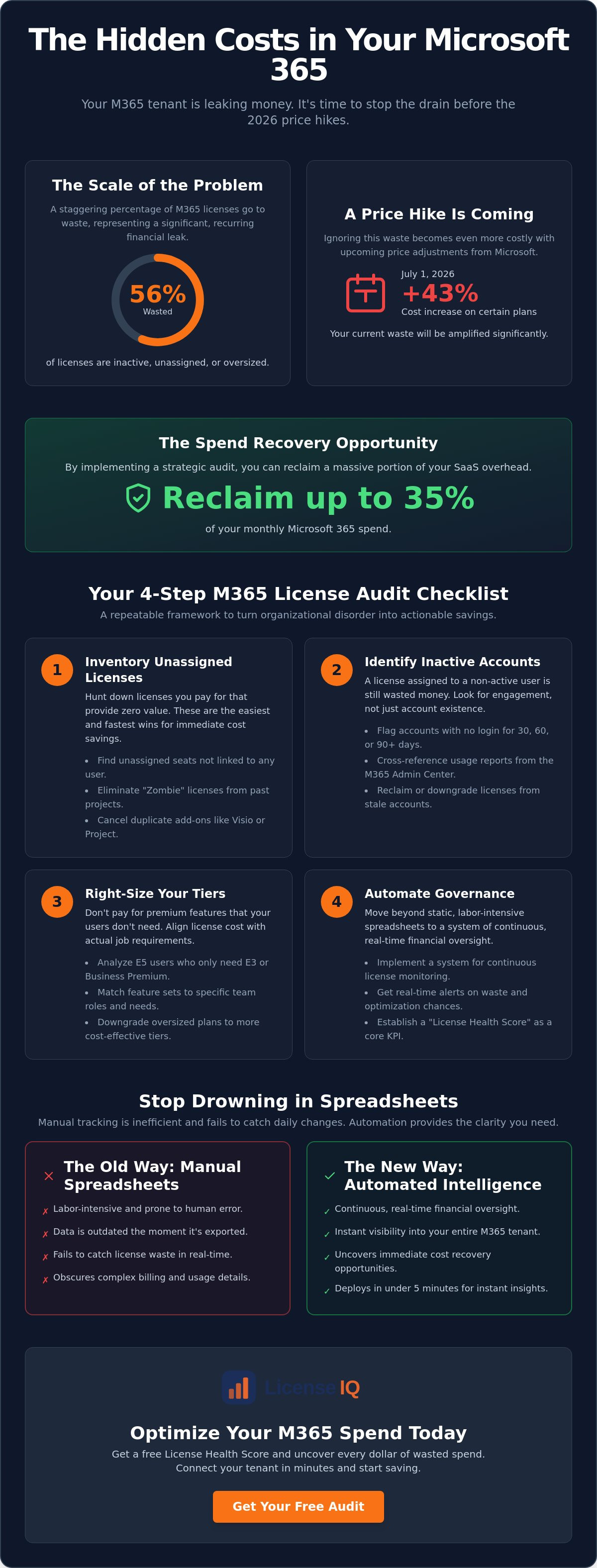
Over 56% of Microsoft 365 licenses are currently inactive, unassigned, or completely oversized for the user's actual needs. With the July 1, 2026 price increases raising costs by as much as 43% for certain plans, your organization can't afford to ignore this recurring financial leak. Most leaders recognize that their billing is opaque, yet they struggle to track zombie licenses from former employees or expensive E5 plans assigned to basic users. This lack of oversight isn't just an IT problem; it's a direct hit to your bottom line.
You need a clear path to transparency. This guide provides a definitive microsoft 365 license audit checklist for smb to help you identify every dollar of wasted spend and reclaim up to 35% of your SaaS overhead. We'll move beyond the frustration of manual spreadsheets to implement a repeatable framework for total fiscal hygiene. By the end of this article, you'll have a precise list of licenses to cut and a strategy to automate your governance. We're breaking down the 2026 price shifts and providing a step-by-step process to turn organizational disorder into actionable savings.
Key Takeaways
- Eliminate SaaS sprawl by identifying the specific operational gaps that lead to redundant Microsoft 365 billing and unassigned seats.
- Implement a repeatable microsoft 365 license audit checklist for smb to recover wasted spend and reduce monthly overhead.
- Right-size your workforce by aligning specific user requirements with the most cost-effective tiers, such as Business Premium or E3.
- Transition from labor-intensive manual spreadsheets to automated governance for continuous, real-time financial oversight.
- Deploy the LicenseIQ platform in under five minutes to generate a License Health Score and uncover immediate recovery opportunities.
Why Every SMB Needs a Microsoft 365 License Audit in 2026
Microsoft's July 1, 2026 price adjustments have transformed license management from a routine IT task into a critical financial priority. With costs increasing by up to 43% for specific plans, unmonitored tenants are now significant sources of capital leakage. For the average small business, a Microsoft 365 license audit serves as a strategic financial hygiene check. It ensures that every dollar spent on your subscription directly contributes to operational output. As SMBs rely more heavily on cloud computing, the ease of provisioning new users often outpaces the rigor of deprovisioning them. This creates SaaS sprawl, where redundant licenses accumulate quietly in the background.
Most unmonitored tenants operate with a 35% waste threshold. This means over one-third of your monthly spend likely funds inactive accounts or oversized plans. While traditional security audits focus on vulnerabilities and access logs, a spend-recovery audit focuses on fiscal efficiency. It uncovers obscured details that the standard Microsoft admin portal often hides. Implementing a microsoft 365 license audit checklist for smb allows leadership to regain control over their digital resources and stop the cycle of over-provisioning. For those looking to go beyond licensing and optimize their entire technical environment, you can discover InfoTech Solutions & Services for professional IT consulting and managed support.
The High Cost of "Set and Forget" Subscriptions
Subscription models thrive on inertia. Auto-renewals mask the costs of inactive users, allowing "zombie" licenses from former employees to bill indefinitely. Over a fiscal year, these redundant licenses compound into thousands of dollars in lost capital. This isn't just an administrative oversight; it's a drain on your growth budget. A Microsoft 365 license audit is a strategic financial review of subscription utility versus actual user engagement. It replaces passive spending with active oversight, ensuring your technology stack remains lean and efficient.
Identifying the 35% Spend Recovery Opportunity
Research indicates that 56% of enterprise licenses are unassigned or oversized. For SMBs, these leaks typically stem from two areas: unassigned seats and users stuck on expensive E5 plans who only require Business Premium features. Manual tracking via spreadsheets fails to catch these leaks in real-time because the data changes daily. This is why visibility is the ultimate solution to organizational disorder. By establishing a License Health Score as a core KPI, your business can monitor efficiency at a glance. Tools like the LicenseIQ Platform provide this clarity instantly. Using a microsoft 365 license audit checklist for smb ensures you don't just find waste once; you build a system that prevents it from returning.
The Essential SMB Microsoft 365 License Audit Checklist
Most SMBs treat their Microsoft tenant like a utility bill. They pay it without question. However, a security-first audit often misses the financial leaks that drain your monthly budget. This microsoft 365 license audit checklist for smb focuses on high-impact recovery areas to maximize your software ROI. Effective cloud cost management requires a shift from passive observation to active oversight. You must cross-reference actual user activity with license costs to find the orphaned capital sitting in your portal. By following this framework, you can transform your billing from a source of confusion into a model of efficiency.
Step 1: Inventory Unassigned and Redundant Licenses
Start with the low-hanging fruit. Unassigned licenses are seats you pay for that aren't linked to any active user. Check your billing for Zombie SKUs. These are licenses purchased for a specific project or a temporary contractor that were never cancelled. Don't overlook duplicate add-ons. Users often accumulate multiple licenses for Visio or Project that they no longer use. Clearing these redundant items provides immediate relief to your monthly SaaS overhead. Every unassigned seat is a direct hit to your bottom line that provides zero operational value.
Step 2: Identify Inactive and Stale User Accounts
An account that hasn't seen a login in 30, 60, or 90 days is a financial liability. Pull usage reports directly from the M365 Admin Center to see which users aren't engaging with their assigned apps. Be careful. An Active status in Entra ID only means the account exists. It doesn't mean the user is actually utilizing the software you're paying for. Identifying these stale accounts is a core component of a microsoft 365 license audit checklist for smb. Once identified, these licenses should be downgraded or reclaimed to prevent further waste.
Step 3: Offboarding and License Reclamation
Employee turnover creates orphaned accounts. If your HR and IT workflows aren't perfectly synced, you're likely paying for licenses for people who no longer work for you. Follow a comprehensive Office 365 Offboarding Checklist 2026 to ensure licenses are reclaimed the moment an employee leaves. Immediate reclamation prevents the slow accumulation of waste that typically occurs during periods of rapid growth. This proactive approach ensures your license count always matches your current headcount.
Manual tracking of these variables is a recipe for error. SMBs need a way to visualize these leaks without spending hours in the admin portal. You can simplify this process and gain immediate clarity by using the LicenseIQ Platform to scan for waste automatically. This transitions your organization from reactive cleanup to proactive governance.
Right-Sizing Your Tiers: Analyzing E3 vs. E5 and Business Premium
License right-sizing is the strategic process of matching a user's specific job requirements to the most cost-effective subscription tier. Many small businesses default to expensive Enterprise plans because they assume "more is better." This leads to significant capital waste. In 2026, the price gap between tiers is wider than ever. For example, Microsoft 365 E5 now costs $60 per user, while Business Premium remains at $22. If you're paying for E5 features that your staff never touches, you're effectively throwing away $38 per month, per user. A robust microsoft 365 license audit checklist for smb must prioritize this tier-by-tier alignment to recover these funds.
Choosing the right tier requires a data-driven approach. Business Premium is often the "sweet spot" for SMBs under 300 users because it includes advanced security and device management without the Enterprise price tag. However, if your organization requires unlimited mailbox storage or advanced data governance, E3 ($39) might be necessary. You should only consider an upgrade to E5 if your team actively uses high-end analytics like Power BI Pro or the full suite of Security Copilot features. For a deeper breakdown of these options, consult our Microsoft 365 License Types Guide.
Feature Utilization vs. Subscription Cost
Audit your tenant to see who actually uses E5-exclusive tools. Many "over-licensed" users only require basic Office apps and secure email. If a user hasn't opened Power BI or utilized Advanced eDiscovery in 90 days, they don't need an E5 license. You can downgrade these users to Business Premium or E3 to capture immediate savings. This transition can be managed without data loss by ensuring all cloud-stored files remain within the shared environment during the SKU swap. Using a microsoft 365 license audit checklist for smb helps you identify these specific downgrade candidates with precision.
The Value of F-Series Licenses for Frontline Workers
Don't overlook your frontline staff. Workers who don't sit at a desk, such as retail associates or field technicians, often don't need the full desktop version of Word or Excel. Microsoft's F1 and F3 licenses provide web-based access and essential communication tools at a fraction of the cost of a full Business license. Moving a non-desk worker from a $22 Business Premium plan to a lower-cost F-series SKU can save your company hundreds of dollars annually per employee. This simple shift is one of the fastest ways to optimize your 2026 budget without sacrificing operational connectivity.
Manual Spreadsheets vs. Automated Software Intelligence
Manual audits are static. They capture a single moment in time. In the volatile operational environment of 2026, a snapshot approach is no longer sufficient. By the time an IT manager completes a manual microsoft 365 license audit checklist for smb, the data is often already obsolete. New hires, employee departures, and shifting project requirements occur daily. A spreadsheet cannot keep pace with these fluctuations. This delay results in rebound waste, where the financial savings identified during an audit are erased by new, unmonitored spending within 30 days. Relying on human memory and manual entry is a strategy for failure.
The High Cost of Manual License Tracking
Small businesses often underestimate the hidden labor costs of manual oversight. IT specialists typically spend 10 to 15 hours per month pulling CSV files and cross-referencing entries. This manual labor frequently costs more than the licenses being recovered. Because manual audits are performed infrequently, "zombie" licenses bill the company for weeks before they are caught. This reactive cycle keeps your organization in a state of constant financial catch-up. Automation removes this burden, allowing your technical leadership to focus on growth rather than administrative cleanup.
Real-Time Monitoring and Automated Governance
Automated tools provide instant visibility that manual methods cannot match. These platforms connect to your tenant in minutes, immediately generating a License Health Score to quantify your efficiency. Modern governance now utilizes the Model Context Protocol to automate complex tasks, such as flagging unassigned licenses or identifying inactive users. You can implement Automated Governance Workflows that trigger alerts the moment a license becomes redundant. This ensures continuous spend recovery without requiring a single minute of manual labor. To stop the cycle of manual errors and reclaim your budget instantly, deploy the LicenseIQ Platform today.
Optimizing Your M365 Spend with LicenseIQ
The LicenseIQ Platform is the definitive solution for small businesses that demand fiscal transparency without the overhead of expensive managed IT services. It transforms the traditional microsoft 365 license audit checklist for smb into a streamlined, digital process. Setup requires only five minutes. This rapid deployment provides immediate clarity in complex operational environments. You gain a proactive partner in your company’s growth that monitors your resources with surgical precision. It's time to stop the passive drain on your budget and start managing your subscriptions with the authority of an expert.
Get Your License Health Score in Minutes
A high-performing organization requires data-driven oversight. Your License Health Score provides an instant snapshot of subscription efficiency by measuring utilization, redundancy, and account activity. The platform's AI-native engine scans every license and user to identify obscured waste. This doesn't just provide a list of names; it generates a financial roadmap for your leadership. The engine analyzes specific app engagement across the entire Microsoft 365 suite to ensure you aren't paying for features that remain untouched. It’s the difference between a generic scan and a precise financial audit.
The Spend Recovery Dashboard presents actionable dollar-value recommendations for every identified leak. You see exactly how much capital you can reclaim before you take any action. This eliminates guesswork and allows you to make decisions that protect your organization's financial health. By quantifying your potential savings instantly, the dashboard turns organizational disorder into total clarity. This level of transparency ensures your resources are never misallocated again.
Executing Automated Governance Workflows
Continuous monitoring is the only way to prevent "rebound waste" in 2026. Automated Governance Workflows ensure that once you optimize your tenant, it stays optimized. The system automatically flags licenses from inactive users for reclamation and identifies when engagement levels no longer justify an expensive E5 tier. This happens without manual IT intervention, saving your technical staff dozens of hours every month. You maintain total fiscal hygiene with zero administrative friction while following your microsoft 365 license audit checklist for smb automatically.
Manual offboarding often leaves gaps where licenses remain unassigned but active on your bill. LicenseIQ closes these gaps instantly. Your License Health Score becomes a living metric that reflects your real-time operational health and financial discipline. It's a vigilant, precise system designed for specialized leadership who value results over technical complexity. Discover and recover your wasted M365 spend with LicenseIQ to secure your budget and maximize your software ROI today.
Secure Your 2026 Budget with Automated Governance
The 2026 price increases have made passive license management a luxury your organization can no longer afford. Transitioning from reactive spreadsheets to a repeatable microsoft 365 license audit checklist for smb is the only way to protect your operational margins. You've seen how right-sizing tiers and reclaiming zombie licenses can transform your bottom line. Now, it's time to replace organizational disorder with total transparency. Efficiency doesn't require hours of manual labor; it requires the right oversight system.
By deploying AI-native Automated Governance Workflows, you can maintain fiscal hygiene around the clock without technical friction. Organizations can save up to 35% on software subscriptions while ensuring their leadership remains focused on high-value growth. Your instant License Health Score provides the clarity needed to make confident, data-driven decisions. Don't let unassigned seats and oversized plans continue to drain your capital. Reclaim your resources and build a leaner, more resilient organization today.
Start your 5-minute M365 audit and recover wasted spend with LicenseIQ.
Frequently Asked Questions
How often should an SMB perform a Microsoft 365 license audit?
SMBs should perform a license audit at least once a month to capture new waste. However, manual "snapshot" audits are often obsolete within days due to routine hiring or departures. Continuous monitoring is the only way to prevent rebound waste and maintain total fiscal hygiene. Implementing a microsoft 365 license audit checklist for smb on a recurring basis ensures your billing always matches your actual headcount.
What is the most common source of wasted spend in Microsoft 365?
Unassigned licenses and "zombie" accounts from former employees are the primary drivers of waste. Many businesses pay for seats that aren't linked to any active user. Over-provisioning users on expensive E5 plans when they only need Business Premium features is another major leak. Identifying these specific areas can recover up to 35% of your monthly SaaS overhead immediately.
Can I perform a license audit without being a Global Admin?
Directly accessing usage reports in the Microsoft 365 Admin Center requires Global Admin or Reports Reader permissions. Manual audits often stall because technical credentials are restricted. Automated platforms solve this by using secure API connections to pull data into a Spend Recovery Dashboard. This allows financial leaders to oversee efficiency without requiring high-level IT access or compromising tenant security.
How much can a typical SMB save through a license audit?
Organizations typically reduce their Microsoft 365 spending by 18% to 35% through thorough optimization. This saving comes from reclaiming unassigned licenses and right-sizing users to more appropriate tiers. With the July 2026 price increases raising costs by up to 43% for certain plans, these recoveries are vital for maintaining your annual technology budget and protecting your margins.
What is the difference between an unassigned license and an inactive user?
An unassigned license is a seat you pay for that isn't linked to any user identity. An inactive user is a licensed account that hasn't seen a login for a specific period, such as 30 or 90 days. Both represent capital waste. A comprehensive microsoft 365 license audit checklist for smb must address both categories to ensure you aren't funding unused digital resources.
Is it better to use annual or monthly billing for Microsoft 365 licenses?
Annual billing offers the lowest per-user price but locks you into a fixed seat count for the term. Monthly billing through the New Commerce Experience (NCE) includes a 20% premium but allows you to reduce seats instantly. Most efficient SMBs use a hybrid approach. They lock in core staff on annual terms and use monthly licenses for temporary contractors to maximize flexibility.
Do I need a technical degree to use a license optimization tool?
No technical expertise is required. Modern platforms are designed for business managers and financial controllers who need immediate clarity. These tools provide an intuitive License Health Score and actionable recommendations in plain English. You can identify every dollar of wasted spend and implement governance workflows without writing a single line of code or running complex PowerShell scripts.
Can I reclaim licenses from offboarded employees automatically?
Yes, you can automate this process using Automated Governance Workflows. These systems detect when an account is disabled or becomes inactive and immediately flag the license for reclamation. This prevents the "orphaned account" problem where former employees continue to bill the company for months. Automation ensures your license count remains lean without requiring constant manual intervention from your IT team.


