

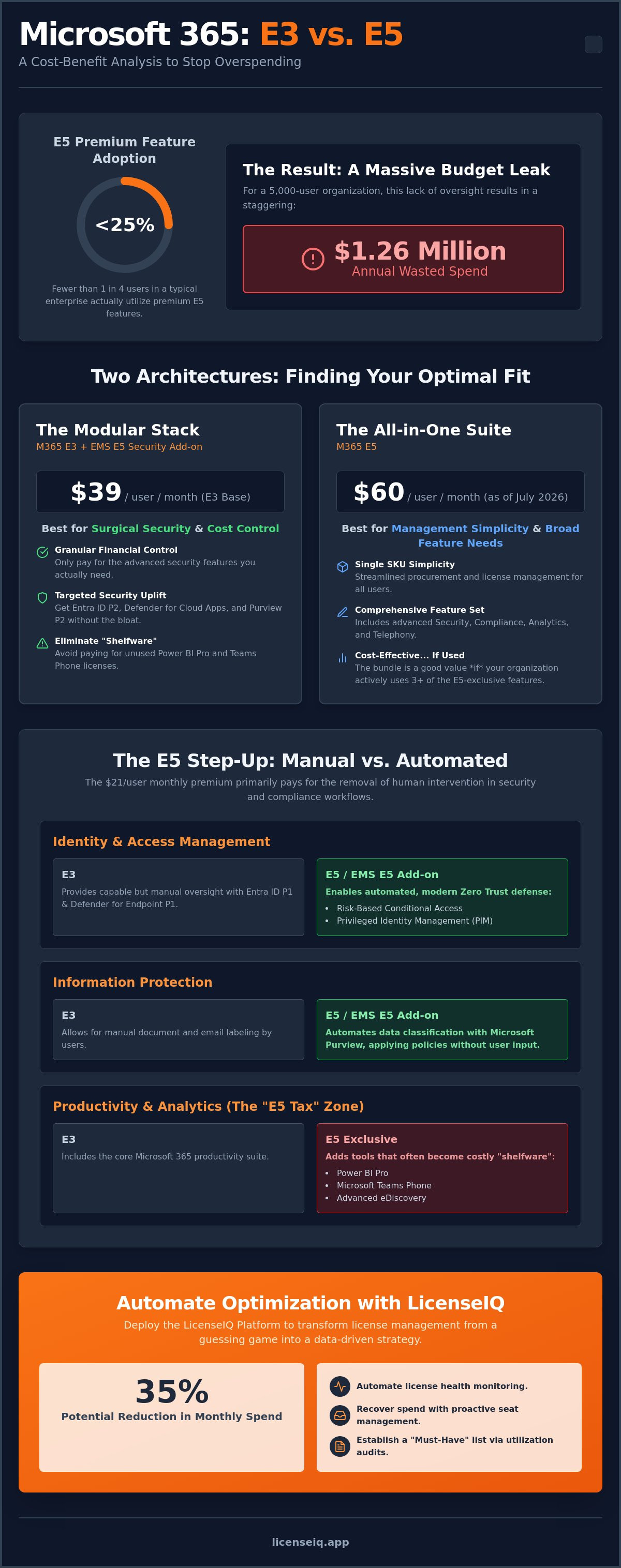
Fewer than 25% of users in a typical enterprise actually utilize the premium features bundled in an E5 license. For a 5,000-user organization, this lack of oversight results in a $1.26 million annual budget leak. Conducting a detailed microsoft 365 e3 vs e5 cost-benefit analysis is now a critical operational requirement. With E5 prices hitting $60 per user as of July 2026, overprovisioning isn't just inefficient; it's a direct threat to your department's financial health.
You want total security without paying the E5 tax for users who only need basic productivity tools. It's exhausting to audit these tiers manually while fearing that a downgrade might leave a gap in your defenses. This article reveals the exact technical and financial breakpoints between the E3 security stack and the full suite. We'll preview a hybrid licensing framework that can reduce your monthly spend by up to 35%. You'll walk away with a data-backed justification to optimize your seats and reclaim your wasted SaaS budget.
Key Takeaways
- Contrast the all-in-one E5 SKU with modular E3 and EMS E5 combinations to find your optimal licensing architecture.
- Execute a precise microsoft 365 e3 vs e5 cost-benefit analysis to isolate the true value of advanced identity and endpoint protection.
- Identify and eliminate "E5 Tax" waste by stripping away unused analytics and communication features from users who only require security upgrades.
- Apply a structured framework to audit feature utilization and establish a "Must-Have" list for automated governance.
- Deploy the LicenseIQ Platform to automate license health monitoring and recover spend through proactive, data-driven seat management.
The Architecture of Choice: M365 E3 + Security Add-on vs. E5
Selecting the right licensing structure for the Microsoft 365 suite is no longer a simple procurement task. It's a strategic financial decision. As of July 2026, the list price for E3 has climbed to $39 per user, while E5 sits at $60. This $21 monthly premium creates a massive budget gap that requires a rigorous microsoft 365 e3 vs e5 cost-benefit analysis. You must decide between the management simplicity of a single SKU and the granular financial control of a modular add-on strategy.
The landscape changed significantly in 2026 with the introduction of Agent 365 requirements. These AI-driven workflows demand robust governance and higher identity security standards than previous years. However, the "E5 or nothing" mindset often leads to massive waste. You have two primary architectures to consider. The first is the E5 All-in-One SKU, which bundles productivity, advanced security, compliance, and analytics. The second is the E3 base license paired with the Enterprise Mobility + Security (EMS) E5 add-on.
Decoding the Security Add-on (EMS E5)
The EMS E5 add-on is a surgical tool for security leaders. It provides the heavy-hitting security features of the full E5 suite without the unnecessary analytics baggage. Inside this bundle, you find Microsoft Entra ID P2, Microsoft Defender for Cloud Apps, and Purview Information Protection P2. This combination allows you to implement Conditional Access and automated data classification for a fraction of the full E5 cost. EMS E5 serves as the security bridge for cost-conscious IT leaders who prioritize defense over bundled extras.
The E5 Suite: More Than Just Security
The full E5 suite justifies its premium by including tools that many organizations never actually deploy. Beyond security, you receive Power BI Pro, Microsoft Teams Phone, and advanced eDiscovery capabilities. In 2026, the Work IQ integration promises to leverage these analytics to drive productivity, but the reality for many mid-market firms is different. These extras frequently become shelfware. If your users don't require advanced telephony or high-end business intelligence, paying the $21 step-up fee is a direct hit to your bottom line. You're essentially paying for a Cadillac when you only need the armored plating.
Your choice depends on your specific operational needs. If you require three or more of the E5-exclusive features, the bundle is cost-effective. If your goal is strictly to secure your environment against modern threats, the modular approach wins every time. Don't let licensing simplicity mask financial inefficiency. The core trade-off is simple: do you value the ease of a single bill or the precision of a lean, high-performance stack?
Feature Breakdown: What the E5 Step-Up Actually Delivers
The step-up from E3 to E5 represents more than a simple version upgrade. It's a jump from manual management to automated orchestration. In a microsoft 365 e3 vs e5 cost-benefit analysis, you're primarily paying for the removal of human intervention in security workflows. E3 provides Microsoft Entra ID P1 and Defender for Endpoint Plan 1. These are capable but require significant manual oversight. E5 introduces Entra ID P2 and Defender Plan 2, which provide the automated response capabilities required for modern Zero Trust environments.
Information protection also sees a major shift. E3 allows for manual document labeling. E5 uses Microsoft Purview to automate this process. It scans files and emails for sensitive data like credit card numbers or internal IP addresses, applying protection policies without user input. For organizations in regulated sectors, the Official Microsoft 365 Government service descriptions detail how these advanced auditing and compliance tools meet federal standards.
Just as organizations automate to meet these rigid federal standards, individuals pursuing careers in the public sector can use a federal resume compliance tool to ensure their applications align with strict government formatting requirements.
Advanced Identity and Access Management
Risk-based Conditional Access is the standout feature here. It evaluates the risk level of every login attempt based on user behavior and location. If a session looks suspicious, the system enforces MFA or blocks the attempt instantly. Privileged Identity Management (PIM) further secures the environment by eliminating "always-on" admin rights. Admins must request "just-in-time" access, which expires after a set period. These critical defenses are included in the E5 suite but are also accessible via the EMS E5 add-on.
The Productivity and Analytics Gap
The $21 monthly premium for E5 often covers tools your staff doesn't use. Power BI Pro and Microsoft Teams Phone are the primary drivers of this "productivity bloat." Unless your entire workforce requires advanced data visualization or a cloud-based PBX, you're overpaying for shelfware. Research indicates that in typical enterprises, fewer than 25% of users utilize these premium features. You can identify these redundancies and improve your License Health Score by auditing actual feature usage before your next renewal.
Endpoint security is another area of divergence. Defender for Endpoint Plan 2 adds Endpoint Detection and Response (EDR) and automated investigation tools. Plan 1 is limited to basic preventative protection. If your security team is suffering from manual audit fatigue, the automation in Plan 2 is a necessity, not a luxury. To maximize the value of these tools, organizations often turn to specialists like cyberone.security to manage their detection and response workflows. This technical gap is the most common justification for an upgrade, yet it can often be filled without buying the full E5 bundle.
The Financial Friction: Calculating the Real Cost of Over-Licensing
Financial efficiency requires more than a simple comparison of list prices. It demands a rigorous microsoft 365 e3 vs e5 cost-benefit analysis based on actual feature consumption. Many organizations fall into the "E5 Tax" trap. They upgrade to the full suite to gain advanced security, yet they end up paying for Power BI Pro ($10/mo) and Teams Phone ($4/mo) for users who never open those applications. This mismatch between licensing and utility creates significant budget bloat that remains hidden without deep oversight.
Incremental cost analysis reveals the massive savings potential of a modular approach. As of July 2026, the list price for E5 is $60 per user. In contrast, combining E3 ($39) with the EMS E5 add-on ($12) totals only $51. By choosing the add-on strategy, you secure the same high-end identity and compliance features while saving $9 per user every month. For a 500-seat organization, this simple shift recovers $54,000 in annual spend. You can find more tactical advice in our guide on How to Reduce M365 Subscription Costs.
Identifying 'Shelfware' in the E5 Stack
Shelfware refers to premium features that are licensed but never activated or utilized. In smaller environments, features like Defender for Identity or Advanced Audit often sit idle because the IT team lacks the bandwidth to manage them. Paying for these "ghost" features is a direct drain on your financial health. Over a 12-month period, a single unused E5 license wastes $720. Across a mid-sized department, this adds up to tens of thousands of dollars in lost capital that could have been reinvested in core infrastructure.
The ROI of the Add-on Strategy
Consider a scenario where you need to secure 250 users. A blanket E5 rollout costs $15,000 per month. A hybrid "mix and match" strategy, using E3 with EMS E5 add-ons, drops that cost to $12,750. This creates an immediate monthly ROI without sacrificing a single security control. To build a precise strategy, you must first understand the Microsoft 365 License Types available in the 2026 ecosystem. Manual audits are too slow to catch these discrepancies. By the time your team finishes a spreadsheet, the data is already obsolete, leading to persistent manual audit fatigue and continued overspending.
Decision Framework: When to Stick with E3 + Add-ons
Executing a microsoft 365 e3 vs e5 cost-benefit analysis requires a structured process to avoid emotional or "safe" licensing decisions. You need a framework that prioritizes operational requirements over bundle convenience. Most IT leaders default to E5 because it feels comprehensive, yet this decision often ignores the financial friction of unused features. Follow these five steps to determine your optimal path.
- Step 1: Audit current feature utilization. Scrutinize your existing tenant to see which users actually interact with Power BI, Teams Phone, or advanced Purview features.
- Step 2: Define your "Must-Have" security list. Identify if you require specific E5-level tools like Privileged Identity Management (PIM) or automated data loss prevention (DLP).
- Step 3: Evaluate productivity tool necessity. Determine if your workforce needs a cloud-based PBX or if standard Teams meetings and chat suffice for daily operations.
- Step 4: Conduct a direct cost comparison. Compare the $60 monthly E5 list price against the $51 combined cost of E3 and the EMS E5 add-on.
- Step 5: Implement automated monitoring. Deploy a system to track license health and prevent future sprawl as your headcount fluctuates.
The Case for E3 + EMS E5
This architecture is ideal for organizations with strict security requirements but no immediate need for advanced analytics. You gain the full power of Entra ID P2 and Defender for Cloud Apps while maintaining a significantly lower monthly bill. This "security-first" approach protects the bottom line by ensuring you only pay for defense, not unused data visualization tools. It allows you to achieve 90% of your security goals without the 58% price hike associated with the full E5 suite.
When M365 E5 is the Correct Choice
M365 E5 is the correct choice for large enterprises that already have high adoption rates for Power BI Pro and require unified compliance across global regions. The "Simplicity Premium" makes sense when the administrative cost of managing multiple SKUs exceeds the potential savings. To ensure value, you must have a mandate for full feature adoption. If your team isn't prepared to deploy the advanced eDiscovery and Insider Risk Management tools, the suite remains a financial liability rather than an asset.
Transparency is the cornerstone of effective licensing. Implement the LicenseIQ Platform to automate this framework and maintain total visibility over your license health. You can stop guessing which users need which tier and start making decisions based on real-time utilization data.
Automated Governance: Optimising Your M365 Stack with LicenseIQ
Manual audits are a relic of a slower era. By the time your team finishes a licensing spreadsheet, the data is already obsolete. Users join, leave, or change roles daily, making static oversight impossible. To maintain financial hygiene, you need a system that performs a continuous microsoft 365 e3 vs e5 cost-benefit analysis. The LicenseIQ Platform replaces manual fatigue with automated precision, ensuring your SaaS spend aligns perfectly with actual feature consumption.
Our system identifies wasted capital by scanning for inactive users and redundant E5 features. If an employee hasn't touched Power BI or Teams Phone in 90 days, they don't need a $60 license. LicenseIQ flags these discrepancies instantly. We introduce the License Health Score, a real-time metric that quantifies your organization's financial efficiency. A low score indicates significant budget leakage, while a high score confirms that every seat is optimized for maximum ROI.
Stop the Bleeding: Real-Time Spend Recovery
Connecting the LicenseIQ Platform to your tenant is a five-minute process that provides total visibility. Once integrated, our Spend Recovery Dashboard delivers specific, dollar-value recommendations for downgrades. You don't have to guess which users should move from E5 to E3 plus add-ons; the data tells you exactly who is over-provisioned. This proactive approach stops the bleeding before your next renewal cycle. For a comprehensive strategy, follow our Microsoft 365 License Optimization playbook to master automated recovery.
Continuous Governance for 2026 and Beyond
The 2026 "Agent" era demands high-speed governance. As AI-driven workflows become standard, your licensing requirements will shift more rapidly than ever. Automated Governance Workflows allow you to maintain financial accuracy without increasing your IT headcount. You can set rules to automatically adjust licenses based on usage triggers, ensuring you never pay for shelfware again. This level of transparency is the only way to protect your corporate resources in a complex operational environment.
Don't let obscured details drain your budget. Reclaim control over your M365 environment with a system that's always one step ahead. Get your free License Health Score at LicenseIQ and discover exactly how much you can save by optimizing your microsoft 365 e3 vs e5 cost-benefit analysis today.
Reclaim Your SaaS Budget with Precision Governance
Licensing complexity shouldn't be a permanent drain on your financial health. You've seen how the E5 suite often bundles productivity bloat that fewer than 25% of users actually require. By shifting to a modular E3 plus security add-on architecture, you can maintain a robust Zero Trust posture without paying the full E5 premium. Executing a continuous microsoft 365 e3 vs e5 cost-benefit analysis is the only way to ensure your licensing strategy remains lean and effective as your organization grows.
Don't let manual audit fatigue obscure your path to savings. The LicenseIQ Platform provides AI-native automated governance designed specifically for SMBs. Our system identifies up to 35% waste in Microsoft 365 subscriptions and connects to your tenant in minutes to deliver an instant License Health Score. You can finally replace guesswork with data-driven oversight. Discover how much you are wasting on M365; Scan your tenant with LicenseIQ to stop overpaying for unused features. Take the first step toward total operational transparency today.
Frequently Asked Questions
Is M365 E5 more secure than E3 with the security add-on?
No, the core security capabilities are identical when you pair E3 with the M365 E5 Security add-on. Both configurations provide Microsoft Entra ID P2, Defender for Endpoint Plan 2, and Defender for Cloud Apps. The E5 suite only becomes "more secure" if you also utilize its advanced compliance and insider risk tools, which aren't included in the standalone security add-on.
What is the difference between EMS E3 and EMS E5?
EMS E5 provides automated identity and information protection that EMS E3 lacks. While EMS E3 includes Entra ID P1 and basic manual labeling, EMS E5 introduces Entra ID P2 with Risk-based Conditional Access and Privileged Identity Management. It also adds Purview Information Protection P2 for automated data classification, which is essential for reducing manual audit fatigue in large environments.
Can I mix and match E3 and E5 licenses in the same tenant?
Yes, you can assign different license tiers to different users within a single tenant. This hybrid approach is a primary strategy in a microsoft 365 e3 vs e5 cost-benefit analysis to eliminate waste. You can assign E5 to high-risk admins or power users while keeping the general workforce on E3 with specific add-ons, potentially reducing your total spend by 35%.
Does M365 E3 include Defender for Endpoint?
M365 E3 includes Defender for Endpoint Plan 1, which provides basic preventative protection against common threats. It doesn't include Plan 2, which is required for Endpoint Detection and Response (EDR) and automated remediation. To access these advanced features, you must either upgrade to a full E5 license or purchase the M365 E5 Security add-on for your E3 users.
How much can I save by downgrading from E5 to E3 with add-ons?
You can save $9 per user per month by moving from E5 to E3 paired with the E5 Security add-on. As of July 2026, E5 costs $60 while the E3 plus Security bundle totals $51. For an organization with 1,000 users, this shift recovers $108,000 in annual SaaS spend while maintaining the exact same security posture for your endpoints and identities.
What are the compliance features exclusive to M365 E5?
M365 E5 includes advanced governance tools like Insider Risk Management, Communication Compliance, and eDiscovery Premium. These tools automate the detection of data leaks and simplify legal investigations. While E3 offers basic compliance, it lacks the automation and deep forensic capabilities that regulated industries require to manage data at scale without increasing IT headcount.
Is Power BI Pro included in M365 E3?
No, Power BI Pro isn't included in the M365 E3 license. It's a premium component of the E5 suite or available as a standalone add-on for $10 per user per month. If your goal is to optimize your microsoft 365 e3 vs e5 cost-benefit analysis, you should only pay for Power BI for users who actively build and share reports rather than licensing it for the whole company.
How does LicenseIQ identify wasted M365 licenses?
LicenseIQ uses Automated Governance Workflows to scan your tenant for inactive accounts and redundant feature assignments. It analyzes real-time utilization data to find users who have premium E5 licenses but never use tools like Power BI or PIM. The platform then generates a License Health Score and provides specific, dollar-value recommendations to reclaim your budget through the Spend Recovery Dashboard.


