

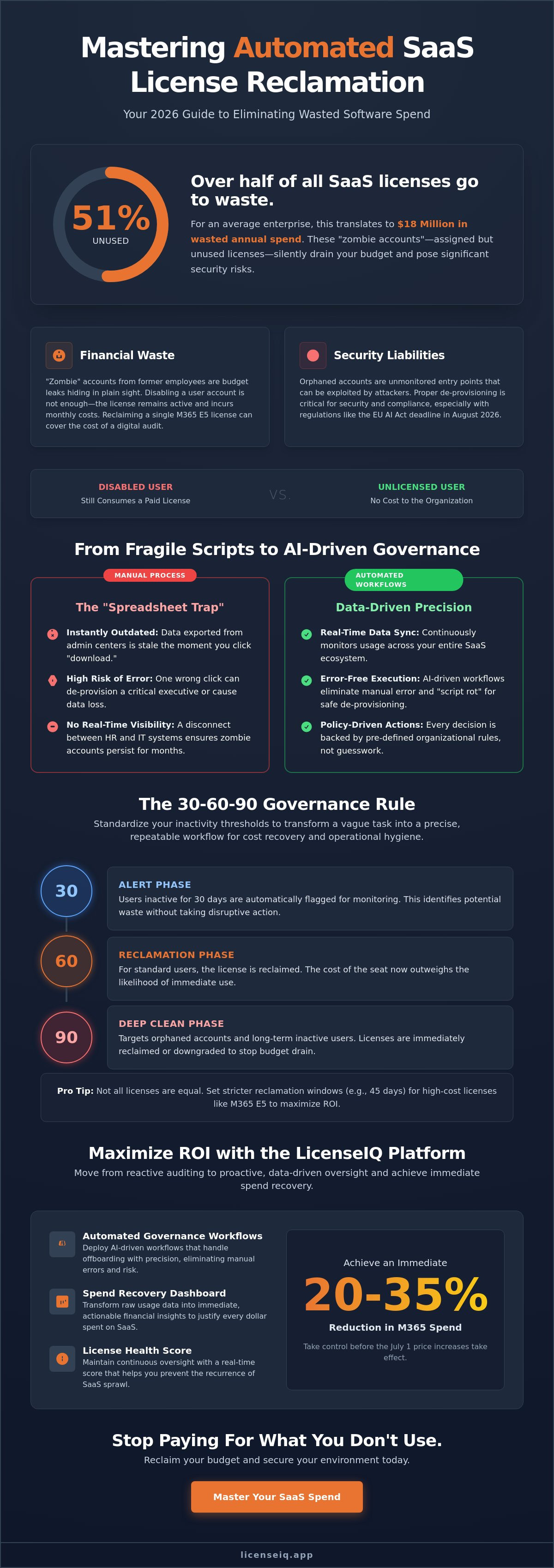
51% of SaaS licenses purchased by enterprises go unused. For the average organization, this translates to $18 million in wasted annual spend. This financial leak is the direct result of failing to implement consistent inactive user license reclamation across your software ecosystem. You likely know the frustration of manual audits that take days to finish. You fear accidentally de-provisioning an active executive while "zombie" accounts continue to drain your budget.
Stop paying for what you don't use. This 2026 guide shows you how to master automated license reclamation and spend recovery. You'll learn how to establish a License Health Score for your tenant and deploy Automated Governance Workflows that handle offboarding with precision. By utilizing the LicenseIQ Platform and its Spend Recovery Dashboard, you can achieve an immediate 20 to 35% reduction in M365 spend before the July 1 price increases take effect. We'll show you how to move from reactive auditing to proactive, data-driven oversight.
Key Takeaways
- Implement the 30-60-90 governance framework to systematically identify and flag underutilized accounts before they drain your budget.
- Move beyond fragile PowerShell scripts to AI-driven Automated Governance Workflows that eliminate the risk of manual error and "script rot."
- Execute a 5-step strategy for inactive user license reclamation to ensure every dollar spent on SaaS correlates to active productivity.
- Leverage the Spend Recovery Dashboard to transform raw usage data into immediate, actionable financial insights.
- Utilize a License Health Score to maintain continuous oversight and prevent the recurrence of SaaS sprawl.
What is Inactive User License Reclamation?
Inactive user license reclamation is the strategic process of identifying and de-provisioning software seats from users who no longer use them. While simple in theory, it represents the most significant opportunity for operational efficiency in 2026. As the average organization now manages 305 SaaS applications, sprawl has become the primary budget leak for SMBs. This isn't just about unassigned licenses sitting in your tenant. It's about the "assigned but ignored" licenses that continue to incur monthly costs without delivering value.
Effective inactive user license reclamation is a core component of Software Asset Management (SAM). The financial impact is immediate. Reclaiming just one M365 E5 license covers the cost of a digital audit in minutes. Organizations often confuse unassigned licenses with inactive ones. An unassigned license is visible and easy to manage. An inactive assigned license is a "zombie" account that hides in your monthly invoice, draining resources while remaining undetected by standard oversight.
The Anatomy of a Zombie Account
Orphaned accounts from former employees or contractors create the most common budget leaks. When an employee leaves, IT often disables the user account but fails to remove the license. This leaves the organization paying for a seat that no one can access. Beyond the financial waste, these accounts are security liabilities. They represent unmonitored entry points that can be exploited if not properly de-provisioned. High-risk systems, especially those falling under the EU AI Act compliance deadlines in August 2026, require meticulous oversight of who has access. There is a critical difference between a disabled user and an unlicensed one. A disabled user still consumes a paid seat. An unlicensed user does not.
Why Manual Reclamation Fails SMBs
Manual audits rely on the "Spreadsheet Trap." The moment you export user data from the M365 Admin Center, that information is outdated. IT teams often spend days cross-referencing login dates only to find that the data has shifted before they can take action. Manual intervention also carries high risks. One wrong click in a complex admin panel can lead to accidental data loss or the de-provisioning of a high-level executive. Without Automated Governance Workflows, there is no real-time visibility between HR systems and IT infrastructure. This lack of transparency ensures that "zombie" accounts persist. These accounts remain on the books until they become a massive financial burden, often accounting for a 30% increase in unnecessary SaaS expenditure.
Defining Inactivity: The 30-60-90 Governance Rule
Standardizing your inactivity threshold is the primary step toward total financial hygiene. Without a firm policy, your IT team operates on guesswork. This leads to either excessive waste or high-risk operational disruption. The 30-60-90 framework provides a structured approach to inactive user license reclamation that balances cost recovery with user productivity. It transforms a vague administrative task into a precise, repeatable workflow.
At 30 days of inactivity, the system enters the Alert phase. This is where you identify potential waste without taking disruptive action. Users who haven't logged in for a month are flagged for monitoring. At 60 days, you move to the Reclamation phase for standard users. This is the point where the cost of the seat outweighs the likelihood of immediate return. Finally, the 90-day Deep Clean phase targets orphaned accounts or long-term inactive users. These licenses are reclaimed or downgraded immediately to preserve your budget.
This tiered approach mirrors formal IRS Asset Management Software Procedures, which emphasize life-cycle management and rigorous oversight. By codifying these rules, you eliminate the ambiguity that plagues manual audits. You ensure that every decision is backed by data and organizational policy rather than individual discretion.
Setting Your Thresholds by License Tier
Not all licenses are equal. An M365 E5 license represents a significantly higher investment than a Business Basic seat. Consequently, high-cost SKUs require stricter reclamation windows to prevent budget leaks. For premium tiers, the optimal reclamation window is typically 45 days to maximize ROI. Conversely, seasonal workers or contractors may require extended 120-day thresholds to accommodate project-based gaps in usage. You must align your policy with the financial weight of each SKU to ensure the most expensive resources are monitored with the highest frequency.
Identifying Critical Exceptions
Total automation requires nuance. A common failure in basic reclamation scripts is the accidental de-provisioning of Service Accounts. These accounts often show zero "sign-in" activity but perform vital background tasks like data synchronization or automated reporting. You must also protect Executive and Legal Hold accounts from automated workflows to avoid high-stakes disruptions. Using the LicenseIQ Platform, you can apply AI-driven filters that distinguish between "low usage" and "no usage." This ensures that critical infrastructure remains intact while you purge genuine waste. Vigilance shouldn't come at the cost of operational stability.
Manual PowerShell vs. Automated AI Governance
Manual methods fail to keep pace with modern SaaS complexity. While a custom PowerShell script might seem cost-effective initially, the constant evolution of the Microsoft Graph API creates a phenomenon known as "Script Rot." Your code breaks without warning as Microsoft updates its backend. This forces your IT team into a cycle of reactive debugging rather than proactive optimization. In contrast, AI-native platforms connect to your tenant in minutes via secure OAuth integrations. They offer immediate time-to-value by replacing static quarterly reports with a real-time License Health Score. This visibility ensures your inactive user license reclamation efforts are continuous, not occasional.
Relying on scripts often means relying on incomplete data. Leading institutions routinely monitors our solutions to manage license limits, recognizing that manual oversight is insufficient for modern scale. Automation provides the precision required to beat the July 1, 2026, Microsoft price increases. If you aren't auditing your environment with a vigilant system, you're likely overpaying for seats that haven't been touched in months.
The Hidden Cost of "Free" Scripts
The term "free" is a misnomer when applied to manual scripts. Consider the hourly rate of a senior IT Admin. Spending ten hours a month writing, testing, and running reclamation scripts represents a significant financial drain. This is time stolen from high-impact strategic projects that drive growth. Furthermore, manual scripts rarely generate the granular audit logs required for modern compliance frameworks like the EU AI Act. Without a centralized Spend Recovery Dashboard, you lack the documented evidence of governance that auditors demand. The opportunity cost of manual labor far outweighs the investment in professional automation.
AI-Native Intelligence: Beyond Simple Sign-ins
Standard scripts only look at the last sign-in date. This is a surface-level metric that often misses deeper waste. AI-native intelligence analyzes activity across the entire M365 stack, including Teams interactions, SharePoint file edits, and Outlook engagement. It identifies users who log in but don't actually utilize the expensive features of an E5 license. This allows for predictive spend recovery. You can identify potential waste weeks before the next billing cycle begins. By integrating with the LicenseIQ Platform, you gain instant visibility into these obscured details. You move from guessing who needs a license to knowing exactly where every dollar is going.
5 Steps to Build an Automated Reclamation Workflow
Building a robust workflow transforms inactive user license reclamation from a manual burden into a silent, efficient background process. You don't need complex scripts or specialized coding knowledge. You need a structured approach that prioritizes data integrity and financial transparency. Follow these five steps to secure your environment and recover your SaaS spend before the July 1, 2026, Microsoft price increases take effect. Transitioning to an automated system ensures your resources are monitored by a vigilant, precise system that never sleeps.
Connecting Your Tenant Safely
Start with a baseline scan. You must connect your M365 tenant using the Model Context Protocol (MCP) to ensure total data security during the discovery phase. This protocol allows for precise, read-only access, ensuring your system identifies waste without altering your environment. It's the safest way to uncover obscured details across your digital estate without risking operational stability. For a deeper look at the technical requirements of secure integration, review our Microsoft 365 License Optimization Guide.
Once connected, define your inactivity policies based on license cost. As established in the 30-60-90 rule, high-cost E5 SKUs require more aggressive thresholds than basic seats. After setting these rules, configure automated alerts for your Finance and IT stakeholders. This ensures that every reclamation action is visible and approved, maintaining cross-departmental alignment. Finance needs to see the immediate recovery of the budget, while IT maintains oversight of the user lifecycle.
Managing the "Soft-Reclamation" Process
The most critical step in the workflow is executing "Soft-Reclamation." This process involves unassigning a license while keeping the user account active. Since the 30-day grace period for expired M365 licenses was eliminated in May 2026, you must be precise. You need to ensure data integrity for OneDrive and Outlook before the seat is pulled back. Use our M365 Offboarding Checklist to verify that all critical files are backed up or transferred before the license is removed.
Finally, use your Spend Recovery Dashboards to review and iterate. Automation isn't a "set and forget" solution; it's a continuous cycle of improvement. Analyze the data to see which departments have the highest turnover or the most "zombie" accounts. Use these insights to refine your thresholds and drive even greater efficiency. If you're ready to see your own data in action, you can start your first baseline scan with LicenseIQ today to identify immediate savings opportunities.
Maximizing ROI with LicenseIQ Spend Recovery
Deploying a strategic approach to inactive user license reclamation is the most effective way to protect your bottom line. Precision in license management is no longer optional as Microsoft 365 prices increase by up to 33% on July 1, 2026. The LicenseIQ Platform provides the oversight necessary to eliminate waste without disrupting your operations. By utilizing a real-time License Health Score, you gain an immediate grade on your tenant's efficiency. This score identifies obscured details and highlights exactly where your budget is leaking. Our users typically achieve a 20 to 35% reduction in M365 subscription costs within the first 30 days of implementation. This isn't a one-time fix; it's the foundation of long-term financial hygiene.
From Insights to Actionable Dollars
The Spend Recovery Dashboard transforms complex usage data into clear financial metrics. It visualizes exactly how much capital is tied up in "zombie" accounts and underutilized seats. These reports provide the concrete evidence you need to justify IT budgets to the CFO. Instead of presenting vague usage stats, you present specific dollar-value recommendations for cost avoidance. This transparency builds trust across leadership and ensures that your technical operations align with the company's financial goals. LicenseIQ offers the flexibility of tiered monthly or discounted annual subscriptions, allowing you to choose the model that best fits your cash flow requirements. You stop guessing and start managing with total clarity.
SMBs specifically benefit from this AI-native software intelligence. Smaller teams don't have the bandwidth for the manual audits or script maintenance discussed in previous sections. You need a proactive digital auditor that stays ahead of the 30-60-90 governance rule. Automation handles the repetitive tasks of identifying and flagging inactive users, freeing your IT staff for strategic growth projects. This shift from reactive maintenance to proactive optimization is what separates efficient organizations from those drained by SaaS sprawl.
Securing Your Future SaaS Growth
Mastering inactive user license reclamation is your first step toward total SaaS Spend Management. It establishes a repeatable framework for every application in your stack, not just M365. You can scale your environment as your company grows without scaling your costs at the same rate. This vigilance ensures that every new hire is provisioned correctly and every departure is handled instantly. You maintain a lean, secure, and highly efficient digital estate that is ready for future challenges, including the compliance demands of the EU AI Act in August 2026. Don't let your budget continue to leak through unmonitored accounts. Start your 5-minute M365 audit with LicenseIQ to uncover your immediate savings and take control of your SaaS spend today.
Secure Your SaaS Budget for 2026 and Beyond
The July 1, 2026, Microsoft price increases serve as a critical deadline for your financial efficiency. You've seen how manual audits and fragile scripts drain your resources while zombie accounts remain hidden. Implementing a 30-60-90 governance framework ensures that your organization only pays for the tools it actually uses. By shifting to automated workflows, you eliminate human error and secure your environment against the risks of orphaned accounts. Total clarity is now within reach.
Effective inactive user license reclamation is no longer a luxury reserved for large enterprises. It is a vital survival tactic for SMBs seeking to scale without bloated overhead. You now have the roadmap to move from organizational disorder to precise, data-driven oversight. Use your License Health Score as a benchmark to maintain high standards of digital hygiene and operational transparency across your entire tenant.
Recover up to 35% of your M365 spend in 5 minutes with LicenseIQ. Our AI-native spend discovery and automated governance workflows provide the vigilant oversight your business deserves. Take the first step toward a leaner, more resilient IT infrastructure today. Your resources are too valuable to waste.
Frequently Asked Questions
What is considered an "inactive" user in Microsoft 365?
An inactive user is any account that hasn't registered a sign-in or activity event across the M365 stack within your defined governance threshold. Most organizations use a 30-day window to flag potential waste. This includes a lack of engagement with Teams, SharePoint, and Outlook. Monitoring these specific activity signals ensures you don't pay for seats that provide zero utility.
Will reclaiming a license delete the user’s data or emails?
Reclaiming a license does not delete user data or emails if you perform a soft-reclamation. This process unassigns the paid seat while maintaining the user object in your directory. You must ensure your retention policies are active to preserve OneDrive and mailbox contents. This allows you to recover spend without risking permanent data loss.
How often should I perform license reclamation audits?
You should perform audits continuously to maintain financial hygiene. Automated systems provide a real-time License Health Score that monitors your tenant 24/7. Monthly audits are the absolute minimum to prevent budget leaks from employee churn and project completions. Continuous oversight is the only way to stay ahead of the July 2026 price increases.
Can I automate reclamation for specific groups like contractors only?
Yes. Automated Governance Workflows allow you to target specific user groups with unique inactivity thresholds. You can set aggressive 30-day reclamation rules for contractors while maintaining more relaxed windows for full-time staff. This granular control ensures your most volatile seats are monitored with the highest level of precision.
What is the difference between a disabled account and a reclaimed license?
A disabled account prevents user access but still consumes a paid license seat. A reclaimed license is unassigned from the user, stopping the monthly billing immediately. Many organizations waste thousands by disabling users during offboarding without actually reclaiming their licenses. True spend recovery requires removing the license assignment entirely.
How much can a typical SMB save through license reclamation?
Typical SMBs achieve a 20 to 35% reduction in M365 spend within the first month of active management. Organizations that prioritize inactive user license reclamation significantly reduce the waste caused by unused SaaS seats. This immediate recovery often pays for the optimization tool within the first few weeks of deployment.
Does LicenseIQ require a global admin account to scan for waste?
LicenseIQ uses the Model Context Protocol (MCP) to provide secure, read-only access to your tenant. You don't need to share Global Admin credentials. This ensures your data remains protected while the system identifies spend recovery opportunities. It's a secure, non-intrusive way to gain total visibility into your digital estate.
What happens if a user returns after their license has been reclaimed?
You simply re-assign a license to the user to restore full access immediately. Since the user object and data were preserved during the reclamation process, their mailbox and OneDrive files remain intact. This allows for rapid re-onboarding if a contractor returns or an employee resumes their role after an extended leave.


