

What if a license you’re paying for isn’t truly unused, but simply quiet for a few weeks? The financial impact of inactive user accounts can be hard to spot in subscription bills, especially when assigned licenses outlast role changes, leave periods, or seasonal work. Yet reclaiming access based on a single activity signal can disrupt legitimate work.
To answer a practical question, how much are inactive accounts costing your organization, start with your own license assignments, billing data, and account context. Manual audits can uncover waste, but repeating them consistently takes time and can lead to uneven decisions.
This guide explains how to calculate recurring exposure, distinguish inactivity from valid exceptions, and choose a process that helps prevent waste from returning. You’ll learn how to connect account findings to potential savings without treating silence as proof that access is unnecessary. We’ll also look at how ongoing governance, a spend recovery dashboard, and LicenseIQ’s dollar-value recommendations can make reviews more consistent and measurable.
Key Takeaways
- Measure the financial impact of inactive user accounts using confirmed account status, assigned licenses, and your organization’s actual recurring costs.
- Separate inactive accounts from unassigned or incorrectly tiered licenses so each type of exposure gets the right response.
- Treat inactivity as a signal to investigate, not an automatic reason to remove access. Check for leave, seasonal work, and infrequent responsibilities.
- Compare spreadsheets, scheduled audits, and automated governance by review effort, consistency, frequency, and traceability.
- Track confirmed spend recovered, unresolved exceptions, review effort, and recurring exposure to see whether governance is reducing waste over time.
What Is the Financial Impact of Inactive User Accounts?
Definition: The financial impact of inactive user accounts is the recurring license spend assigned to accounts whose users have no current, validated business need for that license. It is potential exposure to review, not proof that access should be removed. An account can be quiet and still serve a legitimate purpose.
To assess the exposure accurately, separate four questions: Is the account active? Which license is assigned? Is the user using the licensed product? Has the user or manager confirmed an ongoing need? These answers describe different conditions. An inactive account may have a needed license, while an active account may have a license tier that exceeds its requirements.
When Does an Inactive Account Become a Financial Issue?
An inactive account becomes a license-spend concern when it retains an assigned, paid license despite having no current, validated need. The recurring subscription charge is the direct financial exposure. Time spent investigating accounts, access disruption, and security concerns are separate operational or risk considerations. Don’t add them to license waste as if they were confirmed subscription costs.
A quiet account may still support a planned return from leave, seasonal responsibilities, retention needs, or business continuity. Validate its purpose before treating its assigned license as unnecessary.
Account Inactivity Versus License Waste
Inactivity is an observable signal, such as a lack of recorded sign-ins or product activity. It doesn’t prove that an account or license is unnecessary. Assess an account’s status, its assigned license, actual product usage, and manager-confirmed business need separately. This helps distinguish a review candidate from a defensible reclaim decision.
For example, a team member may show little activity while on approved leave, yet their manager expects them to resume work with the same tools. The account may be quiet, and its license may still have a valid purpose. By contrast, an account belonging to someone who has left and has no active sponsor may warrant a closer review. The evidence and business context determine the next step.
Other license conditions also affect the financial picture:
- Unused license: A license is assigned, but available usage evidence suggests the user may not be using its features.
- Unassigned license: A license is available but isn’t attached to a user. Its cost treatment depends on the organization’s subscription and billing terms.
- Incorrectly tiered license: A user has a license, but its level may not match their validated requirements.
These distinctions help organizations measure recurring exposure without equating low activity with waste. A sound review connects account and license data to business context, then records whether the need is confirmed, unresolved, or ready for a controlled license change.
How to Calculate the Cost of Inactive Microsoft 365 Accounts
Start with verified records, not a broad inactivity count. The goal is to estimate recurring subscription exposure tied to accounts that have been reviewed and confirmed as not needing their assigned licenses. An initial estimate can guide investigation, but it isn’t the same as savings already realized.
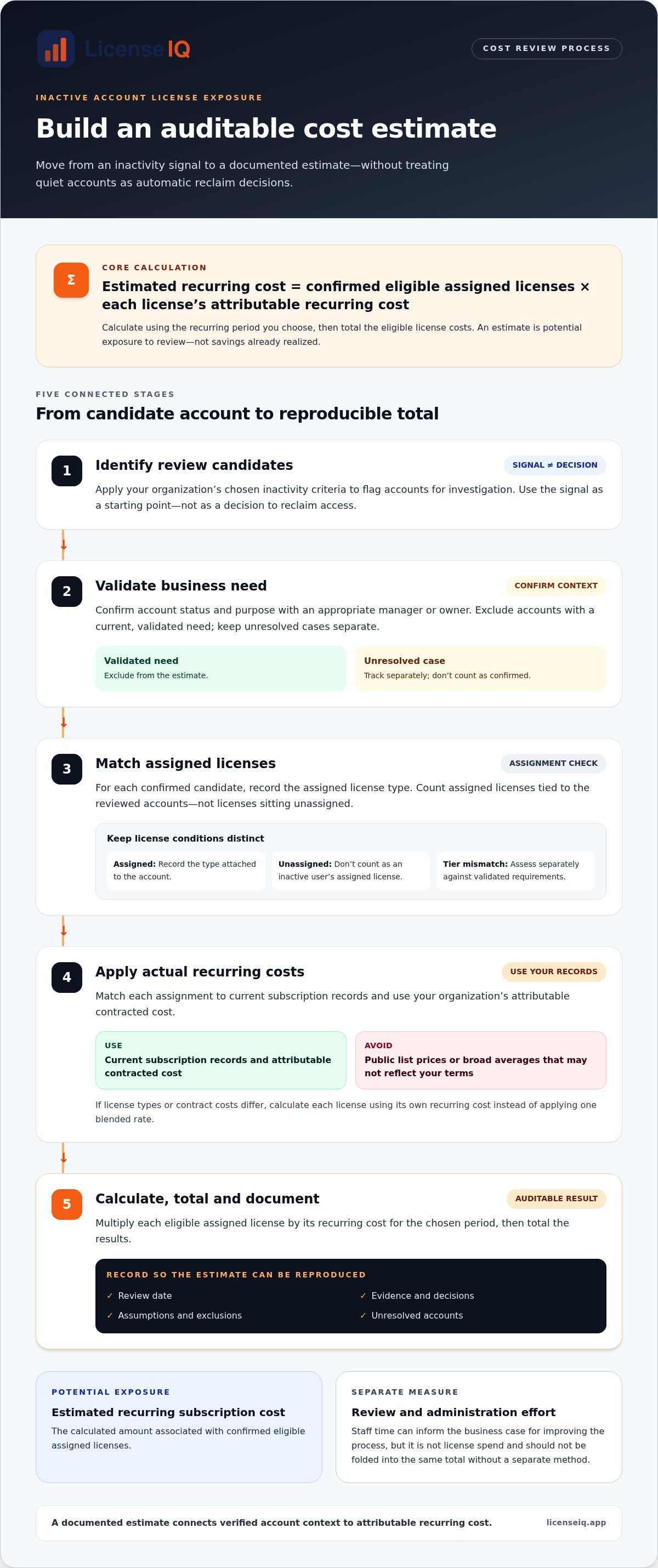
Quotable definition: The estimated recurring cost of inactive accounts equals the number of confirmed, eligible assigned licenses multiplied by each license’s attributable recurring cost.
Build an Auditable Inactive-Account Cost Estimate
Use a consistent review date and document the evidence and decisions behind your estimate. Then follow these steps:
- Identify review candidates. Use your organization’s chosen inactivity criteria to flag accounts for investigation. Treat the signal as a starting point, not a decision to reclaim access.
- Validate business need. Confirm each account’s status and purpose with an appropriate manager or owner. Exclude accounts with a current, validated need, and keep unresolved cases separate.
- Match assigned licenses. For each confirmed candidate, record the assigned license type. Don’t count an unassigned license as an inactive user’s assigned license.
- Apply actual recurring costs. Match license assignments to current subscription records and use your organization’s attributable contracted cost. Avoid public list prices or broad averages that may not reflect your terms.
- Calculate and document. Multiply each eligible assigned license by its recurring cost for the chosen period, then total the results. Record assumptions, exclusions, the review date, and unresolved accounts so the estimate can be reproduced.
For example, if a review confirms that several accounts no longer need their assigned licenses, calculate each license’s exposure using its own recurring cost. Don’t apply one blended rate if the assigned license types or contract costs differ.
Separate Direct Spend From Wider Business Impact
Keep the subscription estimate separate from staff time spent reviewing accounts or administering changes. Those effort measures can inform the business case for improving the process, but they aren’t license spend and shouldn’t be folded into the same total without a separate method.
Also distinguish potential exposure from realized savings. A license may be identified for reclamation, but the financial effect depends on the organization’s billing terms and when a change takes effect. Check subscription records and reclaim timing before reporting savings. Exclude costs that can’t yet be removed, and don’t count licenses already reclaimed in a previous period.
A Microsoft 365 license cost analysis can connect user and license findings to dollar-value recommendations. Keep the calculation traceable to your own billing data, and track confirmed savings separately from estimated exposure.
Does an Inactive Account Always Mean You Can Reclaim Its License?
No. Inactivity is evidence to investigate, not an automatic instruction to remove access. A quiet account may belong to someone on leave, a seasonal worker between assignments, or a colleague with an infrequent but essential responsibility. Shared work can also make individual activity look low even when the account supports a valid business process.
Acting on validated evidence can help reduce recurring license exposure. Acting on a stale or incomplete signal can interrupt work, disrupt access to services, or complicate continuity. Assess the financial impact of inactive user accounts alongside business context, rather than inferring it from activity data alone.
An inactivity flag starts a review; only a validated, approved decision supports a license change.
Which Signals Should Trigger a Review?
Use available sign-in and service-usage evidence from your current Microsoft reporting tools to identify accounts for review. Before interpreting a quiet period, confirm the report’s date range, data scope, and required tenant permissions. Reporting coverage and telemetry limitations can affect what the activity record shows, so don’t treat missing data as proof of no use.
Then add context: the person’s role, manager input, account lifecycle status, and any known leave or seasonal pattern. Technical signals are most useful when they prompt a focused question, such as whether the assigned license still supports current responsibilities.
What to Validate Before a License Change
Follow a controlled decision process before changing access. Confirm the user’s current employment or role status through your organization’s process. Check whether the account supports shared responsibilities or infrequent work, and review relevant data, service dependencies, retention needs, and ownership. These checks can surface operational considerations without assuming they represent a specific financial loss.
- Confirm the need: Record the business owner’s explanation, or note that the case remains unresolved.
- Review dependencies: Identify data or services that could be affected and who owns them.
- Document the decision: Keep the evidence reviewed, decision, approver, and follow-up plan together.
This record makes decisions easier to revisit if a role changes or new information emerges. If the need is unclear, keep the account in a review queue rather than treating the flag as approval to reclaim. If a license change is approved, track it separately from the initial inactivity finding so potential exposure isn’t mistaken for completed savings.
Manual Reviews, Periodic Audits, or Automated Governance?
Each approach can support license oversight, but they differ in how often findings surface and how reliably teams follow through. Spreadsheets offer flexibility. Scheduled audits provide a repeatable review point. Automated governance supports recurring monitoring between reviews, while people still validate business context and make or approve decisions.
| Approach | Effort | Frequency and consistency | Traceability |
|---|---|---|---|
| Spreadsheet review | Manual data gathering, matching, and follow-up | Depends on the team’s review schedule and updates | Can be documented, but version control and decision records need care |
| Periodic audit | Concentrated effort during each review cycle | Creates a defined cadence, but changes between audits may be missed | Can preserve a clear review record if findings and actions are logged |
| Automated governance | Can reduce repeated manual monitoring work | Supports recurring visibility as account and license data change | Can connect findings and workflow records, depending on configured capabilities |
Where Manual and Periodic Reviews Fall Short
A spreadsheet can work well for a focused review, especially when the account set is manageable and owners respond promptly. Its reliability depends on complete exports, current ownership details, and consistent follow-up. A scheduled audit adds structure, but a license assignment that changes just after the review may go unnoticed until the next cycle.
These methods aren’t inherently unsuitable. They require clear ownership and a process for keeping findings current between reviews. The financial impact of inactive user accounts is harder to monitor if each cycle starts from a fresh file with no consistent record of prior decisions.
How to Evaluate an Automated Governance Approach
Assess whether an approach brings account and license data together, explains recommendations clearly, supports recurring monitoring, and records review outcomes. Financial findings should connect to specific users and assigned licenses so teams can investigate the basis for a recommendation. Automation should support oversight, not imply that every finding is approved for immediate action.
For a deeper framework, see Microsoft 365 License Optimization: The 2026 Guide to Automated Spend Recovery. LicenseIQ’s platform scans Microsoft 365 licenses and users, provides a License Health Score, and surfaces specific dollar-value recommendations. Explore LicenseIQ’s license governance platform to see how ongoing visibility and automated governance workflows can support recurring reviews.
Turn Inactive-Account Findings Into Sustained Spend Recovery
A one-time cleanup can reveal potential exposure. Sustained recovery needs a repeatable process that tracks each finding from discovery to a verified financial outcome. That discipline also keeps the financial impact of inactive user accounts visible as people, roles, and license assignments change.
Create a Repeatable Review and Approval Workflow
Assign clear ownership at each stage. One person or team identifies accounts for review; a business owner validates need; an authorized approver decides whether a license change is appropriate; and an administrator records the action and outcome. Route exceptions, such as leave or uncertain ownership, for human review instead of applying a blanket inactivity rule.
Keep the evidence, decision, responsible owner, and follow-up date together. For lifecycle context, consult the Office 365 Offboarding Checklist 2026: Secure Data and Reclaim Spend.
- Discover: Identify accounts and assigned licenses for review.
- Validate: Confirm account status and current business need.
- Approve and act: Record the decision, then make any approved license change.
- Track: Compare the resulting subscription position with the verified baseline.
Monitor Financial Outcomes Beyond the First Cleanup
Measure outcomes separately so an estimate isn’t mistaken for a realized result. Compare verified subscription exposure before and after each approved change, and account for your organization’s billing and reclaim timing. Keep a recurring view of:
- Confirmed spend recovered: Subscription costs actually removed or reduced after approved changes take effect.
- Unresolved exceptions: Accounts still awaiting business-context validation or a decision.
- Review effort: Time spent investigating, approving, and documenting findings.
- Recurring exposure: Newly identified accounts that may still have a paid license without a validated need.
Continue monitoring after the first cleanup. Recheck newly inactive accounts, document license changes, and track whether reclaimed capacity is reassigned or remains available. This helps prevent old assignments from becoming an untracked source of exposure.
LicenseIQ’s License Health Score and dollar-value recommendations help prioritize findings by connecting license data to potential financial outcomes. Its Automated Governance Workflows support ongoing license governance, while the Spend Recovery Dashboard provides a view of spend recovery insights. Explore Microsoft 365 spend recovery insights to see how ongoing oversight can support more consistent financial tracking.
Make License Governance a Continuous Financial Control
The financial impact of inactive user accounts becomes clearer when you connect account findings to assigned licenses, actual subscription costs, and validated business need. Activity is a reason to review, not an automatic reason to revoke access. Confirm the context, document the decision, and distinguish estimated exposure from savings that have taken effect.
Then make the process repeatable. Track confirmed spend recovered, unresolved exceptions, review effort, and new exposure over time. LicenseIQ’s Health Score and dollar-value recommendations can help prioritize findings, while Automated Governance Workflows support ongoing license governance beyond a one-time cleanup.
Turn scattered account data into clearer financial oversight. Explore Microsoft 365 spend recovery insights with LicenseIQ’s software intelligence platform to identify inactive users and redundant licenses, then use actionable insights to guide your review. With a measured process and ongoing governance, your organization can work to reduce recurring waste while protecting access people still need.
Frequently Asked Questions
How do inactive user accounts affect a company’s finances?
Inactive accounts can create recurring subscription exposure when they retain paid licenses without a current, validated business need. The financial impact of inactive user accounts depends on which licenses are assigned, their actual cost under the organization’s subscription terms, and whether that cost can be reduced. Low activity alone doesn’t prove waste. Leave, seasonal work, or continuity needs may justify keeping an account and its access.
How do you calculate the cost of inactive user accounts?
First, identify accounts that meet your review criteria, then validate whether each user still needs the assigned license. Match confirmed cases to license types and current subscription records. Multiply each eligible assigned license by its attributable recurring cost, then total the results for the period you’re measuring. Record assumptions, exclusions, review dates, and unresolved accounts. Treat this as potential exposure until approved changes take effect and billing confirms the outcome.
Does an inactive Microsoft 365 account always have an unused license?
No. An account may show limited activity while its assigned license remains necessary for leave coverage, seasonal duties, or infrequent responsibilities. An inactive account may also have no assigned license, or it may have a license tier that needs review rather than removal. Check account status, available activity evidence, assigned license, and manager-confirmed business need separately before recommending a change.
Can an organization reclaim a license without deleting the user account?
In many cases, an organization can remove a license while retaining the user account, but the change may affect access to licensed services and associated data. Before proceeding, review service dependencies, data ownership, retention requirements, and the organization’s account-management process. Confirm the outcome in the relevant tenant and subscription records. License removal and account deletion are separate decisions, and neither should be treated as a substitute for validating business need.
What is the difference between potential savings and realized savings?
Potential savings are the estimated recurring costs linked to licenses that appear eligible for review or reclamation. Realized savings are the verified reduction in subscription spend after an approved license change takes effect. Billing terms and reclaim timing can affect when, or whether, a change reduces charges. Track the estimate and confirmed financial result separately, and exclude licenses already reclaimed to avoid counting the same exposure twice.
How often should companies review inactive user accounts?
Set a review cadence that fits your organization’s staffing changes, license volume, and available oversight, then review accounts when lifecycle events or role changes occur. There’s no single interval that suits every company. Use current Microsoft reporting, understand its date range and limitations, and follow up on flagged accounts consistently. Recurring monitoring can help identify changes between scheduled reviews, while periodic reviews provide a checkpoint for unresolved exceptions.
Can automation identify inactive accounts and recover license spend?
Automation can help scan users and assigned licenses, surface accounts for investigation, and connect findings to potential financial outcomes. Recovery still depends on validating business need, approving an appropriate change, and confirming its billing effect. LicenseIQ provides a License Health Score and dollar-value optimization recommendations. Its Automated Governance Workflows support ongoing license governance. Use these insights to guide review, not as proof that every flagged license should be removed.
How can a business prevent inactive-account license waste from returning?
Make license governance part of ongoing account management. Assign owners to identify candidates, validate business need, approve changes, and document outcomes. Track confirmed spend recovered, unresolved exceptions, review effort, and recurring exposure. Revisit the process as roles and account status change, and check subscription records after approved actions. Continuous monitoring, supported by clear ownership and human review, helps teams spot new exposure before it becomes an untracked recurring cost.


