

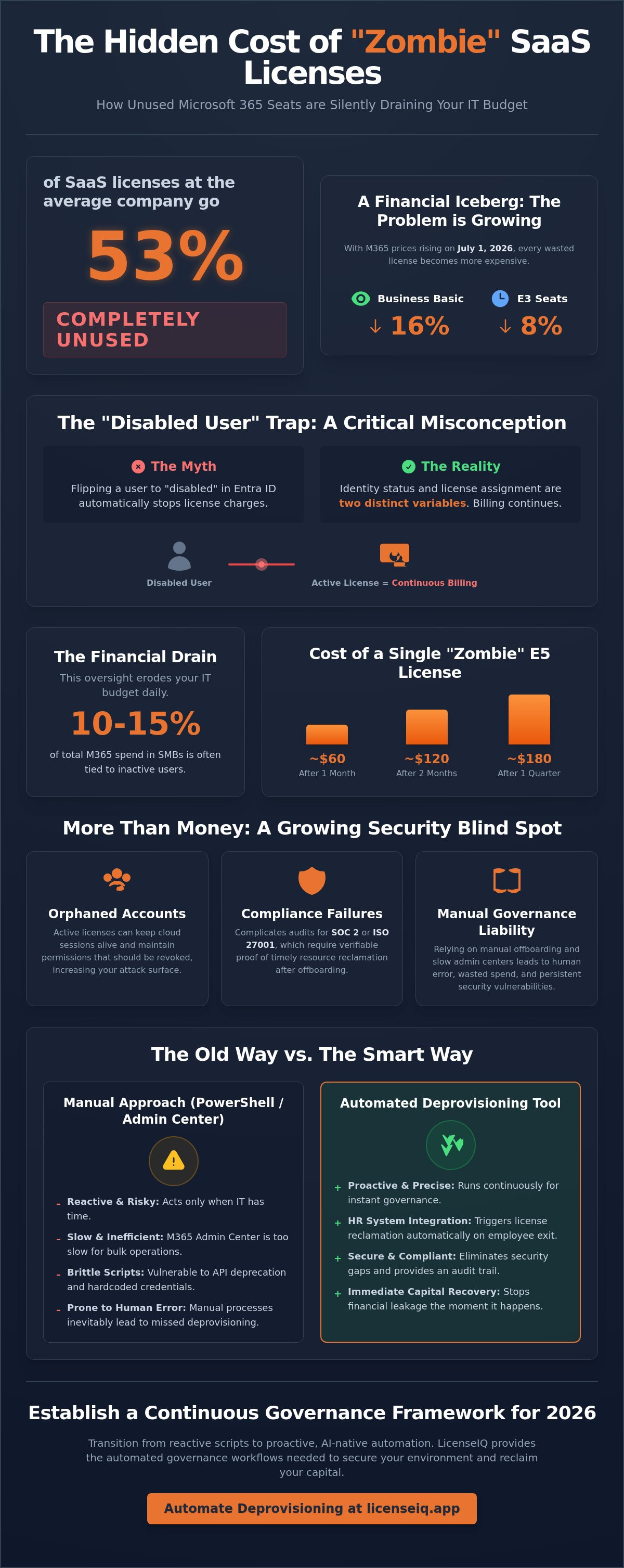
Did you know that 53% of SaaS licenses at the average company go completely unused? With Microsoft 365 prices set to rise on July 1, 2026, including an 8% increase for E3 seats and a 16% jump for Business Basic, these "zombie" licenses represent a massive drain on your IT budget. Relying on manual offboarding is a liability that leads to human error and wasted spend. To maintain financial health, your organization needs an automated m365 license deprovisioning tool that operates with precision and speed.
You probably realize that the M365 Admin Center is too slow for bulk operations and complex governance. It's frustrating to watch your monthly SaaS expenditure climb while inactive accounts hold onto expensive seats. This guide provides a working Microsoft Graph PowerShell script to automate license removal and eliminate wasted spend. You'll also discover why AI-native automation is the mandatory requirement for 2026 governance. We'll walk through a repeatable offboarding workflow that secures your environment and recovers your capital immediately. By the end, you'll have the oversight needed to act as a meticulous digital auditor for your firm's resources.
Key Takeaways
- Identify and eliminate "zombie" licenses assigned to disabled Entra ID accounts to stop immediate financial leakage.
- Implement a Microsoft Graph PowerShell script to filter disabled users and automate the removal of active SKUs.
- Understand the operational risks of manual scripting, including API deprecation and the security vulnerabilities of hardcoded credentials.
- Transition from reactive offboarding to a proactive automated m365 license deprovisioning tool for continuous governance.
- Utilize LicenseIQ to integrate HR systems and trigger immediate license reclamation through Automated Governance Workflows.
The Hidden Financial Risk of Licenses Assigned to Disabled Users
Disabling a user account doesn't stop the billing clock. Many IT leaders operate under the assumption that flipping the status to "disabled" in Entra ID or Active Directory automatically halts license charges. It doesn't. In the Microsoft ecosystem, identity status and license assignment are two distinct variables. When you disable an account, the associated M365 license remains active, silent, and expensive. This creates a "zombie license" problem where your organization pays for resources that no one can access or use.
The scale of this waste is significant. Industry data indicates that 10-15% of total M365 spend in small to mid-sized businesses is often tied to inactive users. Without an automated m365 license deprovisioning tool, these costs compound every month, obscured within the complexities of the M365 Admin Center. The disconnect between identity management and license billing is a legacy design that favors vendor revenue over your operational efficiency. You are essentially renting a room, locking the door, and continuing to pay the full daily rate for an empty space.
The Cost of "Disabled" Status
Offboarding frequently suffers from a critical lag time. HR notifies IT, IT disables the account, but license reclamation sits at the bottom of a manual to-do list. For an employee with an E5 license, every month of delay costs roughly $60. If that seat isn't reclaimed for a quarter, you've lost $180 on a single user. Scale this across a high-turnover department or a large organization, and the cumulative erosion of your IT budget is staggering. These "invisible" costs drain funds that should fuel innovation or new projects. Relying on a dedicated automated m365 license deprovisioning tool ensures that your financial data matches your actual workforce count in real time.
Security Risks of Orphaned Accounts
Robust Identity and access management (IAM) protocols demand that access and cost are managed in tandem. Orphaned licenses represent a massive gap in your security framework. An active license can keep cloud sessions alive or maintain permissions that should have been revoked the moment the employee left. This oversight complicates compliance audits for SOC 2 or ISO 27001, which require verifiable proof of timely resource reclamation. For a comprehensive security strategy, review our Office 365 offboarding checklist to ensure no doors are left unlocked. Reclaiming licenses isn't just about saving money; it's about closing the loop on organizational security.
Automating License Removal with PowerShell and Microsoft Graph
PowerShell provides the tactical relief your IT department needs to stop financial leakage immediately. Manual cleanup in the M365 Admin Center is too slow for modern operations. By the time you've manually stripped five licenses, you've already lost more in labor costs than the licenses are worth. To execute at scale, you must leverage the Microsoft Graph API. It's the most efficient way to identify accounts that are disabled but still consuming paid SKUs.
Step 1: Authenticating with Microsoft Graph
Legacy modules like MSOnline and AzureAD are officially retired. In 2026, the Microsoft Graph PowerShell SDK (v2.37.0) is the standard. You'll need to connect with specific permissions to modify user objects. Specifically, you require the User.ReadWrite.All and Directory.ReadWrite.All scopes. Use the Connect-MgGraph command to initiate a secure session with your tenant. This ensures your automation has the authority to audit and alter license assignments across the entire directory.
Step 2: Identifying Disabled Users with Active Licenses
The goal is to find accounts where AccountEnabled is false but the AssignedLicenses property isn't empty. You can use an OData filter to pull only the users you need, which saves bandwidth and processing time. It's vital to exclude users on litigation hold or those requiring specific data retention profiles. You'll want to expand the license property to see exactly which SKUs are being wasted. This transparency allows you to quantify the potential savings before you commit any changes.
Step 3: Executing the Bulk License Removal
Once you've identified the target accounts, use the Set-MgUserLicense command to reclaim the seats. Always include the -WhatIf parameter during your first run to simulate the results without making permanent changes. This safety measure prevents accidental bulk deprovisioning of critical accounts. After verifying the output, you can run the final script and export the results to a CSV file. Maintaining a clear audit trail is essential for any formal Information Technology (IT) policy regarding asset management and financial accountability.
# Connect to Graph
Connect-MgGraph -Scopes "User.ReadWrite.All", "Directory.ReadWrite.All"
Identify disabled users with licenses
$users = Get-MgUser -Filter "accountEnabled eq false" -Property Id, DisplayName, AssignedLicenses -All |
Where-Object { $_.AssignedLicenses.Count -gt 0 }
Remove licenses (Simulated with -WhatIf)
foreach ($user in $users) {
$skuIds = $user.AssignedLicenses.SkuId
if ($skuIds) {
Set-MgUserLicense -UserId $user.Id -RemoveLicenses $skuIds -AddLicenses @() -WhatIf
Write-Host "Reclaiming licenses for: $($user.DisplayName)"
}
}
While scripts offer a quick fix, they require constant maintenance as API endpoints evolve. If you're looking for a more resilient, permanent solution, an automated m365 license deprovisioning tool like LicenseIQ removes the need for manual coding. It provides a proactive layer of oversight that catches "zombie" licenses the moment they appear, ensuring your SaaS spend stays lean and optimized without the risk of script failure.
Why PowerShell Scripts Fail: The Case for Dedicated Deprovisioning Tools
While the script provided in the previous section offers tactical relief, relying on custom code for long-term governance is a strategic error. Scripts are brittle. They lack the resilience required for a 2026 operational environment. Technical removal is only 50% of the puzzle. If your automation doesn't provide financial oversight, it isn't solving the core business problem. A dedicated automated m365 license deprovisioning tool replaces fragile code with a robust, audit-ready system.
PowerShell scripts frequently fail due to three primary factors. First, API deprecation is a constant threat. Microsoft updates Graph endpoints regularly; a property that works today might be retired next quarter, breaking your automation without warning. Second, credential management is a security nightmare. Hardcoding secrets or storing tokens in local task schedulers creates a vulnerability that attackers can exploit. Finally, scalability is a major hurdle. In tenants with 500 or more users, raw scripts often hit rate limits or timeout, leaving your deprovisioning process incomplete and your budget leaking.
The Maintenance Burden of Custom Scripts
The hidden cost of "free" scripts is the administrative time required to keep them running. Every hour an IT admin spends debugging a broken offboarding script is an hour lost on high-value infrastructure projects. Modern security requirements like Conditional Access and MFA further complicate unattended execution, often requiring manual intervention that defeats the purpose of automation. This constant upkeep is a significant barrier to mastering the M365 license management lifecycle. You need a system that stays ahead of Microsoft's updates, not one that forces you to react to them.
The "What Now?" Problem
Raw PowerShell output is technically accurate but financially useless. It tells you that a license was removed, but it doesn't quantify the return on investment. It doesn't generate executive-ready reports that show exactly how many dollars were recovered this month. More importantly, scripts are binary; they handle disabled users but ignore active users who are over-licensed for their actual needs. An automated m365 license deprovisioning tool provides the financial context that scripts lack. It identifies opportunities for license downgrades and ensures that every dollar spent on SaaS is tied to an active, productive user. Transitioning to a specialized platform shifts your IT department from a cost center to a vigilant guardian of corporate resources.
Establishing a Continuous Governance Framework for 2026
Governance is not a one-time event. It is a persistent operational requirement. While scripts handle the cleanup of the past, a modern framework prevents waste from occurring in the first place. Transitioning from reactive scripting to proactive automation is the only way to manage the 2026 price increases effectively. Implementing an automated m365 license deprovisioning tool is the cornerstone of this evolution, shifting your IT department from a manual service desk to a strategic oversight body.
A continuous governance model integrates your HR system directly with Entra ID. When an employee's status changes to "terminated" in your HRIS, the deprovisioning workflow should trigger immediately. This eliminates the lag time that typically results in "zombie" licenses. Beyond simple removal, you must establish regular License Health Checks. These audits identify patterns of waste, such as accounts that are enabled but show zero login activity for 30, 60, or 90 days. This level of transparency ensures your SaaS environment remains lean and secure.
Proactive vs. Reactive License Management
Reactive management waits for a problem to appear. Proactive governance sets policies that trigger based on actual user behavior. By analyzing usage data, you can identify users who are over-licensed for their daily tasks. If an E5 user hasn't utilized advanced security features or Power BI in three months, they are a candidate for a downgrade. This "right-sizing" approach is a vital part of your strategy. For a deeper look at reclaiming your budget, review our guide on how to reduce M365 subscription costs. Moving beyond "enabled vs. disabled" logic is how you achieve true financial accuracy.
Communicating IT Value to Leadership
IT hygiene is often invisible to the C-suite until something breaks. You must change the narrative by providing executive-ready reports that highlight "Spend Recovery." Instead of reporting that you deleted 50 accounts, show the CFO the exact dollar value recovered through reclaimed licenses. Aligning your IT operations with corporate financial goals builds trust and secures future project funding. A Spend Recovery Dashboard turns technical maintenance into a measurable business win. It proves that your team is a vigilant guardian of company resources, not just a cost center. To start generating these insights automatically, deploy the LicenseIQ Platform and gain total clarity over your SaaS expenditure today.
Beyond Scripts: Leveraging LicenseIQ for Automated Governance
PowerShell scripts are a tactical band-aid. LicenseIQ is the strategic cure. While the Microsoft Graph scripts discussed earlier require manual triggers and ongoing maintenance, an AI-native automated m365 license deprovisioning tool operates autonomously. It removes the burden of oversight from your IT team and places it into a system designed for financial precision. LicenseIQ doesn't just delete licenses; it manages the entire lifecycle of your SaaS investment, ensuring that your organization is never caught off guard by the 2026 price hikes.
Automated Governance Workflows replace the fragility of custom code. These workflows listen for changes in your directory and act instantly. There's no need to worry about API deprecation or hardcoded secrets. The platform handles the technical complexity while providing you with a Spend Recovery Dashboard. This dashboard visualizes your immediate ROI, turning technical hygiene into a clear financial win for the organization. By uncovering obscured details in your tenant, LicenseIQ acts as an active participant in your company's growth.
5-Minute Setup vs. 5-Hour Scripting
Connecting your tenant to LicenseIQ takes less than a minute. Contrast this with the hours required to write, test, and secure a custom Graph script. Once connected, the AI engine performs a comprehensive scan of every license and user. It identifies waste patterns that raw scripts miss. You receive instant dollar-value recommendations, allowing you to reclaim your budget without writing a single line of code. This speed is essential for maintaining operational momentum. While a script might find a disabled user, the LicenseIQ platform analyzes usage data to suggest downgrades for active users who are over-provisioned. It provides the oversight needed to act as a meticulous digital auditor for your firm's resources.
Continuous Financial Accuracy
LicenseIQ ensures you never pay for a disabled user again. By maintaining a real-time link between identity and expenditure, the platform acts as a digital auditor that is always one step ahead. The License Health Score serves as a vital metric for alignment between IT and Finance. It provides a transparent view of your organizational health, ensuring that every seat is a productive asset. This metric allows leadership to see exactly where resources are being optimized. You can finally move away from the "zombie license" problem that plagues 53% of SaaS licenses at the average company. Visit LicenseIQ to discover your tenant’s Health Score today and stop the cycle of manual scripting.
Secure Your Financial Future with Proactive Governance
Manual license reclamation is a legacy process that has no place in a 2026 IT strategy. You've seen how "zombie" licenses drain budgets and how custom code eventually breaks under the weight of API updates. While PowerShell scripts provide immediate tactical relief, they cannot match the resilience of a dedicated automated m365 license deprovisioning tool. True operational excellence requires a shift toward continuous, AI-native oversight that bridges the gap between technical identity and financial expenditure.
It's time to stop the leakage and reclaim your capital. Organizations using LicenseIQ can save up to 35% on Microsoft 365 subscriptions by eliminating waste and right-sizing active users. The platform connects in minutes, providing an instant License Health Score and access to an AI-native Spend Recovery Dashboard. Stop wasting budget and automate your M365 governance with LicenseIQ.
Take control of your SaaS environment today. Transform your IT department into a vigilant guardian of corporate resources and ensure every dollar spent drives measurable value. Your organization deserves total clarity and financial precision.
Frequently Asked Questions
Is there a way to automatically remove M365 licenses when a user is disabled in AD?
Yes, but it requires an additional workflow beyond standard directory synchronization. While Entra ID Connect syncs the "disabled" status, it doesn't natively trigger license removal. You can bridge this gap by deploying an automated m365 license deprovisioning tool or a Microsoft Graph PowerShell script that monitors for account status changes and executes reclamation commands immediately.
Does disabling a user in Microsoft 365 free up their license for others?
No. Disabling an account only blocks the user from logging in; the license remains assigned and billed. This is a common source of financial waste. You must explicitly remove the license from the user object in the M365 Admin Center or via automation to return that seat to your available pool and stop the recurring charge.
What PowerShell module is best for M365 license management in 2026?
The Microsoft Graph PowerShell SDK is the only supported and reliable module for 2026 operations. Legacy modules like MSOnline and AzureAD are deprecated and no longer receive security updates. For optimal performance and API compatibility, ensure your environment is running the Microsoft Graph SDK version 2.37.0 or later.
Can I remove licenses from disabled users without using PowerShell scripts?
Yes, you can manage this manually through the M365 Admin Center, though this is inefficient for large tenants. A more professional alternative is using the LicenseIQ platform. It provides a no-code environment that automates the entire reclamation process, removing the need for manual intervention or the maintenance of custom scripts.
How do I find all disabled users with an active license in Entra ID?
You can identify these users by running a Microsoft Graph query that filters for accountEnabled eq false while checking the assignedLicenses property. This dual-filter approach isolates "zombie" accounts that are inactive but still consuming budget. Regular auditing of this specific user subset is essential for maintaining a high License Health Score.
What happens to a user’s data when I remove their license via script?
Removing a license starts a 30-day grace period during which the user's mailbox and OneDrive data remain accessible. After this window, Microsoft permanently deletes the data. To prevent data loss, you must implement litigation holds or retention policies before the script executes, ensuring compliance with your organization's data preservation requirements.
How can I automate license reclamation for inactive users who are still enabled?
Automating reclamation for enabled users requires analyzing activity logs rather than just account status. An automated m365 license deprovisioning tool like LicenseIQ monitors for zero login activity over 30, 60, or 90 days. It then triggers a workflow to reclaim the license, ensuring you aren't paying for users who aren't utilizing their assigned tools.
Is it better to use group-based licensing or PowerShell for offboarding?
Group-based licensing is excellent for provisioning, but it's often insufficient for offboarding. If a disabled user remains a member of a licensed group, the license stays active and billable. PowerShell or dedicated automation is necessary to actively remove users from these groups or strip the licenses directly the moment their employment status changes.


