

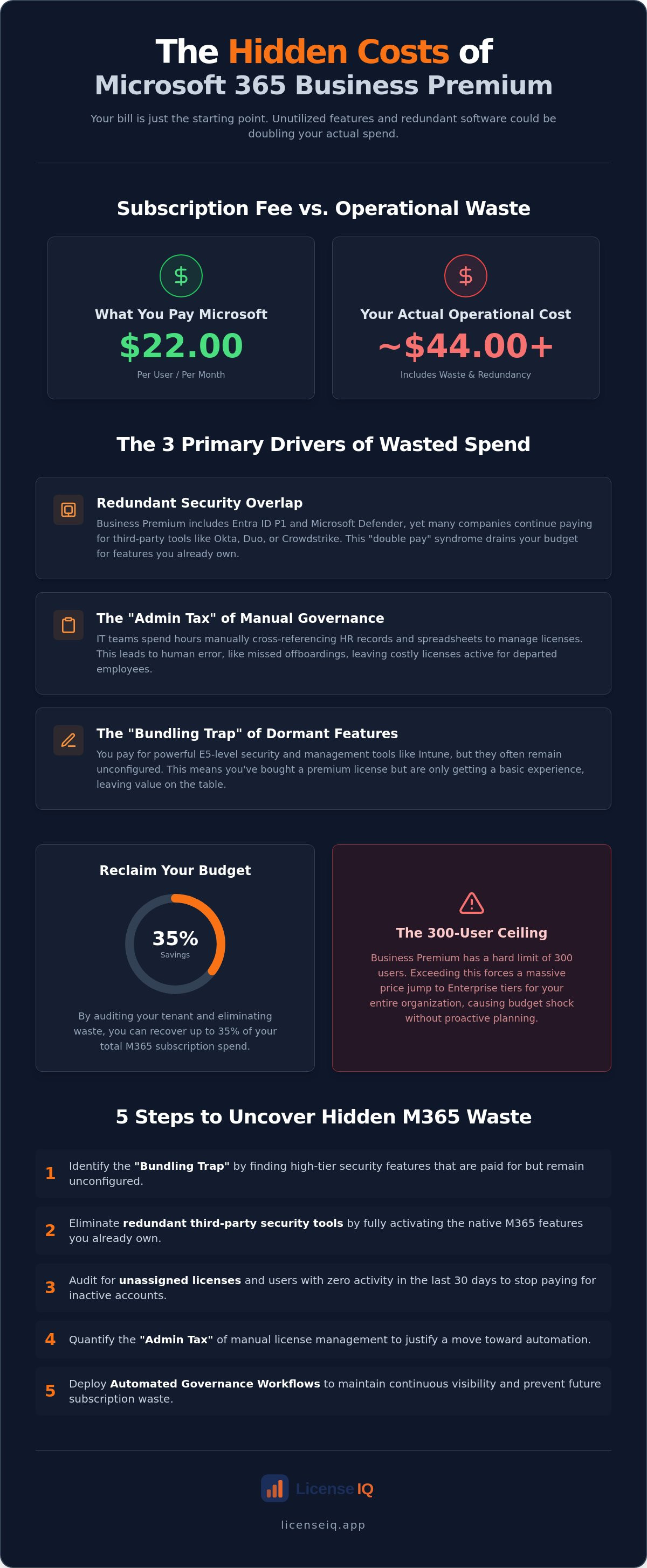
Your Microsoft 365 bill says $22.00 per user, but your actual operational waste might be costing you double that in unutilized security features and redundant third-party software. Most organizations pay for advanced capabilities they never deploy, leading to a bloated budget and fragmented security. Identifying the hidden costs of microsoft 365 business premium is no longer optional for leadership focused on financial health. It's a requirement for operational transparency.
You likely upgraded to this tier to consolidate your stack and secure your workforce. However, the complexity of managing Entra ID P1 and Intune often results in businesses keeping expensive, overlapping security tools. We understand the frustration of seeing subscription fees rise while license utilization remains low. It's difficult to justify the spend when your IT team is overwhelmed by technical complexity.
This 2026 financial audit provides the clarity you need to reclaim your budget. You'll learn how to identify invisible waste in your tenant and recover up to 35% of your subscription spend. We will analyze the July 2026 pricing landscape and provide a precise path to a leaner, more secure M365 environment.
Key Takeaways
- Identify the "Bundling Trap" where high-tier security features are paid for but remain unconfigured and dormant.
- Eliminate redundant third-party security subscriptions by fully activating the native tools already included in your M365 tenant.
- Uncover the hidden costs of microsoft 365 business premium by auditing unassigned licenses and users with zero activity over the last 30 days.
- Quantify the "Admin Tax" of manual license management to transition your IT team toward high-value strategic tasks.
- Deploy LicenseIQ’s Automated Governance Workflows to maintain continuous visibility and prevent future subscription waste.
The Business Premium Paradox: Why Bundled Savings Often Hide Massive Waste
Microsoft 365 Business Premium has solidified its position as the flagship tier for small and mid-sized businesses in 2026. It promises an all-in-one solution. You get advanced security, device management, and productivity tools in a single SKU. On paper, the consolidation saves money. In practice, it often creates a "Bundling Trap." Many organizations pay for E5-level security features, such as automated investigation and response, that remain completely unconfigured. This is a primary source of the hidden costs of microsoft 365 business premium.
This creates a significant disconnect between procurement and performance. You've purchased the license, but your team hasn't achieved actual feature adoption. You're effectively paying a premium for a basic experience. This inefficiency allows "SaaS Sprawl" to manifest within your own tenant. You continue to pay for third-party security vendors because you haven't fully migrated to the native Microsoft 365 tools you already fund. These overlapping subscriptions drain resources that should be fueling growth.
What is the "Invisible Waste" in Business Premium?
Financial leakage occurs in the shadows of your admin center. Offboarding delays often leave inactive users holding premium licenses for months after their departure. Additionally, many IT managers maintain a "buffer" of unassigned licenses to handle new hires. This "just in case" mentality is expensive and unnecessary. Invisible Waste is the delta between paid licenses and active feature utilization. Every unassigned seat and unconfigured feature represents capital that could be reinvested into strategic initiatives. Identifying these gaps is the first step toward reclaiming your budget.
The 300-User Ceiling: A Hidden Scalability Cost
Scalability is a major factor in your long-term M365 ROI. Business Premium has a hard limit of 300 users per tenant. When you hire your 301st employee, the entire organization faces a mandatory jump to Enterprise tiers. This transition often results in a massive price shock because Enterprise licenses carry a significantly higher cost per seat. Without proactive license right-sizing, your budget will explode overnight. Monitoring your utilization via LicenseIQ ensures you don't hit this ceiling unprepared. Total visibility is the only way to manage the hidden costs of microsoft 365 business premium before they impact your bottom line.
The Three Primary Cost Drivers Obscuring Your M365 ROI
Your monthly subscription bill is only the baseline. True financial leakage stems from operational inefficiency and redundant licensing. The hidden costs of microsoft 365 business premium aren't found in the Microsoft invoice. They're buried in your third-party software stack and your IT department's labor hours. Identifying these drivers is the only way to transform M365 from a cost center into a value driver.
Redundant Security Overlap
Business Premium includes enterprise-grade tools like Entra ID P1 and Microsoft Defender for Business. Despite this, many organizations continue paying for standalone solutions like Okta, Duo, or Crowdstrike. This "Double Pay" syndrome is a massive drain on ROI. You're funding two tools to do one job. This redundancy doesn't just waste money; it complicates your security architecture. Auditing your tech stack for feature parity allows you to decommission redundant services. Consolidation simplifies your environment and secures your budget. Identifying these overlaps is essential to mitigating the hidden costs of microsoft 365 business premium.
The Burden of Manual Governance
Manual license management is a silent profit killer. We call this the "Admin Tax." IT teams often spend significant hours every month manually cross-referencing HR records with the M365 Admin Center. Human error is inevitable in this process. One missed offboarding task can leave a $22.00 license active for months. Manual spreadsheets are the primary cause of license waste in 2026. They lack the real-time visibility needed to manage a dynamic workforce. Every minute spent on a spreadsheet is a minute lost to strategic innovation. Monitoring these metrics through a Spend Recovery Dashboard provides the oversight required to stop financial leakage.
Shadow IT and Security Gaps
Partial implementation creates more than just financial waste. It creates vulnerability. When Premium features like Intune or Defender aren't fully deployed, employees often turn to unapproved "Shadow IT" applications. This usually happens because the native Microsoft tools haven't been properly configured for the user's workflow. This persistence of Shadow IT fragments your data and increases your risk profile. You're paying for a secure ecosystem while your data lives in unmanaged, third-party apps. A complete audit ensures your security posture matches your financial investment, closing the gap between what you pay for and what your team actually uses.
Calculating the Real Cost: Subscription Fees vs. Operational Waste
As of July 1, 2026, the sticker price for Microsoft 365 Business Premium remains $22.00 per user per month with an annual commitment. Organizations requiring month-to-month flexibility pay a significant premium, often increasing the per-seat cost by 20%. This is the baseline. However, the sticker price is rarely the real cost. Your "Effective Price" is determined by your utilization rate. If you pay for 100 licenses but only 80 are actively utilized or properly configured, your effective cost per user jumps to $27.50. This $5.50 delta represents the hidden costs of microsoft 365 business premium that quietly erode your IT budget.
Financial hygiene requires moving beyond the monthly invoice. You must account for "zombie licenses" and unconfigured features. Manual audits fail here because they lack the granularity to track feature-level adoption. They only confirm that a seat exists, not that it provides value. Automated governance replaces guesswork with precision. It identifies exactly where your spend exceeds your requirements. By aligning your subscription count with actual headcount and activity, you secure your resources and eliminate invisible waste.
The True Cost of an Inactive User
One forgotten Business Premium seat drains $264.00 from your budget every year. In a 100-person organization, a seemingly minor 10% "zombie" rate results in $2,640.00 of pure annual waste. This is the Compound Waste Effect. These costs scale rapidly as your organization grows. It isn't just a licensing issue; it's a failure of operational oversight. To stop this leakage, you need a structured approach to spend recovery. You can find detailed strategies in the Microsoft 365 License Optimization Guide.
Measuring Your License Health Score
Modern financial management demands a clear metric for tenant efficiency. We use the License Health Score to provide this clarity. This score evaluates your environment based on three critical pillars:
- Assignment Accuracy: Matching license tiers to actual user requirements.
- Activity Verification: Identifying accounts with zero logins over 30, 60, or 90 days.
- Feature Adoption: Tracking the configuration of premium tools like Intune and Defender.
LicenseIQ uses advanced scanning to analyze these data points across your entire ecosystem. It doesn't just report on the hidden costs of microsoft 365 business premium; it provides a specific dollar-value recommendation for immediate recovery. This proactive oversight ensures your organization maintains a high License Health Score, keeping your M365 investment lean and high-performing.
Audit Checklist: 5 Steps to Uncover Hidden M365 Waste
Recovery requires more than just a cursory glance at your monthly invoice. You need a systematic framework to identify and eliminate the hidden costs of microsoft 365 business premium. This audit checklist provides a data-driven path to immediate spend recovery. Execute these five steps to ensure your tenant remains lean and efficient.
- Identify Unassigned Licenses: Access your billing portal to find seats currently being billed but not assigned to any user. These represent immediate, 100% waste.
- Scan for Inactive Users: Filter your user list for accounts with no login activity for 30, 60, or 90 days. These "zombie" accounts often belong to former employees or contractors.
- Cross-Reference Feature Usage: Verify if users assigned to Premium are actually utilizing Entra ID P1 and Intune. If they aren't using these security features, they are over-licensed.
- Review Offboarding Workflows: Audit your HR-to-IT handoff. Ensure license reclamation is a mandatory, automated step in the employee exit process.
- Analyze Tech Stack Parity: Compare your spend on third-party security tools against the native capabilities of Business Premium. Identify every instance where you are paying twice for the same protection.
Step-by-Step License Reclamation
The M365 Admin Center provides basic usage reports that can help you identify inactive accounts. You can view last activity dates for Teams, Exchange, and OneDrive. However, native reporting has significant limitations for financial optimization. It often lacks the real-time granularity needed to trigger immediate reclamation workflows. To secure your environment and stop financial leakage during transitions, implement a robust Office 365 Offboarding Checklist. This ensures no license is left active longer than necessary.
Right-Sizing Your Tiers
Not every employee requires a $22.00 license for basic email access and document editing. A "Mix and Match" strategy is the most effective way to manage the hidden costs of microsoft 365 business premium. Frontline workers or administrative staff may only need Business Basic, which costs significantly less while still providing essential cloud services. By reserving Premium licenses for users who truly require advanced device management and identity protection, you optimize your budget without compromising your security posture. Precision in assignment is the cornerstone of financial hygiene.
Stop guessing and start recovering. Use LicenseIQ's Automated Governance Workflows to turn this checklist into a continuous, hands-off process for your IT team.
Automated Governance: The Logical Conclusion of Spend Recovery
Manual oversight is a relic of a slower era. Modern SMBs can't afford the latency of human-led audits. Relying on spreadsheets to track hundreds of dynamic licenses is a strategic liability. Automated governance is the only scalable defense against the hidden costs of microsoft 365 business premium. It replaces periodic, reactive cleanups with continuous, proactive precision. By integrating directly with your tenant, automated systems identify waste in real time. This ensures your financial data is always accurate and your resources are never idle.
AI-native platforms like LicenseIQ discover obscured details that human auditors overlook. They analyze complex usage patterns across Entra ID, Intune, and the broader M365 ecosystem. This depth of insight allows you to move beyond basic seat counting. You gain the ability to enforce "Continuous Financial Accuracy." When a user's activity drops or a license becomes redundant, the system flags it immediately. This proactive stance transforms your IT department from a reactive support unit into a vigilant guardian of corporate resources.
Recovering 35% of Your M365 Spend
The Spend Recovery Dashboard provides immediate visibility into your tenant's financial health. It visualizes exactly where your capital is leaking and how to stop it. The connection process is engineered for efficiency, taking only five minutes to scan your entire environment. This rapid assessment allows you to maintain a near-perfect License Health Score. Organizations using the LicenseIQ Platform consistently identify opportunities to recover up to 35% of their annual subscription spend. They achieve this by eliminating zombie licenses and right-sizing over-provisioned accounts without impacting operational momentum.
Securing Your Financial Future
The next evolution of license management relies on the Model Context Protocol to automate complex governance tasks. This technology allows for deeper automation within your Automated Governance Workflows. It enables the system to understand the context of license usage, making autonomous recommendations that align with your growth strategy. Proactive monitoring is the only way to prevent the return of SaaS sprawl. It ensures that as your team scales, your budget remains lean and your security remains tight. Don't let your resources go unmonitored. Discover your License Health Score with LicenseIQ today.
Reclaim Your Budget with Operational Precision
Operational excellence requires total visibility into your digital resources. You now understand that the sticker price is just the beginning of your investment. The hidden costs of microsoft 365 business premium stem from unconfigured security features and the heavy "Admin Tax" of manual license management. These inefficiencies drain capital that belongs in your strategic initiatives—much like how missed customer inquiries can stall growth, an issue many UK service businesses address with CallAid. Relying on outdated spreadsheets for governance is a risk your organization doesn't need to take in 2026.
True spend recovery is not a one-time event; it's a continuous process of refinement. Automated governance workflows provide the vigilant oversight needed to prevent SaaS sprawl and maintain financial hygiene. Our AI-native platform identifies obscured waste that human auditors consistently miss, allowing you to reclaim your budget with total confidence. By aligning your license count with actual utilization, you ensure every dollar spent drives measurable value.
Our audit scan takes less than 5 minutes to reveal immediate savings of up to 35% on your monthly subscriptions. Take control of your tenant today and eliminate invisible waste for good. Stop wasting money on M365; Get your free License Health Score now. Your organization deserves a lean, high-performing environment that supports sustainable growth.
Frequently Asked Questions
What are the most common hidden costs in Microsoft 365 Business Premium?
The primary hidden costs are unassigned licenses and redundant third-party security subscriptions. Many organizations pay for premium features like Intune or Defender for Business but never configure them, essentially paying for a basic experience at a premium price. This overlap creates a massive drain on your IT budget without providing additional security value. Identifying these gaps is the first step toward reclaiming your monthly spend.
How can I identify inactive users who are still costing me money?
You can identify inactive users by running usage reports in the Microsoft 365 Admin Center to check last login dates. Look for users with zero activity over 30, 60, or 90 days. While manual checks work, automated governance workflows provide a more precise, real-time analysis of the hidden costs of microsoft 365 business premium by flagging dormant accounts before they accrue monthly waste.
Is it possible to mix Business Premium with cheaper licenses like Business Basic?
Yes, you can mix license tiers within a single tenant to optimize your spend. Assign Business Premium to users who require advanced security and device management while using Business Basic for frontline staff who only need email and cloud storage. This strategic alignment ensures you don't overpay for features that specific employee roles will never utilize. It is a proven method for right-sizing your IT budget.
Does Microsoft 365 Business Premium replace the need for third-party antivirus?
Business Premium includes Microsoft Defender for Business, which is designed to replace traditional third-party antivirus solutions. It provides cross-platform endpoint protection, automated investigation, and remediation capabilities. Fully deploying these native tools allows you to decommission redundant security subscriptions and consolidate your technology stack. This consolidation simplifies your environment and significantly reduces your total cost of ownership.
How much can a typical SMB save by optimizing their M365 licenses?
A typical SMB can recover up to 35% of their subscription spend through rigorous license optimization. These savings come from reclaiming unassigned seats, offboarding inactive users, and eliminating overlapping third-party security tools. Achieving these results requires total visibility into your tenant's utilization rates and a commitment to continuous financial accuracy. Small adjustments often lead to thousands of dollars in annual recovery.
What happens to my data if I downgrade a user from Premium to Basic?
Downgrading a user from Premium to Basic does not delete their mailbox or OneDrive data, but it does remove access to specific features. Users lose their desktop Office applications and advanced security protections like Intune device management. You must ensure the user's workflow doesn't depend on these premium tools before implementing a downgrade to avoid operational disruptions. Always verify feature requirements before changing license assignments.
Why doesn’t the Microsoft Admin Center automatically stop billing for inactive users?
Microsoft bills for the availability of the seat, not the actual usage of the service. The Admin Center remains a passive billing system that assumes you want to keep every purchased license active for future use. It's your responsibility to monitor utilization and reclaim licenses, which is why the hidden costs of microsoft 365 business premium often go unnoticed without proactive auditing and specialized oversight tools.
How often should I conduct a Microsoft 365 license audit?
You should conduct a manual license audit at least once a month to catch immediate waste from employee turnover. However, high-growth organizations benefit more from continuous, automated monitoring. Real-time oversight ensures that your License Health Score remains high and that no unassigned or inactive seat drains your budget between scheduled manual reviews. Continuous auditing is the only way to maintain a lean environment.


