

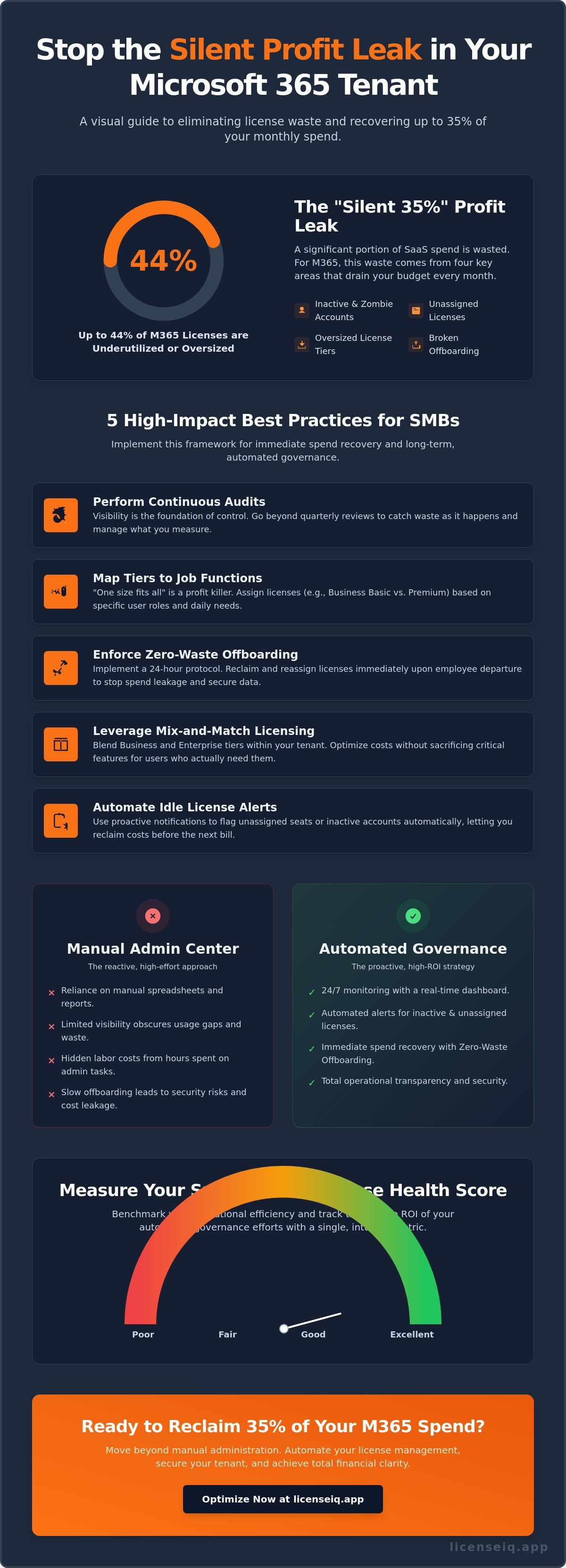
Up to 44% of Microsoft 365 licenses are currently underutilized or oversized. For a typical organization, this creates a massive financial leak that drains capital every single month. With Microsoft implementing new price increases and plan bundles on July 1, 2026, the cost of operational disorder has never been higher. Mastering microsoft 365 license management best practices for smbs is no longer a choice. It's a critical requirement for maintaining a healthy bottom line. You've likely dealt with unpredictable SaaS bills and manual offboarding processes that let money slip through the cracks.
It's frustrating to manage a tenant when you lack visibility into user activity. You need a clean, optimized environment where every dollar spent translates into actual productivity. This guide provides the strategies to eliminate license waste, secure your tenant, and recover up to 35% of your Microsoft 365 spend. We'll show you how to achieve a high License Health Score through automated spend recovery and role-based licensing. You'll learn to transition from manual administration to a proactive system that protects your resources and ensures total operational transparency.
Key Takeaways
- Identify the "Silent 35%" profit leak by auditing inactive users, unassigned licenses, and redundant tiers that drain your budget.
- Implement microsoft 365 license management best practices for smbs by mapping specific license tiers to job functions instead of using universal assignments.
- Eliminate hidden labor costs by moving beyond manual spreadsheets and the limited visibility of standard Admin Center reports.
- Adopt a 24-hour offboarding protocol to reclaim licenses immediately upon employee departure and prevent ongoing spend leakage.
- Benchmark your operational efficiency using the License Health Score to track the precise ROI of your automated governance efforts.
Why SMBs Overspend on Microsoft 365 Licenses: The Silent Profit Leak
SMBs often treat their cloud subscriptions as a fixed utility rather than a variable expense. This mindset is expensive. Industry data shows that 35% of SaaS spend is wasted on underutilized or redundant resources. Within the Microsoft ecosystem, this "Silent 35%" is composed of inactive users, unassigned seats, and oversized tiers. Implementing microsoft 365 license management best practices for smbs is the only way to stop this capital from leaking out of your organization.
The Microsoft 365 Admin Center defaults are part of the problem. They prioritize user availability over cost efficiency. Reports in the native portal frequently obscure usage gaps, making it difficult to see which licenses are actually driving value. With the price increases effective July 1, 2026, these hidden costs are becoming more painful. You can no longer afford to ignore software asset management if you want to maintain healthy operational margins.
The Hidden Cost of Inactive and Zombie Accounts
Broken offboarding processes are the primary cause of license bloat. Accounts for former employees often remain active for months because nobody told the IT department to revoke the seat. These accounts aren't just financial drains; they're security vulnerabilities waiting to be exploited. A zombie account is a paid seat with zero login activity for 30+ days. Identifying these through the LicenseIQ Platform allows for immediate spend recovery and tighter tenant security.
Over-Provisioning: The Premium Plan Trap
Many SMBs purchase higher-tier plans as a "safety net" for compliance without auditing actual needs. Buying Business Premium for a frontline worker who only needs web-based email is a strategic error. The price gap between Business Basic and Business Premium is significant when multiplied across a growing team. This redundant feature set leads to subscription creep, where you pay for advanced security tools that your staff never configures or uses. Adopting microsoft 365 license management best practices for smbs ensures that every license tier matches the specific job function of the user, preserving your budget for actual growth initiatives.
5 High-Impact Best Practices for SMB License Management
Efficiency in SaaS management isn't a one-time event. It's a continuous cycle of oversight. To move past the "Silent 35%" leak discussed earlier, you must implement a rigorous framework. These microsoft 365 license management best practices for smbs focus on immediate spend recovery and long-term governance. Waiting for a quarterly review is a mistake. Waste accumulates daily, and your strategy must be just as fast.
- Perform continuous baseline audits: Visibility is the foundation of control. You cannot manage what you do not measure.
- Map tiers to functions: Universal assignment is the enemy of profit. Match the license to the user's daily reality.
- Enforce Zero-Waste offboarding: Licenses should return to the pool the moment an employee departs.
- Leverage mix-and-match licensing: Blend Business and Enterprise tiers within a single tenant to optimize costs without sacrificing features.
- Automate idle license alerts: Use proactive notifications to flag unassigned seats before they appear on next month's bill.
Managing these moving parts manually is a recipe for error. To gain total clarity, you can use the LicenseIQ Platform to automate these workflows and ensure no seat goes unmonitored.
Conducting a 5-Minute License Health Audit
A manual audit doesn't have to be a multi-day project. Follow this three-step protocol to identify immediate savings. First, export user activity logs from the Microsoft 365 portal. Second, cross-reference these login dates with your current billing cycle. Finally, identify any licenses with no application usage in the last 90 days. These are your primary targets for reclamation or tier downgrades.
Role-Based Licensing: One Size Does Not Fit All
Universal licensing is a premium trap. You must categorize your workforce into functional groups. Frontline workers often only require F-series licenses, which provide essential mobile and web access at a fraction of the cost. Users who work exclusively in browsers should be on Business Basic. Reserve Business Premium for power users who require advanced Intune or Defender for Endpoint features. For a deeper dive into these tiers, you can find Microsoft 365 licensing explained for small business needs. This granular approach ensures you only pay for the security and productivity tools that are actually in use.
Manual Admin Center vs. Automated Governance: Choosing Your Strategy
Most SMBs rely on the Microsoft 365 Admin Center for oversight. It's a native tool, but it wasn't designed for financial optimization. The "Active Users" report is often insufficient for spend recovery because it only tracks basic connectivity. It doesn't tell you if a user is actually utilizing the premium features you're paying for. To truly implement microsoft 365 license management best practices for smbs, you need visibility that goes beyond a simple login timestamp. Relying on default reports leaves your budget vulnerable to hidden waste.
The Limitations of Manual M365 Administration
Manual license tracking depends on human input and static spreadsheets. This approach is fundamentally flawed in a dynamic cloud environment. The hidden labor cost of manual tracking is high; IT staff spend hours reconciling data that changes daily. Human error in spreadsheet updates leads to missed cancellations and "ghost" costs that persist for years. You also face the challenge of tracking nested licenses and complex add-on subscriptions that the standard portal doesn't clearly aggregate. Manual audits are often outdated the moment they're finished. By the time you've reconciled your data, a new onboarding or offboarding event has already changed the math.
Unlike complex PowerShell scripts that require specialized expertise to maintain, modern systems provide immediate clarity. You don't need to be a developer to understand your spend. LicenseIQ connects to your tenant in minutes, providing a real-time Spend Recovery Dashboard that replaces the guesswork of manual tracking. It acts as a vigilant digital auditor that's always one step ahead of your billing cycle.
The Shift to Automated Governance Workflows
Automation identifies waste that manual eyes miss by scanning for specific feature utilization rather than just basic connectivity. You can set up guardrails to prevent unauthorized license purchases by department heads. This ensures that every new seat fits within your pre-defined budget. Automated Governance Workflows eliminate the need for manual IT degree-level auditing by handling the heavy lifting of data cross-referencing and license reclamation. This shift represents a transition from a reactive posture to a proactive one.
Instead of hunting for waste once a year, your system monitors resources in real-time. This ensures that your microsoft 365 license management best practices for smbs are baked into your operations rather than treated as a periodic chore. You gain total transparency. This transforms your IT department from a cost center into a streamlined, value-driven asset that protects your bottom line.
The Offboarding Protocol: Securing Data and Reclaiming Spend
Offboarding represents the single largest point of failure in cloud cost control. Most organizations fail to synchronize their HR departures with their IT billing cycles. This gap creates "billing ghosts"—licensed seats for users who no longer have access to the building. Implementing microsoft 365 license management best practices for smbs requires a shift in how you handle employee exits. You must treat license reclamation as a high-priority security and financial task. Any delay in this process is an active choice to waste capital.
Adhering to a strict 24-hour rule is essential. You should reclaim licenses immediately upon an employee's departure rather than waiting for a monthly review. This prevents the accumulation of wasted spend that often goes unnoticed for months. For a comprehensive workflow, consult our Office 365 Offboarding Checklist 2026 to ensure no step is missed during the transition. Balancing data retention with subscription cancellation is a matter of technical execution, not a reason for delay.
Instant Spend Recovery During Employee Transitions
Data retention often serves as an excuse for keeping licenses active. This is unnecessary. Converting a departing user's mailbox to a shared mailbox preserves all historical data without requiring an active subscription. You must also understand the technical difference between revoking access and unassigning a license. Revoking access secures the tenant; unassigning the license stops the bill. Both actions must occur simultaneously to ensure total resource oversight. Automation ensures these seats return to your available pool instantly, preventing the purchase of new, redundant licenses.
Continuous Monitoring vs. Periodic Cleanups
Periodic "spring cleaning" is an outdated strategy. The ROI of real-time monitoring far exceeds the value of an annual audit. Continuous oversight identifies waste as it happens, allowing for immediate corrective action. This level of Microsoft 365 license optimization improves overall IT hygiene and strengthens your security posture. It's a core component of microsoft 365 license management best practices for smbs. Utilizing a Spend Recovery Dashboard allows you to report these tangible savings directly to leadership, proving the value of your governance strategy. Stop letting manual processes drain your budget and switch to a system that prioritizes financial health.
Secure your tenant and stop billing leaks by deploying Automated Governance Workflows today.
Measuring Success: The License Health Score and ROI
Operational efficiency requires a metric that transcends simple cost-cutting. In 2026, the License Health Score serves as the definitive benchmark for SMB resource management. It provides a real-time assessment of your tenant's financial and security posture. By consolidating usage data, tier alignment, and offboarding speed into a single percentage, you gain immediate clarity on your operational performance. This metric transforms abstract IT tasks into a concrete value that resonates with specialized leadership.
Calculating the dollar-value impact of your optimization efforts is the final step in mastering microsoft 365 license management best practices for smbs. When you present your findings to a CEO or CFO, you aren't just showing "savings." You're demonstrating recovered profit. Every unassigned license reclaimed and every oversized tier downgraded represents capital that can be reinvested into core business growth. Long-term financial accuracy in SaaS subscriptions ensures that your budget remains a precise tool rather than an estimated liability.
What Makes a High License Health Score?
A high score indicates a tenant that is lean, secure, and fully optimized. Achieving this requires strict adherence to three specific operational standards:
- Minimal Idle Time: Zero unassigned licenses sitting in your pool for more than 48 hours.
- Precise Tier Mapping: 100% of users are matched to the lowest-cost license tier that fulfills their specific job requirements.
- Full Automation: Automated Governance Workflows are active across all departments to handle employee transitions instantly.
Recovering Your First 35% with LicenseIQ
The path to a perfect score doesn't require manual data entry or complex calculations. The LicenseIQ Platform identifies specific dollar-value recommendations by scanning your environment for the waste patterns discussed in previous sections. It provides a "set and forget" governance model that monitors your resources with the vigilance of a digital auditor. You don't have to guess where your money is going; the Spend Recovery Dashboard shows you exactly how much capital has been returned to your budget. Take control of your tenant and stop the silent leak today.
Discover your License Health Score in minutes with LicenseIQ and start your journey toward total operational transparency.
Secure Your Tenant and Reclaim Your Budget
Stop letting unassigned licenses and oversized tiers dictate your monthly spend. You've seen how the "Silent 35%" leak occurs and how automated offboarding protocols protect both your data and your bottom line. Adopting microsoft 365 license management best practices for smbs is the most direct path to operational transparency. It's time to move beyond the limitations of the standard Admin Center and embrace a system that prioritizes financial health.
Real-time oversight is the new standard for financial hygiene. By deploying a platform that connects to your tenant in minutes, you gain access to an AI-native spend recovery dashboard that works while you focus on growth. You now have the strategies required to recover up to 35% of your subscription costs and maintain a high License Health Score. Your IT operations should be a lean, value-driven asset; not a source of organizational disorder.
Start your 5-minute M365 audit and recover wasted spend with LicenseIQ. Take the first step toward a cleaner, more profitable tenant today. You're now equipped to turn technical complexity into a streamlined competitive advantage.
Frequently Asked Questions
How do I find unassigned Microsoft 365 licenses in the Admin Center?
Navigate to the Billing section and select Licenses to view a summary of your current subscriptions. The dashboard displays the number of assigned licenses versus the total purchased. Any discrepancy between these two numbers represents unassigned seats that are actively draining your budget. For a detailed list, you must filter your Active Users report by license status to identify which specific seats aren't currently linked to a user.
What is the difference between Microsoft 365 Business Basic and Premium?
Business Basic provides web and mobile versions of Office apps with cloud storage; it's designed for light users. Business Premium is a comprehensive tier that includes desktop app installations and advanced security tools like Microsoft Intune and Azure Information Protection. Matching these tiers to actual job requirements is a core part of microsoft 365 license management best practices for smbs. This ensures you don't pay for premium security features for users who don't need them.
Can I mix and match different Microsoft 365 licenses in one tenant?
Yes, you can assign different license types to individual users within a single tenant environment. This flexibility allows you to optimize costs by giving frontline workers low-cost plans while reserving Enterprise or Premium tiers for power users. Mixing and matching licenses is the most effective way to eliminate the "one-size-fits-all" trap. It ensures your software spend aligns precisely with the functional needs of each department.
Is it possible to automate the offboarding of Microsoft 365 users?
Automation is possible through specialized governance platforms that trigger workflows the moment an employee's status changes. These systems instantly revoke access and unassign the license to stop the billing cycle. While the native Microsoft portal requires several manual steps to complete an exit, third-party tools ensure that licenses return to your available pool in real-time. This proactive approach prevents "billing ghosts" from persisting on your monthly invoice.
How often should an SMB conduct a Microsoft 365 license audit?
You should transition from periodic audits to continuous, real-time monitoring. Traditional quarterly reviews are too slow; they allow waste to accumulate for 90 days before you take action. Modern microsoft 365 license management best practices for smbs prioritize daily oversight to catch unassigned or underutilized seats immediately. This ensures your organization maintains a high License Health Score and avoids unnecessary expenditure during the months between manual checks.
Will I lose user data if I unassign a Microsoft 365 license?
Microsoft provides a 30-day grace period where data remains accessible after a license is removed. After this window, the data is permanently deleted unless you take specific preservation steps. To keep data indefinitely without paying for a license, convert the departing user's mailbox to a shared mailbox before unassigning the seat. This technical maneuver preserves all historical emails and files while allowing you to reclaim the license cost immediately.
What are the security risks of leaving inactive licenses active?
Inactive licensed accounts are significant security vulnerabilities because they often escape regular monitoring. These "zombie accounts" provide a silent entry point for attackers to exploit your tenant without being noticed by active users. If an account remains licensed after an employee leaves, it may still have active permissions or access to sensitive company data. Revoking the license is a critical security control that reduces your organization's attack surface.


