

What if SaaS cost control could improve without slowing teams down or cutting licenses people still need? Effective it and finance collaboration for saas spend starts with a shared view of what the company pays for and how employees use it. IT can see access and usage patterns. Finance can see invoices, budgets, and renewal dates. Neither view is enough on its own.
When teams lack that shared view, they may be unsure who should review a license, approve a change, or own a renewal decision. A cost-cutting proposal without usage evidence or business context can create friction instead of clear action. The answer isn’t to make IT or Finance carry the process alone. It’s to define how they make decisions together.
This article explains how to assign decision rights, bring usage and financial data into the same review, and prioritize actions with the right business context. You’ll also learn how to create a repeatable process that tracks decisions through to financial outcomes.
Key Takeaways
- Define who validates usage, approves budgets, and implements license changes so reviews have clear accountability.
- Use it and finance collaboration for saas spend to connect utilization evidence with invoices, renewal dates, and business context.
- Compare spreadsheets, manual reviews, and purpose-built platforms by evidence quality, coordination effort, and repeatability.
- Build a repeatable review workflow that turns exceptions into assigned actions and tracks their financial outcomes.
- LicenseIQ provides Microsoft 365 license evidence through a free one-time scan that costs $0 and requires no credit-card information. Its read-only connection never modifies, deletes, or creates anything in the tenant.
Why IT and Finance Need a Shared Process for SaaS Spend Control
IT sees who has access, which licenses are assigned, and how software is used. Finance sees invoices, budget impact, renewal dates, and cost allocation. When those records sit in separate systems, neither team has the full picture needed to make a confident subscription decision. A usage report may flag a license for review, while Finance may not know which contract or budget line it affects.
Cross-functional SaaS spend control is the shared oversight of software usage, subscription costs, renewals, and approved actions. It connects operational evidence with financial context, then assigns responsibility for decisions and follow-through. The goal isn’t to cut licenses automatically. It’s to give the right people enough reliable information to decide what to retain, change, or investigate.
Where IT and Finance see different parts of the same spend
IT can confirm user assignments, access patterns, technical requirements, and dependencies that may affect a change. Finance can match subscriptions to invoices, budgets, renewal dates, and departments or cost centers. IT helps explain how a service is used; Finance shows what the organization pays and where the expense lands.
Without a shared record, a review can stall over basic details. IT may identify a license that appears inactive, while Finance cannot tell which renewal it belongs to. Finance may propose reducing seats without knowing a team’s access requirements. Reconciliation turns these separate observations into a case the teams can review, not an untested recommendation.
What a successful collaboration should improve
The value of it and finance collaboration for saas spend is clearer decisions and accountability. A shared evidence base helps both teams distinguish an item that needs investigation from one ready for action. It also makes ownership explicit: who validates usage, who weighs budget impact, who approves a change, and who confirms that the approved action was completed.
Microsoft 365 licenses offer a practical example. IT can review license assignments and utilization evidence; Finance can connect the subscription to invoices and budget ownership. Together, they can decide whether a license needs further review or whether a change is appropriate. A login alone doesn’t prove business value, and low activity doesn’t explain every operational need. Evidence should inform a conversation, not replace business judgment.
Keep the scope precise. SaaS spend control concerns software subscriptions, including usage, seat allocation, contract renewals, and related decisions. Cloud infrastructure cost management addresses a different category of technology spending, such as computing-resource consumption. The data, owners, and review questions can differ, so combining these categories without distinction may obscure the subscription decision.
A useful shared process gives each team a defined contribution while preserving decision rights. IT validates technical and access context. Finance assesses budget and invoice impact. The designated approver decides, and an accountable owner records the action and outcome. This structure makes reviews easier to repeat and reduces disputes caused by incomplete evidence.
How IT and Finance Share SaaS Spend Decisions Without Blurring Ownership
Collaboration works best when both teams contribute evidence without assuming the other owns the decision. IT validates whether a proposed change is technically sound. Finance assesses its budget and reporting impact. Business owners confirm whether the software still supports a current need. Final approval follows the organization’s existing authority and purchasing policies.
Utilization evidence informs a decision, but it doesn’t make the decision alone. Low activity may prompt a review, but it can’t establish business value, contractual terms, or operational necessity by itself. Clear decision rights keep that distinction visible.
Which SaaS decisions belong to IT, Finance, and business owners?
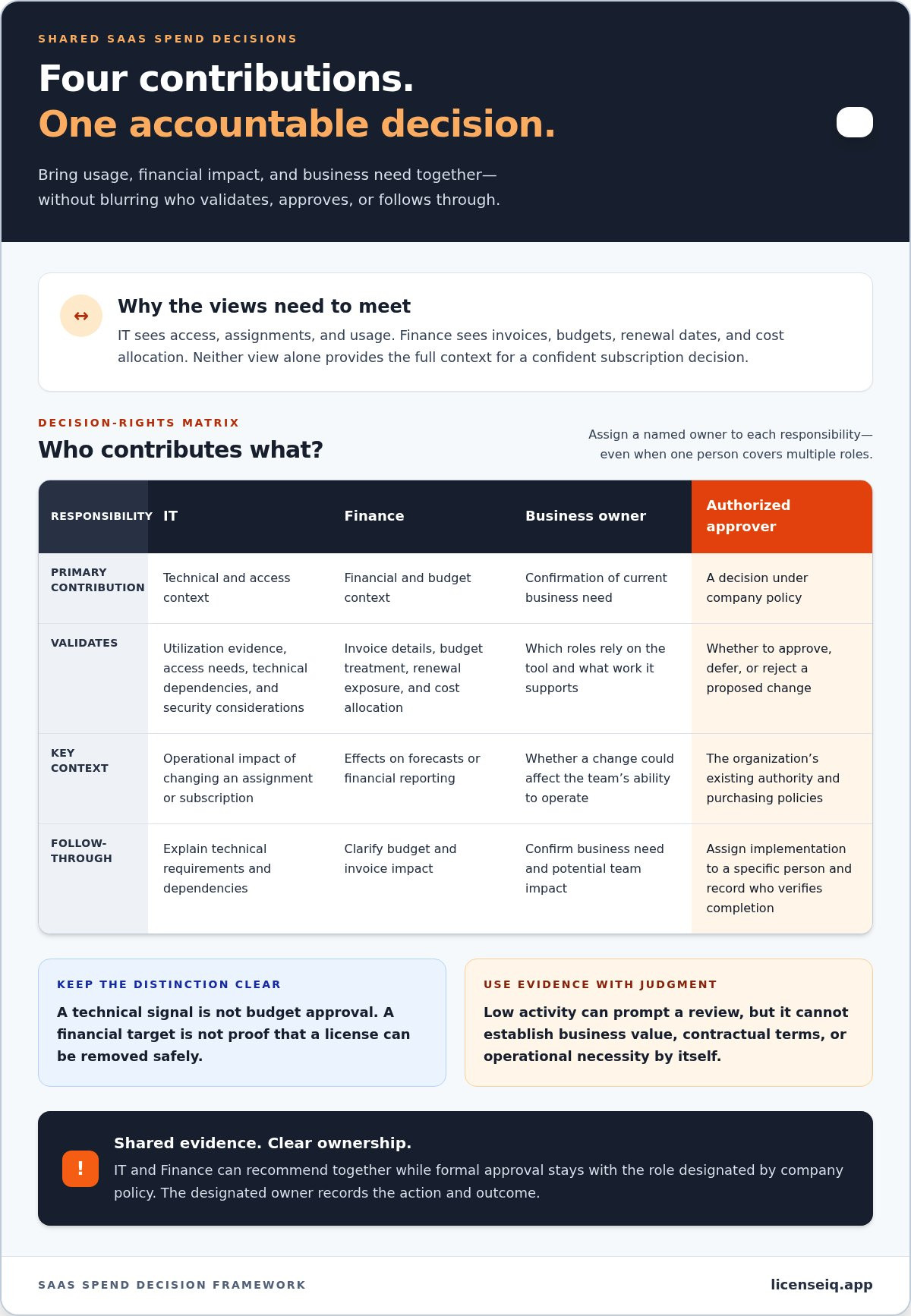
Use a role matrix to separate evidence gathering from approval and execution. Assign a named owner to each responsibility, even when one person covers multiple roles:
- IT owns technical validation: Confirm utilization evidence, user access needs, technical dependencies, and security considerations. Identify the operational impact of changing an assignment or subscription.
- Finance owns financial validation: Reconcile invoice details, budget treatment, renewal exposure, and cost allocation. Explain how a proposed change affects forecasts or financial reporting.
- Business owners own need confirmation: Verify which roles rely on the tool, what work it supports, and whether a change would affect a team’s ability to operate.
- The authorized approver owns the decision: Approve, defer, or reject a change under the organization’s policies. Assign implementation to a specific person and record who will verify completion.
This split avoids two common errors: treating a technical signal as budget approval, or treating a financial target as proof that a license can be removed safely. IT and Finance can recommend together while formal approval remains with the role designated by company policy.
How to resolve conflicting usage and budget evidence
When records disagree, separate the questions instead of collapsing them into a single “keep or cut” debate. Check observed activity, business value, contract terms, and operational necessity. For example, a license with little recorded activity may still support a role with intermittent responsibilities. The business owner can clarify the need, IT can explain the access evidence, and Finance can confirm the renewal and cost context.
If the teams still disagree, use a defined escalation path. Route the case to the budget owner, technology leader, or other approver named in the organization’s policy. Until a decision is made, document the open question rather than presenting a recommendation as an approved action.
Record the evidence reviewed, the decision owner, the rationale, the action owner, and the next review date. This gives the teams a clear decision trail and makes follow-up concrete. For Microsoft 365 license reviews, LicenseIQ’s Microsoft 365 license evidence can give IT and Finance a shared reference through utilization health scores and recommendations. Its free one-time scan costs $0 and requires no credit-card information. The tenant connection is read-only, and LicenseIQ never modifies, deletes, or creates anything in the tenant.
Compare SaaS Spend Control Methods by Evidence, Effort, and Accountability
The right review method depends on the size and complexity of the subscription portfolio, the evidence teams need, and how reliably they can assign follow-up. A spreadsheet can work when the scope is limited and ownership is clear. As records grow or reviews become harder to repeat, a specialized platform may provide more structured evidence. No method makes business judgments or guarantees savings on its own.
Compare each option against the same criteria: the evidence it brings together, the coordination it requires, and the review situation it supports.
| Method | Evidence available | Coordination effort | Suitable use case |
|---|---|---|---|
| Spreadsheet | Manually entered subscription, invoice, owner, and review details. Freshness depends on updates from each source. | People collect, reconcile, and maintain records. Ownership can become unclear without named editors and action owners. | A small, stable portfolio with a documented process and manageable data volume. |
| Periodic manual review | Evidence gathered for a review, such as invoices, renewal records, and available usage exports. | Teams coordinate for each review, reconcile different records, and track actions afterward. | Organizations that can assign reviewers and keep review dates and decisions consistent. |
| Purpose-built platform | Structured findings based on the platform’s defined data sources and scope. Evidence depth varies by tool. | Can organize findings for review, but teams still validate context, approve decisions, and follow through. | Recurring reviews where standardized evidence and repeatable handling of exceptions are useful. |
When a spreadsheet or manual review is enough
A documented spreadsheet review may be sufficient when subscriptions are few, stable, and tied to known owners. Keep the record useful by noting the evidence source, collection date, reviewer, decision, and next review date. This helps prevent an assumption from being mistaken for a current fact.
Watch for stale exports, missing owners, and actions that remain open after a meeting. These are process risks, not proof that a spreadsheet has failed. If teams repeatedly rebuild the same evidence or struggle to trace decisions, the coordination effort may justify a more structured method.
When specialized SaaS or license intelligence helps
Tool scope matters. Broad SaaS management platforms address oversight across multiple software subscriptions, while a Microsoft 365 license scanner focuses on utilization in that tenant. LicenseIQ provides Microsoft 365 license-utilization health scores, AI-powered recommendations, and downloadable reports. Its free one-time scan costs $0 and requires no credit-card information. The connection is read-only; LicenseIQ never modifies, deletes, or creates anything in the tenant.
Use focused license evidence for Microsoft 365 reviews, not as a proxy for all SaaS subscriptions or cloud infrastructure costs. For a deeper look at the Microsoft 365 review approach, see this guide to Microsoft 365 license optimization. Strong it and finance collaboration for saas spend depends on matching the method to the evidence needed, then keeping human ownership of every decision.
How to Build a Repeatable IT and Finance SaaS Spend Review
A useful review doesn’t need a complex committee or a new process for every subscription. It needs a shared evidence pack, a clear decision sequence, and a record of what happened next. Set the review cadence to fit your organization’s renewal calendar, portfolio changes, and available capacity. The right frequency is one your teams can sustain.
Prepare a shared review pack before the meeting
Bring together available subscription records, license assignments, utilization evidence, invoices, and renewal dates. Label each item with its source and collection date so participants can distinguish current information from older exports. Prioritize exceptions, such as unclear ownership, mismatched records, or a renewal requiring a decision. The meeting can then focus on cases that need judgment rather than reviewing every subscription equally.
Use a consistent review-to-action workflow
Keep the process lightweight and repeatable. Move each flagged item through the same sequence, and record the outcome before moving on:
- Gather records: Collect subscription, assignment, usage, invoice, and renewal information available for the review.
- Reconcile evidence: Match records where possible, note gaps, and distinguish verified facts from assumptions.
- Prioritize exceptions: Surface items with a pending renewal, unclear owner, or evidence that calls for further review.
- Decide: Review technical, business, and budget context, then route the decision to the appropriate approver.
- Assign actions: Name an owner, document approval status, and note the next step and target review point.
- Review outcomes: Check whether the action was completed and assess its financial and operational effects.
This sequence makes it and finance collaboration for saas spend practical: participants know what evidence to bring, how an exception becomes a decision, and who follows through.
Turn review decisions into accountable follow-up
Maintain a decision log with the subscription or license, evidence sources and dates, renewal date, decision owner, approval status, agreed action, and next review point. Track operational impact alongside financial outcomes. A change may affect access, workflow, or service continuity, so a financial result alone doesn’t show whether the action was appropriate.
A useful review metric connects the evidence considered, the decision made, and the follow-up completed. For example, track whether an agreed license change was implemented and whether its expected financial effect appeared in the relevant records. Choose indicators that reflect your organization’s goals, then revisit them in the next review.
For guidance on Microsoft 365 changes, see reducing M365 subscription costs. To assess Microsoft 365 license evidence, start a LicenseIQ scan. The free one-time scan costs $0, requires no credit-card information, and uses a read-only connection. LicenseIQ never modifies, deletes, or creates anything in the tenant.
Use Microsoft 365 License Evidence to Put Joint Spend Control Into Practice
Microsoft 365 gives IT and Finance a practical place to apply a shared review process. IT can assess license utilization and access evidence. Finance can consider dollar-value recommendations alongside invoices, budgets, renewal exposure, and internal cost-allocation context. This grounds the review in a specific subscription environment rather than treating one tool as a proxy for the full SaaS portfolio.
LicenseIQ scans Microsoft 365 tenants and provides a Health Score from 0 to 100, license-utilization findings, AI-powered recommendations, and downloadable reports. Both teams can use the output as a common starting point: IT examines the license evidence, while Finance evaluates the financial implications. Recommendations support review; they don’t replace Finance approval or a business owner’s confirmation that a license still meets a need.
What LicenseIQ can contribute to an IT-Finance review
Use the report to identify findings that merit discussion, then assess each one in context. A dollar-value recommendation can help Finance frame the potential budget impact, while IT reviews access and technical requirements. If the evidence points to a possible change, the relevant business owner can explain whether the license supports a current role or workflow. This turns a scanner result into an informed decision, not an automatic change or a promise of savings.
LicenseIQ focuses on Microsoft 365 licenses. It isn’t a general-purpose tool for every SaaS subscription, Google Workspace, or cloud infrastructure costs. Keep other spend categories in their appropriate review processes so the evidence stays within scope.
How to review access, data handling, and scan findings
The Microsoft 365 tenant connection is read-only and uses the Microsoft Graph API permissions Directory.Read.All, Reports.Read.All, and Organization.Read.All. LicenseIQ never modifies, deletes, or creates anything in the tenant. Emails, files, and Teams messages are never accessed, and customer data never leaves Microsoft’s cloud. AI analysis does not use customer data for training.
For a joint review, IT can walk Finance through the license-utilization findings and flag technical context that affects interpretation. Finance can compare dollar-value recommendations with budget and renewal information. Together, they can accept a recommendation, investigate further, or leave the license unchanged, then record the rationale and follow-up owner. This makes it and finance collaboration for saas spend evidence-led while keeping decision rights with the appropriate people.
The free one-time scan costs $0 and requires no credit-card information. Start a free Microsoft 365 scan to give IT and Finance a shared evidence source for their license review.
Make Your Next Spend Review More Decisive
Put the partnership into practice with one focused review. Choose a set of subscription decisions, agree on the evidence each team will bring, and record who approves and follows through. Use questions or disagreements from that review to refine the process before expanding it. This gives it and finance collaboration for saas spend a practical next step: a consistent decision process that improves as your organization learns.
For a Microsoft 365 license review, LicenseIQ’s AI-powered recommendations and downloadable reports give IT and Finance a shared evidence source. The tenant connection is read-only, and LicenseIQ never modifies, deletes, or creates anything in the tenant. Its free one-time scan costs $0 and requires no credit-card information.
Start your free Microsoft 365 scan for $0, with no credit card required, then use the findings to shape a clear, accountable review. A more confident process starts with one well-supported decision.
Frequently Asked Questions
What should IT and Finance review together when managing SaaS spend?
Review the subscription record alongside evidence that explains its use and financial impact. For a department’s collaboration software, compare the invoice and renewal terms with assigned accounts, available utilization data, the budget owner, and the team’s current requirements. This gives IT and Finance a basis for resolving mismatches, such as a billed subscription with no confirmed internal owner. Strong it and finance collaboration for saas spend turns those discrepancies into questions with assigned follow-up.
Who should own SaaS renewals: IT, Finance, or the business owner?
The organization should name one accountable renewal owner, while involving IT, Finance, and the business owner in their areas of expertise. IT can assess technical fit and access implications; Finance can track the commitment, budget, and renewal timing; the business owner can confirm the tool still supports the team’s work. The authorized approver should follow company policy. A shared calendar or renewal register helps prevent deadlines from depending on one person’s inbox.
How can IT and Finance measure whether SaaS cost-control decisions are working?
Compare the expected result with what happened after the approved action. Track whether the change was completed, whether the relevant invoice or budget record reflects the adjustment, and whether teams experienced an operational impact. For example, after changing a license assignment, confirm that the intended access remains available and review the next relevant billing information. Use the same measures across reviews so teams can distinguish completed actions from recommendations that are still pending.
Can usage data alone show whether a SaaS license is unnecessary?
No. Usage data can identify a license for investigation, but it doesn’t reveal every business requirement. A person may use a tool intermittently, need access for a specific responsibility, or depend on it during a process that isn’t visible in the activity record. Before changing access, confirm the role’s needs with the business owner and ask IT to assess technical implications. Treat low activity as a signal to validate, not as automatic proof that a license is unnecessary.
Is Microsoft 365 license optimization the same as cloud cost management?
No. Microsoft 365 license optimization examines subscription licenses and utilization within a Microsoft 365 tenant. Cloud infrastructure cost management focuses on resources such as computing, storage, or network consumption. The evidence and review questions differ: a license review may examine assigned seats, while infrastructure analysis may examine resource consumption. Keep the scopes distinct so a Microsoft 365 license report isn’t treated as a complete view of SaaS subscriptions or cloud infrastructure costs.
Is LicenseIQ safe to connect to a Microsoft 365 tenant?
LicenseIQ uses a read-only connection with the Graph API permissions Directory.Read.All, Reports.Read.All, and Organization.Read.All. It never modifies, deletes, or creates anything in the tenant. Emails, files, and Teams messages are never accessed, and customer data never leaves Microsoft’s cloud. AI analysis does not use customer data for training. These controls define what the scan can access and do, and your organization should follow its own approval process for tenant connections.
Does the LicenseIQ free scan require a credit card?
No. The free one-time Microsoft 365 scan costs $0 and requires no credit-card information. It includes a full tenant scan, a Health Score, the top 3 recommendations, and an AI scan summary. The scan is read-only and doesn’t make changes to the tenant. IT and Finance can use its findings as input for their review, then apply organizational context and approval policies before taking any action.


