

What if your next Microsoft 365 license review ended with clear decisions, named owners, and documented follow-through instead of another spreadsheet to revisit? A microsoft 365 license governance framework makes that possible by treating license oversight as an ongoing decision process, not a one-time audit.
When IT, finance, HR, and department leaders share responsibility for licensing, it can be unclear who owns the final call. Manual reviews can leave evidence out of date, while policies without controls or a regular cadence rarely shape day-to-day decisions. The result is limited visibility into whether licenses still match employees’ roles, usage, and business needs.
This guide explains how to build a repeatable framework with defined decision rights, evidence-based reviews, documented approvals, and clear escalation paths. You’ll learn how to set a manageable review cadence and connect license utilization with financial visibility and changing business requirements. The goal is practical oversight: current evidence, accountable decisions, and a process your teams can sustain.
Key Takeaways
- Build a microsoft 365 license governance framework around clear decision rights, evidence, approvals, and documented exceptions.
- Define which tenants, license groups, users, and decisions are in scope before setting governance policies.
- Separate recommendations from approvals and license changes, then assign each action to an accountable role.
- Use a baseline, policy, ownership, pilot, and recurring review to put the framework into practice.
- Track review completion, open exceptions, decision age, and evidence freshness. LicenseIQ’s free one-time scan costs $0 and requires no credit-card information. Its connection is read-only and never modifies, deletes, or creates anything in a tenant.
Why a Microsoft 365 license governance framework needs clear ownership
A license decision can affect department budgets, user access, and service delivery. Yet responsibility often crosses IT, finance, HR, and business teams, leaving no clear owner for the final call. IT may spot an underused license, finance may need to assess the budget impact, and a department leader may know whether the user still needs the associated tools. Without defined decision rights, recommendations stall or changes happen without the right context.
A microsoft 365 license governance framework is the operating model that defines the scope, decision rights, assignment principles, review triggers, records, and outcome measures for license decisions. It connects evidence to accountable approvals and repeatable review routines. A standalone policy says what should happen; the framework also explains who acts, what evidence they use, how exceptions are handled, and how decisions are recorded.
Keep governance distinct from related activities. License administration carries out approved assignments and changes. A one-time audit provides a snapshot but doesn’t establish who owns the next review. Broader Microsoft 365 security governance addresses areas such as access, information protection, and collaboration controls. These disciplines can inform license decisions, but the framework focuses on whether license allocation still fits business roles and needs. For context on the platform’s components and evolution, see this Microsoft 365 overview.
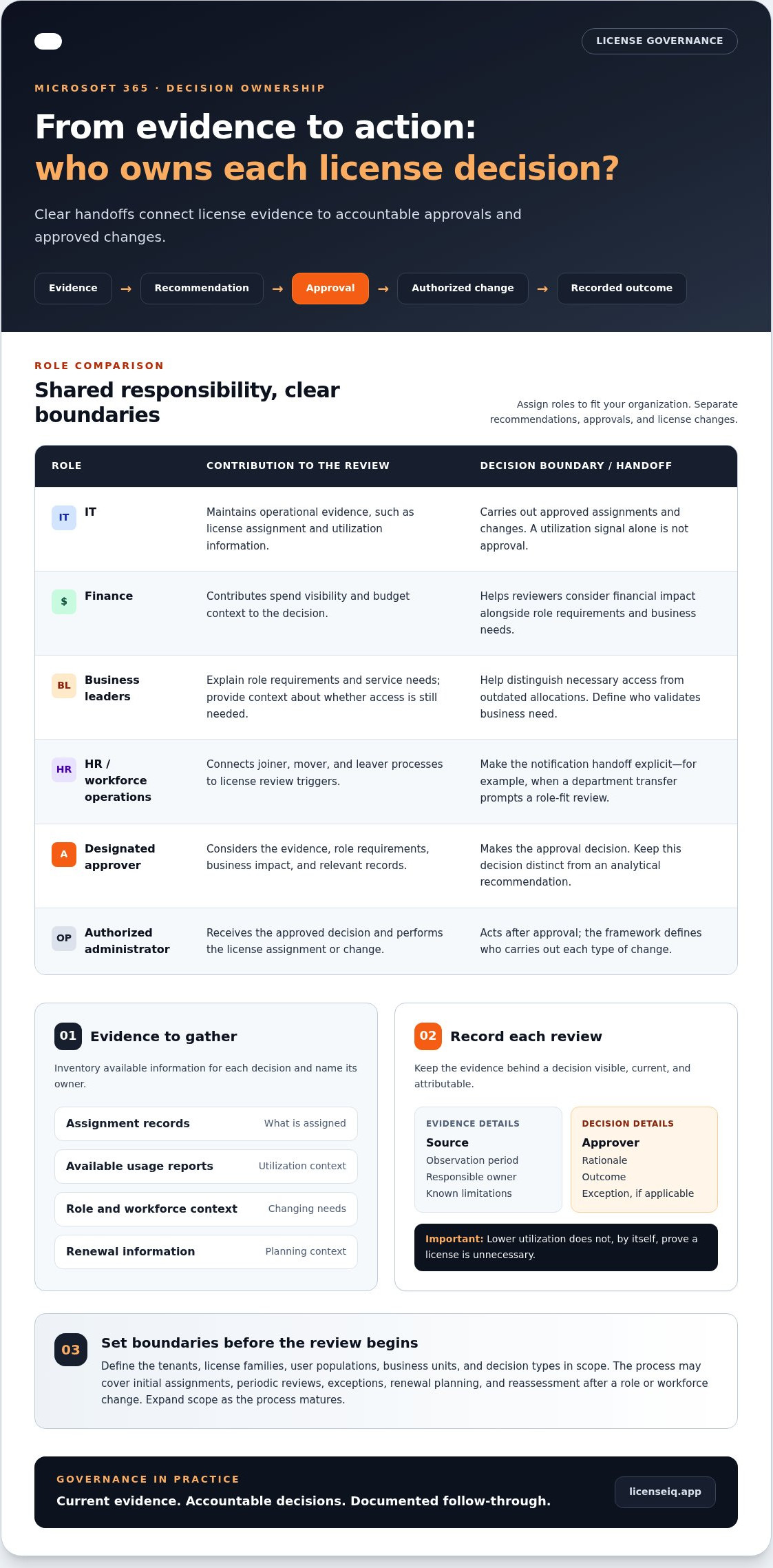
A framework guides decisions; it doesn’t automatically authorize every recommended change. A utilization report can flag a possible mismatch, but a designated approver should consider role requirements, business impact, and relevant records before an authorized administrator makes a change. This separation prevents an analytical signal from being mistaken for approval.
What belongs in a Microsoft 365 license governance framework?
Start by defining which tenants, license families, user populations, business units, and decision types are covered. Then set principles such as role alignment, documented exceptions, reducing waste, and accountable approval. Specify review triggers, including workforce changes and scheduled checks. For each decision, retain the evidence, approver, rationale, and outcome. Finally, measure whether reviews happen on time and exceptions are resolved.
Who needs to participate in license governance?
Assign roles to match your organization. IT commonly maintains operational evidence, such as assignment and utilization information, and carries out approved changes. Finance contributes spend visibility and budget context. Business leaders explain role requirements and service needs, helping reviewers distinguish necessary access from outdated allocations.
HR or workforce operations can connect joiner, mover, and leaver processes to license review triggers. For example, a department transfer can prompt a review of whether the employee’s current license still fits the new role. Make the handoff explicit: who notifies IT, who validates the business need, and who approves an exception? Clear handoffs turn shared responsibility into accountability.
Set the scope, principles, and evidence for license governance
A framework works best when teams know which decisions it covers and what information supports them. Start with a manageable scope, then make the evidence standard explicit. This helps prevent a utilization signal from being mistaken for a complete business case and gives reviewers a consistent basis for action.
Define the scope and operating principles
For the first governance cycle, identify the Microsoft 365 tenants, license families, user populations, and business units in scope. Specify which decisions the process covers: initial assignment, periodic review, exceptions, renewal planning, and reassessment after a role or workforce change. Expand the scope as the process matures so teams know what is included.
Keep license governance distinct from deeper security, retention, collaboration, and data-protection policies. Those areas may inform a license decision, but they have separate controls and owners. Set practical principles to guide decisions across the defined scope:
- Role alignment: Match license capabilities to documented job and service requirements.
- Least waste: Review whether assigned licenses remain appropriate, without assuming lower utilization proves a license is unnecessary.
- Documented exceptions: Record the business reason, approver, and review point for deviations from standard assignment rules.
- Accountable approvals: Identify who recommends, approves, and carries out each type of change.
Principles should guide the process, not replace it. Translate each one into an operational step, such as recording the evidence reviewed alongside an approval.
Build an evidence standard before setting targets
Inventory the evidence available for each decision and name its owner. Sources can include license assignment records, available usage reports, role context from business leaders, workforce updates, and renewal information. For each item, record its source, observation period, responsible owner, and known limitations. Establish a baseline from these inputs before setting utilization targets or review thresholds.
Separate three things in the review record: what the data shows, what the business owner confirms, and what the policy requires. For example, a report may show limited activity in a particular service during the observed period. A manager can explain whether that service is needed for periodic duties, while policy determines who can approve a reassignment. The report is evidence for discussion, not automatic proof that a license should change.
A read-only evidence source can help establish a current-state baseline without carrying out license changes. LicenseIQ’s free one-time scan costs $0 and requires no credit-card information. Its connection is read-only; it never modifies, deletes, or creates anything in a tenant. Use its utilization insights as an input to your review, then apply your approval process. A Microsoft 365 license utilization scan can help teams start that evidence review.
Assign decision rights, controls, and review cadence
A workable microsoft 365 license governance framework makes each handoff visible. Separate the person who identifies a possible change from the person who approves it and the administrator who implements it. This prevents a report or recommendation from being treated as authorization and gives teams a clear route when evidence is incomplete or business owners disagree.
Map roles to decisions
Name an accountable policy owner to maintain the rules and an operational owner to coordinate evidence, reviews, and records. Then document who recommends, approves, communicates, and executes each decision. A RACI-style model can make those assignments explicit: responsible means doing the work, accountable means owning the outcome, consulted means providing input, and informed means receiving the decision.
- Policy and assignment standards: The policy owner is accountable; IT and finance provide input. Escalate unresolved policy questions to the designated governance group or executive sponsor.
- Evidence preparation: IT is typically responsible for collecting assignment and utilization information. Finance contributes spend context, while business leaders confirm role requirements. Escalate missing or conflicting evidence to the operational owner.
- Assignment or reassignment approval: The authorized business or budget approver decides after reviewing the evidence and stated need. Escalate requests outside policy or budget authority to the designated exception approver.
- Implementation and communication: An authorized administrator carries out an approved change, and the operational owner records and communicates the outcome. Route discrepancies between the approval and requested action back to the approver.
- Exceptions: The exception approver records the rationale, affected users or group, decision date, and expiry or reassessment point. Escalate unresolved exceptions at review to the policy owner.
Keep the decision record compact but complete: request, evidence reviewed, recommendation, approval, implementation status, and follow-up date. This creates an audit trail without blurring approval and administration.
Set a review rhythm and event triggers
Choose a scheduled cycle your teams can sustain. A quarterly review can be a practical starting point, adjusted to the organization’s scale, change rate, and renewal calendar. Record an owner and due date for each cycle. If recurring utilization reports are available, use them as evidence, not as automatic instructions to change assignments.
Don’t rely on the calendar alone. Define triggers that open an additional review between scheduled cycles:
- A contract renewal or material change to renewal plans.
- A joiner, leaver, or transfer that changes a person’s role or service needs.
- A material change to the services a business unit uses or expects to use.
- An exception reaching its expiry or reassessment date.
Track whether each review was completed, when the decision was made, and which exceptions remain open. Set an escalation route for overdue reviews and exceptions, such as notifying the operational owner first and the policy owner if the item remains unresolved. This turns reminders into accountable follow-through.
Implement the framework in five practical steps
Turn policy into a sequence of work products, leaving a record at each step for the next owner. This keeps the microsoft 365 license governance framework manageable and clarifies that analysis informs decisions, while authorized people approve and carry out changes.
- Establish a baseline. Deliverable: a current-state view of assigned licenses and available utilization evidence for the selected scope. The operational owner prepares it using tenant records and reports, noting sources and observation periods. The policy owner or designated sponsor approves the baseline as a starting point, not as authorization to change assignments.
- Set the policy. Deliverable: concise assignment principles, review triggers, exception rules, and measures. The policy owner drafts them with input from IT, finance, and business leaders. Use role requirements and spend context as evidence. The designated governance approver confirms the rules before teams apply them.
- Name the owners. Deliverable: a responsibility map for recommendations, approvals, communication, implementation, and exception review. The operational owner prepares it with relevant team leads, using existing approval routes and administrative responsibilities as evidence. The accountable policy owner approves the assignments and escalation path.
- Pilot the process. Deliverable: a completed review for a defined tenant, user population, or decision category, plus a prioritized decision queue. The operational owner coordinates evidence; business and finance reviewers add context where relevant. The authorized approver reviews proposed actions, and an administrator implements only approved changes. Record exceptions and refine unclear steps before expanding.
- Start recurring reviews. Deliverable: a scheduled cycle, decision log, and governance dashboard. The operational owner tracks review completion, open exceptions, assigned follow-ups, and due dates. Use current evidence for each cycle. The policy owner reviews overdue items and approves process adjustments.
Keep the decision log consistent: record the request, evidence reviewed, recommendation, decision and approver, implementation status, exception rationale if applicable, and next review date. A dashboard can summarize completed reviews, unresolved exceptions, and follow-ups due. These measures expose process gaps without treating a utilization indicator as a predetermined outcome.
Make the first cycle small and specific
Choose a scope with clear ownership, then use existing administrative and approval routines where they fit. For example, a sample policy entry might state: “Review assignments for alignment with documented role needs.” Its record would capture the rationale, evidence source and period, decision, approver, and next review date. The entry defines a review requirement, not an automatic license change.
For an initial baseline, LicenseIQ offers a free one-time scan that costs $0 and requires no credit-card information. Its connection is read-only; it never modifies, deletes, or creates anything in a tenant. Establish a Microsoft 365 license baseline with a free scan and use the resulting evidence as an input to your approval process.
Keep the Microsoft 365 license governance framework measurable and current
A governance process needs regular checks to stay useful. Measure whether reviews happen on schedule, decisions move forward, and evidence still reflects the tenant. Then compare license utilization and financial exposure using verified data. These measures help owners see where attention is needed without treating a metric as permission to change an assignment.
Measure process health and license outcomes
Track a concise set of indicators and assign an owner to update each one. Include:
- Review completion: Which scheduled reviews are complete, overdue, or not yet started?
- Exception status: Does each open exception have an accountable owner, rationale, next step, and reassessment point?
- Decision age: How long have recommendations or requests waited for review or approval?
- Evidence freshness: When was the utilization, assignment, or business-context information last refreshed?
- Utilization and exposure: What do verified tenant records show about assigned licenses, observed use, and associated spend?
Process measures show whether reviews and controls are operating; cost outcomes show how license utilization and financial exposure change over time.
A License Health Score and dollar-value recommendations can help reviewers prioritize questions, but they remain evidence inputs. Pair them with role requirements, current assignment records, and the organization’s approval rules. Record the decision and rationale, including when the evidence supports keeping an assignment unchanged. Don’t promise savings based on a score or recommendation alone.
Refresh the framework as conditions change
Revisit policy when organizational structure, workforce patterns, or Microsoft services change in ways that affect license requirements. The policy owner should assess the impact, consult relevant business and operational owners, and document any approved revision with its rationale and review point. Keep earlier versions or decision records available so teams can understand why the rules changed.
Review the framework itself on a recurring basis, separately from individual assignments. Check whether responsibilities remain accurate, exceptions are being reassessed, and evidence sources still support decisions. If a measure repeatedly exposes delays or stale information, adjust the process owner, evidence handoff, or review trigger rather than simply adding another reminder.
Recurring scans can support this rhythm by supplying current utilization evidence. LicenseIQ connects to Microsoft 365 through a read-only connection and never modifies, deletes, or creates anything in a tenant. It requests only the Microsoft Graph permissions Directory.Read.All, Reports.Read.All, and Organization.Read.All. Weekly or daily automated scans are available on paid plans. The scan does not access emails, files, or Teams messages, and customer data stays within Microsoft’s cloud. Use the resulting score and recommendations to inform accountable owners, not to replace policy judgment or approval.
The free one-time scan costs $0 and requires no credit-card information. Start a free Microsoft 365 license scan.
Make your next review the start of lasting oversight
Put the framework into motion with one concrete commitment: select the first review date, name the owner responsible for preparing evidence, and make the approval route visible to participating teams. That first cycle will show where the process needs clarification before it becomes routine. Focus on decisions your organization can explain, revisit, and improve.
A microsoft 365 license governance framework stays valuable when teams use evidence to start informed discussions, not to bypass judgment. LicenseIQ supports those discussions with a License Health Score, AI-powered recommendations, and downloadable reports. Its connection is read-only and never modifies, deletes, or creates anything in your tenant. Your policy owners and approvers remain responsible for decisions.
Establish a current baseline with a free one-time scan. It costs $0 and requires no credit-card information. Start your free Microsoft 365 license scan, then use the evidence to give your next review a clear starting point. Consistent, accountable oversight begins with one well-owned decision.
Frequently Asked Questions
What is a Microsoft 365 license governance framework?
A microsoft 365 license governance framework is a repeatable operating model for deciding how licenses are assigned, reviewed, and reassessed. It gives teams a shared reference when responsibilities or business needs change. For example, a new department can use the framework to identify which roles require review, who evaluates the request, and where the resulting decision is recorded. That makes future decisions easier to trace and apply consistently.
How is license governance different from Microsoft 365 license management?
License management handles operational work, such as assigning a license after approval. Governance sets the decision rules and controls around that work. A usage report may prompt a review, but the governance process determines who checks the role requirement, who approves a change, and what evidence is retained. The administrator then acts through authorized processes. This separation helps prevent an automated recommendation or informal request from becoming an unapproved tenant change.
Who should own Microsoft 365 license governance?
The organization should name an accountable policy owner and an operational owner, even if some responsibilities sit with the same team. IT can prepare tenant information, finance can assess spend implications, and department leaders can confirm the work users need to do. HR or workforce operations can flag relevant role changes. A responsibility map should also name who communicates a decision, so affected teams understand what was approved and when it takes effect.
What evidence should be reviewed before changing a Microsoft 365 license?
Review assignment records and available usage information alongside the employee’s current role, business requirements, and relevant renewal details. Low activity in one service, for instance, may reflect seasonal work rather than an unnecessary assignment. Record the report source, observation period, and any gaps, then ask the business owner to explain the work context. This creates a stronger decision record than relying on a single dashboard signal or an assumption about how a role operates.
How often should a Microsoft 365 license governance framework be reviewed?
Set a recurring governance review that fits your organization, and add reviews when renewals, role changes, or service changes affect license needs. LicenseIQ recommends scanning at least monthly to keep utilization evidence current. Pro and Business plans can automate weekly or daily scans. A scan schedule and an approval schedule serve different purposes: fresh information can inform a review, but designated decision-makers still determine whether action is appropriate.
Is LicenseIQ safe to use for Microsoft 365 license governance?
LicenseIQ uses a read-only connection and never modifies, deletes, or creates anything in a tenant. It requests Directory.Read.All, Reports.Read.All, and Organization.Read.All permissions. It doesn’t access emails, files, or Teams messages, and customer data remains within Microsoft’s cloud. A Global Administrator or a user with Reports Reader and Directory Reader roles can authorize OAuth consent. The resulting scan can inform a governance review, while the organization retains control of decisions.
Which Microsoft 365 plans does LicenseIQ support?
LicenseIQ supports Business Basic, Business Standard, Business Premium, E1, E3, E5, F1, and F3, including combinations of these plans. This lets an organization include different license groups in its review rather than treating the tenant as one uniform population. Document which plans are in scope and compare evidence within relevant groups. Interpret utilization indicators alongside the role and service requirements of the affected users.
Can an MSP apply license governance across multiple Microsoft 365 tenants?
Yes. LicenseIQ’s Business plan includes a multi-tenant dashboard for MSP use. MSPs can use a consistent review structure across tenants while maintaining separate records for each customer’s policies, exceptions, approvers, and outcomes. For example, an MSP may prepare evidence centrally, while the customer retains approval authority for changes. Define that boundary in advance so shared reporting improves visibility without combining decision ownership across organizations.


