

61% of procurement leaders say their software data is disorganized, inaccurate, or needs major improvement, according to Gartner’s 2026 Market Guide for Software Asset Management Tools. That makes it harder to reconcile assigned licenses with actual user activity. So, what is a software license health score? It’s a summary that turns license and usage data into a signal for where to investigate potential waste. It is not a universal standard or a decision-maker on its own.
A single score can hide important details if you don’t know what data feeds it or what its limits are. To use it well, look beyond the number: understand the components, check the evidence behind each finding, and connect the results to a consistent review process. This guide explains what a score may measure, how to interpret it responsibly, and how to use findings to inform Microsoft 365 licensing decisions. LicenseIQ, for example, provides a 0-100 Microsoft 365 License Health Score alongside AI-powered recommendations and downloadable reports. Its free one-time scan costs $0 and requires no credit-card information. The connection is read-only: LicenseIQ never modifies, deletes, or creates anything in your tenant.
Key Takeaways
- Learn what is a software license health score and which signals, such as account status and usage, may shape it.
- Assess the score’s data scope, timing, and assumptions before treating it as evidence of waste.
- Use a practical review sequence to validate findings, assign ownership, and document licensing decisions.
- Separate recommendations from license changes so an authorized administrator can evaluate and approve any action.
What Is a Software License Health Score, and What Problem Does It Solve?
What is a software license health score? It’s a summary of how closely an organization’s software license assignments appear to match its observed needs. It can bring together license assignments, account details, available usage signals, and subscription spend to help teams spot items for review. A software license defines the rights to use software, while a health score evaluates how those rights are allocated in practice. For background, see this overview of a software license.
The underlying problem is misalignment. A license might remain assigned after an employee leaves or changes roles. Another user might have a plan with capabilities they rarely use, while someone else needs access that isn’t reflected in current assignments. These patterns make it harder to tell whether subscription spend still matches business needs. A score helps direct attention to potential mismatches, but it doesn’t identify the cause by itself or decide what should change.
Keep the term in context. A software license health score is not an industry-wide standard with one required formula or threshold. It also doesn’t measure application-code quality, such as resilience or maintainability. Nor does it refer to public-health inspection software used to manage facility inspections and records. Here, “health” describes the apparent fit between software licenses and organizational use.
What does a software license health score measure?
Organizations can compare assigned licenses with account information and available usage signals. Inputs might include whether an account is active, whether a license is assigned, and what activity the system can observe. The exact data and weighting depend on the tool or internal method. One score may emphasize utilization; another may include account status or assignment patterns. There is no universal recipe.
Read the score as a summary, not as the underlying evidence. The findings show which assignments or signals influenced the result, while recommendations can translate those findings into possible review steps. Before acting, check what data the score covers, when it was collected, and how the method handles missing or limited information. For example, an account flagged for low activity deserves a closer look at the observation period and the user’s role before anyone concludes that a license is unnecessary.
Why can a license health score matter to business leaders?
A clear summary gives IT, finance, and procurement a common starting point. Instead of debating a general impression of license waste, teams can focus on specific questions: Is the account still active? Does the assigned plan fit the user’s current role? Does the activity window capture the work they do? These checks help prioritize investigation without treating a score as proof of savings.
That shared view also makes follow-up easier to manage. Assign an owner to validate each finding, record the business context, and decide whether further review is needed. Leaders looking for a wider view of Microsoft 365 cost and assignments can explore Microsoft 365 license optimization. The score is a useful entry point, but sound decisions still depend on supporting evidence and the people responsible for licensing.
How Is a Software License Health Score Built and Interpreted?
A license health score combines selected signals into a compact indicator. Its value depends on the evidence behind it, not just the number displayed. Common inputs include which licenses are assigned, whether accounts are active or disabled, and what usage information is available. Each signal can help identify an assignment for review, but none automatically proves that a license is unnecessary.
Which data points can inform license health?
Start with the assignment record, then compare it with account status and relevant activity signals. A disabled account with an assigned license, for example, may warrant investigation. So might a user whose observed activity appears limited. But those signals need context: the account might be part of a planned change, and a short observation window might miss occasional or seasonal work.
Plan entitlements matter, too. A user may show little activity in a particular signal and still need specific plan capabilities for their role. A fair review considers what the plan includes, what the system can observe, and how the employee’s responsibilities shape the requirement. Usage data is evidence to assess, not a complete account of business need.
Why do scoring formulas and thresholds vary?
Tools and internal programs can use different inputs, weights, scales, and labels. One method might give more weight to licenses assigned to inactive accounts; another might emphasize usage signals. A score of 42 out of 100 therefore has no universal meaning without its definition and supporting findings. Don’t assume that a particular score maps to a specific action or amount of waste.
Keep different types of scores separate. CAST Highlight’s software health scoring evaluates application-code characteristics such as resiliency, agility, and elegance. Its thresholds are not a standard for license utilization. Applying code-health labels to license scores can create false confidence and lead teams to compare unlike measures.
For a sound interpretation, examine the score alongside the details that produced it:
- Inputs: Identify which assignment, account, and usage signals were included.
- Coverage: Check the relevant time period and whether any data may be missing.
- Method: Understand how the inputs are weighted and what the scale represents.
- Findings: Review the specific accounts or assignments flagged for attention.
The score provides a headline; findings provide the trail behind it. Recommendations can explain why an item was flagged and suggest a next question, but they don’t replace validation by people who understand the account and business context.
As a Microsoft 365 example, LicenseIQ displays a 0-100 License Health Score. One example score is 42 out of 100. Read the score with its supporting recommendations, not as an automatic instruction to remove licenses. LicenseIQ’s free one-time scan costs $0 and requires no credit-card information. Its access is read-only, and it never modifies, deletes, or creates anything in the tenant. Teams can use the Microsoft 365 License Health Score to see a score presented alongside supporting context.
Does a High or Low License Health Score Tell the Whole Story?
A high or low result is a signal to investigate, not a verdict. If you’re asking what is a software license health score, remember that it summarizes selected evidence using a particular method. It doesn’t prove that licenses are wasted, establish the value of a potential change, or authorize an administrator to make one. A score can direct attention, but the decision depends on the people and circumstances behind the data.
Interpretation also depends on what the tool can see and when the information was collected. A limited activity window may miss less frequent work. An account record may lag behind a role change. Assumptions about which usage signals matter can also affect the score. Without understanding that scope, treating the number as a complete financial conclusion can lead teams to act on an incomplete picture.
What can make a score incomplete or misleading?
Work patterns aren’t always steady. An employee may be on temporary leave, supporting a seasonal project, or moving into a new role. Recent activity may not reflect their ongoing access needs. A delayed or missing signal can also make an account appear less active than it is. Low activity is a reason to investigate, not proof that a license is unnecessary.
Check the relevant time period and account details, then add business context. A manager may know that someone needs a specific capability for an upcoming project, even if recent activity appears limited. If the evidence and context don’t align, pause the review and resolve the discrepancy before proposing a change.
How should teams use score bands responsibly?
Some tools group scores into bands or labels. Use them to prioritize review only if the tool explains what each band means and how it is calculated. Don’t transfer thresholds from another product or another type of score. A band designed for software-code quality, for example, doesn’t establish whether a license is well matched to a user.
For each flagged item, compare the recommendation with account-level evidence and the user’s business context. Then record the outcome and assign an owner. This keeps an opportunity to investigate distinct from an approved administrative decision.
- Review the evidence: Note the account, assignment, activity signal, and period represented.
- Validate context: Check for leave, role changes, seasonal work, or other reasons activity may be atypical.
- Document the decision: Record who reviewed the finding, the business owner’s input, and whether any action was approved.
Keep analysis separate from implementation. A finding or recommendation can inform a review, but an authorized administrator should make any approved change through the appropriate process. For example, LicenseIQ’s free one-time scan costs $0 and requires no credit-card information. Its access is read-only, and LicenseIQ never modifies, deletes, or creates anything in the tenant. The score can focus the discussion; accountable review keeps the decision grounded.
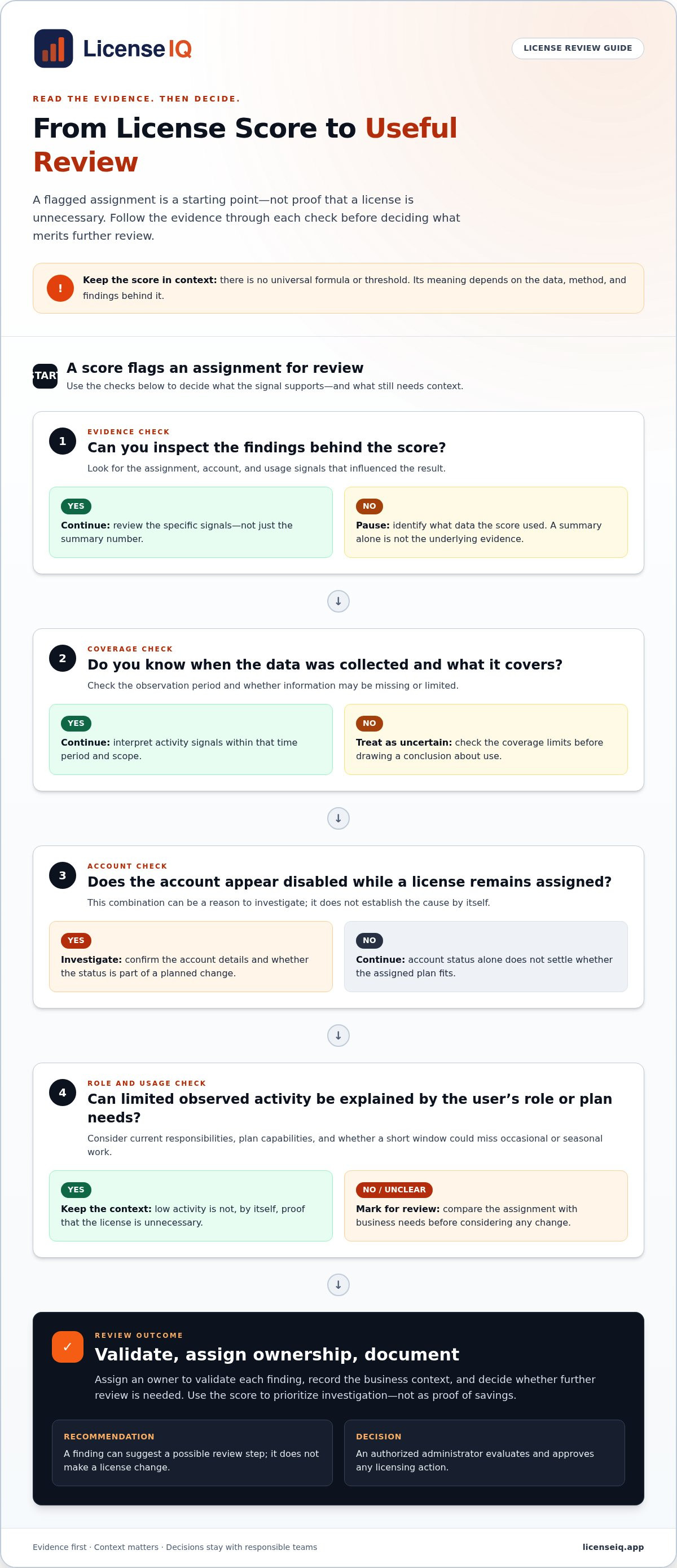
How Can Teams Turn a License Health Score Into a Useful Review?
A score becomes useful when it starts a repeatable review, not when it triggers an automatic license change. In practical terms, treat a software license health score as a prompt to inspect evidence, confirm business context, and assign follow-up. The goal is a documented decision, whether a finding leads to a change or the license remains in place.
Use a consistent sequence so IT, finance, and business owners can see how a finding was handled:
- Inspect the score: Note the overall result, the data scope, and the period covered.
- Open the findings: Identify the accounts, assignments, and signals contributing to each flagged item.
- Validate context: Confirm the user’s role requirements and have the relevant business owner review the evidence.
- Assign an owner: Give a specific person responsibility for resolving questions or documenting why no action is needed.
- Record the decision: Capture the rationale, approver, any authorized administrative action, and when the item should be revisited.
This process creates an audit trail that distinguishes an opportunity from an approved decision. A recommendation can guide investigation, but it isn’t authorization to remove or change a license. Keep analysis separate from implementation. If a change is approved, an authorized administrator should carry it out through the organization’s established process.
What should an organization review after seeing its score?
Start at the account level. Check which assignment contributed to the finding, whether the account status is current, and what usage evidence is available. Then compare the signal with the user’s role and the business owner’s input. Limited observed activity, for example, may have a valid explanation. Resolve that context before treating the assignment as a candidate for change.
Document the finding, reviewer, business-owner decision, and next review date. A concise record makes follow-up easier and helps teams apply the same review standard across accounts. For a broader view of how license assignment and oversight fit across the lifecycle, use the organization’s Microsoft 365 license management lifecycle guidance alongside this review.
How often should teams revisit license health?
Periodic reviews help teams spot changes in assignments and observed usage before outdated records become routine. LicenseIQ recommends running scans at least monthly. Pro and Business plans support automated weekly or daily scans, giving teams options for a more frequent review rhythm. Choose a cadence the team can sustain, and make sure each review has a clear owner and a way to track unresolved findings.
Keep the review focused on validation and follow-up. Teams assessing wider Microsoft 365 costs can connect the findings to their broader cost-optimization process. To establish a recurring view, run a Microsoft 365 license scan with LicenseIQ. Its free one-time scan costs $0 and requires no credit-card information. Access is read-only, and LicenseIQ never modifies, deletes, or creates anything in the tenant.
How LicenseIQ Presents a Microsoft 365 License Health Score
LicenseIQ scans Microsoft 365 tenants and presents findings as a License Health Score from 0 to 100. A full scan takes 5 minutes, and the health-score calculation takes under 60 seconds. The score gives teams a quick summary; recommendations and reports show what sits behind it so reviewers can decide what deserves follow-up.
For readers asking what is a software license health score in a Microsoft 365 setting, LicenseIQ offers a concrete example: one indicator paired with supporting information. Use the score to focus a review, then examine the findings before deciding whether any action is appropriate.
What does a LicenseIQ score come with?
The free one-time scan includes a full tenant scan, the health score, the top 3 recommendations, and an AI scan summary. Recommendations provide context for the summarized score, helping teams see which findings may merit closer review. Downloadable reports make it easier to share results with relevant IT, finance, and business stakeholders.
Treat these materials as inputs to a decision process, not instructions to make a licensing change. Teams can use the score to orient the discussion, review recommendations to understand flagged opportunities, and consult the report when documenting next steps. The business owner and authorized administrator remain central to any decision and action.
How does LicenseIQ protect tenant access?
LicenseIQ connects using read-only Microsoft Graph API permissions: Directory.Read.All, Reports.Read.All, and Organization.Read.All. It never modifies, deletes, or creates anything in the tenant. It doesn’t access emails, files, or Teams messages, and customer data stays in Microsoft’s cloud.
AI analysis does not use customer data to train AI models. Users can disconnect with one click and revoke consent through the Microsoft Entra admin center. These controls help administrators understand the access model and manage the connection as part of their governance process.
To see how the findings apply to a real Microsoft 365 tenant, Get a free one-time scan for $0, with no credit card required.
Make Your Next Licensing Review Evidence-Led
Make license oversight part of how your organization manages change. Assign clear ownership for reviewing findings, capturing business context, and tracking decisions. That turns the question “what is a software license health score” into a practical governance habit: use a clear signal to prompt a review, then let evidence and accountable people guide the decision.
For a concrete Microsoft 365 starting point, LicenseIQ’s free one-time scan costs $0 and requires no credit-card information. It includes a score, the top 3 recommendations, and an AI scan summary. The tenant connection is read-only, and LicenseIQ never modifies, deletes, or creates anything in your tenant.
Get a free one-time Microsoft 365 scan for $0, with no credit card required, then use the findings to set a clear review owner and decide what deserves follow-up. A consistent, evidence-led process helps your team make licensing decisions with greater clarity and confidence.
Frequently Asked Questions
Is a software license health score a standard metric?
No. There’s no universal industry formula, scale, or threshold for a software license health score. Each tool or organization defines which signals count and how they’re combined. Before comparing scores across teams or periods, check whether the data coverage and calculation method are consistent. That helps prevent a change in scoring approach from being mistaken for a change in license utilization.
What does a Microsoft 365 license health score measure?
It summarizes evidence about how Microsoft 365 licenses are assigned and used, based on the information available to the scoring tool. LicenseIQ supports Business Basic, Standard, and Premium, E1, E3, E5, F1, and F3 plans, including combinations. A score can help identify areas for review, but it doesn’t establish each user’s business requirements.
Can a low license health score prove that licenses are being wasted?
No. A low score can point to findings worth checking, but it isn’t proof that a license should be removed. A user may need plan capabilities for a role or upcoming work even if observed activity appears limited. Confirm the account details and business need with the relevant owner, then document the rationale. Only an authorized administrator should make an approved licensing change.
How is a software license health score calculated?
There’s no single calculation that applies to every score. A method may combine license assignments with account status and available usage information, then weight those inputs to produce a result. The specific formula depends on the tool. To interpret a score responsibly, review its definition and supporting findings. For trend comparisons, use results produced with a consistent scope and scoring method.
How often should an organization review its license health score?
LicenseIQ recommends reviewing license health at least monthly. Its Pro and Business plans support automated weekly or daily scans, which can help organizations that want more frequent visibility. Whatever cadence you choose, assign someone to review findings and track unresolved questions. A scan is most useful when the team follows up consistently, rather than collecting results without a clear owner or decision process.
Is LicenseIQ’s Microsoft 365 scan read-only?
Yes. LicenseIQ uses read-only Microsoft Graph API permissions: Directory.Read.All, Reports.Read.All, and Organization.Read.All. It never modifies, deletes, or creates anything in the tenant. It doesn’t access emails, files, or Teams messages, and customer data stays in Microsoft’s cloud. Users can disconnect with one click or revoke consent through the Microsoft Entra admin center.
Does LicenseIQ’s free scan require a credit card?
No. The free one-time scan costs $0 and requires no credit-card information. It includes a full tenant scan, a License Health Score, the top 3 recommendations, and an AI scan summary. These findings can give your team a starting point for a Microsoft 365 license review. They don’t automatically change assignments or replace review by the people responsible for licensing decisions.


