

Plan 2 isn’t automatically the better choice. If your users fit within a 50 GB primary mailbox and don’t need its added retention and compliance controls, paying for more capability may not solve a real business need. This exchange online plan 1 vs plan 2 feature comparison focuses on the operational differences behind the licensing terms, so you can match each plan to actual requirements.
Choosing between the plans can be confusing, especially when older comparisons describe limits that have since changed. This guide compares mailbox capacity, archiving, compliance features, and licensing considerations using current plan details. You’ll see how Plan 1’s 50 GB primary mailbox and archive compare with Plan 2’s 100 GB primary mailbox and expandable archive, and where features such as Litigation Hold and Data Loss Prevention may affect your decision. You’ll also learn how to assess bundled licenses before assigning plans. The goal is to meet mailbox and governance needs without paying for capabilities users don’t require.
Key Takeaways
- Use an exchange online plan 1 vs plan 2 feature comparison to connect licensing differences to user needs, not assumptions about which plan is better.
- Separate required mailbox, retention, and sensitive-data controls from preferences that may not justify a higher-tier assignment.
- Check whether Exchange is licensed standalone or through a Microsoft 365 bundle before reviewing costs and entitlements.
- Apply a five-step review: inventory users, assess usage, identify requirements, compare plan features, and validate assignments.
- Keep assignments visible as needs change. LicenseIQ scans Microsoft 365 licenses and users and surfaces optimization recommendations.
Exchange Online Plan 1 vs. Plan 2: What Actually Changes?
Both plans provide hosted business email, calendars, and contacts. They differ in mailbox and archive capacity, along with the advanced capabilities included with each license. Exchange Online is a cloud-hosted email service. It can be licensed on its own or included in a Microsoft 365 bundle, which may also provide productivity apps and services.
In practical terms, Plan 1 covers core email needs with a smaller mailbox, while Plan 2 adds more capacity and specific retention, data-protection, and voicemail capabilities. Exchange Online is built on Microsoft Exchange technology; the Microsoft Exchange Server Wikipedia article provides background on that underlying platform. The matrix below summarizes the plan entitlements and limits reflected in current comparison information. Microsoft’s service description and the assigned license determine the functionality available in a tenant.
Feature matrix
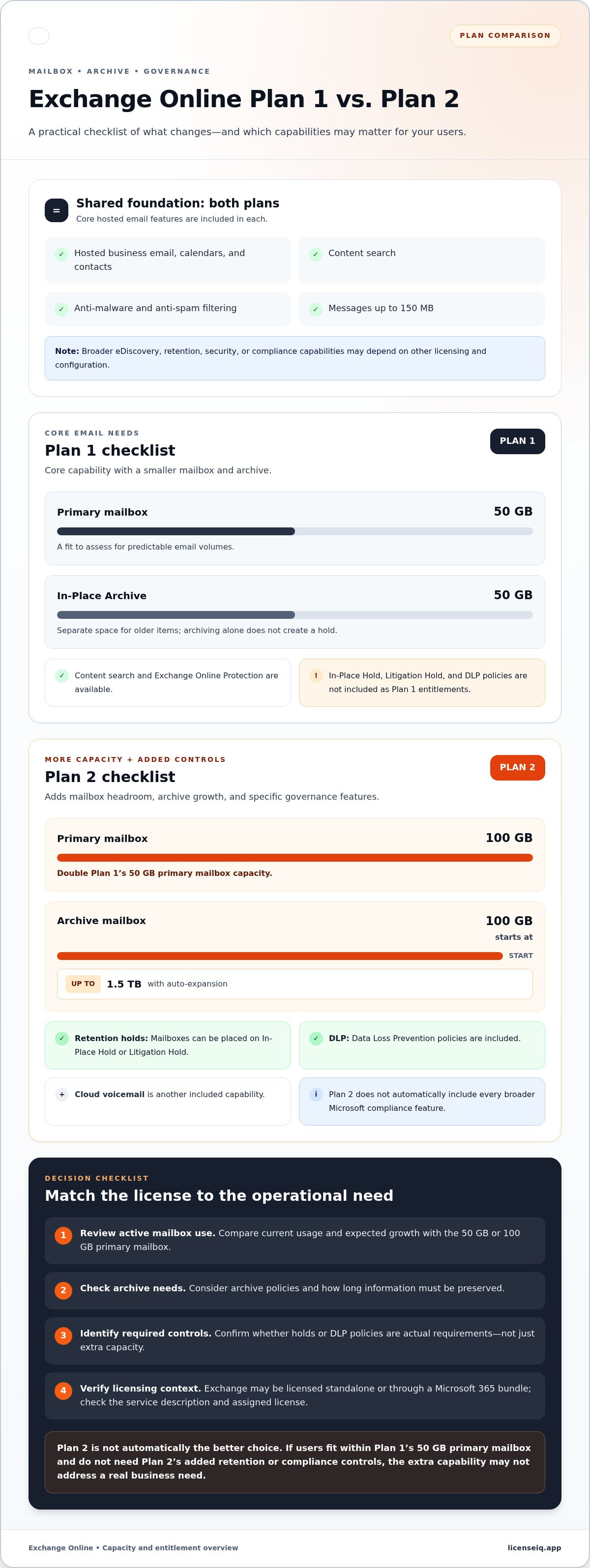
- Primary mailbox: Plan 1, 50 GB included. Plan 2, 100 GB included.
- Archive mailbox: Plan 1, 50 GB included. Plan 2, starts at 100 GB and can auto-expand up to 1.5 TB.
- Retention holds: Plan 1, In-Place Hold and Litigation Hold aren’t included. Plan 2, included.
- Data Loss Prevention: Plan 1, not included as a plan entitlement. Plan 2, DLP policies included.
- Content search: Available in both plans; broader eDiscovery capabilities may depend on other licensing.
- Protection and message size: Both include anti-malware and anti-spam filtering and support messages up to 150 MB.
What does Exchange Online Plan 1 include?
Plan 1 provides the core tools most users need for business email: a hosted mailbox, a calendar for scheduling, and contacts for organizing business details. It includes a 50 GB primary mailbox and a 50 GB In-Place Archive. That capacity can suit users with predictable email volumes who don’t need a larger archive or Plan 2 hold features. Content search and Exchange Online Protection are also available.
What does Exchange Online Plan 2 add?
Plan 2 doubles primary mailbox capacity to 100 GB. Its archive starts at 100 GB and supports auto-expansion up to 1.5 TB, reducing the need to routinely delete older email. Plan 2 also includes Data Loss Prevention policies and the ability to place mailboxes on In-Place Hold or Litigation Hold. Cloud voicemail is another included capability. These entitlements don’t mean every broader Microsoft compliance feature is included; some capabilities require separate licensing.
For an exchange online plan 1 vs plan 2 feature comparison, focus on the entitlements that change operations: mailbox headroom, archive growth, and the need to preserve or control email. Don’t assume a higher-capacity plan automatically meets every compliance requirement. Confirm the current Microsoft service description and licensing terms for the specific capability your organization needs, especially when Exchange is part of a broader Microsoft 365 bundle.
Mailbox Storage, Archiving, and Compliance: Compare the Details
Mailbox size, archive space, and compliance controls solve different problems. A larger primary mailbox gives users more room for active email. An archive provides a separate place for older items. Holds and Data Loss Prevention (DLP) address preservation and sensitive-data handling, not storage capacity alone.
Plan 1 provides a 50 GB primary mailbox and 50 GB archive; Plan 2 provides a 100 GB primary mailbox and an archive that starts at 100 GB and can auto-expand up to 1.5 TB. That storage difference alone doesn’t establish that an organization meets its compliance requirements.
| Capability | Plan 1 | Plan 2 |
|---|---|---|
| Primary mailbox | Included: 50 GB | Included: 100 GB |
| Archive mailbox | Limited: 50 GB | Included: Starts at 100 GB; auto-expanding archive can grow up to 1.5 TB |
| Retention holds | Requiring verification: In-Place Hold and Litigation Hold aren’t included with Plan 1 | Included: Mailboxes can be placed on In-Place Hold or Litigation Hold |
| DLP | Add-on dependent: Not included as a Plan 1 entitlement | Included: DLP policies are included |
| Feature dependencies | Requiring verification: Broader eDiscovery, retention, and security capabilities can depend on other licenses and configuration | Requiring verification: Plan 2 entitlements don’t automatically include every Microsoft compliance or security capability |
How should you compare mailbox and archive capacity?
The primary mailbox holds the email users work with day to day. The archive is a separate mailbox for older items. Moving or retaining email in an archive doesn’t automatically create a hold or meet a retention requirement. For planning, review current mailbox usage, expected growth, archive policies, and how long information must be preserved. A user nearing the primary mailbox limit may need a different response from an organization with formal hold requirements.
Which compliance and protection features matter?
Plan 2 includes the ability to place mailboxes on In-Place Hold or Litigation Hold, as well as DLP policies. These features support specific preservation and data-control needs, but they aren’t a complete compliance program. Both plans include Exchange Online Protection for anti-malware and anti-spam filtering. Separate Microsoft security products or broader eDiscovery capabilities may require additional licensing. Microsoft’s Exchange Online service description is the reference for current service entitlements. For suite-level context, see this Microsoft 365 license types reference guide.
This exchange online plan 1 vs plan 2 feature comparison is a starting point, not a substitute for checking the exact license and configuration assigned to each user. If you’re reviewing Microsoft 365 assignments against actual needs, LicenseIQ license visibility can help surface optimization recommendations.
Which Plan Fits Your Email Workload? Compare Real Use Cases
Choose based on what users need to do with email, not the number of people in the organization. A small organization may have a few users who need larger archives or mailbox holds. A large organization may have many users whose email needs fit Plan 1. The useful question is whether each user’s workload and documented requirements justify the assigned plan.
For a practical exchange online plan 1 vs plan 2 feature comparison, assess mailbox trends alongside retention and sensitive-data controls. Microsoft’s Exchange Online limits reference can help administrators validate service constraints. Then map those limits to actual user needs.
When can Plan 1 be a practical fit?
Plan 1 can suit users with standard email, calendar, and contact needs whose primary mailbox and archive usage fit within the plan’s allowances. For example, a user who handles routine correspondence, keeps active messages organized, and doesn’t need a mailbox hold or Plan 2 DLP entitlement may not benefit from capabilities they won’t use.
Review usage over time, not just the mailbox size today. If a user’s mailbox is growing steadily, estimate whether it will outgrow its current capacity. A near-term capacity issue or a documented need for Plan 2 features can change the assignment decision.
When might Plan 2 justify its additional capabilities?
Plan 2 may be appropriate for users who need greater primary mailbox or archive capacity, or for whom the included Litigation Hold, In-Place Hold, or DLP capabilities address a defined business requirement. These features serve distinct purposes: more storage supports volume, holds preserve mailbox content, and DLP policies help control sensitive information. A larger mailbox alone doesn’t satisfy a retention obligation.
Have your organization’s compliance team validate applicable retention and data-protection requirements. Licensing provides access to features, but configuration and operating procedures still matter. Confirm which Microsoft capabilities are needed and whether they’re included in the user’s assigned plan.
Quick pros and cons
- Plan 1 pros: Provides core hosted email and a defined archive for users with modest, stable requirements. Consideration: Less capacity and no Plan 2 hold or DLP entitlement.
- Plan 2 pros: Adds capacity, an auto-expanding archive, holds, DLP, and cloud voicemail. Consideration: Those capabilities may be unnecessary for users who don’t need them.
Assign plans by role and requirement, not organization size or a blanket preference for the higher tier. A sound decision is one you can explain: what the user needs, which entitlement meets that need, and what evidence would prompt a review.
How to Choose Between Exchange Online Plan 1 and Plan 2
A defensible license decision starts with user-level evidence, not a blanket rule for the organization. Use this five-step review to match Exchange entitlements to actual workload, retention, and data-protection needs. Separate requirements that affect operations or compliance from preferences, such as extra mailbox capacity a user may never need.
- Inventory users and groups. List each user, role, current Exchange license, and any exception. Group similar workloads, but flag executives, legal teams, and high-volume mailboxes for individual review rather than assuming they fit the standard assignment.
- Review usage. Record primary mailbox size, growth trends, and archive usage. Flag users approaching their assigned capacity and consider whether the trend is temporary or ongoing. A single snapshot may miss a mailbox that is growing steadily.
- Identify requirements. Document retention obligations and specific needs for capabilities such as Litigation Hold, In-Place Hold, or DLP. Distinguish these requirements from preferences. Have the compliance team validate obligations and the controls needed to address them.
- Compare entitlements. Map each documented need to the features included with Plan 1 or Plan 2. Check whether the user receives Exchange through a broader Microsoft 365 suite, since suite licensing can change the entitlement picture. The Microsoft 365 license optimization guide explains how to extend a one-time plan choice into ongoing license review.
- Validate assignments. Compare the proposed plan with current assignments and record why exceptions are necessary. Before making a change, identify archive, hold, retention, or other feature dependencies that could be affected. Don’t downgrade a user until those dependencies are understood.
What should administrators assess before assigning licenses?
Build a concise record for each user group: mailbox and archive usage, growth direction, business role, and required features. For example, a high-volume mailbox may need additional capacity, while a legal team member may need a hold capability for a defined business reason. Those needs aren’t interchangeable. Document the reason for each Plan 2 assignment instead of using mailbox size as a proxy for compliance.
How can you avoid over-licensing or under-licensing?
Use an assignment register with the user or group, plan, documented need, exception rationale, and next review point. Revisit it when roles, mailbox usage, or suite licensing changes. This creates an audit trail and helps catch both unnecessary higher-tier assignments and users who lack a required entitlement.
The exchange online plan 1 vs plan 2 feature comparison is most useful when it leads to assignments you can explain and revisit. LicenseIQ scans Microsoft 365 licenses and users, then surfaces optimization recommendations to support ongoing visibility. Review Microsoft 365 license assignments as part of your governance process.
After Choosing a Plan, Keep Exchange License Assignments Visible
Selecting Plan 1 or Plan 2 establishes a starting point, not a permanent assignment. Roles change, mailbox patterns shift, and users may gain or lose responsibilities that depend on specific Exchange capabilities. A recurring review helps keep licenses aligned with current needs, catch redundant assignments, and avoid changing a license before understanding what it supports.
What should a recurring Exchange license review include?
Compare each assignment with the user’s current role, mailbox and archive needs, and documented exceptions. Review the reasons behind higher-tier assignments, especially for executives, legal teams, or high-volume mailboxes. A consistent record helps distinguish an active requirement from a historical exception that may no longer apply.
- Check roles and usage: Look for changes in responsibilities, mailbox patterns, or archive needs that could affect plan fit.
- Flag inactive or redundant assignments: Send potential changes to an administrator for review rather than removing licenses automatically.
- Trace dependencies: Before changing or removing a license, confirm whether holds, retention settings, archive access, or other services rely on it.
- Record the outcome: Note the decision, its business reason, and any follow-up needed so future reviews have a clear starting point.
Review assignments at planned intervals and when a user changes roles or leaves the organization. Don’t treat low recent activity as proof that a license is unnecessary. Confirm account status, data-handling needs, and service dependencies first.
How can LicenseIQ support license visibility?
LicenseIQ scans Microsoft 365 licenses and users to surface optimization opportunities. Its License Health Score and dollar-value recommendations can help administrators identify assignments for closer review. These insights inform the decision; they don’t purchase or change Exchange plans automatically. Administrators retain control of licensing decisions and should validate each recommendation against user needs, licensing entitlements, and retention dependencies.
That visibility strengthens governance after the initial exchange online plan 1 vs plan 2 feature comparison. A plan may fit today, but assignments still need attention as people and workloads change. Reviewing recommendations alongside role and usage information helps teams identify possible waste without treating every flagged license as an automatic removal.
Keep a clear line between identifying an opportunity and approving a change. Confirm the user’s current requirements, check downstream effects, and document the decision. This creates a repeatable process for managing license assignments with control and transparency.
Review Microsoft 365 license optimization insights to bring license and user visibility into your ongoing governance process.
Turn Your Plan Decision Into Ongoing License Clarity
The exchange online plan 1 vs plan 2 feature comparison is most valuable when it leads to assignments grounded in current needs, not assumptions that stay in place indefinitely. Make license reviews part of routine governance, especially as roles, usage, and business requirements change. That keeps decisions visible and gives administrators a clear basis for reviewing exceptions.
For the next step, LicenseIQ scans Microsoft 365 licenses and users, then surfaces a License Health Score and dollar-value optimization recommendations. These insights can help your team identify assignments for review. Your administrators remain in control of decisions and changes.
Review Microsoft 365 license optimization insights and bring more clarity to your license decisions. A consistent review process can help your organization stay aligned as needs evolve.
Frequently Asked Questions
Is Exchange Online Plan 2 worth it over Plan 1?
Plan 2 is worth considering when a user needs its additional mailbox or archive capacity, mailbox holds, or included DLP policies. It may be unnecessary for users whose email workload fits Plan 1 and who don’t need those capabilities. In this exchange online plan 1 vs plan 2 feature comparison, weigh each user’s requirements against the plan’s entitlements rather than choosing the higher tier by default.
Can you mix Exchange Online Plan 1 and Plan 2 in one organization?
Yes. An organization can assign Plan 1 to users with standard email needs and Plan 2 to users whose capacity or feature requirements call for it. For example, a legal team member and a general office user may need different entitlements. Keep a record of why each exception exists, and review it if roles, mailbox usage, or retention needs change.
How much mailbox storage does Exchange Online Plan 1 provide compared with Plan 2?
Plan 1 includes a 50 GB primary mailbox, while Plan 2 includes a 100 GB primary mailbox. Archive storage is separate from primary mailbox capacity, so don’t combine the two figures when estimating a user’s active mailbox space. Before assigning or changing a plan, compare the user’s current mailbox usage with the applicable limit and account for archive needs separately.
Does Exchange Online Plan 2 include Microsoft Office desktop apps?
No. Exchange Online Plan 2 is an email service license, not a desktop Office app license. It provides Exchange capabilities, but doesn’t by itself grant access to install Word, Excel, or other Office desktop applications. Those apps may be available through a separate license or a Microsoft 365 suite that includes them. Check the user’s full license assignment to see which apps and services are covered.
What happens to a mailbox if its Exchange Online license is removed?
Removing an Exchange Online license can affect mailbox access and retention. The outcome depends on the mailbox’s configuration, applicable holds, and other assigned licenses. Don’t treat license removal as a safe way to pause service or reduce spend without checking dependencies. Before changing an assignment, confirm how the mailbox and its data will be handled, and follow your organization’s retention and data-management procedures.
Can you downgrade from Exchange Online Plan 2 to Plan 1?
Yes, but first check whether the mailbox and archive fit the lower plan’s limits and whether the user relies on Plan 2 features. A downgrade can affect access to capabilities such as holds and DLP, unless another assigned license provides them. Review retention settings and relevant data before making the change. Document the reason and validate the resulting configuration afterward.
Are Exchange Online Plan 1 and Plan 2 the same as Microsoft 365 Business plans?
No. Exchange Online Plan 1 and Plan 2 are standalone email service plans; Microsoft 365 Business plans are broader suites that can include Exchange alongside other services and apps. The exact entitlements depend on the specific suite and licensing terms. If a user already has a Business plan, review its included Exchange capabilities before assigning a separate Exchange license to avoid redundant assignments.


