

What if assigning and tracking every Microsoft 365 license still leaves your organization overspending? That’s the gap at the heart of m365 license optimization vs management. Management keeps assignments, renewals, and records under control. Optimization asks whether each subscription still matches the user’s role and actual needs.
If IT and finance share license decisions without clear ownership, or reviews rely on outdated snapshots, unused and oversized subscriptions can go unnoticed as your workforce changes. You need both disciplines, but they solve different problems.
This article explains where license management ends and optimization begins, how the two practices overlap, and how to build a repeatable review process. You’ll learn how to assess license use and spend, weigh cost changes against access and security needs, and use continuous visibility and automated governance workflows to reduce manual oversight. The goal is a clear operating model: management provides control, while optimization keeps licensing aligned with changing needs.
Key Takeaways
- Separate license controls from spend decisions so teams know who owns assignments, approvals, and reviews.
- Use the m365 license optimization vs management distinction to set different measures for operational accuracy and potential savings.
- Build a repeatable review cycle: inventory licenses, assign owners, assess evidence, approve changes, document decisions, and repeat.
- Set approval boundaries before changing assignments or subscriptions to keep cost decisions aligned with access and security needs.
- Use continuous visibility and governance workflows when tenant growth or frequent workforce changes make spreadsheet reviews hard to keep current.
M365 license optimization vs. management: why the distinction matters
Both disciplines deal with Microsoft 365 licenses, but they solve different operational problems. Management keeps assignments, access, ownership, and license lifecycle decisions under control. Optimization examines whether the organization’s allocation and spend still match demonstrated needs. Accurate records alone won’t reveal every unused subscription or active user assigned more capability than their role requires.
Management governs; optimization improves fit and spend. The two should work together, but they call for different review questions. Management asks who has a license, who approved it, and whether it should remain assigned. Optimization asks what usage and role evidence says about the current allocation, and whether a change is appropriate.
What does M365 license management cover?
License management covers assignment oversight, policy ownership, access decisions, and routine lifecycle reviews. Teams need clear responsibility for requests, approvals, changes, and removals. When someone joins, changes roles, takes leave, or leaves the organization, their license status may need review. These recurring events make licensing an operational process, not a one-time setup.
Management also keeps records and decisions consistent. For example, a team might require a manager to approve a license request and an IT administrator to apply the change. License tiers affect which services and capabilities are available, but the core management task is governing who receives and retains each assignment. For a concise overview of plan categories, refer to the existing M365 license types guide. The Microsoft 365 overview and licensing also provides background on the suite and its licensing models.
What does M365 license optimization aim to change?
Optimization uses evidence to find subscriptions that may be unused, redundant, or poorly matched to user needs. A vacant account with an active assignment may warrant review. So may an active employee whose assigned plan includes capabilities their role doesn’t require. These are signals to investigate, not automatic instructions to remove or downgrade a license.
Usage information is only one input. A user may need a capability infrequently but still require it for a specific responsibility. Before changing an assignment, consider role requirements, access needs, and security implications. An evidence-based recommendation identifies a possible opportunity and gives the responsible owners a reason to assess it. Low activity alone doesn’t prove a license is unnecessary.
That distinction is central to m365 license optimization vs management: management provides the ownership and controls for decisions, while optimization surfaces assignments that may merit review. Savings depend on what the evidence reveals, which changes decision-makers approve, and whether those changes are implemented. A License Health Score and dollar-value recommendations can make potential opportunities easier to prioritize, while governance workflows support consistent follow-up. Neither replaces accountable review and decision-making.
How M365 license management and optimization work together
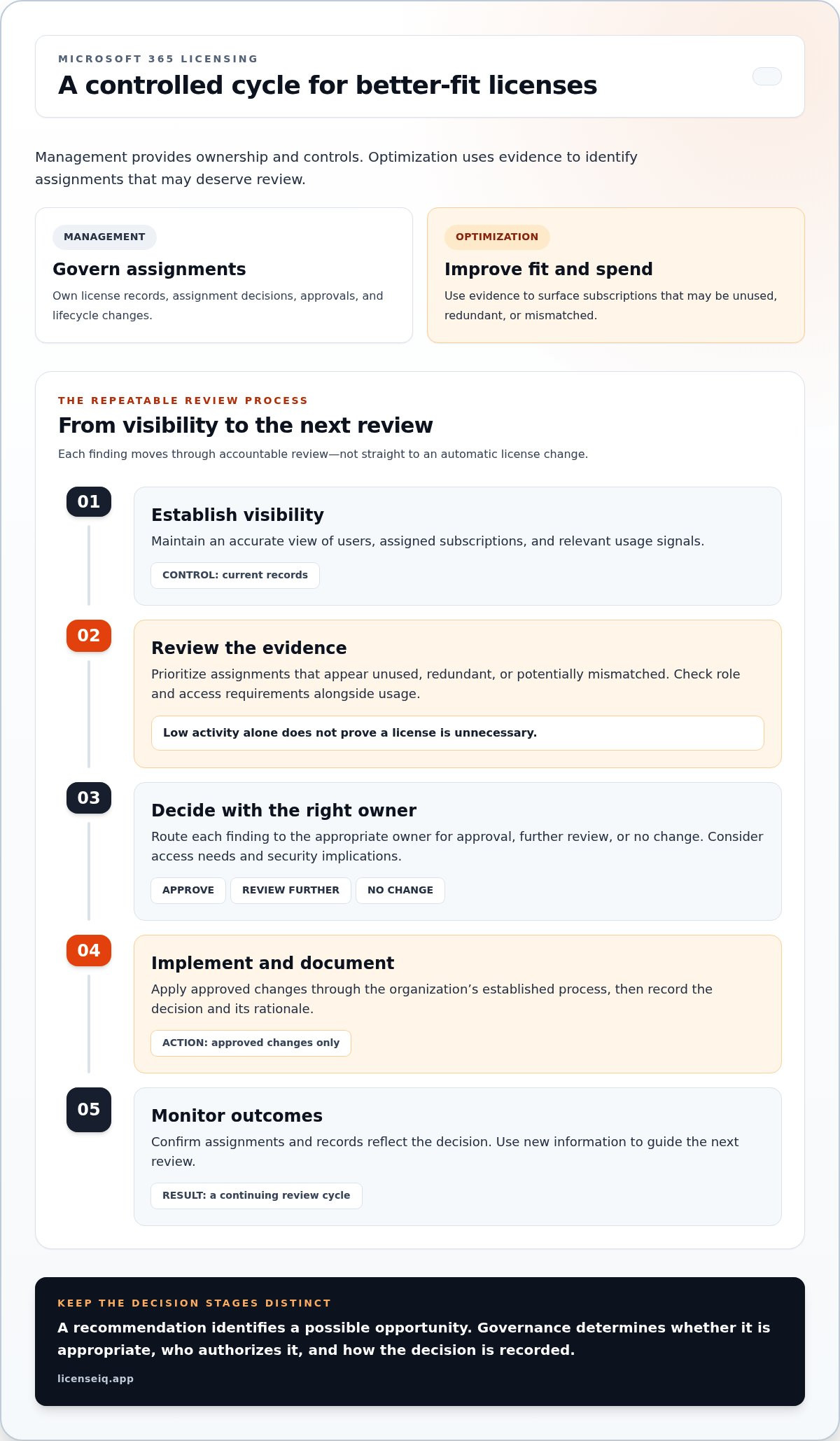
Management and optimization work best as one decision cycle. Management establishes who owns license records, who can approve changes, and how assignments are updated. Optimization uses current evidence to identify which assignments deserve review. One supplies accountability; the other directs attention to possible mismatches and spend opportunities.
The practical answer to m365 license optimization vs management is that neither works well in isolation. Optimization can surface a possible change, but governance determines whether it’s appropriate, who authorizes it, and how the decision is recorded.
A repeatable cycle connects the two disciplines:
- Establish visibility. Maintain an accurate view of users, assigned subscriptions, and relevant usage signals.
- Review evidence. Prioritize assignments that appear unused, redundant, or potentially mismatched, then consider role and access requirements.
- Decide. Route each finding to the appropriate owner for approval, further review, or no change.
- Implement and document. Apply approved changes through the organization’s established process and record the rationale.
- Monitor outcomes. Confirm that assignments and records reflect the decision, then use new information to guide the next review.
This cycle turns a finding into a controlled action rather than treating a recommendation as an instruction. Continuous review connects financial accuracy with operational control by keeping license decisions aligned with current evidence and accountable ownership.
Where the two disciplines overlap
Both rely on assignment records, usage signals, policy decisions, and named owners. A single license change can support governance by correcting an outdated assignment and support spend control by addressing a subscription that no longer fits. But identifying an opportunity isn’t the same as approving or carrying it out. Keep those steps distinct so teams can assess access, role, and security needs before changing an assignment.
For example, an employee moves into a role with different responsibilities. The move prompts a review of the person’s current access and license needs. An optimization finding may suggest that the existing assignment no longer fits, but the designated owner evaluates the evidence against the new role. After approval, management updates the assignment and records the decision.
Why one-time cleanup does not replace ongoing governance
A cleanup captures a point in time. Hiring, departures, internal moves, and subscription changes can quickly make its findings stale. Ongoing reviews keep license records, ownership, and decisions current, and give teams a chance to revisit earlier assumptions as roles and requirements evolve.
Set the review cadence to match the pace of organizational change. A workforce with frequent role movements may need more regular checkpoints than a relatively stable one. Event-triggered reviews can complement scheduled reviews, especially when a departure or role change creates an immediate reason to reassess an assignment.
For teams that want to make reviews repeatable, LicenseIQ governance workflows support ongoing review alongside license visibility and recommendations. Clear ownership and human decisions remain essential; workflows help teams carry decisions through consistently.
M365 license management vs. optimization: compare goals, work, and measures
Management and optimization use overlapping information, but they answer different leadership questions. Management asks whether assignments are accurate, controlled, and owned. Optimization asks whether the organization’s license mix and spend still fit user needs. Compare them by purpose, responsibility, and results, not simply by who works with the data.
Primary goal
Management: Govern license assignment, access, ownership, and lifecycle decisions.
Optimization: Improve alignment between license allocation, demonstrated need, and spend.
Typical activity
Management: Process requests, update assignments after workforce changes, and maintain records.
Optimization: Review usage and role evidence to identify subscriptions that may be unused, redundant, or mismatched.
Owner
Management: Usually IT or the team responsible for license administration, with defined approvers.
Optimization: Shared across IT, finance, and business owners, with clear decision rights.
Cadence
Management: Runs as changes occur, supported by scheduled control reviews.
Optimization: Follows a review rhythm suited to organizational change and available evidence.
Outcome and measures
Management: Accurate assignments, completed reviews, and documented ownership.
Optimization: Reviewed opportunities, approved actions, and resulting spend changes.
The same evidence can support both disciplines. Assignment records help confirm control; usage signals can direct attention to an allocation worth reviewing. Yet the measures shouldn’t be conflated. Accurate assignments don’t prove the license mix is cost-effective, and a list of potential savings doesn’t show that changes were safe, approved, or completed. Management measures control; optimization measures whether spend matches need.
Which responsibilities belong to IT, finance, and operations?
IT brings access knowledge and technical context, and is responsible for executing approved changes. Finance connects subscriptions to spend visibility, budget implications, and financial review. Business owners explain role requirements and the service impact of changing a user’s access. Assign these responsibilities explicitly. Shared input shouldn’t mean unclear accountability: each recommendation needs an owner who can assess it and a defined route to approval.
How should leaders measure progress?
Use a balanced scorecard. Management indicators can include assignment accuracy, review completion, and documented decision ownership. Optimization indicators can include recommendations reviewed, actions taken, and resulting spend changes. Keep the measures distinct, then review them together to see whether financial decisions are also being governed well.
For example, if evidence flags an assignment for review, track whether the appropriate business owner assessed the user’s needs, whether a decision was recorded, and whether an approved change was carried out. The opportunity is only one stage of the process. A lower license count alone isn’t proof of success if users lose capabilities their roles require or operational needs go unmet. Weigh spend outcomes alongside access suitability and the quality of the decision trail.
Build a practical M365 license governance process
A workable governance process makes each license decision traceable, repeatable, and tied to an accountable owner. Define approval boundaries before changing assignments or subscriptions. Specify which changes IT can execute routinely, which require business-owner review, and which need financial approval. This prevents a possible spend opportunity from becoming an unreviewed access change.
- Establish an inventory. Record users, assigned licenses, relevant usage evidence, and the date the information was reviewed.
- Assign owners. Name the people responsible for validating user needs, reviewing financial implications, approving changes, and updating assignments.
- Review evidence. Prioritize records that warrant attention, then check role requirements and potential effects on access or security.
- Decide within approval boundaries. Approve a change, request more information, or document why the current assignment should remain.
- Document the result. Capture the decision, rationale, owner, and completion date so another reviewer can understand the outcome.
- Repeat. Revisit records on a cadence suited to workforce and subscription changes, and review exceptions when they arise.
Sample review record: User: Jordan Lee; assigned license: current subscription; evidence: role changed and assignment flagged for review; decision: retain pending business-owner validation; owner: IT license administrator; date: date reviewed. This compact record separates evidence from decision and makes the next step clear. Use your existing M365 license audit guide for detailed audit execution, then apply the same ownership and documentation rules to follow-up actions.
Set review rules and decision ownership
Before a review starts, define who handles exceptions, who validates role requirements, and who approves changes that affect users. Decide how affected users will be notified and where the change and its rationale will be recorded. The Microsoft 365 Admin Center provides an administrative context for managing assignments, but it doesn’t define your organization’s approval process. Keep policy, authorization, and execution responsibilities explicit.
Use data and automation without losing oversight
A License Health Score can help teams prioritize where to look; it isn’t a substitute for checking an individual’s needs. Dollar-value recommendations show the potential financial relevance of a finding, not guaranteed savings. Review the evidence, assess operational impact, and approve action through the process you’ve defined.
Model Context Protocol (MCP) may be relevant to how AI tools exchange context, but it isn’t an approval authority or proof that a change is appropriate. Keep any MCP-related tooling within the same governance controls. LicenseIQ combines visibility, recommendations, and automated governance workflows so insights can support accountable review rather than bypass it. Learn about LicenseIQ governance workflows.
When continuous M365 license optimization needs a dedicated workflow
A spreadsheet can work when the tenant is manageable, changes are infrequent, and one team can keep records current. A dedicated workflow becomes more useful as the environment grows, employee and role changes recur, or responsibility for reviews is split across IT, finance, and business teams. The warning sign isn’t simply a large license count. It’s when review evidence goes stale, owners aren’t clear, or recommendations sit unresolved between review cycles.
Manual tracking can support a disciplined process, but it depends on people updating the same records, reconciling changes, and following up consistently. If a departure or role change isn’t reflected promptly, a spreadsheet may no longer represent current assignments. Choose a review approach based on how quickly your organization changes and how much effort it takes to maintain reliable visibility.
- Tenant growth: More users and assignments make a complete, current view harder to maintain manually.
- Recurring workforce changes: Frequent hiring, departures, or role moves create repeated review work.
- Fragmented ownership: Reviews stall when teams lack a clear owner for decisions and follow-through.
This is where the distinction in m365 license optimization vs management becomes operational. Management needs dependable ownership and controls. Optimization needs timely evidence to identify what merits review. A dedicated workflow can connect those needs without treating a flagged opportunity as an automatic instruction to change a license.
What continuous license intelligence can contribute
LicenseIQ is an M365-focused intelligence platform, not a license reseller. It connects to a tenant in minutes and scans licenses and users, providing visibility alongside a License Health Score and specific dollar-value recommendations. The score can help teams prioritize attention, while recommendations give reviewers a concrete starting point for assessing possible spend opportunities. They inform decisions; they don’t guarantee savings or establish that a user no longer needs an assigned capability.
Turn recommendations into accountable governance
Information creates value only when the right people review it. Automated governance workflows support repeatable review actions and help teams carry decisions through their established process. Business owners still validate role requirements, and designated approvers still authorize changes. IT remains responsible for executing approved assignment updates and maintaining accurate records.
For broader methods to identify and assess optimization opportunities, use the existing M365 license optimization guide alongside your governance process. Together, guidance and current tenant visibility can help teams move from periodic cleanup toward decisions that keep pace with organizational change. Explore M365 license intelligence to learn how LicenseIQ supports license reviews.
Make your next license review more actionable
Use your next review to set a clear standard for decisions: evidence should be current, ownership should be explicit, and every proposed change should have a documented outcome. That turns m365 license optimization vs management from a terminology question into a practical operating choice. Your organization can strengthen oversight while making license spend decisions with greater clarity.
For teams that need a more continuous view, LicenseIQ connects to a tenant in minutes and scans licenses and users. Its License Health Score and specific dollar-value recommendations can help focus review attention. Automated Governance Workflows support ongoing governance, while your team remains responsible for validating needs and approving changes.
Build from the process that fits your organization now, then improve it as your tenant and workforce evolve. Explore M365 license intelligence with LicenseIQ.
Frequently Asked Questions
Is M365 license optimization the same as license management?
No. In m365 license optimization vs management, management focuses on controlled assignments and lifecycle decisions, while optimization tests whether subscriptions remain appropriate for current needs and spending priorities. A useful way to separate the work is to maintain two records: an administrative log of assignment changes and an optimization backlog of findings awaiting review. This helps leaders distinguish routine control activity from potential improvements that need analysis.
Can a company optimize Microsoft 365 licenses without ongoing license management?
A company can find potential savings during a one-time review, but preserving those improvements requires a way to revisit decisions. For example, record findings deferred because a user’s role was changing or evidence was incomplete. Reassess them when the missing information becomes available. This prevents unresolved opportunities from being mistaken for completed work and helps teams check whether earlier decisions still fit after organizational changes.
How often should an organization review M365 licenses?
There’s no universal review interval. Set one that reflects how often roles, staffing, and subscription decisions change, then identify events that should trigger an additional check. A planned departmental restructure, for instance, may justify a focused review before responsibilities shift. Track when evidence was collected and when it should be refreshed. That makes stale records easier to spot without imposing the same schedule on every team.
What happens if license optimization removes a license someone still needs?
An unvalidated change can interrupt a user’s work by removing access to a service or capability their role depends on. Reduce the risk by including a business owner who understands that role, and give reviewers a clear way to pause a proposed change when requirements are uncertain. Record the user impact and the reason for the decision. If needs change later, use the same approval path to reassess access.
Is a spreadsheet enough for Microsoft 365 license management?
It can be, if the organization can keep its records accurate and reviewers can find the latest version. Use consistent user identifiers, an owner field, a last-reviewed date, and a status for open decisions. These basics make gaps visible. If teams create separate copies or updates routinely lag behind assignment changes, the spreadsheet may no longer provide a dependable picture. Base any move to automation on that operational gap.
How can finance and IT share responsibility for M365 license optimization?
Agree on handoffs before a review begins. IT can document assignment context and explain the operational steps required for a change. Finance can assess how a proposed decision affects subscription reporting and budget forecasts. A business owner can confirm whether the user still needs the relevant capabilities. Keep one named decision owner for each finding, and define how teams will communicate a decision to the people responsible for implementation.
Does M365 license optimization always reduce subscription spend?
No. A review can show that some assignments should remain because users need them, or that a different allocation better supports operational requirements without reducing the number of licenses. Judge progress by whether decisions are evidence-based and needs remain met, not by license count alone. Compare proposed opportunities with approved actions and observed spend changes, while recording cases where retaining an assignment was the right outcome.


