

What if the license keeping a critical workflow running is also an avoidable Microsoft 365 expense? The best practices for managing service account licenses start with evidence, not assumptions. These accounts can be difficult to review when ownership is unclear, and removing an entitlement without checking workload dependencies can disrupt operations.
Service accounts need the access and licensing required for their actual purpose, not a default assignment that remains in place indefinitely. A dependable process gives every account a named owner, documents its business purpose, and checks current Microsoft licensing terms against the workload before making changes.
This guide explains how to build an accurate inventory, verify license needs, and establish recurring reviews that balance cost control, access security, and service continuity. You’ll learn how to assess dependencies before changing assignments and use ongoing license visibility to prioritize recommendations for review. LicenseIQ helps provide that visibility with Microsoft 365 license insights, a License Health Score, and specific dollar-value recommendations. Your team can use those insights to guide decisions while checking the impact on critical workflows.
Key Takeaways
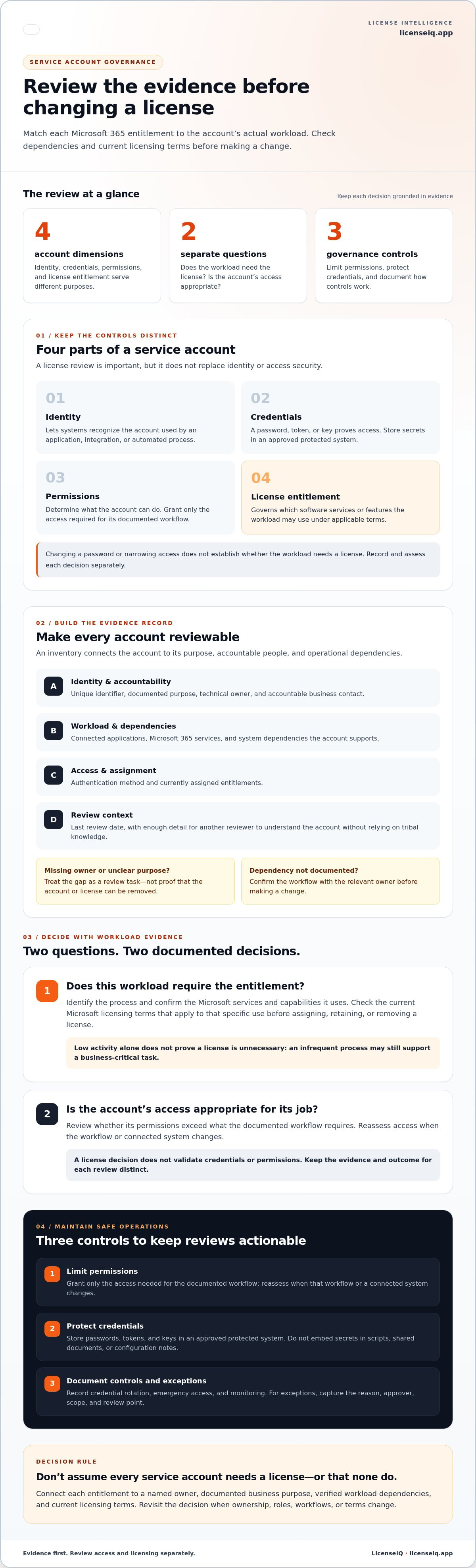
- Review an account’s identity, credentials, permissions, and license entitlement separately, since each has a different purpose.
- Build an inventory that records each account’s purpose, named owner, dependencies, authentication method, and assigned license.
- Apply the best practices for managing service account licenses by comparing workload evidence with business need and current licensing terms before changing assignments.
- Use a repeatable review workflow, and revisit decisions when ownership, roles, or workflows change.
- Use continuous license visibility to flag assignment anomalies for review, then check dependencies before making changes.
What service account license management covers, and what it does not
A service account is an account used by an application, integration, or automated process rather than by a person doing everyday work. Its identity lets systems recognize it. Its credentials, such as a password, token, or key, prove access. Its permissions determine what it can do. A product license entitlement governs which software services or features it may use.
Quotable definition: Service account governance controls who owns an automated identity and what it can access; service account license management determines whether its workload needs a particular product entitlement under the applicable terms.
These controls overlap, but they are not interchangeable. License decisions are part of the wider practice of Identity and access management (IAM), yet a license review alone does not secure credentials or validate permissions. Likewise, changing a password or narrowing access does not establish whether the workload needs a license. The best practices for managing service account licenses keep these questions distinct while using shared evidence about the account’s purpose and activity.
How service accounts differ from employee accounts
An employee account supports a person’s work across changing tasks. A service account should map to a defined application or workflow, such as an integration that moves information between systems. That difference makes a named business or technical owner essential. Someone must be able to explain the account’s purpose and assess whether it is still needed. Without an owner, reviewers may not know whether access is justified, what depends on the account, or who can approve a license change.
Does every Microsoft 365 service account need a license?
No. Don’t assume every service account needs a Microsoft 365 license, or that none do. The answer depends on the account’s actual workload and the Microsoft services and capabilities it uses. Identify the process, confirm its dependencies, then check the current Microsoft licensing terms that apply to that specific use. Licensing guidance can change, so validate the terms before assigning, retaining, or removing an entitlement. Low activity alone isn’t enough to prove that a license is unnecessary. A process may run infrequently and still support a business-critical task.
A practical review asks two separate questions: does this workload require the entitlement, and is the account’s access appropriate for its job? Document the evidence and decision so future reviewers can reassess them if the application, workflow, or licensing terms change. License visibility tools such as LicenseIQ can surface assignment recommendations for review, but they don’t replace workload validation or credential and permission controls.
Build secure service account governance before changing licenses
Before adjusting an entitlement, establish who is accountable for the account and what depends on it. A clear inventory turns a vague account name into a reviewable record. It also helps teams assess security and licensing questions without treating them as the same decision.
What to record in a service account inventory
Give each account a unique identifier and record its documented purpose, technical owner, and accountable business contact. Add the connected applications and Microsoft 365 services, authentication method, assigned entitlements, system dependencies, and last review date. Include enough detail for another reviewer to understand what the account supports without relying on tribal knowledge.
Flag records with a missing owner, unclear purpose, or undocumented dependency. Treat these gaps as review tasks, not as proof that an account or license can be removed. Confirm the workflow with the relevant owner before making a change.
Quotable principle: A named owner makes service account license decisions safer and more accurate by connecting each entitlement to a documented business purpose and accountable review.
How to reduce access and credential risk
Keep permission reviews distinct from license reviews. A permission review asks whether the account can do more than its workload requires. A license review asks whether that workload needs its assigned entitlement under current terms. Coordinate timing and evidence so reviewers share the same account purpose and dependency record, but document each decision separately.
- Limit permissions: Grant only the access required for the documented workflow, then reassess it when the workflow or connected system changes.
- Protect credentials: Store passwords, tokens, and keys in an approved protected system. Don’t embed secrets in scripts, shared documents, or configuration notes.
- Document controls: Record how credentials are rotated, how emergency access is handled, and what monitoring applies. Define an exception process that captures the reason, approver, scope, and review point.
These controls make reviews actionable. For example, if an integration no longer needs access to a Microsoft 365 service, the permission review can document that finding. The license decision still needs a separate check against the workload and applicable terms. Neither decision should rely on an undocumented assumption.
For teams building a repeatable process, the Microsoft 365 license visibility platform can help surface license recommendations for review. Use that visibility alongside ownership records and access controls. It does not replace credential protection or permission governance.
How to decide whether a service account should keep its license
Base the decision on workload evidence, license requirements, and operational impact. Sign-in or activity data can show whether an account has been used, but it can’t prove the business no longer needs it. A scheduled process may run rarely and still support an important workflow. The best practices for managing service account licenses pair usage evidence with dependency checks and current Microsoft licensing terms.
Evidence to review before changing an assignment
Check relevant sign-in or workload activity, then compare it with the account’s documented purpose. Identify connected applications, integrations, scheduled jobs, and business continuity needs. Confirm which Microsoft 365 services the process uses and verify the applicable terms before downgrading, removing, or reallocating an entitlement. For broader tier context, see this Microsoft 365 license types guide.
Record the evidence reviewed, the decision, and who approved it. That audit trail helps the next reviewer understand why an assignment was retained or changed instead of having to restart the investigation.
A practical retain, investigate, or change framework
Decision rule: Retain an assignment when verified requirements and dependencies support it, investigate when evidence is incomplete, and consider a change only when testing and approval show the impact is understood.
Use a comparison table to make the reasoning visible. These examples illustrate review outcomes, not universal license requirements:
| Account purpose | Observed workload | License evidence | Dependency | Review outcome |
|---|---|---|---|---|
| Scheduled reporting process | Runs on a defined schedule | Applicable terms verified | Business reporting relies on output | Retain if evidence supports the current entitlement |
| Unidentified integration | Little or no activity visible | Purpose and license fit unclear | Connected system not documented | Investigate with the owner; don’t remove based on low activity alone |
| Retired workflow candidate | No recent activity observed | Terms and workload reviewed | Owner confirms replacement process | Consider a change after dependency testing, approval, and rollback planning |
Low activity is a signal to investigate, not a standalone reason to remove a license. Before acting, confirm that the workload is no longer needed or that its requirements have changed. Test dependencies, document approval, and prepare a rollback plan so a license adjustment doesn’t unexpectedly interrupt a critical process. Recheck current Microsoft terms at the time of the decision, since licensing guidance can change.
Create a recurring review process for service account licenses
A one-time audit can create a useful baseline, but it won’t keep decisions current as applications, owners, and workflows change. A repeatable review connects account lifecycle events to entitlement checks. These best practices for managing service account licenses make each decision traceable and reduce the risk of disrupting production processes.
A seven-step review workflow
- 1. Discover: Identify service accounts and their assigned licenses across the Microsoft 365 environment.
- 2. Assign ownership: Name a technical owner and accountable business contact for each account. Escalate records without either.
- 3. Validate purpose: Confirm the application or workflow the account supports and whether that purpose is still active.
- 4. Review dependencies: Check connected services, integrations, scheduled processes, and continuity requirements before considering an entitlement change.
- 5. Decide: Retain, investigate, or consider a change based on workload evidence, current licensing terms, and operational impact.
- 6. Document: Record evidence, approval, decision, exceptions, and any testing or rollback steps.
- 7. Monitor: Check that the process continues to work and revisit the decision when relevant conditions change.
For wider context on how these checks fit into ongoing Microsoft 365 governance, see the Microsoft 365 license management lifecycle.
Set review cadence and change triggers
Choose a scheduled review cadence based on account criticality, workload risk, and how quickly your organization changes. Don’t rely on the calendar alone. Trigger a review when an application is retired, an owner leaves, a workflow changes, or inactivity raises questions about continued need. Assign an approver for license decisions and preserve the evidence and rationale so future reviewers can follow the audit trail.
For assignments tied to production, use a controlled pilot where practical. Test the proposed change against the relevant workflow, agree on a rollback plan, and define how the team will confirm service continuity before proceeding more broadly.
Measure outcomes without weakening controls
Track the share of accounts with named owners, reviews completed, unresolved exceptions, and license changes validated against workload needs. Measure recovered licenses only after confirming entitlement eligibility and service continuity. If ownership or workload evidence is unclear, escalate the case rather than treating uncertainty as approval to remove access or licensing.
Continuous license visibility can help teams spot assignments that merit review. Explore Microsoft 365 license governance tools to support a more consistent review process.
Use continuous license visibility to keep service account decisions current
A spreadsheet is a snapshot, not a dependable record of a changing Microsoft 365 environment. Accounts are created, workflows shift, owners leave, and license assignments change. Unless someone updates the file after each event, it can show an entitlement that’s no longer assigned or miss an account that needs review. That gap makes it harder to connect license data with current ownership and workload evidence.
Continuous tenant visibility helps keep license records current and surface assignment anomalies for review. It doesn’t replace service account governance. Instead, it gives owners and reviewers timely information to compare with account purpose, application dependencies, and current licensing terms. That joined-up approach is central to the best practices for managing service account licenses: use visibility to focus attention, then validate before acting.
What automated license governance should make visible
Useful license intelligence should help teams spot records that need an owner, purpose, or utilization review. Recommendations are more actionable when they include relevant context rather than appearing as unexplained alerts. LicenseIQ connects to a Microsoft 365 tenant, scans licenses and users, provides a License Health Score, and offers specific dollar-value recommendations to inform optimization decisions. Approval, dependency checks, and service continuity decisions remain part of your organization’s governance process.
LicenseIQ can help identify potential software subscription savings of up to 35% by surfacing inactive users and redundant licenses. This is a potential result, not a promise or guaranteed outcome. Actual savings depend on the organization’s environment, validated license needs, and decisions made after review.
Turn recommendations into a controlled action plan
Handle each finding as a review item, not an automatic instruction to remove or change a license. Validate it against the workload, connected systems, business need, and current Microsoft licensing terms. Assign an accountable reviewer, record the decision and supporting evidence, then set a follow-up date to confirm the outcome.
- Confirm the finding: Check whether the account and assignment match current tenant records.
- Assess operational impact: Verify dependencies and plan testing before changing an entitlement tied to a live process.
- Close the loop: Document approval, the action taken or deferred, and any follow-up needed.
This keeps cost optimization aligned with service continuity instead of treating license recovery as an isolated task. For broader planning, read the Microsoft 365 license optimization guide. To bring clearer license visibility into your review process, explore Microsoft 365 license visibility.
Make every service account decision accountable
Reliable governance depends on more than checking whether a license is assigned. Give each service account a named owner and documented purpose, then assess workload evidence, dependencies, and current Microsoft licensing terms before changing an entitlement. Low activity may prompt a review, but it doesn’t prove a workflow or license is no longer needed.
The best practices for managing service account licenses combine clear ownership with recurring reviews and continuous visibility. Keep license decisions separate from permission and credential controls, while coordinating the evidence so security, service continuity, and cost management stay aligned.
LicenseIQ scans Microsoft 365 licenses and users to surface optimization opportunities, with a License Health Score and specific dollar-value recommendations. Use those insights to prioritize decisions, not to bypass your organization’s approval and dependency checks. Explore Microsoft 365 license visibility and build a clearer view of your environment. With a repeatable process in place, your team can manage service accounts with greater confidence and control.
Frequently Asked Questions
Do service accounts need Microsoft 365 licenses?
Some do, but there’s no blanket rule that every service account needs a Microsoft 365 license. The requirement depends on the account’s actual workload, the services it uses, and applicable Microsoft licensing terms. Identify the process and its dependencies, then verify the current terms before assigning or changing an entitlement. Don’t assume that an account needs a license simply because it exists, or that it doesn’t because it’s non-human.
How do I find service accounts with unnecessary licenses?
Start with a current inventory of accounts, owners, purposes, assigned licenses, and connected workloads. Compare license assignments with relevant activity data, application dependencies, and current Microsoft terms. Low activity can flag an account for investigation, but it doesn’t prove the license is unnecessary. The best practices for managing service account licenses pair tenant visibility with owner review, workload validation, and documented approval before an assignment changes.
Can I remove a license from an inactive service account?
Not based on inactivity alone. A process may run infrequently and still support an important business task. Confirm the account’s purpose with its owner, check scheduled jobs and connected applications, and verify whether the workload requires the entitlement under current Microsoft terms. Before making a change, test relevant dependencies, record approval, and prepare a rollback plan. This reduces the chance that a cost-saving change interrupts a critical workflow.
How often should service account licenses be reviewed?
Set a recurring cadence that reflects each account’s criticality and how often your organization’s systems and workflows change. Also trigger reviews when an application is retired, an owner leaves, a workflow changes, or suspected inactivity raises questions. Assign an approver and document the decision and evidence. A calendar review provides routine oversight, while event-based reviews help catch changes between scheduled checkpoints.
What information should a service account inventory include?
Record a unique account identifier, documented business purpose, technical owner, accountable business contact, authentication method, assigned license, and last review date. Include connected applications, Microsoft 365 services, and known system dependencies so reviewers can assess potential impact before changing access or entitlements. Flag missing owners, unclear purposes, and undocumented dependencies for investigation. An inventory is useful only if someone can verify and update its records.
How can I manage service account licenses without disrupting workflows?
Separate license decisions from permission and credential reviews, but coordinate them using shared evidence about the account’s purpose and dependencies. Before changing an entitlement, validate the workload and applicable Microsoft terms with the owner. For production processes, test the proposed change where practical, define how to confirm service continuity, and document a rollback plan. If the evidence is incomplete, escalate the case instead of making an assumption-driven change.
Can license management software automatically remove service account licenses?
Capabilities vary by tool, so understand what a platform does before relying on automatic changes. LicenseIQ scans Microsoft 365 licenses and users and provides a License Health Score and specific dollar-value recommendations to support optimization decisions. Treat recommendations as findings for review, not proof that a license should be removed. Validate workload needs, dependencies, and current licensing terms, then use your organization’s approval process before changing an assignment.


