

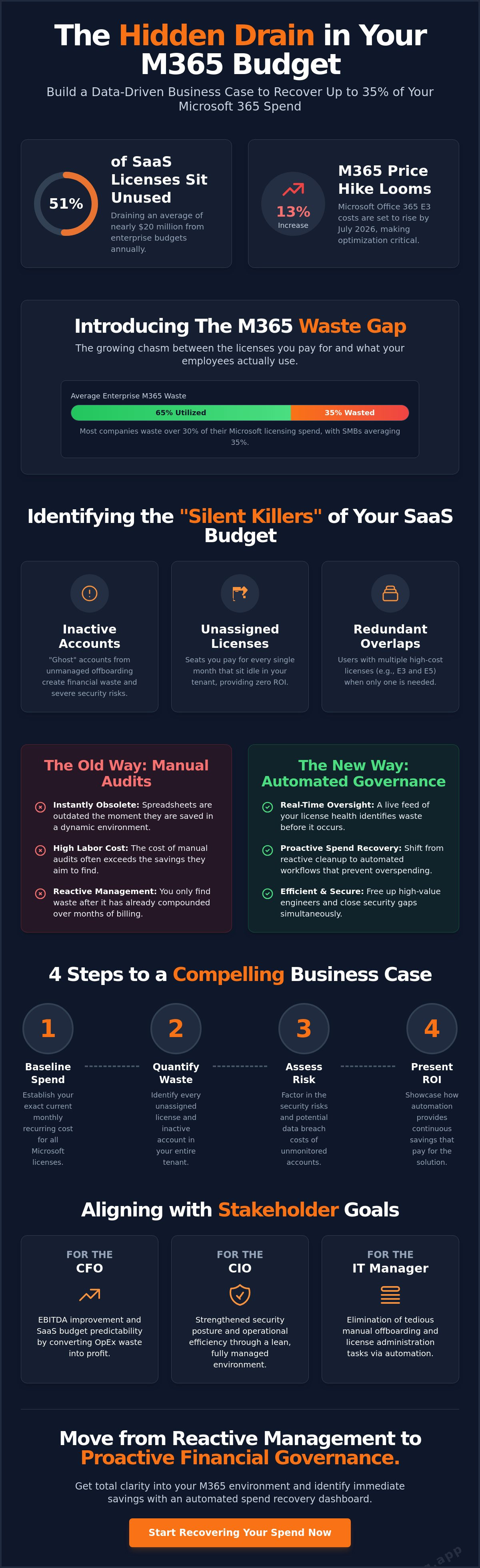
51% of SaaS licenses purchased by enterprises sit unused, draining nearly $20 million from corporate budgets every year. It's a staggering figure that highlights a critical lack of oversight. You've likely felt the pressure from your CFO to justify every dollar of your cloud spend, yet you're stuck with manual spreadsheets that are outdated the moment they're saved. With Microsoft's July 2026 price increases pushing Office 365 E3 costs up by 13%, building a data-driven microsoft 365 cost savings business case is no longer optional; it's a financial necessity.
Opaque billing shouldn't dictate your bottom line. We'll show you how to identify hidden waste and build a business case to recover up to 35% of your Microsoft 365 spend. This article provides a clear ROI framework for automated reporting on inactive users and shows you how to lower monthly recurring costs without losing functionality. You'll gain total clarity into your environment and move from reactive management to proactive financial governance.
Key Takeaways
- Identify the "M365 Waste Gap" by quantifying the disparity between paid licenses and actual employee utilization.
- Build a data-driven microsoft 365 cost savings business case to recover up to 35% of your budget through precise spend recovery.
- Eliminate "silent killers" like inactive accounts and redundant license overlaps that drive up monthly recurring costs.
- Replace manual, point-in-time audits with automated governance workflows to ensure continuous license optimization.
- Utilize the License Health Score to provide leadership with immediate, dollar-value insights for total operational transparency.
The Financial Reality of Microsoft 365 in 2026
The "M365 Waste Gap" is the silent drain on your IT budget. It represents the growing chasm between the licenses your organization pays for and the services your employees actually utilize. Recent industry data indicates that most companies waste over 30% of their Microsoft licensing spend. In many SMB environments, this figure reaches an average of 35%. This isn't just a minor oversight; it's a fundamental breakdown in financial governance. Traditional IT Asset Management (ITAM) was built for hardware and perpetual software. It fails in the face of rapid SaaS sprawl because it lacks the agility to track real-time consumption and user lifecycle changes.
To build a successful microsoft 365 cost savings business case, you must shift your focus from "buying better" to "right-sizing" through continuous oversight. This requires a deep understanding of the Total Cost of Ownership (TCO) associated with your cloud environment. Every unassigned license or redundant seat adds to a TCO that provides zero return on investment. In an era of rising subscription costs, ignoring this gap is no longer an option for specialized leadership.
Why Manual Audits No Longer Work
Manual license tracking is a losing game. Modern businesses are agile, with user counts that fluctuate weekly. Managing a "mix and match" strategy across E3, E5, and F-series suites via spreadsheets creates immediate obsolescence. By the time you save the file, the data is wrong. The labor cost of manual audits often exceeds the very savings they aim to find. You don't need a snapshot. You need a live feed of your license health that identifies waste before it compounds over months of billing cycles.
The Rise of SaaS Spend Management
Effective management now requires FinOps principles tailored for Microsoft 365. It's about moving from reactive cleanup to proactive spend recovery. Automated oversight acts as a vigilant digital auditor, uncovering obscured details that manual checks miss. This transparency is the cornerstone of a data-driven microsoft 365 cost savings business case. For a deeper dive into these strategies, read our Ultimate Guide to M365 License Optimization. Automated governance workflows transform your budget from a black box into a precise, high-performance asset.
Drafting the Business Case: Beyond the Subscription Price
Building a microsoft 365 cost savings business case requires more than a cursory glance at your monthly bill. You must transform vague concerns about overspending into a rigorous, four-step quantification process that speaks the language of the boardroom. Leadership doesn't just want to save money; they want a precise plan for resource recovery.
Start by baselining your current monthly recurring revenue (MRR) for all Microsoft licenses. Most organizations operate on outdated snapshots. You need the exact dollar amount committed today. Next, quantify the "Unassigned License" pool. These are seats you pay for every month that sit idle in your tenant. Third, factor in the security risks of unmanaged offboarded users. These "ghost" accounts aren't just financial waste; they're unmonitored entry points for data leaks. Finally, present the ROI of an automated spend recovery tool. Automation pays for itself by preventing the re-accumulation of waste. Integrating effective cloud cost management strategies ensures your business case is grounded in financial best practices.
Quantifying Hard Savings vs. Soft Savings
A compelling case balances immediate financial recovery with long-term operational gains. Hard savings represent the direct, dollar-for-dollar reduction of your Microsoft invoice. This is the most persuasive metric for financial leadership. Soft savings involve reclaiming IT labor hours currently lost to manual license administration. High-value engineers shouldn't spend hours wrestling with spreadsheets. Finally, risk mitigation quantifies the value of closing security gaps. Identifying accounts with zero activity for 90 days significantly reduces your attack surface. You can visualize these potential gains immediately by connecting your tenant to a Spend Recovery Dashboard.
Aligning with Stakeholder Goals
Your business case must resonate across the C-suite. For the CFO, focus on EBITDA improvement and SaaS budget predictability. They want to see OpEx waste converted back into corporate profit. For the CIO, the priority is security posture and operational efficiency. They need to know that the environment is lean and secure. For the IT Manager, focus on the elimination of tedious offboarding checklists. Automation removes the burden of manual oversight. It allows them to focus on high-impact technical projects. This alignment ensures the microsoft 365 cost savings business case gains broad internal support and moves toward approval quickly.
Identifying the "Silent Killers" of Your SaaS Budget
Hidden waste doesn't appear as a line item on your standard Microsoft invoice. It hides within the granular details of user activity and license assignments. To construct a bulletproof microsoft 365 cost savings business case, you must expose the "zombie licenses" that drain corporate resources without providing operational value. These silent killers represent the most immediate opportunity for spend recovery. They often go unnoticed because manual tracking can't keep pace with the velocity of modern cloud environments.
Ghost licenses are perhaps the most egregious form of waste. These are unassigned seats that remain active in your billing cycle simply because they weren't removed after a project concluded or a hiring plan shifted. If you're paying for 500 seats but only 450 are assigned, you're losing money every second. Automated scans identify these idle assets in minutes, providing an instant win for your budget and immediate clarity for your financial reporting.
The Inactive User Problem
Inactivity is more than just a lack of login. True oversight requires looking at specific telemetry across Teams, Exchange, and SharePoint. If a user hasn't sent an email, joined a call, or edited a document in 30, 60, or 90 days, that license is a prime candidate for reclamation. The Forrester Total Economic Impact study highlights how vendor consolidation and efficient license management drive significant ROI. Delayed offboarding during employee churn is a primary driver of this waste. Every month an inactive account remains licensed, your MRR stays artificially high. Continuous oversight ensures these accounts are harvested and repurposed the moment they stop providing value.
Feature Overlap and Tier Right-Sizing
Many organizations default to premium E5 suites for perceived security benefits. However, meticulous audits often reveal that a significant percentage of those users only require E3 or even Business Basic features. You're paying a premium for advanced analytics and voice capabilities that remain untouched. Redundant licensing also occurs when users are assigned multiple standalone licenses that overlap with their primary suite. For example, assigning a standalone security SKU to someone who already has equivalent functionality through their main bundle. Right-sizing these tiers is a core pillar of your microsoft 365 cost savings business case. For a detailed breakdown of what each tier actually includes, consult our Microsoft 365 License Types Guide. Precise alignment between user needs and license features eliminates over-provisioning and secures your financial health.
From Manual Audits to Automated Governance
Manual audits are obsolete. Point-in-time reviews, even when conducted quarterly, allow waste to accumulate for 89 days before detection. A modern microsoft 365 cost savings business case demands continuous optimization. Instead of static spreadsheets, AI-native platforms connect directly to your tenant via secure APIs. This provides immediate clarity without the friction of manual data exports or consultancy-led delays. You gain a vigilant system that monitors consumption patterns every hour, not every few months.
Automated Governance Workflows enforce financial hygiene by monitoring every seat in real time. They replace organizational disorder with a structured, data-driven approach. By transitioning to a real-time Spend Recovery Dashboard, leadership moves from guessing to knowing. You see exactly where resources are allocated and where they're being drained. This transparency is the only way to maintain a lean environment in a high-velocity operational landscape.
Automating the Offboarding Lifecycle
Effective spend recovery begins at the end of the user journey. Automated workflows trigger license reclamation the moment an account is disabled in Entra ID. This eliminates the "lag time" where licenses remain paid but unused. Following a rigorous Office 365 Offboarding Checklist ensures that no seat is left behind. This is where security and finance converge. A revoked license is a closed security door and a reclaimed budget line. It prevents the accumulation of "ghost" accounts that plague manual systems.
Predictive Budget Forecasting
Automation does more than clean up the past; it secures the future. By analyzing historical usage patterns, these systems predict future license requirements with high precision. This foresight is critical for organizations under Enterprise Agreements (EA). It prevents the "true-up" surprises that often lead to unbudgeted expenses at the end of a term. Proactive alerts reduce the cognitive load on IT leadership, allowing them to manage by exception rather than constant manual verification. This ensures your microsoft 365 cost savings business case remains valid throughout the entire fiscal year.
Stop the cycle of manual audits today by deploying the LicenseIQ Platform to gain total transparency over your tenant.
Executing the Business Case with LicenseIQ
Execution is the final hurdle for any microsoft 365 cost savings business case. Identifying waste is a diagnostic step; recovering that spend is the operational victory. The LicenseIQ Platform transforms these insights into immediate financial action. It acts as the vigilant guardian of your corporate resources, ensuring that no license remains unoptimized or forgotten. By implementing a system of continuous oversight, you move beyond the limitations of manual audits and establish a permanent culture of financial hygiene.
The LicenseIQ Health Score serves as the primary KPI for your business case. This single metric provides specialized leadership with an instant benchmark for their SaaS environment. It quantifies the gap between current spending and optimal efficiency. Instead of wading through hundreds of rows in a spreadsheet, you receive specific dollar-value recommendations in minutes. This clarity allows for rapid decision-making and immediate spend recovery. Our "Minutes to Connect, Months of Savings" approach ensures that the time to value is nearly instantaneous.
The 5-Minute Audit
Speed is a core component of the LicenseIQ value proposition. Connecting to your tenant requires only a few minutes via secure APIs. Once linked, the platform performs an instant scan of your entire environment. You receive actionable insights through the Spend Recovery Dashboard. This interface highlights exactly where ghost licenses and over-provisioned tiers are draining your budget. The platform leverages the Model Context Protocol to maintain extreme precision. This ensures that every recommendation is technically sound and ready for implementation without manual verification.
Starting Your Spend Recovery Journey
The data provided by LicenseIQ allows you to present a "no-brainer" proposal to the CFO. You aren't asking for a budget increase; you're proposing a method to reclaim existing waste. The platform helps you navigate the complexities of Microsoft's pricing models. You can easily compare the benefits of tiered monthly flexibility against discounted annual subscriptions based on your actual usage patterns. This data-driven approach removes the guesswork from SaaS forecasting. It ensures that your microsoft 365 cost savings business case delivers long-term results rather than temporary fixes. Get your free License Health Score at LicenseIQ and begin your recovery journey today.
Secure Your Budget with Automated Oversight
Cloud spending is no longer a set and forget line item. It requires a vigilant, data-driven approach to ensure every dollar provides measurable value. You've seen how manual spreadsheets fail to capture the volatility of modern tenants. By automating the offboarding lifecycle and right-sizing your license tiers, you reclaim control over your environment. This is the difference between organizational disorder and total clarity.
Building a robust microsoft 365 cost savings business case is about more than just cutting costs. It's about establishing a foundation of permanent operational transparency. You can recover up to 35% of your spend by deploying AI-native automated governance. This shift from reactive cleanup to proactive recovery secures your financial health and satisfies the most demanding CFO requirements. It transforms IT from a cost center into a model of efficiency.
Don't let obscured details drain your corporate resources. Our platform connects to your tenant in minutes to provide immediate, actionable clarity. Discover how much you can save with a LicenseIQ Health Check and start your spend recovery journey today. Your budget deserves a guardian that never sleeps.
Frequently Asked Questions
How much can a typical business save on Microsoft 365?
A typical business can recover up to 35% of its total spend by eliminating unused licenses and right-sizing user tiers. Organizations often carry a significant "M365 Waste Gap" due to unassigned seats and inactive accounts. By identifying these obscured details, you can significantly lower your monthly recurring costs without impacting your operational functionality.
What is a Microsoft 365 License Health Score?
The License Health Score is a primary KPI that benchmarks the financial hygiene of your SaaS environment. It provides an immediate, data-driven snapshot of your license utilization versus your total expenditure. This score allows leadership to see exactly how much of their budget is being optimized and where waste is accumulating in real time.
How do I identify inactive Microsoft 365 users without PowerShell?
You can identify inactive users through the Spend Recovery Dashboard without writing a single line of code. The system uses secure APIs to scan telemetry across Teams, Exchange, and SharePoint automatically. It flags accounts that haven't logged in for 30, 60, or 90 days, allowing for instant reclamation of those licenses through automated governance workflows.
Is it better to pay for Microsoft 365 monthly or annually for cost savings?
Annual billing is typically cheaper per seat but locks you into a specific count, which often leads to wasted spend if your workforce fluctuates. Monthly billing offers the agility to scale down immediately when users depart. A data-driven microsoft 365 cost savings business case often recommends a hybrid approach: annual for your baseline staff and monthly for temporary or seasonal roles.
What are the risks of downgrading Microsoft 365 licenses?
The primary risks include losing access to advanced security features, compliance tools, or specific storage capacities found in premium tiers like E5. To mitigate this, use the LicenseIQ Platform to analyze actual feature utilization before downgrading. This ensures you only move users to lower tiers if they aren't actively using the advanced functionality their current plan provides.
How does automated license governance differ from manual auditing?
Automated governance provides continuous oversight, whereas manual auditing is a point-in-time snapshot that becomes outdated immediately. Automation triggers license reclamation the moment a user is disabled in Entra ID, preventing the accumulation of "ghost" licenses. This proactive approach eliminates the human error and high labor costs associated with manual spreadsheet tracking.
Can LicenseIQ help with Microsoft 365 E3 to E5 transition business cases?
Yes, LicenseIQ provides the specific data needed to build a microsoft 365 cost savings business case for tier transitions. It identifies which users actually require E5 features and which can remain on E3, preventing over-provisioning during the upgrade. This ensures your transition is based on real-world consumption telemetry rather than generic licensing bundles.


