

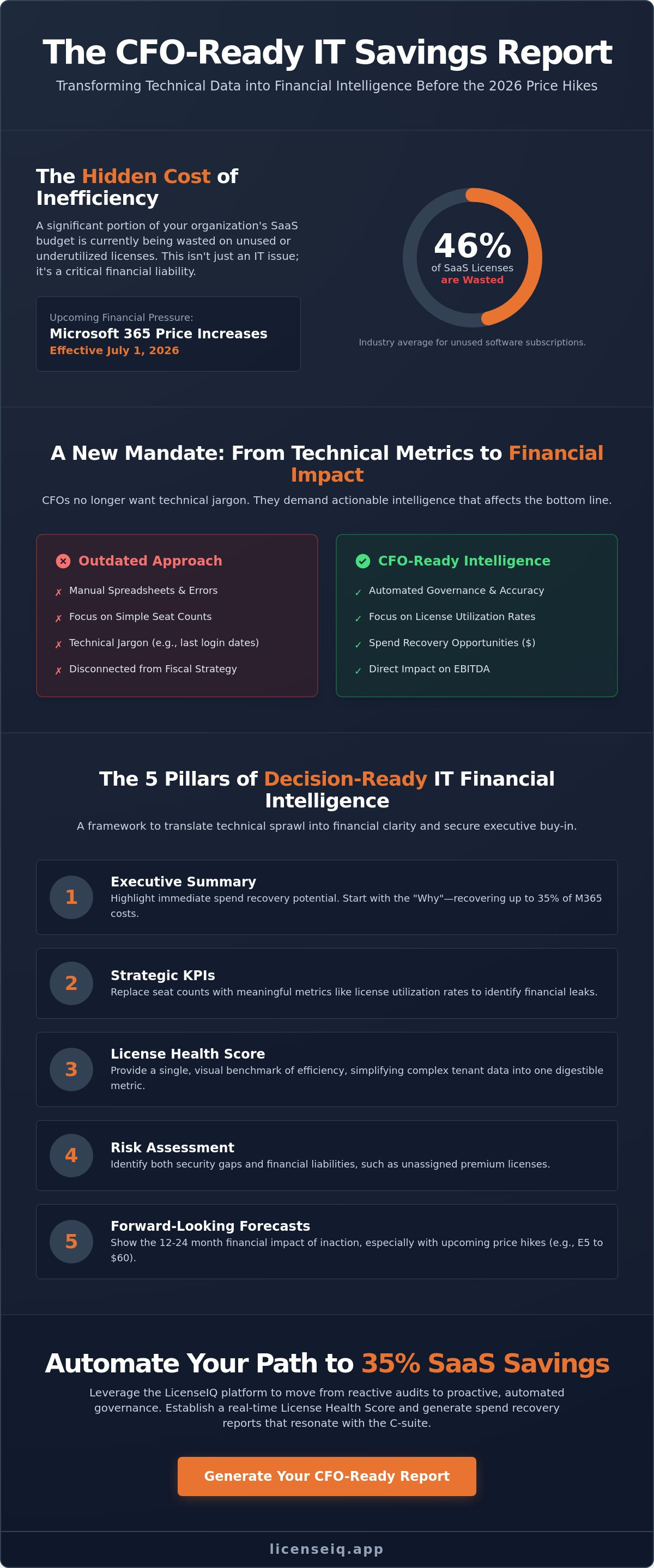
Did you know that 46% of SaaS licenses in the average organization are currently unused or wasted? With Microsoft 365 price increases set for July 1, 2026, your ability to identify and eliminate this inefficiency is no longer just an IT goal; it's a financial mandate. You need a cfo-ready it savings report that cuts through technical jargon to present a clear case for cost recovery. CFOs today don't want spreadsheets full of noise. They want actionable intelligence that impacts the bottom line.
We understand the struggle of quantifying shadow IT and fixing manual spreadsheet errors that erode executive trust. It's difficult to prove value when your data feels disconnected from the company's broader fiscal strategy. This guide provides the exact roadmap you need to transform complex usage data into a high-impact financial document. You'll learn how to secure executive buy-in by speaking the language of the C-suite and demonstrating total operational transparency.
By following these steps, you can reduce SaaS waste by up to 35% and position yourself as a proactive guardian of corporate resources. We'll explore how to right-size your environment before the new E3 and E5 pricing takes effect. This approach ensures every dollar spent on your Microsoft ecosystem yields a measurable return and reinforces your professional credibility.
Key Takeaways
- Shift your reporting focus from technical usage metrics to financial spend recovery opportunities to align IT operations with corporate fiscal hygiene.
- Identify the specific KPIs that executives value, prioritizing license utilization rates over simple seat counts for better decision-making.
- Eliminate the efficiency gap by moving away from manual spreadsheets that fail to capture the dynamic nature of 2026 M365 environments.
- Follow a structured roadmap to build a cfo-ready it savings report that identifies inactive users and unassigned licenses across every tier.
- Leverage the LicenseIQ platform to establish a License Health Score and automate the governance workflows needed to recover up to 35% of wasted spend.
What is a CFO-Ready IT Savings Report?
A cfo-ready it savings report isn't a simple list of user logins or server uptimes. It's a strategic bridge between IT operations and financial hygiene. In 2026, CFOs have moved past technical "usage" statistics and now demand a focus on "spend recovery" opportunities that directly impact the organization's EBITDA. This report transforms obscure data into reclaimed capital. It provides the oversight necessary to maintain a lean, high-performance digital estate by highlighting exactly where money is being lost to subscription bloat.
The core purpose of this document is to turn inactive user data into actionable financial insights. With Microsoft 365 price increases effective July 1, 2026, the stakes for accurate reporting have never been higher. Executives don't need to know which features are popular; they need to know which licenses can be harvested or downgraded to protect the bottom line. This shift from monitoring to auditing is what defines a truly executive-grade report.
Technical Data vs. Financial Intelligence
IT teams often focus on last-login dates to manage security and access. While this matters for operational safety, Finance needs to see the unassigned license costs sitting idle. A cfo-ready it savings report translates user activity into a clear dollar-value risk assessment. If 46% of SaaS licenses are wasted, as current industry data suggests, your report must quantify that loss in real currency. Using IT cost transparency models ensures your data is audit-proof and defensible during budget reviews.
Financial intelligence means moving beyond "how many users we have" to "what is the cost of our unused capacity." This requires a granular scan of all tiers, from Business Basic to E5. By presenting these figures in a structured format, you provide the C-suite with the clarity needed to approve consolidation projects. It's about showing the CFO that IT isn't just a cost center but a proactive partner in capital efficiency.
The State of Continuous Disruption in 2026
The pace of SaaS scaling in 2026 creates obscured waste at an unprecedented rate. Static annual audits are obsolete. They capture a single moment in a dynamic software environment, leaving months of overspending undetected between reviews. Modern financial governance requires real-time monitoring to eliminate this disorder. Organizations that rely on LicenseIQ to track their License Health Score can identify discrepancies as they happen rather than waiting for a year-end cleanup.
CFOs now demand continuous transparency over the traditional "check-the-box" audit. Rapid workforce changes and the adoption of AI add-ons like Microsoft 365 Copilot make manual tracking impossible. A dynamic report identifies these shifts instantly. It ensures that your organization isn't paying for licenses for offboarded employees or premium tiers that aren't being utilized. This level of vigilance is the only way to recover up to 35% of M365 spend in a volatile economic environment.
The 5 Pillars of Decision-Ready IT Financial Intelligence
A cfo-ready it savings report demands more than a list of software assets. It requires a framework that translates technical sprawl into financial clarity. To secure executive buy-in, your reporting must rest on five specific pillars of intelligence. These pillars move the conversation from "what we own" to "how we optimize." You aren't just reporting data; you're providing a roadmap for capital efficiency.
First, lead with an Executive Summary that highlights immediate spend recovery potential. Mentioning that organizations can recover up to 35% of Microsoft 365 costs creates instant urgency. Second, replace seat counts with Strategic KPIs like license utilization rates. A seat that hasn't been touched in 30 days is a financial leak. Third, use a License Health Score to provide a single, visual benchmark of efficiency. Fourth, include a Risk Assessment that identifies both security gaps and financial liabilities like unassigned premium licenses. Finally, provide Forward-Looking Forecasts. With Microsoft 365 E3 rising to $39 and E5 to $60 on July 1, 2026, your CFO needs to see the 12-24 month impact of these price hikes today.
Implementing the License Health Score
A License Health Score simplifies complex tenant data into a single, digestible metric. You calculate this by analyzing the ratio of active users against total assigned licenses. For example, if your tenant shows high E5 adoption but low usage of premium security features, your score drops. This visual indicator reduces cognitive load for busy executives. It allows the CFO to see at a glance if the organization is meeting internal efficiency benchmarks. Benchmarking against the industry standard for SMBs helps justify the need for automated governance. You can easily track this metric through a Spend Recovery Dashboard to ensure ongoing transparency.
Identifying Spend Recovery Opportunities
True financial intelligence requires quantifying the cost of inactive users and redundant tiers. This is the "low-hanging fruit" of budget reclamation. An effective cfo-ready it savings report distinguishes between E3 and E5 waste. Since E5 costs $60 per user as of mid-2026, even a small percentage of inactive premium seats represents significant capital. Highlighting these specific figures makes the case for right-sizing undeniable. You should consult a comprehensive guide to IT cost optimization to refine your approach to vendor contracts and cloud services. By focusing on these recovery zones, you transform the IT department into a value-driver for the entire company.
Manual Audits vs. Automated Governance: The Efficiency Gap
Relying on manual audits in 2026 is a high-stakes gamble. Traditional methods of tracking Microsoft 365 licenses are slow, reactive, and prone to significant error. When you present a cfo-ready it savings report, its value depends entirely on the accuracy of your underlying data. Manual processes create a visibility gap that hides nearly half of your potential savings. You can't expect executive buy-in if your reporting relies on outdated, human-compiled files.
Automated governance workflows bridge this gap by providing continuous oversight. Instead of a frantic monthly cleanup, your financial data remains in a state of constant readiness. This shift allows you to move from defensive accounting to proactive spend recovery. By scanning every license tier and user activity in minutes, you ensure that no dollar is left on the table. Automation doesn't just save time; it establishes a foundation of trust with the C-suite.
The Spreadsheet Trap
Spreadsheets are where financial transparency goes to die. Human error in manual data entry isn't just a nuisance; it's a direct threat to CFO trust. If your numbers don't add up during a high-stakes budget review, your professional credibility vanishes. Beyond simple typos, spreadsheets suffer from "point-in-time" limitations. By the time you finish a monthly manual audit, the data is already obsolete. New users have joined, others have offboarded, and licenses have been shifted, leaving you with a distorted view of your tenant.
Security risks also hide within these static files. Improper offboarding often goes unnoticed when tracked manually. An unassigned E5 license costing $60 per month is a financial drain, but an active account for a former employee is a critical security liability. CFOs in 2026 demand a level of precision that manual tracking simply cannot provide. You need a system that reflects the dynamic reality of your software estate.
AI-Native Spend Recovery
Modern financial governance requires AI-native tools to eliminate organizational disorder. By leveraging the Model Context Protocol for deep tenant insights, automation can analyze complex usage patterns that a human eye would miss. This proactive approach identifies 35% more waste than manual scanning. It doesn't just look at who has a license; it analyzes whether the features they're paying for are actually being used. This level of granularity is essential for justifying premium tiers like Copilot or E5.
Reducing the time-to-report from weeks to minutes is the ultimate goal. Using Automated Governance Workflows ensures your cfo-ready it savings report is always based on live, verified data. This eliminates the cognitive load of administrative tasks and allows you to focus on strategic decision-making. In an environment of elevated interest rates and rising subscription costs, speed and accuracy are your most valuable assets.
Step-by-Step: Generating Your First Spend Recovery Report
Generating a cfo-ready it savings report begins with establishing a secure connection between your Microsoft 365 tenant and an automated intelligence platform. This process must prioritize data integrity. You should use read-only access to allow the system to audit your environment without altering any configurations. Once the connection is live, the platform performs a deep scan across all license tiers, including Business Basic, E3, and E5. It identifies inactive users and unassigned licenses that represent immediate financial waste. This initial scan creates the baseline for your recovery strategy.
After the scan, you must evaluate your License Health Score to pinpoint priority areas. This score ranks your tenant's efficiency, allowing you to see exactly where your organization sits compared to industry benchmarks. If your score is low, the report will highlight the specific "low-hanging fruit" for immediate budget reclamation. You then download the results from your Spend Recovery Dashboard as a professional PDF. This document is designed specifically for executive review, stripping away technical noise to focus on the bottom line. Access the LicenseIQ Platform to automate this connection and start your first scan in minutes.
Connecting and Scanning the Tenant
Security is the foundation of a reliable audit. Ensure your scanning tool uses secure, read-only permissions to maintain tenant safety while gathering data. A comprehensive scan must handle diverse license types simultaneously. Whether you manage E3, E5, or F3 licenses, the system should aggregate this data into a single view. You must validate the accuracy of this data before moving to the report generation phase. Validating that "inactive" users haven't logged in for at least 30 to 90 days ensures your recovery recommendations are defensible during a budget meeting.
Framing the Presentation for Leadership
When you present your findings, you must focus on "Dollar Value Recoverable" rather than "IT Problems." CFOs in 2026 are interested in capital efficiency, not technical hurdles. Link your proposed savings directly to specific business outcomes, such as funding new AI initiatives or offsetting the July 1, 2026, price increases. For instance, show how recovering $3,000 per month from unused E5 seats can fund your Microsoft 365 Copilot pilot program. Be prepared for scrutiny by having granular, user-level data ready as a backup. Providing this level of detail proves that your cfo-ready it savings report is backed by precise, audit-proof intelligence.
- Highlight immediate spend recovery potential in the first 30 seconds.
- Use the License Health Score to provide a visual benchmark.
- Connect savings to the organization's broader fiscal strategy.
LicenseIQ: Automating Your Path to 35% SaaS Savings
LicenseIQ eliminates the manual burden of tenant management. It connects to your M365 environment in minutes to provide a comprehensive License Health Score. This score serves as the heartbeat of your digital estate. It provides the immediate clarity needed to build a cfo-ready it savings report that survives executive scrutiny. You're no longer presenting static data; you're offering a live view of financial efficiency that updates as your workforce changes. This level of oversight is essential for maintaining a lean operational environment in 2026.
CFOs in 2026 demand the precision that only Automated Governance Workflows can provide. LicenseIQ acts as a proactive digital auditor, scanning for obscured details that manual audits miss. This includes identifying unassigned licenses, inactive users, and redundant premium tiers like E5 or Copilot add-ons. By using an AI-native approach, organizations can recover up to 35% of their SaaS spend. This shift from reactive cleanup to perpetual hygiene ensures your budget remains lean and your resources stay protected. The platform's Spend Recovery Dashboard consolidates these findings into a single, high-impact view for leadership.
Designed for SMB Financial Accuracy
Small and medium-sized businesses often lack the dedicated FinOps departments found in large enterprises. LicenseIQ levels the playing field by providing specialized oversight that is both powerful and accessible. It delivers actionable intelligence without requiring an advanced IT degree or weeks of data manipulation. This efficiency allows general business managers to make data-driven decisions that directly impact the company's EBITDA. You can easily identify which users actually need premium features and which can be downgraded. Read our guide on Microsoft 365 license optimization to understand how to navigate the 2026 price increases with confidence.
Next Steps for IT Leaders
Your path to total clarity starts with a baseline assessment. Perform a free Health Score check to benchmark your tenant against industry efficiency standards. This single metric provides the momentum needed to justify deeper optimization efforts to your leadership team. Once you establish your baseline, transition to automated monthly reporting. This ensures ongoing transparency and keeps your cfo-ready it savings report current without any manual intervention. You'll receive a detailed breakdown of savings opportunities directly in your inbox, allowing you to act before the next billing cycle. Get started with LicenseIQ today to stop the drain on your corporate resources and secure your standing as a tech-savvy problem-solver in the C-suite.
Secure Your Digital Estate and Reclaim Capital
The 2026 Microsoft 365 price increases transform license optimization from an IT task into a critical financial priority. You've seen how translating technical usage into dollar-valued recovery opportunities establishes the transparency CFOs demand. By moving away from static spreadsheets and adopting automated workflows, you eliminate the visibility gaps that lead to subscription bloat. A cfo-ready it savings report is your most powerful tool for demonstrating fiscal responsibility and securing executive buy-in for future projects.
It's time to stop the drain on your corporate resources. You can identify inactive users and unassigned licenses across every tier in a matter of moments. Our AI-native Health Score provides the immediate clarity needed to benchmark your efficiency and drive meaningful savings. Every unassigned seat is a leak in your budget that you can plug today.
Generate your CFO-ready IT savings report with LicenseIQ to recover up to 35% of your M365 spend. The platform connects in minutes, giving you the audit-proof intelligence required to protect your organization's bottom line. Take control of your digital environment today and lead your company toward total operational transparency.
Frequently Asked Questions
What makes an IT report "CFO-ready" specifically for Microsoft 365?
A cfo-ready it savings report translates technical usage into direct financial impact. It prioritizes EBITDA improvements and spend recovery over technical logs or feature adoption metrics. CFOs require audit-proof data that justifies budget allocations and identifies immediate capital reclamation opportunities within the software estate.
How much can a typical SMB save on M365 licenses with an automated report?
Organizations can recover up to 35% of their Microsoft 365 subscription costs by right-sizing their licenses. Current research indicates that 46% of SaaS licenses in the average company are currently unused or wasted. Automation uncovers these obscured details far more accurately than manual scanning, leading to significant budget recovery.
What is a License Health Score and why does it matter to finance?
A License Health Score is a consolidated metric that measures the efficiency of your total software spend. It compares active user engagement against assigned license tiers to identify over-provisioning and waste. For finance leaders, this score provides immediate clarity on organizational efficiency without requiring a deep technical background.
Can I generate these savings reports manually using Excel?
Manual reporting is possible but frequently leads to human error and missed savings opportunities. Manual audits are static "point-in-time" snapshots that become outdated the moment they are completed. In 2026, the dynamic nature of M365 tenants requires automated governance to ensure continuous financial accuracy and trust.
How often should an IT savings report be presented to leadership?
Presenting a cfo-ready it savings report on a monthly basis ensures ongoing transparency and fiscal discipline. This frequency allows leadership to act on workforce changes and license shifts before they impact the next billing cycle. It successfully moves the organization from reactive annual audits to a state of perpetual financial hygiene.
Does a spend recovery report help with M365 offboarding security?
Yes, these reports act as a vital safety check for your offboarding protocols. Identifying inactive licenses often uncovers active accounts for former employees that were missed during the standard offboarding process. Removing these accounts recovers capital and eliminates a significant security vulnerability at the same time.
What metrics are most important to include in a SaaS savings report?
Prioritize license utilization rates, unassigned license costs, and projected savings from tier right-sizing. Focus on high-cost tiers like E5, which rises to $60 per user in July 2026. Showing the specific dollar-value difference between an E3 and E5 license makes the financial case for optimization undeniable to the C-suite.
How does LicenseIQ differ from standard Microsoft 365 usage reports?
Standard Microsoft reports focus on user activity and technical logs for administrative purposes. LicenseIQ focuses on financial health and active spend recovery. It provides the specific Automated Governance Workflows and Spend Recovery Dashboard needed to transform technical activity data into actionable, reclaimed capital.


