

Manual license tracking can show what your organization bought, but not always what employees actively use. A saas license optimization tool brings assignments, usage signals, and subscription costs into view, helping teams identify idle seats, review renewals, and make informed allocation decisions. The benefit is clearer oversight: connect usage to spend and address waste before it carries into another renewal.
Spreadsheets can work for a focused inventory, and manual reviews help teams understand exceptions. But as applications, users, and renewal dates change, keeping records current becomes harder. This guide explains how SaaS license management tracks usage and costs, what to review when identifying underused licenses, and how automated tools differ from spreadsheets and manual audits. Use the practical framework to decide which approach fits your organization and turn better visibility into more controlled software spending.
Key Takeaways
- Build renewal reminders into your license review process so you can assess demand and contract terms before renewal decisions are due.
- Compare assigned entitlements with meaningful activity, then route low-use seats for review before reclaiming or reallocating them.
- Use spreadsheets to organize a focused inventory, but recognize how changing users and subscriptions can make manual records harder to maintain.
- Choose automation when recurring reviews and consolidated usage insights are difficult to sustain manually; keep human review for decisions that need business context.
1. What are the key benefits of SaaS license management and cost tracking?
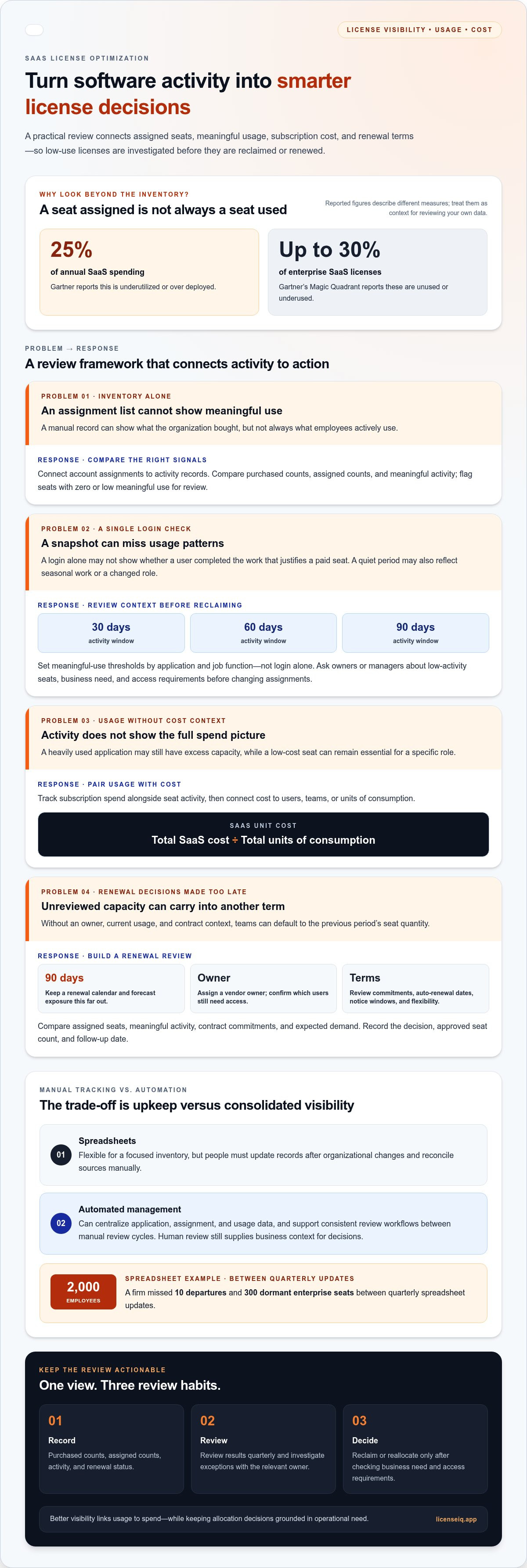
Renewal planning turns usage tracking into a purchasing decision. Keep a renewal calendar covering the next 90 days, with an owner assigned to each vendor. Forecast renewal exposure 90 days out. Then compare assigned seats, meaningful activity, contract commitments, and expected demand. This gives procurement time to flag surplus licenses before renewal, instead of carrying last period’s quantity forward by default. A license management program can reduce license counts at renewal when usage and contract terms support the change.
Use renewal reminders to begin negotiations before the vendor’s deadline. Gather seat counts, usage records, invoices, and renewal terms from your sources of truth. Ask the application owner to confirm which users still need access. Procurement can compare the proposed quantity with validated demand and identify terms to discuss, such as seat minimums, commitment length, and renewal flexibility. Connecting usage tracking with contract records makes this review more consistent and helps teams prepare a clear position instead of relying on estimates or scattered spreadsheets.
Review contract and compliance details such as auto-renewal dates, notice windows, seat commitments, and whether assigned licenses match purchased entitlements. Check these terms alongside access records, and keep evidence of assignments. Before an exit, identify data-export requirements, account deactivation steps, and remaining contractual commitments. These checks help procurement avoid renewing unnecessary capacity while preserving access employees still need. For example, an application owner can confirm active roles before IT reclaims seats or changes assignments.
A saas license optimization tool can organize renewal dates, usage signals, and subscription records into a single tracking process. Prioritize applications with upcoming renewals, then route decisions to procurement and the relevant owner. For each vendor, record the decision, approved seat count, and follow-up date to create a repeatable audit trail. This also helps distinguish a genuine reduction opportunity from temporary inactivity, so renewal changes reflect operational needs as well as cost control.
2. How do I track software usage to optimize licensing costs?
Compare assigned software licenses with meaningful activity, then investigate seats showing little or no use. A review across the last 90 days can reveal patterns that a single login check misses. Gartner reports that 25% of annual SaaS spending is underutilized or over deployed. The National Institute of Standards and Technology (NIST) describes cloud systems that meter active accounts and monitor, audit, and report resource usage.
To identify unused or underused licenses, connect account assignments to activity records, then flag seats with zero or low meaningful use. Compare usage across 30-, 60-, and 90-day windows, and ask the application owner whether an apparent gap reflects seasonal work or a changed role. Gartner’s Magic Quadrant reports that up to 30% of enterprise SaaS licenses are unused or underused.
Set thresholds by application and job function, not login alone. A user might sign in without completing the work that justifies a paid seat. Prioritize accounts with no meaningful activity, then review low-activity seats with managers. Check business need and access requirements before reclaiming a license. This aligns entitlements with actual demand and reduces unnecessary assignments.
Track both usage and cost. Usage tracking shows which seats employees use, while cost tracking connects subscription spend to users, teams, or units of consumption. Calculate SaaS unit cost by dividing total SaaS cost by total units of consumption. This comparison can reveal whether a heavily used application still has excess capacity, or whether a low-cost seat remains essential for a specific role.
For clear visibility, record purchased counts, assigned counts, activity, and renewal status in one saas management view. Review the results quarterly and route exceptions to the appropriate owner. A Microsoft 365 license usage view can help teams assess assigned seats against actual activity.
3. Automated license management vs Excel spreadsheets: What’s different?
Excel can hold an inventory, but it depends on people updating records after every organizational change. In one example, a firm with 2,000 employees missed 10 departures and 300 dormant enterprise seats between quarterly spreadsheet updates. A SaaS license management tool can centralize application, assignment, and usage data, helping teams monitor unused licenses between reviews.
The best SaaS license optimization tools in 2026 depend on your organization’s priorities. Compare coverage of applications, usage analytics, entitlement records, reporting, and workflow support. A useful management tool should maintain an accurate software inventory and help teams connect assigned rights with actual use. SaaS tools typically focus on subscriptions and user activity; traditional license management may also need to account for installed software and complex entitlements.
Tools vary in data coverage and in how they turn visibility into action. Compare whether analytics identify dormant accounts, support compliance reviews, and help teams reclaim and reissue unused licenses through repeatable processes. Spreadsheets offer flexible tracking but require manual reconciliation across sources. Automated management can consolidate records and apply consistent review workflows.
In the United States, tool costs depend on scope, integrations, and selected capabilities; pricing is provided after a quote request. To choose and implement a tool, first map your applications and data sources, then define the decisions it must support. Test the workflow against a real license review, assign owners for exceptions, and establish a process for validating recommendations.
Integrating identity, HR, and expense systems can connect user status, access assignments, and subscription records. HR status, for example, can help identify departed employees, while identity data shows whether accounts remain active. Expense records add purchasing context. Before relying on analytics for compliance or reclaim decisions, confirm that each source has a clear owner and that its records can be reconciled.
4. Manual versus automated license optimization
Manual reviews can work when an organization tracks a small, stable set of applications. Analysts export license usage, compare assignments with invoices, and record decisions in spreadsheets. Each update depends on timely input from application owners, procurement, and IT. As users and subscriptions change, missed updates can distort metrics and delay action. Automated workflows reduce repetitive collection and comparison, leaving teams more time to review exceptions and make informed decisions.
Speed changes the review cycle. Manual license audits can take hours or weeks, while automated real-time insights can arrive in minutes. Automated license optimization data is described as 99%+ accurate with live data. Treat that as an operational input, not permission to approve every recommendation automatically. Managers still need to confirm whether low activity reflects a genuine lack of need, a seasonal role, or an account used for occasional critical work.
Choose a process that fits your application footprint and decision frequency. A spreadsheet may be adequate for a narrow inventory with one owner and infrequent changes. Automation is more useful when teams need to monitor license usage across applications, reconcile recurring data, and route decisions to different owners. Compare both approaches using the same measures: time spent collecting records, exceptions identified, seats reviewed, and actions completed. Record savings only after confirming that reclaimed access does not disrupt work.
For a controlled transition, start with one application group. Compare its current manual review with an automated review, check the underlying records, and document which recommendations required human judgment. Then expand the workflow where repeated checks create delays or obscure cost savings. Explore automated license optimization to see how continuous usage visibility can support more consistent decisions.
LicenseIQ: Automated Governance Workflows
LicenseIQ helps organizations find and recover wasted spend on Microsoft 365 licenses. Its platform scans licenses and users to surface inactive accounts, redundant licenses, and actionable optimization recommendations. The License Health Score gives teams a focused view of license status, while the Spend Recovery Dashboard highlights potential spend recovery. Automated Governance Workflows support a more consistent approach to reviewing license decisions.
Turn to LicenseIQ when manual reviews make it difficult to see Microsoft 365 usage and subscription spend clearly. The platform connects to a tenant in minutes and provides real-time spend recovery insights. By identifying inactive users and redundant licenses, its insights can help businesses save up to 35% on software subscriptions.
Visit licenseiq.app to explore LicenseIQ.
Turn license visibility into an operating practice
Make license decisions repeatable by assigning a clear owner to each application, defining meaningful usage, and recording why seats are reclaimed, retained, or reassigned. This creates a decision trail for future reviews, instead of requiring teams to rebuild the case from scattered records. A saas license optimization tool can support the process, but clear ownership and consistent review criteria make its insights actionable.
LicenseIQ brings together Automated Governance Workflows, a Spend Recovery Dashboard, and a License Health Score. These offerings help teams structure license reviews and examine Microsoft 365 usage and spend. Choose the approach that fits your current visibility gaps, then build on it as your organization’s needs change.
Contact LicenseIQ to discuss license optimization and take a practical next step toward clearer license decisions.
Frequently Asked Questions
What are the key benefits of SaaS license management and cost tracking?
Core benefits include clearer spend visibility, accurate entitlements, and stronger purchasing decisions. Teams can identify duplicate subscriptions, distinguish role-critical access from dormant accounts, and prepare renewal requests using records rather than estimates. Cost tracking can also reveal which departments own recurring charges and where subscriptions overlap.
How Do I Manage Software Licenses Across the Organization?
Manage licenses through a shared inventory and assign a clear owner to each application. Record who approves access, who reviews exceptions, and how account changes are handled. For example, connect license reviews to employee onboarding, role changes, and offboarding so access decisions follow the employee lifecycle. Give department owners a defined way to request exceptions, and document approvals so IT can explain why each assignment remains active.
How do I track software usage to optimize licensing costs?
Start by defining what meaningful use looks like for each application, then compare those signals with assigned entitlements. A design platform might require completed projects, while a collaboration tool may rely on active participation rather than a login alone. Record exceptions for seasonal duties or specialized roles. For Microsoft 365, LicenseIQ's scan is read-only, so it reviews license utilization without modifying the tenant.
Automated license management vs Excel spreadsheets: What’s different?
Spreadsheets provide a flexible record, while automated management can reduce reliance on manually maintained entries. The practical difference lies in how teams handle updates, ownership, and evidence. A spreadsheet needs version control and a named editor; an automated process can make changes visible in a consistent review trail. Keep human approval for access decisions, and record who reviewed each exception and why.
How Does Manual License Optimization Differ from Automated License Optimization?
Manual optimization depends on people gathering records and applying judgment. Automation can run repeatable checks and surface exceptions for review. For example, a system may flag an account whose status changed, while an application owner confirms whether its access is still necessary. Use automation for consistent monitoring, but retain human review for business context, sensitive roles, and decisions that could interrupt essential work.
What does SaaS sprawl mean and why does SaaS sprawl harm IT budgets?
SaaS sprawl occurs when an organization accumulates applications across teams without a complete, shared view of ownership and usage. It can strain budgets when departments buy overlapping tools, keep subscriptions after needs change, or miss renewals for applications no longer used. It also complicates access oversight. A central application inventory can reveal duplicate capabilities and assign someone to review each subscription.


