

SaaS waste often accumulates between purchases, renewals, and employee departures. The SaaS license management lifecycle covers each stage: discovering applications, assigning access, tracking usage, optimizing licenses, managing renewals, and removing access when it is no longer needed. Treating these steps as one continuous process gives teams a clearer view of spending and risk.
Spreadsheets can track a small set of subscriptions, but they depend on people to keep records current and coordinate changes. As applications, users, and renewal dates multiply, gaps in visibility make it harder to spot unused licenses, duplicate tools, or lingering access.
This guide explains how lifecycle management works and where automation can strengthen oversight. You’ll find practical ways to build an application inventory, review utilization, prepare for renewals, and close access gaps. The goal is a repeatable process that helps IT and finance make informed decisions about SaaS spending while keeping access aligned with business needs.
Key Takeaways
- Automate onboarding, offboarding, and renewal workflows to keep access and license records aligned as employees and subscriptions change.
- Review usage and contract terms together to identify inactive seats, redundant apps, and opportunities to adjust license quantities.
- Revoke access when employees leave and include application oversight in security and data-compliance processes.
- Use LicenseIQ’s License Health Score and Spend Recovery Dashboard to uncover Microsoft 365 license waste and guide optimization decisions.
1. Automated license management vs Excel spreadsheets: What’s different?
Excel records depend on employees to update access, usage, owners, and renewal dates. An automated process connects these events, creating a clearer record of each license from onboarding through offboarding. SaaS application access should be ready on an employee’s first day, while departing employees’ access should be revoked promptly. One market finding reports that 50% of companies lack automated offboarding processes.
Use employee changes as triggers. During onboarding, assign approved applications and the access required for each role. When someone leaves, revoke access and review their assigned licenses for reuse. Automated alerts can flag upcoming renewals, expirations, or payments so teams can act before a contract rolls over. Record an owner and renewal date for each vendor, then compare assigned seats with actual usage.
SaaS license management tools range from spreadsheets and centralized inventories to platforms that automate discovery, access workflows, usage monitoring, and renewal alerts. Choose based on whether you need a shared record, connected systems, or organization-wide visibility. The right tool should make owners, contracts, and unused licenses easier to track.
Small businesses can start with one inventory, a named owner for each application, and calendar reminders. Enterprises need consistent workflows across departments, broader application monitoring, and coordinated IT and finance reviews. In either case, match the process to the vendors, user changes, and contract terms the team must manage.
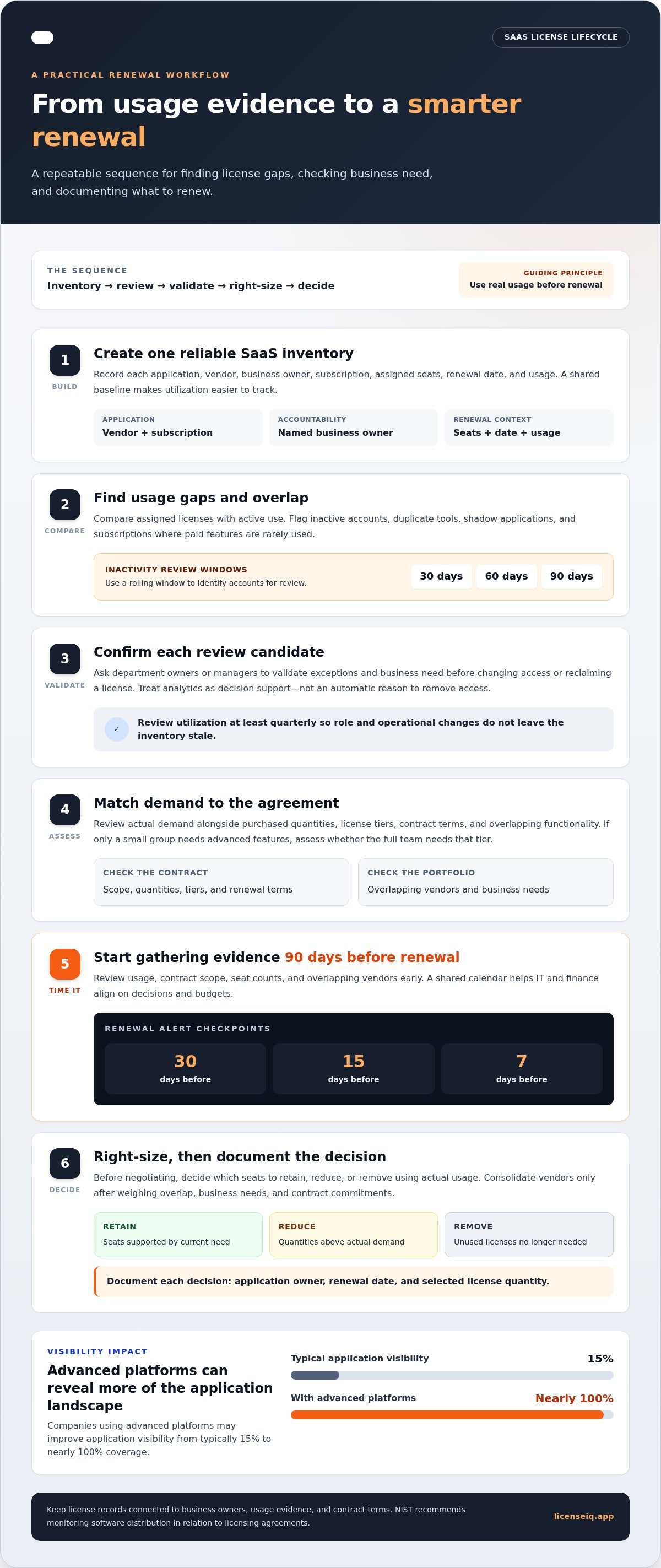
Plan renewal decisions early. Begin gathering usage evidence 90 days before renewal, then review contract scope, seat counts, and overlapping vendors. Renewal alerts at 30, 15, and 7 days before renewal create decision points; a shared calendar helps IT and finance align budgets. Consolidate vendors only after comparing application overlap, business needs, and contract commitments. Right-size license quantities against actual usage before negotiating terms, rather than renewing unused licenses by default.
Document each decision, including the owner, renewal date, and selected license quantity. The National Institute of Standards and Technology (NIST) recommends monitoring software distribution in relation to licensing agreements to control copying and distribution. This connects day-to-day access changes with contract oversight.
2. How Can Organizations Optimize Their Saas License Usage for Better ROI?
Start with a centralized SaaS inventory. Record each application, vendor, business owner, subscription, assigned seats, renewal date, and usage. Compare assigned licenses with active use, then flag duplicate tools and shadow applications. Ask department owners to validate exceptions before changing access. This creates a practical baseline for tracking utilization across the organization.
AI-powered analytics can help surface patterns across license and usage records. Look for inactive accounts, teams with overlapping applications, and subscriptions where employees rarely use paid features. Apply a rolling inactivity window of 30, 60, or 90 days to identify review candidates. Validate each account with its manager before reclaiming a license. Review utilization at least quarterly so changes in roles and operational needs don’t leave the inventory stale.
Use usage data alongside vendor agreements. Compare actual demand with purchased quantities, license tiers, renewal terms, and overlapping functionality. If only a small group needs advanced features, assess whether the whole team requires that tier. Before renewal, document which seats to retain, reduce, or remove, and link each decision to usage data. This gives procurement a clearer basis for vendor discussions and contract adjustments.
A SaaS management platform can centralize application, account, and license visibility. Companies using advanced platforms may improve application visibility from typically 15% to nearly 100% coverage. Set utilization alerts against contracted usage, then investigate unusual spikes before they affect renewal planning. Treat analytics as decision support: confirm business need, agreement terms, and access requirements before changing a subscription.
For Microsoft 365, license usage insights can help reveal inactive users and redundant licenses. Use the findings to prioritize reviews, quantify potential savings, and focus optimization on the subscriptions with the clearest usage gaps.
3. How do unused SaaS licenses create security risk, not just wasted spend?
Unused accounts may retain access after an employee changes roles or leaves. This can create overlooked access paths, especially when separate departments own different applications. Poor tracking also obscures who can view, export, or share company data. Security and compliance risks include lingering access, unreviewed applications, unclear data handling, and license use that conflicts with software agreements. A centralized inventory helps IT connect each account to its owner and business purpose.
Make offboarding a defined workflow. When HR records a departure, revoke application access, disable active sessions where available, and reassign business data to an approved owner. Then reclaim or reallocate the unused license. Review shared accounts, integrations, and externally accessible files as separate steps. Record completion centrally so IT and finance can see which access was removed and which subscription remains active.
Unreviewed applications can create compliance exposure. The European Commission notes that SaaS applications that IT has not evaluated can expose companies to compliance issues involving GDPR, HIPAA, and CCPA. Assess the data each application collects, its access permissions and storage practices, and its business owner. Send unclear data use for the relevant security or privacy review before employees upload sensitive information. These checks support compliance oversight without treating every application as equally risky.
AI-related pricing adds another control point. When contracts charge for AI features or usage, finance should compare invoices with actual consumption and agreed pricing terms. Track enabled features, usage records, and the teams benefiting from them. This helps distinguish legitimate increases from unused capacity or unexpected consumption. Include software license compliance in optimization reviews: compare deployment and access with contract terms, document exceptions, and resolve discrepancies before renewal. Clear records make security decisions and spending reviews more actionable.
4. SaaS spend and license waste
SaaS spending grows through new subscriptions, unused seats, and pricing changes. Organizations add an average of 9 new unique applications to their SaaS environments each month in 2026. Their SaaS portfolios grew by 34% year over year. Without clear visibility, procurement may miss overlapping tools or renew subscriptions no team actively needs.
The 2026 SaaS Management Index by Zylo puts unused licenses at around 36% against recommended utilization. That gap can persist when application ownership is unclear or license records don’t match actual use. Start with a spend baseline: combine invoices, procurement records, application inventories, assigned seats, and user activity. Then flag subscriptions without a current owner or a clear business purpose.
Pricing adds another source of uncertainty. In a survey of 218 IT leaders, 78% experienced surprise costs from usage-based or AI pricing models in 2026. Compare invoices with contract terms and product usage, and identify which teams drive changes. Treat usage-based charges separately from fixed subscriptions so finance can trace spending to its source.
Connect each review to a decision. For every subscription, record the owner, renewal date, active users, contracted quantity, and next action. Compare overlapping applications before consolidating vendors, and account for contract commitments before reducing seats. Include employee offboarding in the review, since removing access can reveal licenses ready for reassignment or retirement. Track approved reductions against future invoices to confirm that spending reflects the decision.
Unplanned increases affect more than the software budget: 61% of IT leaders cut projects because of unplanned SaaS cost increases in 2026. Use recurring spend reviews to surface exceptions before procurement decisions lock in another term. Identify Microsoft 365 license waste with usage-based spend insights and focus reviews on subscriptions with inactive users or redundant licenses.
LicenseIQ: Automated Governance Workflows
LicenseIQ helps organizations identify wasted spend on Microsoft 365 licenses and decide where to focus optimization. Its LicenseIQ Platform monitors Microsoft 365 tenant usage, helping surface inactive users and redundant licenses. The License Health Score gives teams a way to assess license health, while the Spend Recovery Dashboard presents actionable spend insights.
Use license management tools when spreadsheets and separate records make usage difficult to see, or when IT and finance need clearer evidence to review subscriptions. LicenseIQ’s Automated Governance Workflows support structured oversight by connecting license insights with governance processes. Teams can use the findings to prioritize reviews and make informed license decisions.
To explore LicenseIQ’s software intelligence platform, visit licenseiq.app.
Make license oversight part of operating practice
Make the next improvement specific: assign an owner to a high-priority subscription, define who reviews its usage, and record the decision in a shared process. That turns the SaaS license management lifecycle into an operating discipline rather than a one-time cleanup. Revisit the process when teams, applications, or contract terms change, so oversight stays connected to business decisions.
LicenseIQ’s Automated Governance Workflows, Spend Recovery Dashboard, and License Health Score can support teams seeking more structured visibility into Microsoft 365 licenses. They provide a practical starting point for reviewing license health and identifying where further attention may be useful.
If you’re ready to discuss how LicenseIQ can fit your license oversight process, contact LicenseIQ about your SaaS licenses. Start with the questions your IT and finance teams need answered, then build a clearer process around them.
Frequently Asked Questions
What Is SaaS Lifecycle Management?
SaaS lifecycle management is the coordinated oversight of cloud applications from selection through retirement. It includes deciding who owns each application, how employees access it, and whether it still meets business needs. For example, a department evaluating a new project tool can document its owner and purpose before purchase. That record helps teams maintain accountability and avoid unmanaged subscriptions later.
How do unused SaaS licenses create security risk, not just wasted spend?
Unused licenses can remain attached to accounts that still have access to company information. For example, a former contractor’s account may stay active if offboarding covers only employees. Include contractors, shared accounts, and integrations in access reviews. Check who owns the data before removing an account, then document the access change so security teams can trace it.
Automated license management vs Excel spreadsheets: What’s different?
Automation can connect records and trigger tasks, while spreadsheets depend on people to update entries and act on them. LicenseIQ uses a read-only connection, so it does not change anything in the tenant. A spreadsheet may still suit a small, stable inventory if someone maintains it consistently.
How Can Organizations Optimize Their Saas License Usage for Better ROI?
Optimize by linking each subscription to a business outcome, not just a seat count. Ask the application owner which teams depend on it, what work it supports, and whether another approved tool already meets that need. Then compare the answers with usage data before changing tiers or quantities. This grounds license decisions in operational value, not unused capacity alone.
What is the SaaS license management lifecycle?
The SaaS license management lifecycle is the process of controlling licenses from purchase through retirement. A practical approach assigns a business owner, records the agreement and quantity, tracks assignments, reviews usage, and decides whether to renew, adjust, or end the subscription. Document each decision so a new budget owner can understand why a license was retained or removed.
What are the stages of SaaS license management from procurement to renewal and offboarding?
Typical stages include procurement, assignment, usage review, the renewal decision, and offboarding or reassignment. During procurement, record the approver and business purpose. At renewal, compare current needs with agreement terms. When someone leaves, remove their access and decide whether the license can be reassigned. For a retired application, close remaining accounts and record the subscription’s end so it does not appear in future spending reviews.


