

Automate employee offboarding by tying access removal and license recovery to a defined exit cutoff. An employee offboarding license reclamation policy should revoke primary identity access on the employee’s final day, remove access to apps outside single sign-on that same day, and return paid software seats to the available pool under the organization’s license rules. Involuntary exits need immediate access removal, with privileged access revoked before or during the exit conversation.
A clear offboarding process helps ensure access is removed and paid licenses are reclaimed when someone leaves. A clear process gives HR, IT, security, and finance a shared record of what needs to happen and when.
This article explains how to automate offboarding across IT, reclaim licenses, and preserve evidence of access changes. It also covers how controls differ for contractors, privileged users, and involuntary exits, so your policy can close security and spend gaps without relying on disconnected manual steps.
Key Takeaways
- Coordinate HR, IT, security, and finance around a defined exit cutoff so access removal and license recovery happen as part of one process.
- Track licenses by user and return unused seats to the available pool under your organization’s license policy.
- Preserve evidence of access changes, approvals, exceptions, and license actions to support a clear audit trail.
- Tailor exit controls to the situation: involuntary departures and privileged access call for tighter timing than routine voluntary exits.
How do You Automate Employee Offboarding Across IT?
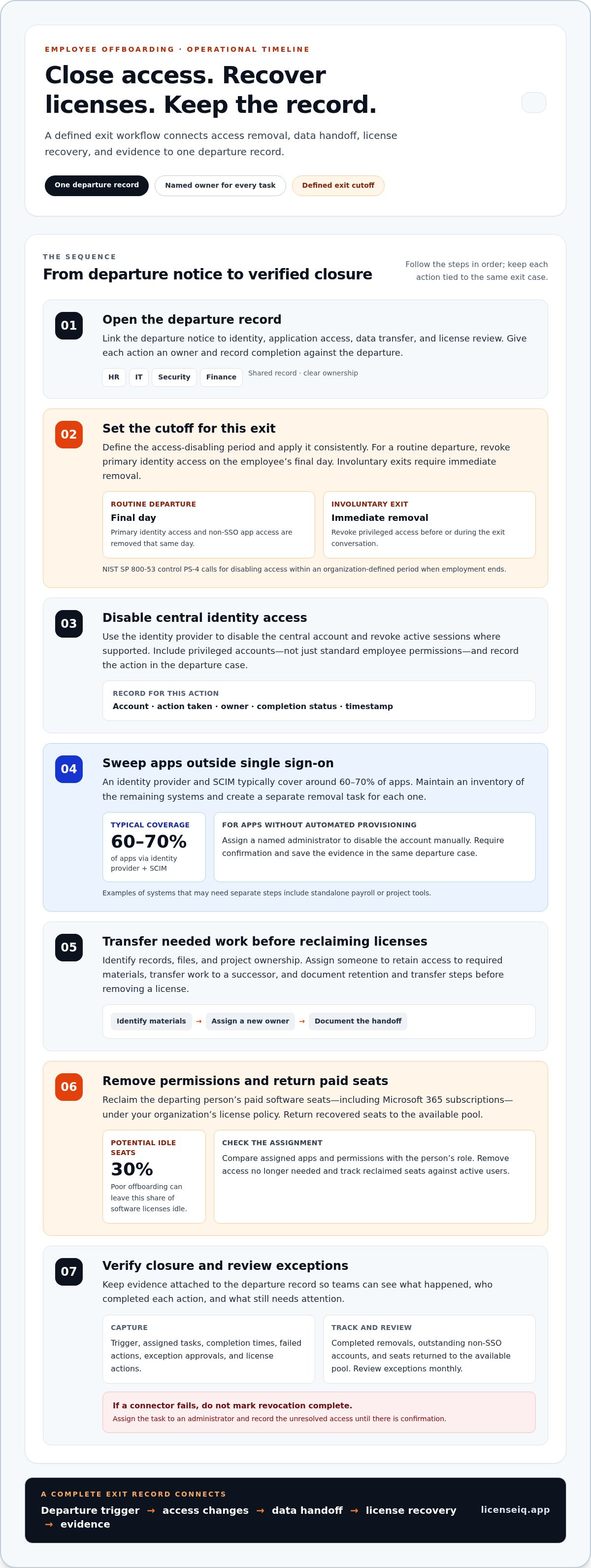
Link the departure record to identity, application access, data transfer, and license review. Assign an owner to each action and record its completion against the departure.
Access Revocation Across Apps
Access revocation disables an employee’s identity and application permissions when their employment ends. An identity provider can centralize sign-in controls, but apps outside single sign-on need separate removal steps. A typical identity stack using an identity provider and SCIM covers around 60-70% of apps, so maintain an inventory of the remaining systems. For example, include standalone payroll or project tools in the same exit workflow. In healthcare, promptly deactivate access to electronic health records, e-prescribing, imaging, and billing systems that contain protected health information. Apply the minimum necessary standard when managing that access.
User Access and License Deprovisioning
User and license deprovisioning removes a departing employee’s permissions and returns paid seats under the organization’s license management policy. Reclaim licenses assigned to the departing person, including Microsoft 365 subscriptions and other paid software seats they no longer need. Before onboarding, define role-based access recommendations so each job receives appropriate apps and permissions. When an employee leaves, compare their assigned access with that role, remove access they no longer need, and transfer work to the successor. This links onboarding choices to a cleaner offboarding record.
License Reclamation and Access Removal Metrics
Metrics show whether access removal and license recovery happen completely and on time. Track completed removals against departure records, outstanding non-SSO accounts, and reclaimed seats returned to the available pool. Compare license assignments with active users to surface idle seats; poor offboarding can leave 30% of software licenses idle. Include payroll handoff status in the exit record. According to the California Department of Industrial Relations, a terminated employee's final paycheck is due the same day; late payment can incur a waiting time penalty of one day's wages for each day late, up to 30 days.
Data Preservation Before License Reclamation
Before removing a license, transfer any employee data and work files the business needs. Identify records, files, and project ownership, then assign someone to retain access to required materials. Document the transfer and retention steps before reclaiming the license. Delays can leave former employees with access to company email or work files, while unused licenses continue to incur subscription costs. Keep the account, access change, license action, and transfer status together in the departure record. This evidence helps teams spot unresolved access and data-handling gaps.
Automated employee offboarding
Automate offboarding by linking a departure to access revocation, license review, and evidence capture. A defined workflow makes ownership clear and reduces the risk of missed tasks.
Offboarding Workflow Automation
Workflow automation turns a departure notice into assigned actions across identity, applications, and license records. Set the trigger, cutoff, responsible owner, and completion status for each task. NIST SP 800-53 control PS-4 calls for disabling system access within an organization-defined period when employment ends. The organization should define that period and apply it consistently to each exit type.
An identity provider and SCIM typically cover around 60-70% of apps. Build the workflow to revoke identity-provider access, remove active sessions where supported, and create a separate task for each app outside that connection. Include privileged accounts so the offboarding record captures high-impact access, not just standard employee permissions.
Exceptions and Manual App Fallbacks
An exception record explains why an action could not follow the standard workflow and names its owner and resolution. If an application lacks automated provisioning, assign a named administrator to revoke access manually. Require confirmation that the account was disabled and record the evidence in the same departure case.
Review exceptions monthly to find recurring gaps, such as an unmanaged application or unclear ownership. This helps prevent a manual workaround from becoming a permanent blind spot or leaving a former employee’s access active.
Keep evidence linked to the departure record, including the trigger, assigned tasks, completion times, failed actions, and exception approvals. If a connector fails, assign the task to an administrator rather than marking revocation complete. This makes unresolved access visible and helps teams assess whether a threat remains.
For repeatable governance across connected systems, Automated Governance Workflows can support coordinated software governance actions. Pair workflow status with a review of reclaimed seats, so access closure and license recovery remain visible in the same operational process.
Audit logs and evidence for compliance
An offboarding audit trail connects the termination decision to each access change and license action. SOC 2, ISO 27001, and HIPAA call for verifiable access termination during offboarding. A checklist helps HR, IT, and security teams show what happened, who completed each action, and which accounts still need attention. Keep evidence tied to the employee’s departure record, not scattered across application notes or email threads.
For each system, record the employee identifier, application, action, owner, completion status, and timestamp. Note whether access was disabled, a session revoked, or a license reclaimed. For example, an identity-provider event might show that the central account was disabled, while a separate application record confirms access was removed from a standalone payroll tool. Together, these records show what happened behind the completed workflow.
- Preserve the termination trigger and approved cutoff.
- Record account revocation results for each application.
- Attach manual completion evidence when automation does not reach an app.
- Document license reassignment or return to the available pool.
- Track exceptions, owners, and their resolution status.
Automation can standardize records, but a successful workflow status does not prove that every application action succeeded. Compare the task list with application results. Keep connector failures on record and assign an owner to follow up. This lets an auditor see which controls are complete and which remain open, rather than relying on a single green status.
Use the same record format for voluntary departures, involuntary exits, and contractor offboarding. Limit access to evidence to authorized reviewers, and retain records under your organization’s retention process. During an audit, filter by employee, termination date, or application to trace access changes and find gaps. A clear trail also reveals recurring failures, such as accounts in applications the automation cannot reach.
How does Offboarding Differ for Contractors, Privileged Users and Involuntary Exits?
Set the offboarding trigger and access cutoff according to the type of exit and its risk. Use a shared checklist with distinct tasks for voluntary departures, contractors, and employees with administrative privileges.
For a voluntary departure, schedule standard access revocation for the agreed cutoff. Revoke privileged and administrative access at that time, then complete the remaining account and license steps. For an involuntary exit, revoke IT access immediately. Remove privileged and administrative access before or during the exit conversation to reduce the time elevated credentials remain usable.
For contractors, use the engagement’s defined end date as the trigger. HR or the contract owner can notify IT, identify the contractor’s accounts and assigned applications, and confirm access removal when the engagement ends. If the work concludes early, update the end date and assign someone accountable for initiating deprovisioning.
Clear coordination makes each offboarding path actionable. HR or the engagement owner provides departure details; IT manages identity and application access; security reviews privileged accounts; and finance or software owners track paid seats. Assign an owner and status to every action in the same checklist. That shared record prevents a completed HR task from being mistaken for completed IT revocation.
Treat workflow failures as open work, not successful completion. If an application connector fails, record the failure, assign a manual task to the application administrator, and confirm revocation in the application. Review unresolved tasks and exceptions so a missed notification or changed departure date does not leave accounts active. Record the reason, owner, and resolution for each exception.
Use software license governance tools to bring greater visibility to license decisions as exits are processed. Keep the access cutoff, assigned actions, and completion evidence aligned, while adjusting the checklist to each departure’s risk and working arrangement.
LicenseIQ: Automated Governance Workflows
LicenseIQ helps organizations identify Microsoft 365 licenses that may be unused after employee departures. Its AI-native software intelligence platform scans licenses and users, highlights inactive users and redundant licenses, and provides actionable recommendations for spend recovery. Use these insights alongside your offboarding process to review assigned seats and decide which licenses to reclaim.
Automated Governance Workflows support structured software governance, while the License Health Score and Spend Recovery Dashboard make license status and potential savings easier to assess. LicenseIQ also provides continuous Microsoft 365 tenant monitoring and real-time spend recovery insights. It complements access deprovisioning by bringing license use into view; teams still manage access revocation through their established identity and application controls.
Visit LicenseIQ’s platform to explore its software intelligence capabilities.
Make License Governance Part of Every Exit
Make offboarding a recurring governance practice, not a one-time cleanup. Review whether departure records have clear owners, reclaimed licenses return to active inventory, and teams can identify patterns behind unused subscriptions. A well-maintained employee offboarding license reclamation policy helps leaders improve decisions as roles, applications, and staffing needs change.
LicenseIQ brings license oversight into that work through Automated Governance Workflows, the Spend Recovery Dashboard, and the License Health Score. Use these capabilities to examine license activity and identify where software governance can become more consistent. They support license visibility; your organization’s established identity and application controls remain central to access removal.
Ready to discuss license reclamation for your organization? Contact LicenseIQ to discuss license reclamation. Build a more deliberate process, and keep your software decisions aligned with changing workforce needs.
Frequently Asked Questions
How long should the offboarding process take?
Complete core administrative closeout within the first week after departure, while access actions follow the defined cutoff. Separate urgent security tasks from work that requires coordination, such as equipment return, records transfer, and knowledge handoff. Give each task an owner and a clear completion condition. The timeline should reflect application coverage, property logistics, and the complexity of the employee’s responsibilities.
How quickly should IT access be revoked after termination?
Revoke access at the scheduled cutoff, and act immediately for involuntary termination. For a voluntary departure, revoke IT access within hours of the employee’s final shift. NIST SP 800-53 control PS-4 calls for disabling system access within an organization-defined period when employment ends. Include identity-provider accounts, standalone applications, and privileged credentials in the cutoff plan.
How do You Measure Whether IT Offboarding is Working?
Measure completed access removals against departures, then track closure time, failed actions, and reopened tasks. Calculate a completion rate by dividing fully closed departure records by all departure records in the review period. Also review exceptions monthly for recurring gaps. Repeat the access review 30 days after the employee’s final day to catch permissions that the initial process missed.
What Should an IT Offboarding Checklist Template Include?
Include the departure trigger, employee or contractor type, cutoff, application owners, and completion evidence. Add equipment return, records transfer, payroll handoff, and a named owner for essential work. List shared and service credentials for rotation within one business day. A useful template also tracks exceptions and follow-up actions, keeping unresolved tasks visible instead of marking them complete.
What’s automated deprovisioning?
Automated deprovisioning uses a departure event to remove a person’s access or entitlements through connected systems. For example, an HR status change can trigger identity-account disablement, application access removal, and a license review. The workflow should distinguish completed actions from failures and send exceptions to an owner for resolution. This makes offboarding repeatable while preserving human oversight for disconnected applications.
What is an employee offboarding license reclamation policy?
An employee offboarding license reclamation policy defines how an organization reviews, removes, and returns software licenses when someone leaves. It assigns decision-making responsibility, identifies which licenses are in scope, and records whether each license is reclaimed or retained for a business reason.


