

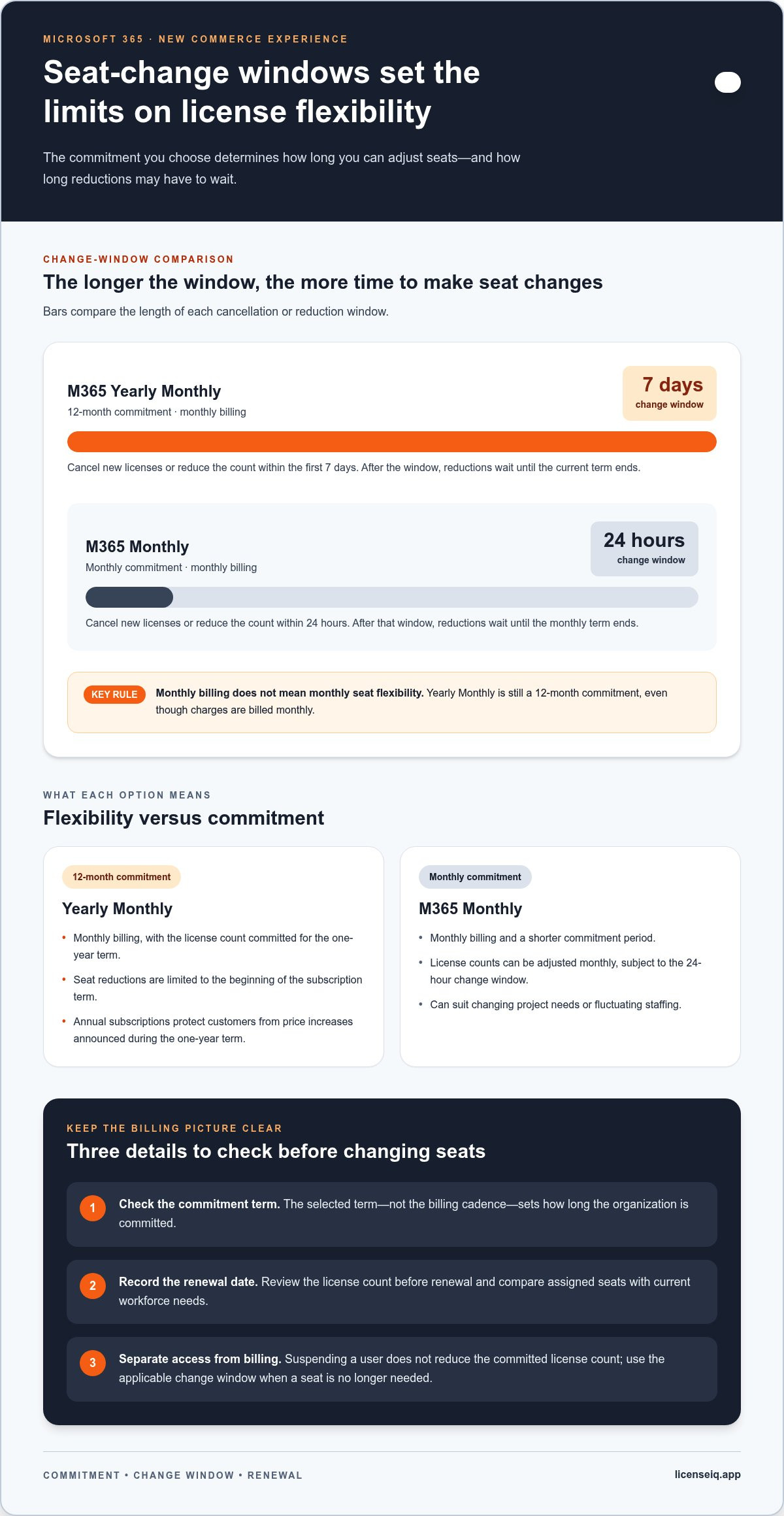
NCE makes Microsoft 365 license flexibility depend on the commitment you choose. The impact of NCE on M365 license flexibility is clearest in the seat-change windows: M365 Yearly Monthly has a 12-month commitment, with 7 days to cancel new licenses or reduce the count; M365 Monthly has a monthly commitment, with 24 hours to make those changes. After the applicable window, reductions aren’t permitted until the current term ends.
That structure can make it harder to align license counts with changing headcount, especially when a business chooses a longer commitment for predictable billing. The trade-off is real: subscription choices can affect how easily businesses adjust seat counts.
This guide explains how NCE options compare, what happens when subscriptions renew, and how cancellation and seat-reduction windows work. It also shows how to plan license counts around renewal dates and changing demand, so you can assess flexibility and potential waste more clearly.
Key Takeaways
- Match the subscription term to how predictable your license demand is, balancing flexibility against the commitment and billing structure.
- Review direct Microsoft 365 subscriptions at renewal and plan for the transition to NCE terms before the anniversary date.
- Align seat changes with each subscription’s cancellation window to avoid carrying licenses you no longer need through the term.
- Use renewal planning to compare assigned licenses with current user needs, then set counts with the next commitment period in mind.
- LicenseIQ’s License Health Score, Spend Recovery Dashboard and Automated Governance Workflows help surface unused or redundant licenses for review.
Choosing subscription models based on business needs
In the United States, compare the price for the specific Microsoft 365 SKU under each commitment. M365 Monthly uses a monthly commitment and monthly billing. M365 Yearly Monthly uses a 12-month commitment with monthly billing. The SKU and subscription term both matter when assessing the amount billed and the flexibility available.
Choose a licensing model that fits how stable demand is. A business with predictable staffing may prefer an annual commitment because its license count stays fixed through the one-year term. Under the annual subscription models described here, businesses cannot reduce seats before the term ends. Annual subscriptions also protect customers from price increases announced during the one-year term, which can make billing easier to forecast.
M365 Monthly supports a shorter commitment, with monthly billing and the ability to adjust license counts on a monthly basis. That can suit teams with changing project needs or fluctuating staffing. The trade-off is a shorter planning horizon, rather than the fixed license count associated with an annual term. A cloud solution provider may offer annual and month-to-month terms where available, so compare the actual term attached to the subscription.
Billing cadence and commitment aren’t the same thing. Yearly Monthly bills monthly, but the 12-month commitment still applies. Monthly billing therefore doesn’t mean the subscription can be reduced freely each month. The annual commitment option for M365 carries a 5% price uplift from April 1, 2025. Include that uplift when comparing the total billing impact of the term.
Plan seat reductions around each subscription’s change window. For M365 Yearly Monthly licenses, reductions are limited to the beginning of the subscription term; afterward, they wait until the current term ends. For M365 Monthly licenses, the corresponding window is 24 hours, followed by the remainder of the monthly term. A seat increase made outside the window can therefore affect spending for longer than expected.
Suspending a user and reducing a subscription are separate administrative actions. Removing access does not change the committed license count. Track user status alongside the subscription term, and use the applicable cancellation or reduction window when a seat is no longer needed. This distinction helps prevent account changes from being mistaken for billing changes.
Record each renewal date and review the yearly monthly license count before it arrives. Compare assigned seats with current workforce needs, then decide whether the count still fits for the next term. This review is especially useful after hiring changes, team reorganizations, or project closures. Aligning the count with actual demand keeps renewal decisions grounded in current needs, not last year’s assumptions.
Direct Microsoft 365 subscriptions transitioning to NCE at renewal
Microsoft 365 subscriptions purchased directly transitioned to the New Commerce Experience at renewal. Microsoft required new and renewed subscriptions to be purchased through NCE starting March 1, 2022. This changed the subscription terms governing commitment, billing, renewal, and seat adjustments.
NCE differs from legacy CSP licensing through its defined commitment options and change windows. Direct billing describes a purchasing route, not a guarantee of unrestricted seat changes: flexibility depends on the subscription term. Microsoft’s New Commerce Experience offers monthly or annual options for seat-based subscriptions, each with a different commitment period.
The transition followed a defined timeline. Microsoft adopted NCE for seat-based cloud subscriptions in 2022. Legacy Microsoft licensing programs fell out of support on October 1, 2022, after which licenses had to be purchased through NCE. For direct subscriptions, renewal became the point to assess the available NCE terms and choose a commitment matching expected demand.
New commerce covers Microsoft 365 and other license-based cloud services. A cloud solution provider can offer annual and month-to-month terms where available. The selected term determines how long the organization commits, while the billing schedule determines when charges recur. Separate these decisions during migration. Monthly billing can still accompany an annual commitment, so payment frequency alone doesn’t define flexibility.
Security and compliance requirements also shape the Microsoft 365 subscription choice. First, map the organization’s actual user needs to the license capabilities required for its security and compliance policies. Then compare the eligible subscription terms and renewal conditions for those licenses. A bundle decision should account for both required capabilities and seat commitments, rather than assuming that a broader package automatically fits every user.
At renewal, review the subscription date, license count, and user requirements together. Identify which users need each license type, then distinguish steady demand from temporary or uncertain needs. This helps prevent carrying last term’s seat assumptions into a new commitment. A renewal calendar also gives finance and IT a shared time to review billing and subscription changes.
For each Microsoft 365 or CSP subscription, record the purchasing route, term, billing cadence, renewal date, and relevant change window. Compare those details before deciding whether to retain the current structure or select another available NCE term. This record makes migration decisions clearer and shows where commitment rules, rather than the direct or partner route, constrain license flexibility.
Microsoft launched the New Commerce Experience on January 10, 2022. The Microsoft Customer Agreement and the new commerce platform were introduced through Microsoft Cloud Solution Provider partners in 2019. These milestones provide context for direct subscribers reviewing a renewal: compare the commitment and cancellation conditions, not just the route used to buy. New commerce subscriptions can only be canceled during the first seven days of their term, so a renewal decision deserves careful review before the term begins.
Microsoft partners can earn higher one-time margins by selling annual subscriptions rather than monthly subscriptions, a consideration that may influence the offers presented to customers. Public-sector customers have a separate transition history: Microsoft began transitioning public-sector customers to NCE on March 1, 2023, while Microsoft’s public-sector migration to NCE was scheduled to start in July 2024. Organizations should confirm the applicable terms for their own subscription and keep the renewal review focused on required seats, commitment, and the cancellation window.
Cancellation and seat-reduction windows
NCE makes timing central to Microsoft 365 seat changes. For M365 Yearly Monthly licenses, you can cancel new licenses or reduce the count within 7 days. After that window, reductions aren’t permitted until the current term ends. For M365 Monthly licenses, the change window is 24 hours, then reductions wait until the monthly term ends.
The 7-day cancellation window applies to new commerce subscriptions. For Microsoft 365, distinguish that general window from the specific 24-hour window for M365 Monthly licenses. The subscription model matters: an organization with a monthly commitment has a shorter period to cancel or reduce seats than one with a 12-month commitment billed monthly.
Seat increases and reductions work differently. Organizations can adjust license counts on a monthly or annual basis, depending on the selected model. If demand rises, add seats under the subscription’s available options. If demand falls, the applicable cancellation or reduction window determines when the lower count can take effect.
For example, if a team removes a user after the M365 Yearly Monthly window closes, reducing the subscription count must wait until the current term ends. Removing the user’s access and reducing the purchased license quantity are separate actions. Track both in the agreement and billing records, so an account change doesn’t get mistaken for a subscription change.
Cancellation charges depend on what a request changes and when it is submitted. The stated NCE rules set out when cancellation or a seat reduction is permitted, but do not specify a separate cancellation-fee amount. Outside the applicable window, the subscription remains committed until its current term ends. Account for that commitment in the billing plan.
Suspension is not the same as cancellation. Suspending a user’s access does not, by itself, reduce the subscription quantity or end the commitment. Keep user status, license assignment, and subscription count distinct. This gives IT and finance a clear record of whether the organization changed access, purchased seats, or both.
Renewal creates the next opportunity to align the committed count with current demand. Before the anniversary date, review active users, planned staffing changes, and licenses no longer needed. For M365 Yearly Monthly, make that review annually before renewal. For M365 Monthly, align changes with the monthly term. Record the applicable window and renewal date for each subscription, then route seat changes through the correct process.
License optimization and renewal planning
Renewal planning under NCE starts with the license count, not the invoice. Compare assigned Microsoft 365 licenses with current user needs, and flag inactive accounts or redundant seats. Then separate stable demand from temporary changes, such as project staffing or planned departures. This creates a clear basis for deciding which counts should carry into the next term.
For M365 Yearly Monthly subscriptions, review the count annually before the renewal anniversary. The 12-month commitment means an outdated seat count can carry forward into another year. Set a renewal review date early enough to assess staffing changes, remove unnecessary assignments, and submit permitted adjustments within the applicable window. Monthly billing doesn’t remove the annual commitment.
Build the review around three records: active users, assigned license types, and subscription renewal dates. Compare them with expected hiring, departures, and role changes. For example, if a department needs fewer staff, identify which seats are no longer required before renewal. Keep access changes separate from subscription quantity changes, since removing a user does not reduce the committed count.
Commitment length also affects price planning. NCE can lock prices for a three-year commitment, which may help with longer-range forecasting. But a longer term also binds the organization to its chosen commitment for longer. Before selecting a term, compare that price certainty with expected changes in headcount and license requirements, as well as cash-flow plans.
Monthly commitment offers a different trade-off. In the early 2026 renewal context, the described Microsoft NCE monthly option carried a 20% premium on top of price increases. That premium makes the flexibility decision a budget question as well as an operational one. Consider how often seat needs change, and whether that variability outweighs the higher subscription cost.
At each review, record the proposed count, the reason for each change, and the renewal date. Specify which users need which license types rather than treating all seats as interchangeable. This helps finance understand expected billing and lets IT connect the count to user requirements. Consistent records also make the next renewal comparison more useful.
Before renewal, compare the current subscription with the upcoming term. Decide whether demand is stable enough for a longer commitment or variable enough to favor a shorter one. Revisit the decision when staffing, license needs, or pricing conditions change. A disciplined review turns an NCE renewal from a routine rollover into a deliberate license and budget decision.
Choosing a longer term when uncertainty is greater requires careful evaluation. NCE can lock prices for a 3-year commitment, so weigh that certainty against the possibility that user needs will change. Use the renewal review to make the choice from the expected license count, not from billing cadence alone.
Record the rationale alongside the proposed count and renewal date. At the next review, compare staffing and license needs with expectations to keep future planning grounded in demand.
NCE’s impact on M365 licensing
The impact of NCE on M365 license flexibility comes down to a trade-off: commitment can support price planning, while shorter terms allow more frequent adjustments. Microsoft’s NCE seat-based subscriptions offer monthly or annual commitments. Organizations need to weigh how stable their license counts are against the billing effect of each option.
Before moving subscriptions, assess three risks: committing to more seats than users need, missing a cancellation or reduction window, and choosing a term that does not fit changing demand. These risks can affect both operational flexibility and renewal spending. Compare current assignments, forecast staffing changes, and map each subscription’s renewal date before selecting a term.
Price differences can change the savings calculation. In the early 2026 renewal context, the described Microsoft NCE monthly subscription carried a 20% premium on top of price increases. Microsoft 365 annual commitments with monthly billing have a 5% price uplift from April 1, 2025. A lower commitment can therefore offer added flexibility, but its premium may offset savings from reducing unused seats.
Longer commitments also affect budget planning. NCE can lock prices for a three-year commitment. Microsoft NCE three-year subscriptions billed monthly incur a 5% surcharge as of April 2025. Compare that surcharge with the value of predictable pricing across the commitment. The right comparison includes the subscription term, billing cadence, expected seat changes, and applicable price adjustments.
Consider an organization with steady staffing and a reliable annual license count. An annual commitment may support more predictable planning, while a business with frequent staffing changes may value monthly terms despite the premium. Neither option is automatically cheaper. The outcome depends on how often counts change, whether seats can be reduced during the term, and how the subscription is billed.
Build a renewal comparison using current seat assignments, forecast needs, and subscription terms. Separate price certainty from license flexibility, then estimate the impact of carrying unused seats through the commitment. Review the comparison before renewal, not after the next term begins. This gives finance and IT a shared basis for balancing operational needs with potential savings.
For a clearer view of license use before renewal, review Microsoft 365 license usage and identify seats that may no longer match user needs.
LicenseIQ: Automated Governance Workflows
LicenseIQ helps organizations turn NCE commitment rules into clearer Microsoft 365 license decisions. Its platform scans licenses and users, identifies inactive accounts and redundant seats, and provides a License Health Score with specific dollar-value recommendations. Use these insights before renewal or after staffing changes to spot potential waste and review which seats still match user needs.
Automated Governance Workflows support ongoing license oversight, while the Spend Recovery Dashboard presents actionable spend recovery insights. LicenseIQ continuously monitors Microsoft 365 tenants and can help businesses save up to 35% on software subscriptions through these insights. It doesn’t change NCE’s cancellation windows or subscription terms; it helps make license usage and potential optimization opportunities more visible.
Visit LicenseIQ’s platform to explore Microsoft 365 license optimization.
Make License Decisions Part of Ongoing Governance
The impact of NCE on M365 license flexibility is best managed as a continuing governance issue, not a renewal-day task. Give IT and finance shared visibility into license use, upcoming decisions, and the business reasons behind each subscription choice. That creates a stronger basis for future planning as teams and requirements change.
LicenseIQ supports this work with Automated Governance Workflows, a Spend Recovery Dashboard, and a License Health Score. These tools surface license usage and optimization opportunities, giving teams clearer information to act on. Use that visibility to make license oversight a consistent part of operational reviews.
If you’re ready to bring more clarity to Microsoft 365 license planning, contact LicenseIQ about M365 licensing. A more deliberate governance process can help your team move into its next renewal with greater control and confidence.
Frequently Asked Questions
What does this mean for users and MSPs?
NCE affects how quickly an organization can align paid seats with changing workforce needs. Users may still gain or lose access through routine account administration, but that does not automatically change the subscription quantity. MSPs managing multiple tenants need to track each tenant’s term and renewal separately. A shared calendar and clear change log help distinguish access updates from billable subscription changes.
How do monthly, annual, and three-year Microsoft 365 NCE terms compare in price and flexibility?
Monthly terms prioritize shorter commitments, while annual terms trade some flexibility for a longer pricing horizon. In the early 2026 renewal context, the described monthly option carried a 20% premium on top of price increases. Annual commitments with monthly billing have a 5% uplift from April 1, 2025. NCE three-year subscriptions billed monthly incur a 5% surcharge as of April 2025. Commitment options can vary across Microsoft product families.
How can a business choose an NCE term and manage Microsoft 365 renewals to preserve flexibility?
Choose the term by comparing workforce stability, budget priorities, and how often license needs shift. Assign an owner to maintain a renewal calendar and log proposed seat changes with their business reason. For organizations using an MSP, include tenant-level renewal dates and responsibility for each change. This governance makes the impact of NCE on M365 license flexibility easier to manage, because decisions are based on current demand rather than past assumptions.


